Sea Export · WWG Consolidators · KiK

KiK On-Boarding – Scope of Work

Three files for KiK: shipment status to APLL, electronic invoices to KiK, and the dispo list. Each section shows the new screens and fields in CostSoft, what is done automatically, and what is assumed.

Back to projects
In all pictures, new items are shown in an orange box with a NEW tag. The GIFs play the steps automatically; click any picture to open it full size.

Part A · ANSI X12 315 (Ocean Status)

Shipment status file to APLL

APLL tracks all KiK shipments. As agreed with APLL on 20-Oct-2026, three milestones are sent: ATD (Actual Departure), ETA (Estimated Arrival) and ATA (Actual Arrival). For each milestone, CostSoft creates one status file per Master B/L, with one block for every House B/L and container on it.

A1Master B/L – ETD / ETA with time, new ATD and ATA

Where

Sea Export › Transactions › Master Bill of Lading (existing screen), next to ETD Date and ETA Date.

Why

ATD, ETA and ATA belong to the vessel, so they are the same for every House B/L and container on the Master B/L. They are entered once, on the Master B/L.

How

ETD and ETA now hold date and time. New ATD and ATA have a tick box inside the date, as on the Sea Import screen: unticked means not happened yet and is saved empty. When the vessel sails, tick ATD and enter the actual date and time; when it arrives, tick ATA. ATA is also used for the KiK invoice exchange rate (ECB rate of ATA − 5 days).
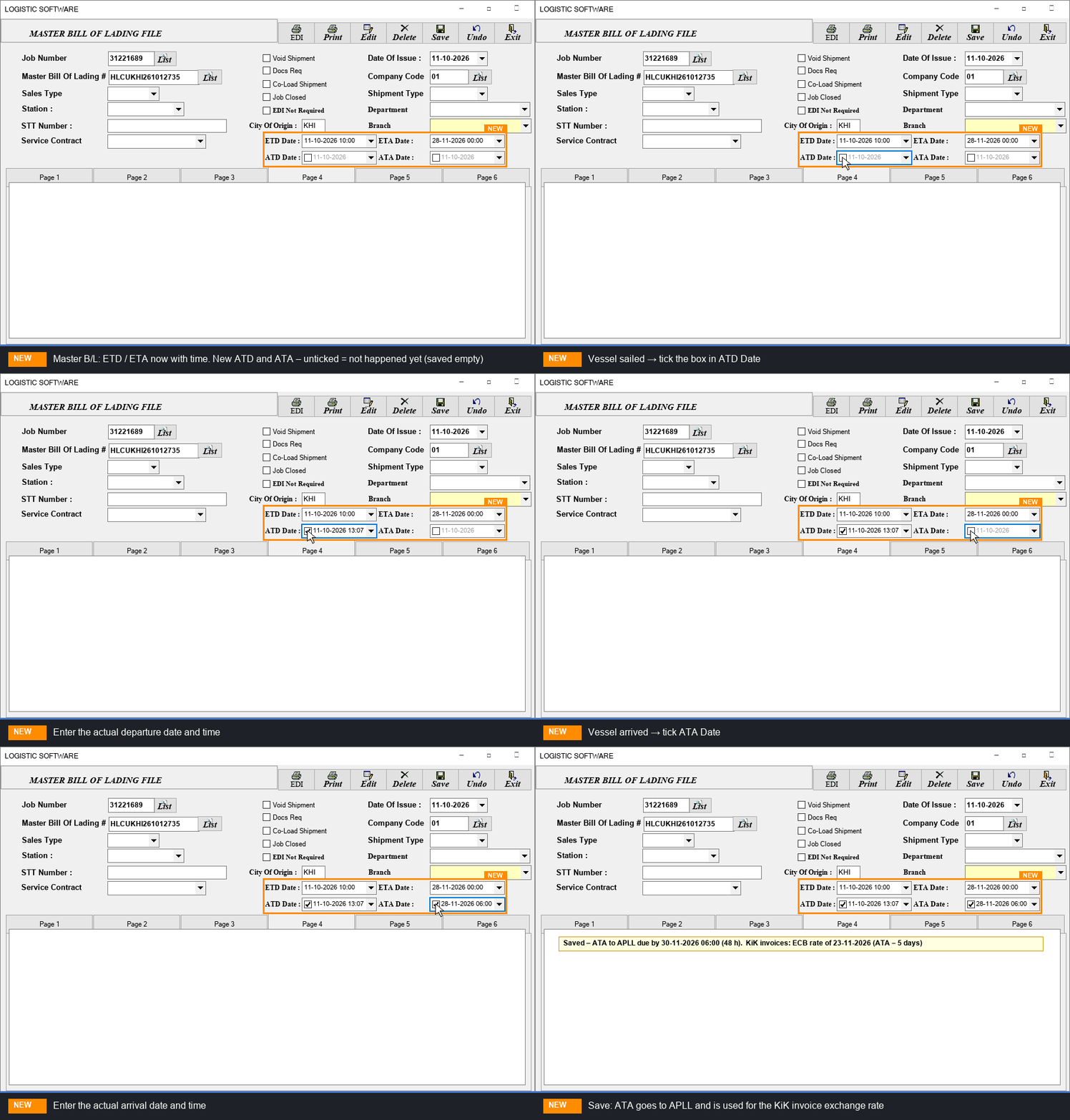
Master B/L → tick ATD → 11-10-2026 13:07 → Save → tick ATA → 28-11-2026 06:00 → Save

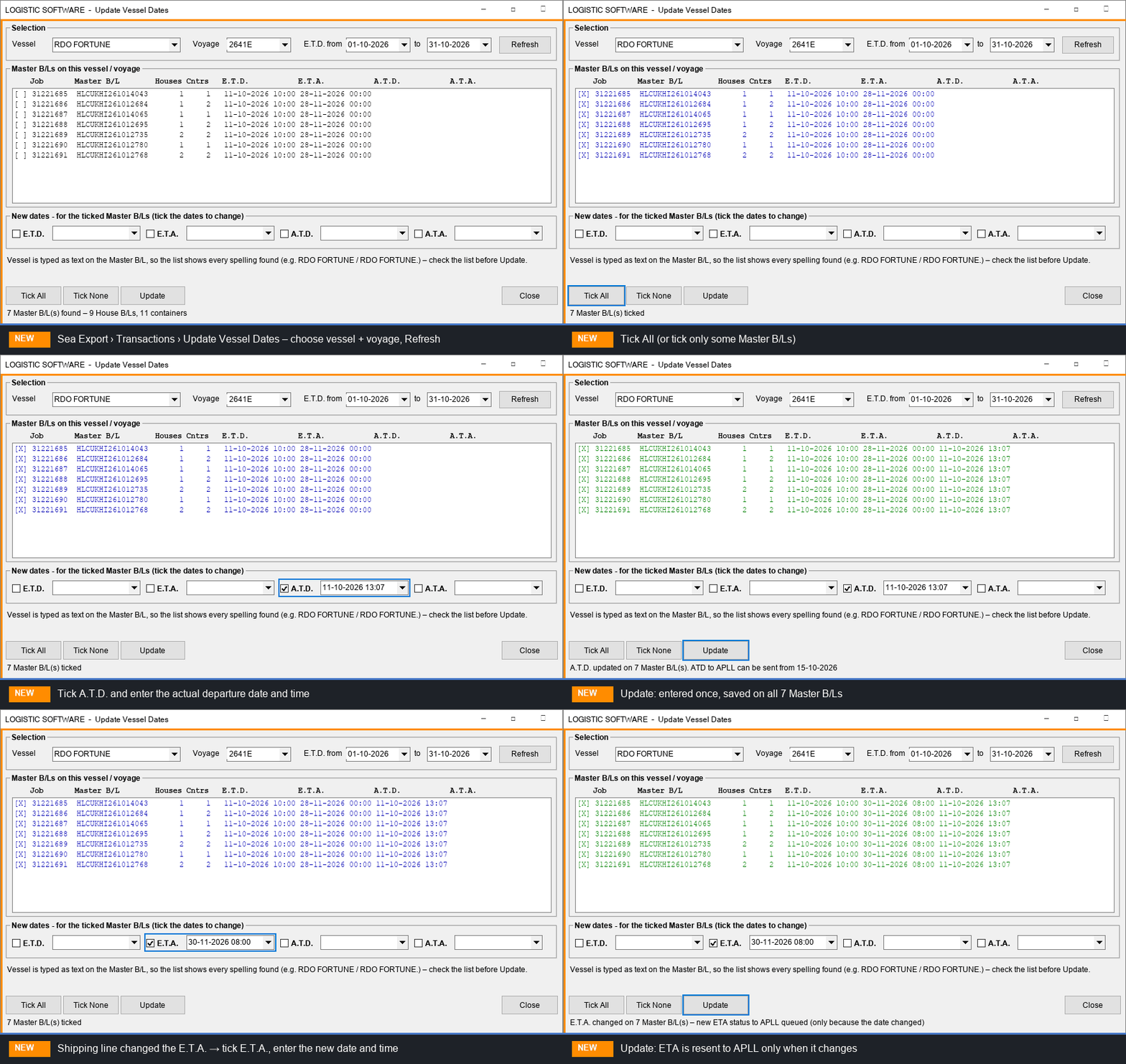
A2Update Vessel Dates – new screen

Where

Sea Export › Transactions › Update Vessel Dates (new menu item, same layout as SupplyX Send Files).

Why

Many Master B/Ls travel on the same vessel. When it sails, arrives or the shipping line changes the ETA, the date is entered once instead of on every Master B/L.

How

Choose vessel and voyage (and an ETD range) and Refresh: all Master B/Ls on that sailing are listed with their ETD, ETA, ATD and ATA. Tick the Master B/Ls, tick the dates to change, enter them and Update. Vessel is typed as text on the Master B/L, so the list shows every spelling found and the user checks it before updating.

Vessel RDO FORTUNE / 2641E → Tick All → A.T.D. 11-10-2026 13:07 → Update → E.T.A. changed → Update

A3Port File and Shipping Line – code fields

Where

Port File: new UN/LOCODE and Terminal fields. Accounts › Chart of Account (shipping line account): new SCAC code field.

Why

APLL requires international port codes (e.g. PKBQM, DEHAM) and the shipping line's SCAC code (e.g. HLCU, MSCU).

How

Enter once for the ports and shipping lines used for KiK. A missing code is shown as an error before sending.

A4KiK EDI Setup – APLL Status tab

Where

Sea Export › Maintenance › KiK EDI Setup, tab APLL Status.

Why

The sender and receiver IDs and the connection are set once.

How

Sender ID is WWGC's SCAC code WCPL. Choose Test (receiver NETRTEST) or Live (receiver APLUNET), the connection details and automatic or manual sending.

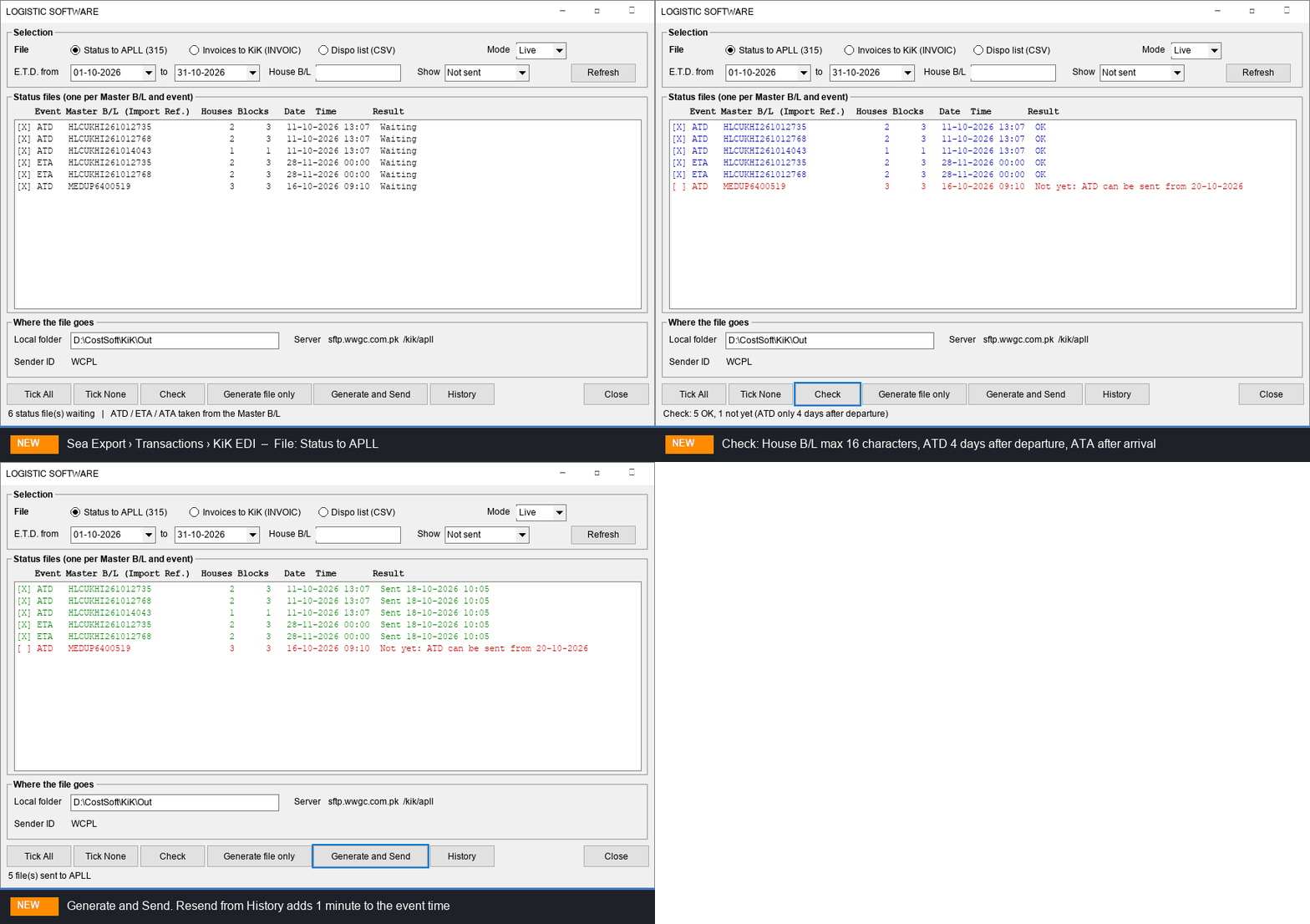
A5KiK EDI screen – Status to APLL

Where

Sea Export › Transactions › KiK EDI (new menu item, same layout as SupplyX Send Files), File: Status to APLL.

Why

One place to see what is waiting, what was sent and what cannot be sent yet.

How

One line per Master B/L and event. Check applies APLL's rules: House B/L number at most 16 characters (the file is not made if longer), ATD only from 4 days after departure, ATA only after arrival, ETA only when it has changed; ETA and ATA should go within 48 hours. Send sends the files, or they go automatically. History keeps every file with View File and Resend; a resend moves the event time by 1 minute so APLL does not treat it as a duplicate.

Status to APLL → Check → ATD not yet due shown in red → Send → History

Done automatically

  • One file per Master B/L and event (ATD, ETA, ATA), one block per House B/L and container – a shared container is never split
  • Import Reference = Master B/L number, the same for all containers of the Master B/L
  • Vessel, voyage, ports, dates and shipping line taken from the Master B/L; House B/L and containers from the House B/L
  • ETA resent only when it changes; a resend of ATD / ATA moves the time by 1 minute
  • Every sent file saved in the log, with resend

Assumptions / to be confirmed

  • First test files are e-mailed to APLL; after APLL approves them, files go through WWGC's SFTP server.
  • Built on APLL spec v2.2.8 and the rules shown by APLL / KiK on 20-Oct-2026. If APLL sends a newer version, changes will be reviewed.
  • Only ATD, ETA and ATA are sent. Other events (gate in, customs, loaded) are not part of this scope.

Part B · EDIFACT INVOIC (EANCOM D.01B)

Electronic invoice file to KiK

KiK invoices are made in EUR in CostSoft as usual. After the vessel arrives, each invoice is checked against KiK's rules and uploaded as one file to the SFTP server, where KiK collects it.

B0Chart of Account – KiK customer tick

Where

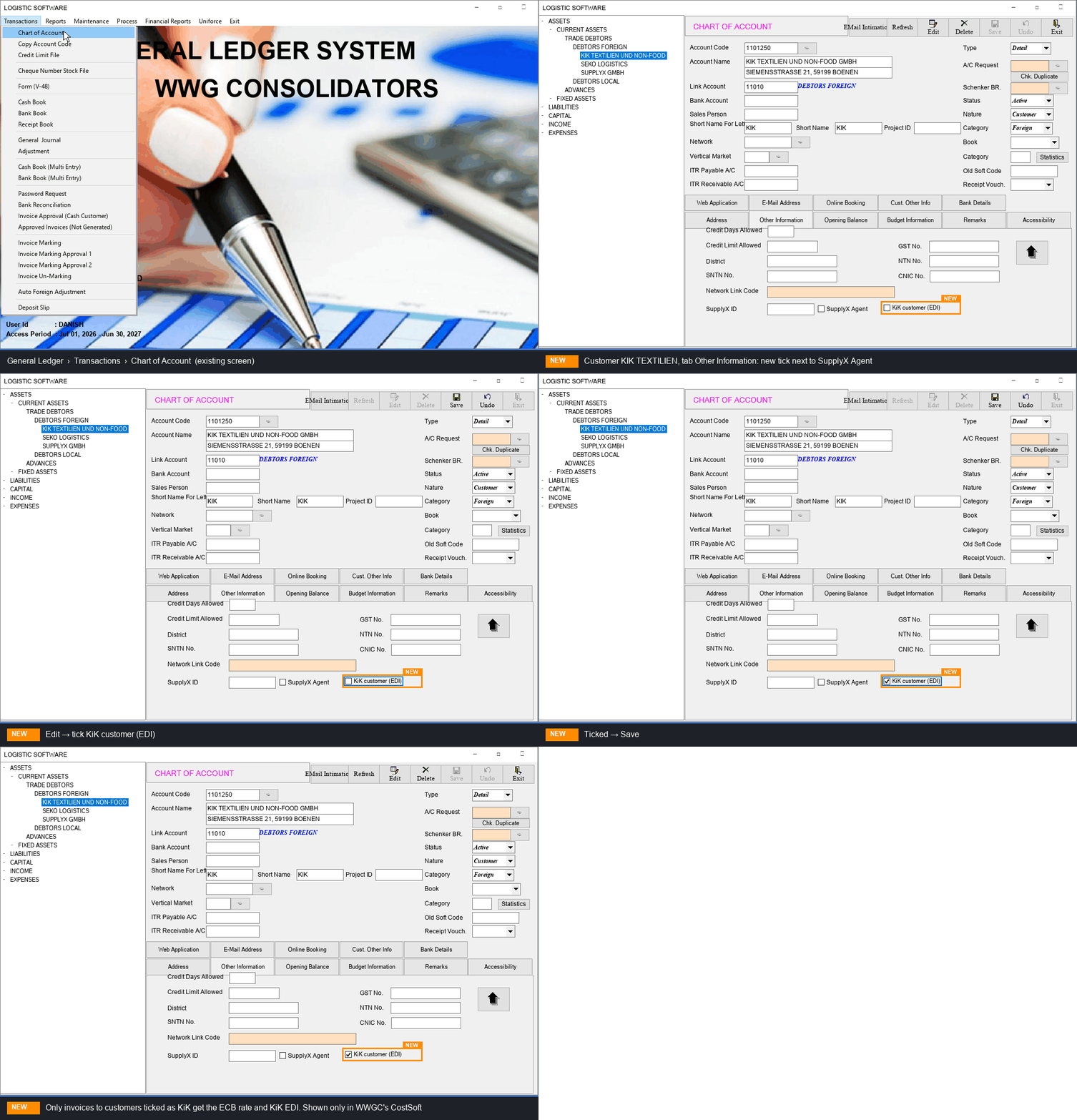
General Ledger › Transactions › Chart of Account, tab Other Information: new tick KiK customer (EDI), next to the existing SupplyX Agent tick.

Why

WWGC has many customers; only KiK needs the ECB rate, KiK EDI and the dispo list.

How

Tick it once on the KiK customer account. Invoices, events and EDI files are handled the KiK way only for ticked customers; all other customers work exactly as today.

Chart of Account → KIK TEXTILIEN → Other Information → tick KiK customer (EDI) → Save

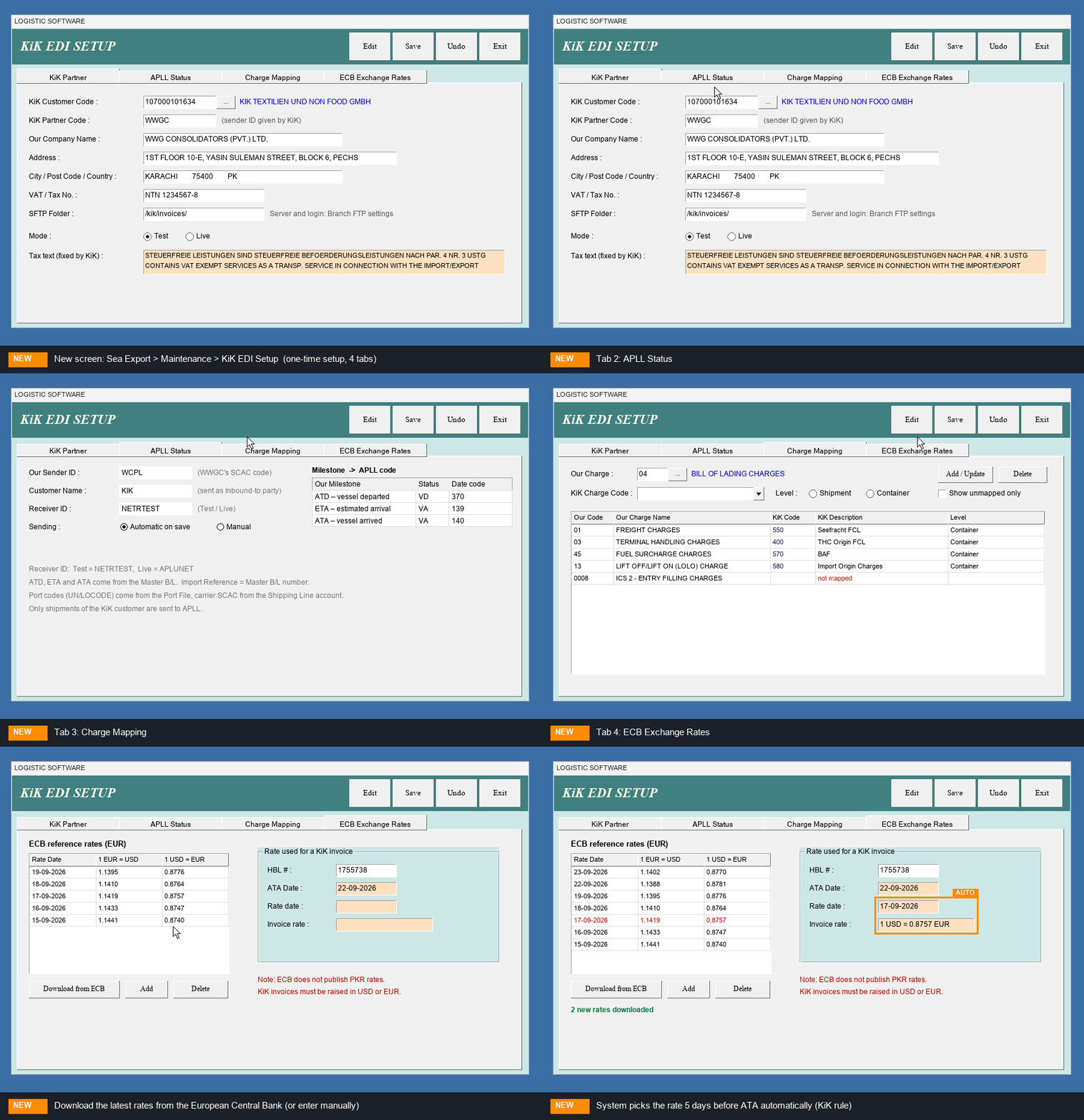
B2Invoices in EUR – ECB exchange rates

Where

Sea Export › Maintenance › KiK EDI Setup, tab ECB Exchange Rates.

Why

KiK invoices are sent only after the goods arrive. KiK requires the invoice in EUR and the ECB rate from 5 days before ATA (entered on the Master B/L, A1) in every invoice file. A KiK invoice cannot be made or sent while ATA is empty. Invoice, statement of account and EDI file all show the same EUR amounts.

How

Download button reads the daily ECB rates (manual entry also possible). When an invoice is made for a customer ticked as KiK, the rate for ATA − 5 days is put in Ex. Rate For Inv. automatically; on a weekend or ECB holiday the last earlier rate is used (confirmed by KiK).

The system downloads the ECB exchange rates from the web automatically every day, in the background, when the first user logs in. It runs once a day for all users (a log shows when it ran, by whom and the result); if it fails, the next login tries again.

B3Charges File – KiK Charge Mapping

Where

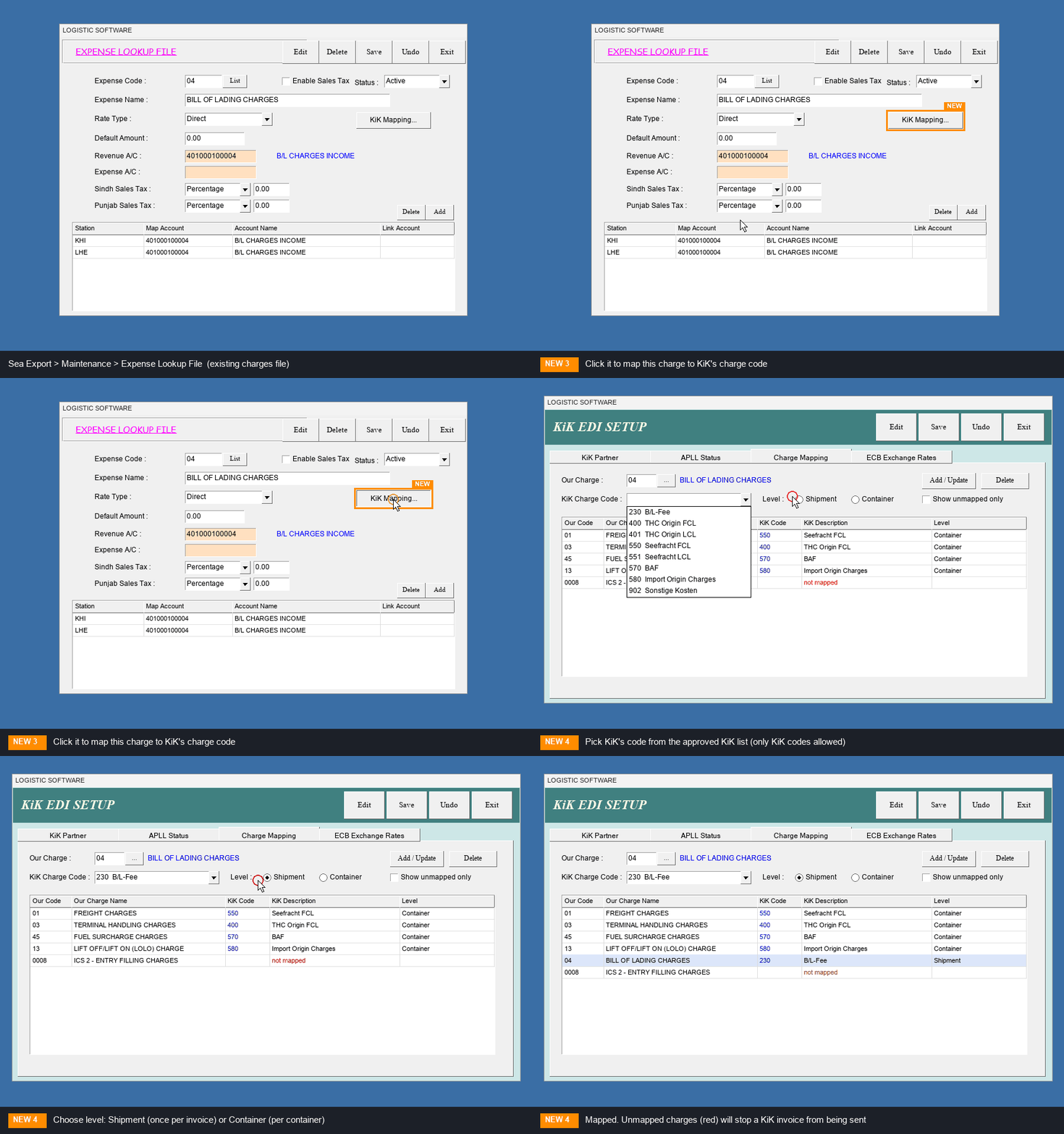
Expense Lookup File: new KiK Mapping... button opens the Charge Mapping tab of KiK EDI Setup.

Why

KiK accepts only its own charge codes and rejects any other code.

How

Map each charge once: the KiK code and the level (Shipment = once per invoice, Container = per container). New charge codes are added for on-carriage: GIES (on-carriage agent) gives its cost to WWGC, it is entered as an expense, and WWGC bills it to KiK. Unmapped charges are shown in red and block sending.

Charges file → KiK Mapping → choose KiK code and level → Add
Our chargeKiK codeKiK nameLevel
04 Bill of Lading charges230B/L-FeeShipment
01 / 02 Freight charges (incl. ICS2 / ENS)550 / 551 / 552Sea freight FCL / LCLContainer
03 Terminal handling400 / 401THC Origin FCL / LCLContainer
New: On-carriage805 / 808On-carriage FCL / LCLContainer
Other origin charges (CRO, LOLO, seal, courier, handling…)902Other costs (to be approved by KiK)Container

Proposed mapping, to be approved by KiK. ICS2 / ENS is included in ocean freight as KiK requires.

B4Other Invoice – KiK invoice in EUR

Where

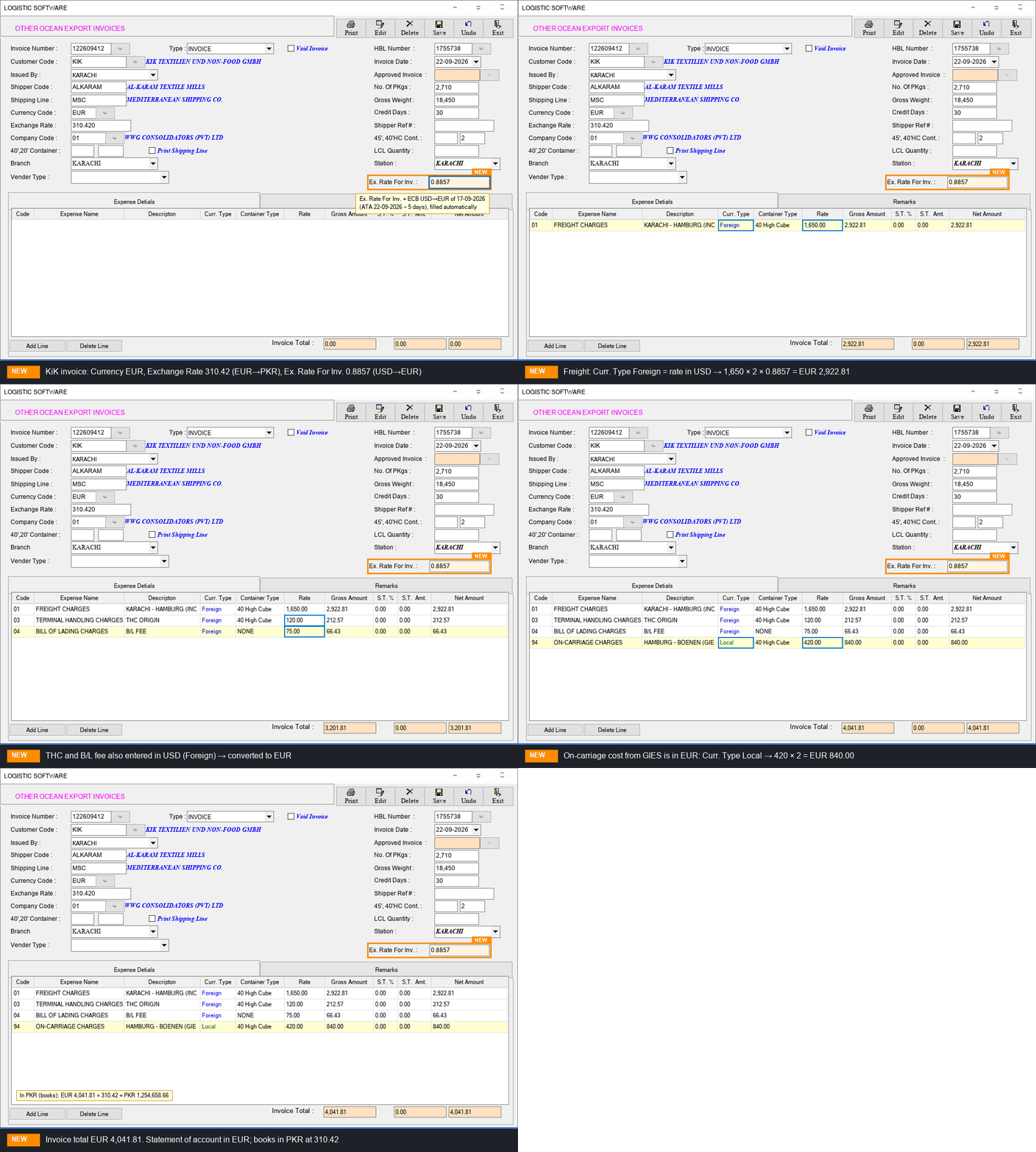
Sea Export › Transactions › Bill Of Lading (Other Invoice) (existing screen). One invoice per House B/L with ocean freight and on-carriage.

Why

The invoice, statement of account and EDI file must all be in EUR, while freight rates are in USD.

How

Currency Code EUR and Exchange Rate (EUR → PKR, e.g. 310.42) as today. The existing Ex. Rate For Inv. field holds the ECB USD → EUR rate of ATA − 5 days; for KiK it is filled automatically, locked, and saved with the invoice. Per line, Curr. Type Foreign = rate entered in USD (converted with Ex. Rate For Inv.), Local = rate entered in EUR (e.g. GIES on-carriage). The user never converts by hand.

Sample KiK invoice: freight, THC, B/L fee in USD (Foreign) + on-carriage in EUR (Local) = EUR 4,041.81

B5KiK EDI Setup – KiK Partner tab

Where

Sea Export › Maintenance › KiK EDI Setup, tab KiK Partner.

Why

All KiK settings in one place, set once.

How

KiK customer account, sender ID for invoices and the dispo list (WWGPROD for live, WWGTEST for test), SFTP folder, Test/Live. Company name, address and NTN are taken from the company setup. The fixed tax-free text required by KiK is added automatically.

KiK Partner → APLL Status → Charge Mapping → ECB Exchange Rates

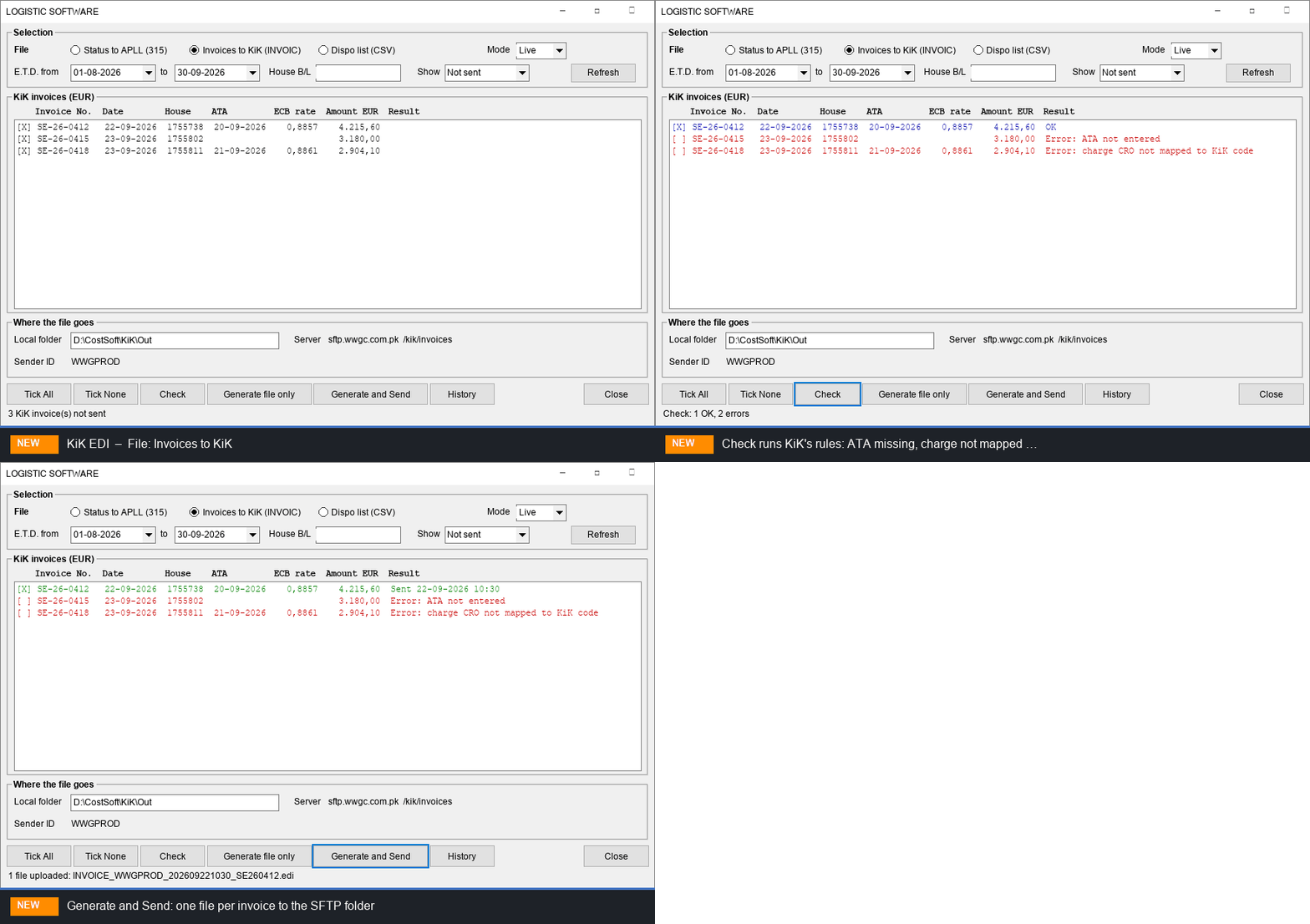
B6KiK EDI screen – Invoices to KiK

Where

Sea Export › Transactions › KiK EDI, tab Invoices to KiK.

Why

Every invoice is checked against KiK's rules before it leaves WWGC.

How

Check runs KiK's rules (errors in red, ready invoices ticked). Send uploads one file per invoice to the SFTP folder. Log shows every file with View File and Resend.

Invoices to KiK → Check → Send → Log → View File

Done automatically

  • House B/L number sent as the KiK tracking number
  • Import Reference (Master B/L number) sent in every invoice, for KiK's invoice allocation and cost check
  • One block per container (number, type, weight, CBM, cartons); LCL as one block
  • Container charges per container, shipment charges (e.g. B/L fee) once
  • ECB rate, KiK charge codes, tax-free text, totals, addresses, NTN
  • Credit notes sent as KiK credit notes with the original invoice number

KiK checks before sending

Supplier and KiK name/address · NTN · invoice date and number · service date · ATA entered on the Master B/L · Import Reference · at least one container · totals add up · tax-free text · exchange rate · all charges mapped.

Assumptions / to be confirmed

  • On-carriage is done by GIES. GIES gives its cost to WWGC and does not invoice KiK; WWGC bills ocean freight and on-carriage to KiK.
  • WWGC provides the SFTP server and login; KiK collects the files from it.
  • KiK sends rejection notices by email directly to WWGC; the invoice is corrected and resent from the log.
  • WWGC sends one invoice to KiK including ocean freight and on-carriage charges. Invoice screen changes to be finalised.
  • Exchange-rate segment as per KiK's confirmation.
  • The invoice segment for the Import Reference to be confirmed by KiK.
  • Charge mapping approved by KiK before go-live.

Part C · CSV (semicolon, UTF-8)

Dispo list file to KiK

KiK's planning list for the on-carriage of each container from the destination port to the KiK warehouse. WWGC users enter the dispo data in CostSoft; the list is created and uploaded to the same SFTP server.

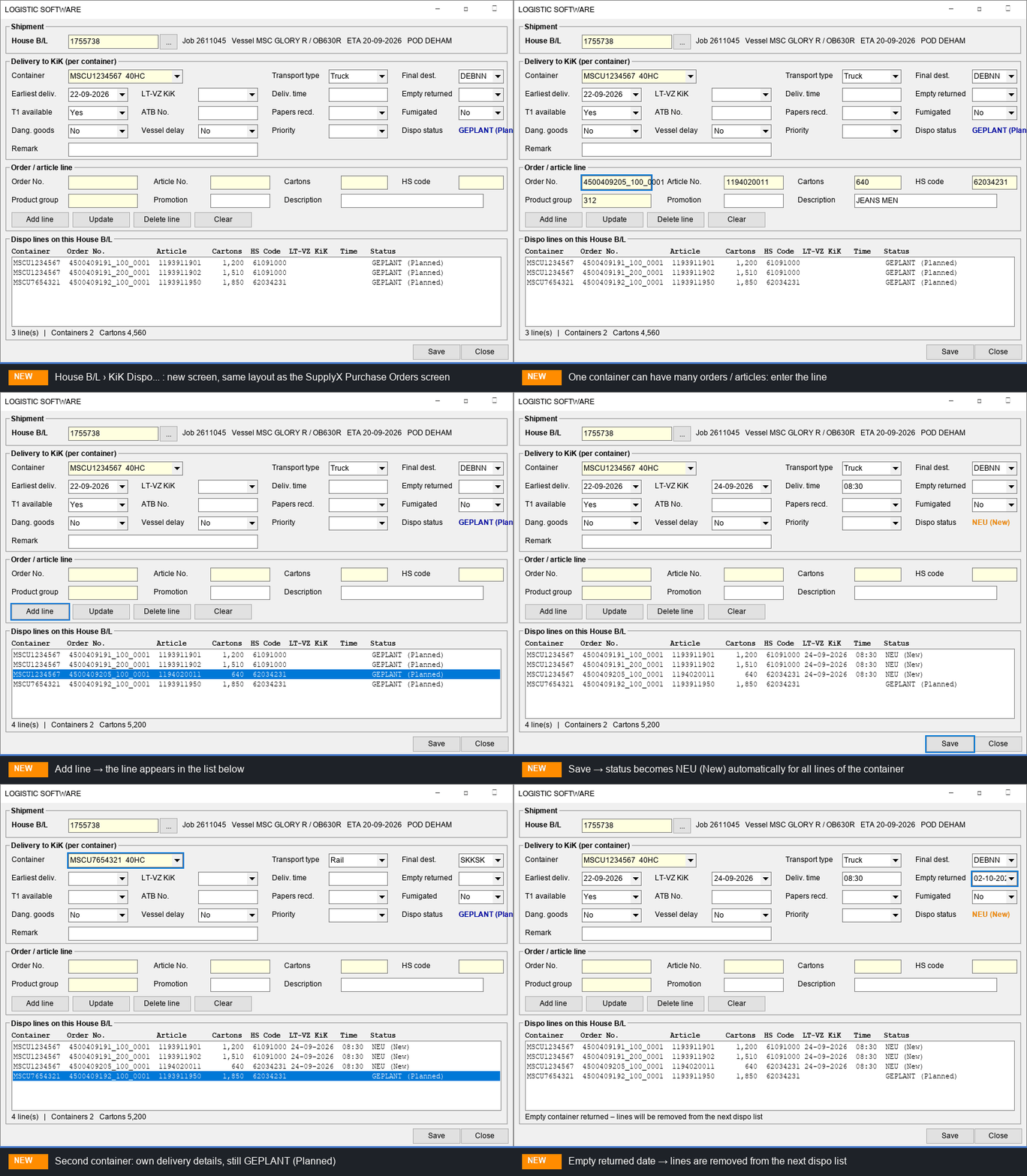
C1House B/L – KiK Dispo screen

Where

House B/L: new KiK Dispo... button opens the KiK Dispo screen for that B/L (same layout as the SupplyX Purchase Orders screen).

Why

KiK needs order, article and delivery details per container. These are not in CostSoft today.

How

Containers come from the House B/L. One container can have many orders / articles: per line enter order no., article no., cartons, HS code, product group (Warengruppe), promotion code (Werbung) and description. Per container enter the delivery details: transport type, final destination, earliest delivery date, delivery date and time at KiK, T1 / ATB, papers received, fumigation, dangerous goods, priority, remark and empty returned date. Vessel delay is not typed per container: it is set automatically when the ETA on the Master B/L changes.

KiK Dispo → order lines per container → delivery date → status NEU → empty returned

C2Dispo status – handled automatically

Where

KiK Dispo screen and KiK EDI screen.

Why

KiK processes a row only with the correct status; a wrong status is rejected.

How

GEPLANT (Planned) until the delivery date at KiK is entered, then NEU (New) once, then AVISIERT (Notified) if unchanged or GEAENDERT (Changed) if any field changed. Screens show the German value with the English meaning. Rows are removed 4 weeks after delivery or once the empty container is returned.

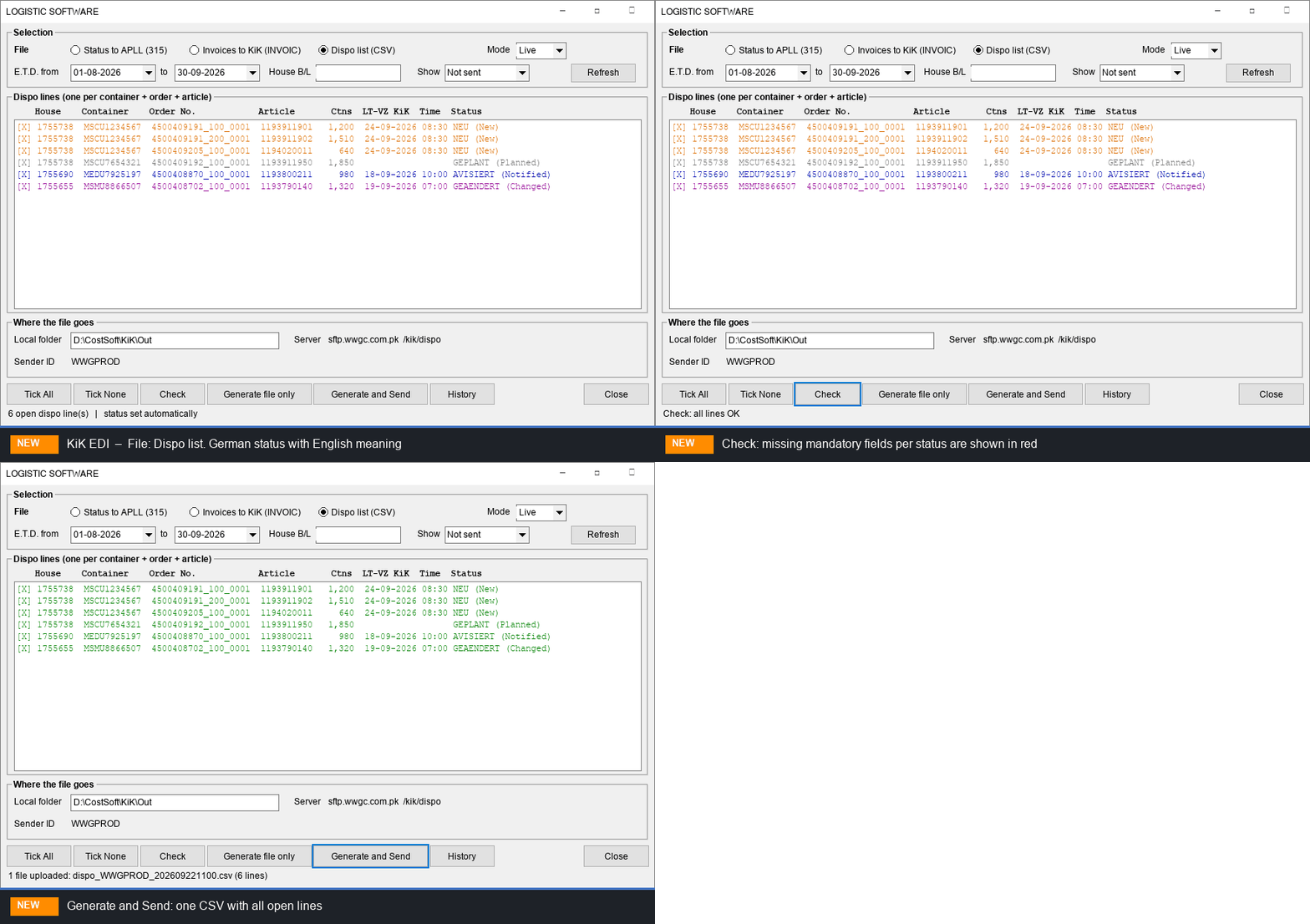
C3KiK EDI screen – Dispo List

Where

Sea Export › Transactions › KiK EDI, tab Dispo List.

Why

One list with all open KiK containers, re-sent on every update.

How

One row per container + order + article. Check shows missing mandatory fields per status (errors in red). Send creates one CSV with all open rows and uploads it. Log keeps every file with View File and Resend.

Dispo List → Send Dispo List → Log

Done automatically

  • Tracking number, container no. and type and supplier taken from the House B/L; vessel, ETA, vessel delay, port of discharge and shipping line SCAC from the Master B/L
  • Status set automatically (planned / new / notified / changed)
  • Completed rows removed after 4 weeks or empty return
  • File name and format as per KiK's spec

Assumptions / to be confirmed

  • WWGC users collect the order, article and delivery data and enter it in CostSoft.
  • Container types 20GE, 20HC, 40HC, 40RE and LCL; destinations as per KiK's list (Bönen, Košice, Poland).
  • Partner code: WWGC's SCAC code WCPL.

Menu

Where the new options appear

All KiK and SupplyX options (menus, fields, columns) are shown only in WWGC's CostSoft. Other customers do not see them.

MenuNew / changedPart
Sea Export › MaintenanceKiK EDI Setup (new screen: KiK Partner · APLL Status · Charge Mapping · ECB Exchange Rates)A, B
Sea Export › Maintenance › Port FileUN/LOCODE, Terminal (new fields)A, C
General Ledger › Transactions › Chart of AccountKiK customer (EDI) tick on the customer; SCAC code on the shipping lineA, B, C
Sea Export › Maintenance › Expense Lookup FileKiK Mapping... button, new on-carriage chargesB
Sea Export › Transactions › Master Bill of LadingETD / ETA with time, ATD and ATA (new fields)A, B, C
Sea Export › TransactionsUpdate Vessel Dates (new screen: ETD / ETA / ATD / ATA for all Master B/Ls of a vessel and voyage)A
Sea Export › Transactions › House B/LKiK Dispo... buttonC
Sea Export › Transactions › Bill Of Lading (Other Invoice)Ex. Rate For Inv. filled from ECB (ATA − 5), locked and saved for KiK invoicesB
Sea Export › TransactionsKiK EDI (new screen: Status to APLL · Invoices to KiK · Dispo List · Log)A, B, C