
Sea import, from allotment to delivered.
Book space against your carrier contracts, sell it to customers, collect shipping instructions, open the Master and House B/Ls, track every milestone and invoice the job, all in one flow.
- tracking milestones
- 9
- tracking milestones
- B/L release types
- 5
- B/L release types
- per milestone
- 1 click
- per milestone
How it works
7 steps, one system.
Press ? on any step to read the same help your team sees inside LogiSoft.
- 01
Set up your carrier allotments
?LogiSoft help
Sea Import Allotments
Inbound capacity contracts with shipping lines — pre-arranged allotment that incoming bookings draw from. Tracks how much is committed vs. used.
A Sea Import Allotment is a contract with a shipping line for inbound capacity (TEU / FEU / Kg / CBM) over a period. Each Sea Import Carrier Booking that links to this allotment draws from it via AllotmentDraws.
The Allotment Dashboard (Sea Export module — same dashboard for both directions) shows committed vs. used vs. remaining. You don't enter draws manually — they're created automatically when bookings link.
Common tasks
- 1. Click + Add Allotment
- 2. Pick the Carrier
- 3. Set the period (e.g. monthly contract)
- 4. Enter total commitment + chargeable unit
- 5. Optionally break down into capacity lines per container size/type
- 6. Save — incoming bookings can now reference this allotment
The same help appears on this screen inside LogiSoft.
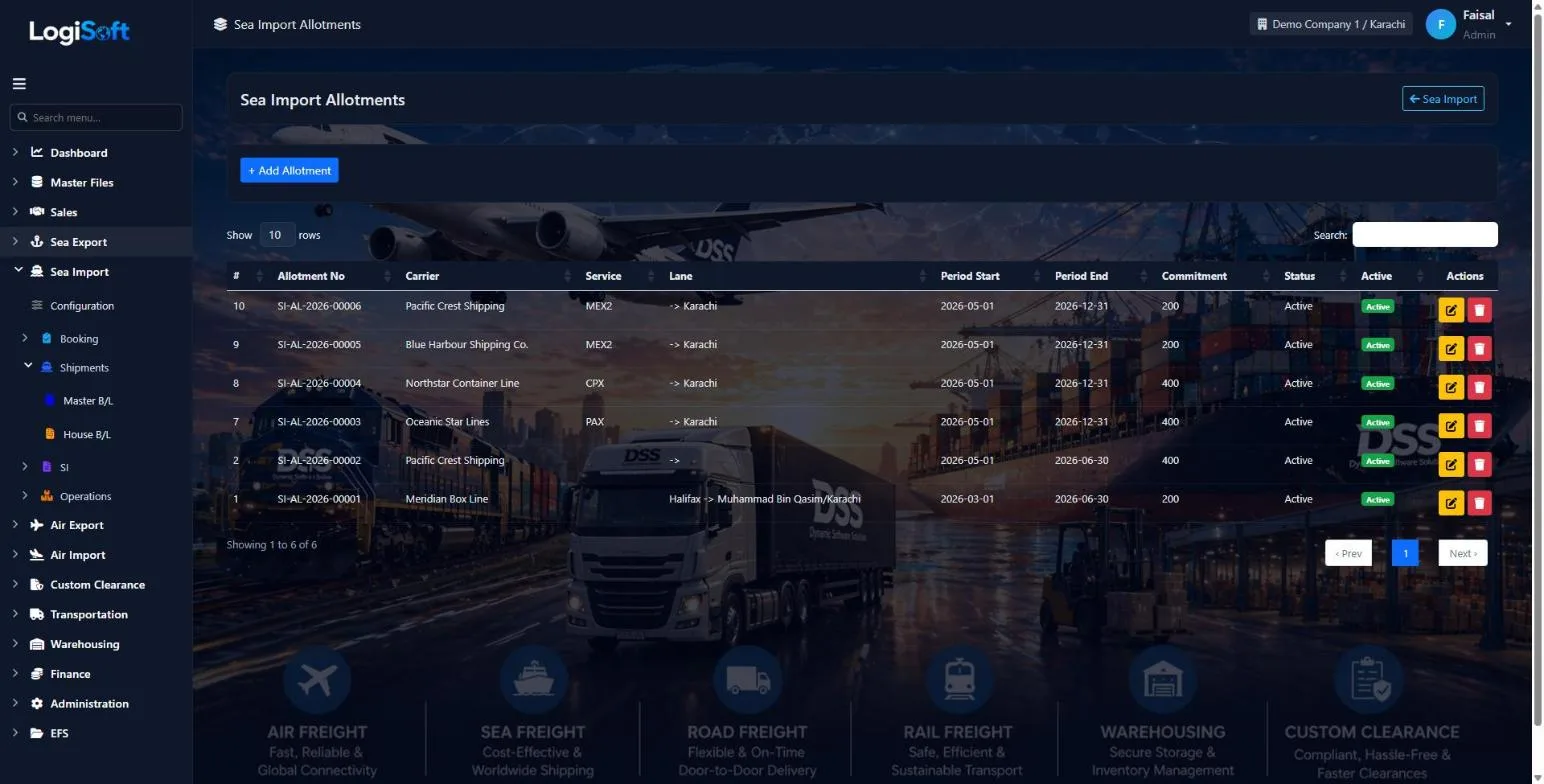
Record the space you have contracted with each shipping line, per service, lane and period.
- Commitment per allotment
- Active and inactive periods
- Allotment dashboard shows used and available space
- 02
Book with the carrier and the customer
?LogiSoft help
Sea Import Carrier Bookings
Inbound bookings made WITH the shipping line — typically by a NVOCC/co-loader on behalf of their downstream agents. Captures the agent name that will flow to the linked Customer Booking.
Carrier Bookings on the import side are for the NVOCC pattern: a customer of yours pre-books allotment with the shipping line, then assigns each shipment to a specific agent (the actual end consignee at destination).
The Agent field is the key field on this screen. It identifies the destination/consignee party and:
- Auto-fills as the Customer on the linked Customer Booking
- Gets saved into the Parties master if it's a new agent (use the + Add new on the dropdown)
The agent allotment for stock tracking is on Sea Import Allotments — link this booking to one of those to draw down its capacity.
Common tasks
- 1. Click + Add Booking
- 2. Pick the Carrier (shipping line)
- 3. Pick the Agent — type a name; if not in the master, click + Add new
- 4. Optionally link an Allotment to track stock against pre-arranged capacity
- 5. Fill in vessel/voyage, container details, ETD/ETA
- 6. Save
The same help appears on this screen inside LogiSoft.
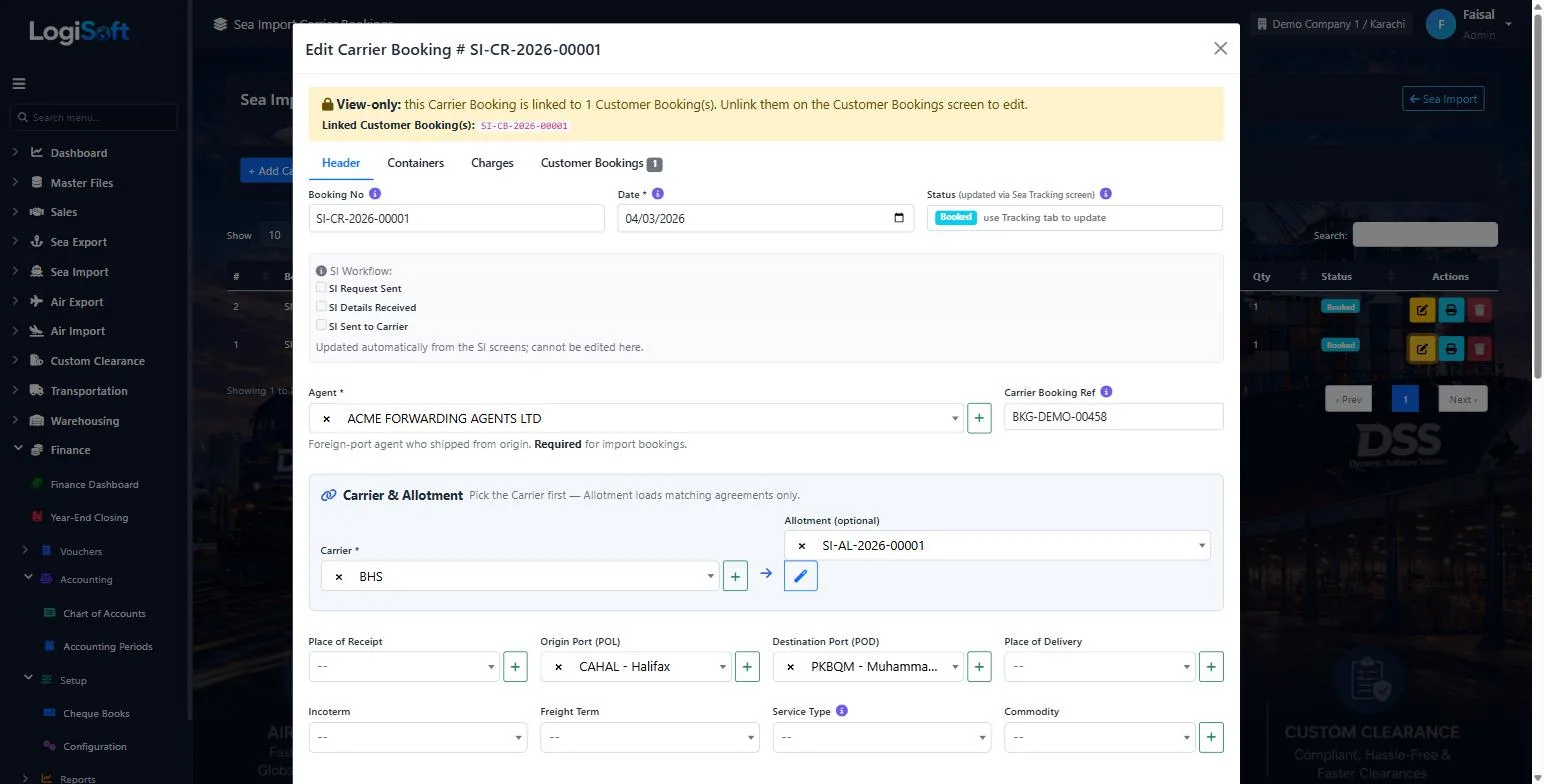
Create the carrier booking, link it to an allotment, and sell the space through customer bookings that stay connected to it.
- Agent, carrier, allotment and ports on one form
- Containers and charges tabs
- Status from confirmed to delivered
- 03
Collect shipping instructions
?LogiSoft help
Sea SI — Inbound (from Customer)
Track which customers have submitted Shipping Instructions for their bookings, and which haven't. Critical when handling 500+ shipments per month.
SI Inbound tracking answers a single question: which of my customers still owe me a Shipping Instruction for this voyage?
Each row represents one Customer Booking. Status colors:
- 🟢 Received — customer sent the SI
- 🟡 Pending — within the cut-off window
- 🔴 Late — past the SI cut-off
Mark received: click the upload button, attach the customer's SI document (PDF/image), add notes, save. The document is stored linked to the booking. Bulk-select rows to send email reminders via the existing Email Templates engine.
Common tasks
- 1. Filter by vessel/voyage to focus on next sailing
- 2. Find the row with status "Pending" or "Late"
- 3. Click ⬆ upload icon → attach SI PDF → save
- 4. For pending ones: tick rows + click "Bulk Email Reminders"
The same help appears on this screen inside LogiSoft.
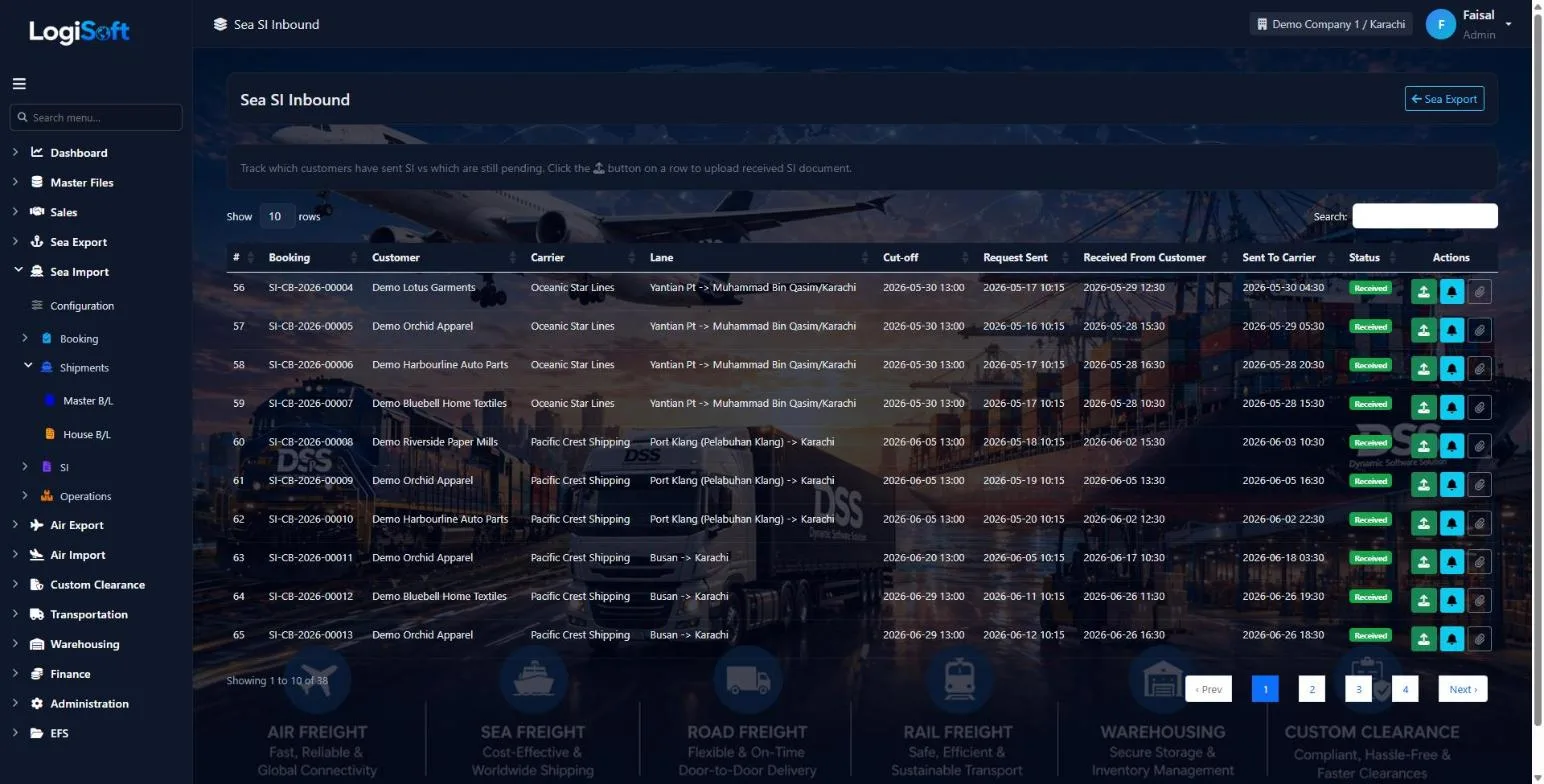
See which customers have sent their SI and which are still pending before the cut-off, then pass them to the carrier.
- Request, received from customer and sent to carrier, each time-stamped
- Upload the SI document on the row
- Send reminders to customers
- 04
Open the Master B/L and its House B/Ls
?LogiSoft help
Sea Import — Master B/L (MBL)
Capture the carrier's Master Bill of Lading received from the origin agent. One MBL per shipment; can roll up many House B/Ls.
The Master B/L is the carrier's contract of carriage. Origin agent sends us the MBL copy; you capture its data here for IGM filing, arrival tracking, and release management.
Key tabs:
- Overview — MBL #, mother + feeder vessel, voyage, POL/POD/Transshipment, IGM/VIR (Pakistan customs)
- Parties — Carrier, Origin Agent, Ship Agent, Clearing Agent (all from Parties master)
- Containers — container#, seal, ISO code, weights — per-container detail
- Houses — list of HBLs under this MBL with reconciliation (totals match? ✓)
- Documents & Events — uploaded files + timeline (manifest filed, arrival, release)
Two power features:
- 🪄 Import from File — pick the agent's emailed MBL PDF; AI extracts the data and pre-fills the form (you review + correct)
- 🔗 Link Bookings — for LCL consolidation: tick multiple Carrier Bookings; system auto-creates one HBL per booking
Common tasks
- **Add an MBL**: click + Add MBL, fill Overview tab first (MBL#, vessel, ports), Save, then add Containers and link Bookings.
- **Auto-fill from agent file**: click Import from File, pick PDF/image. AI extracts ~80% of the fields. Yellow highlights = needs verification.
- **LCL consolidation**: in Houses tab → Link Bookings → tick the carrier bookings on this vessel → Apply. System creates draft HBLs from each booking.
- **Status pipeline**: advance Draft → Submitted → IGM Filed → Arrived → Released → Closed via the chips at the top.
The same help appears on this screen inside LogiSoft.
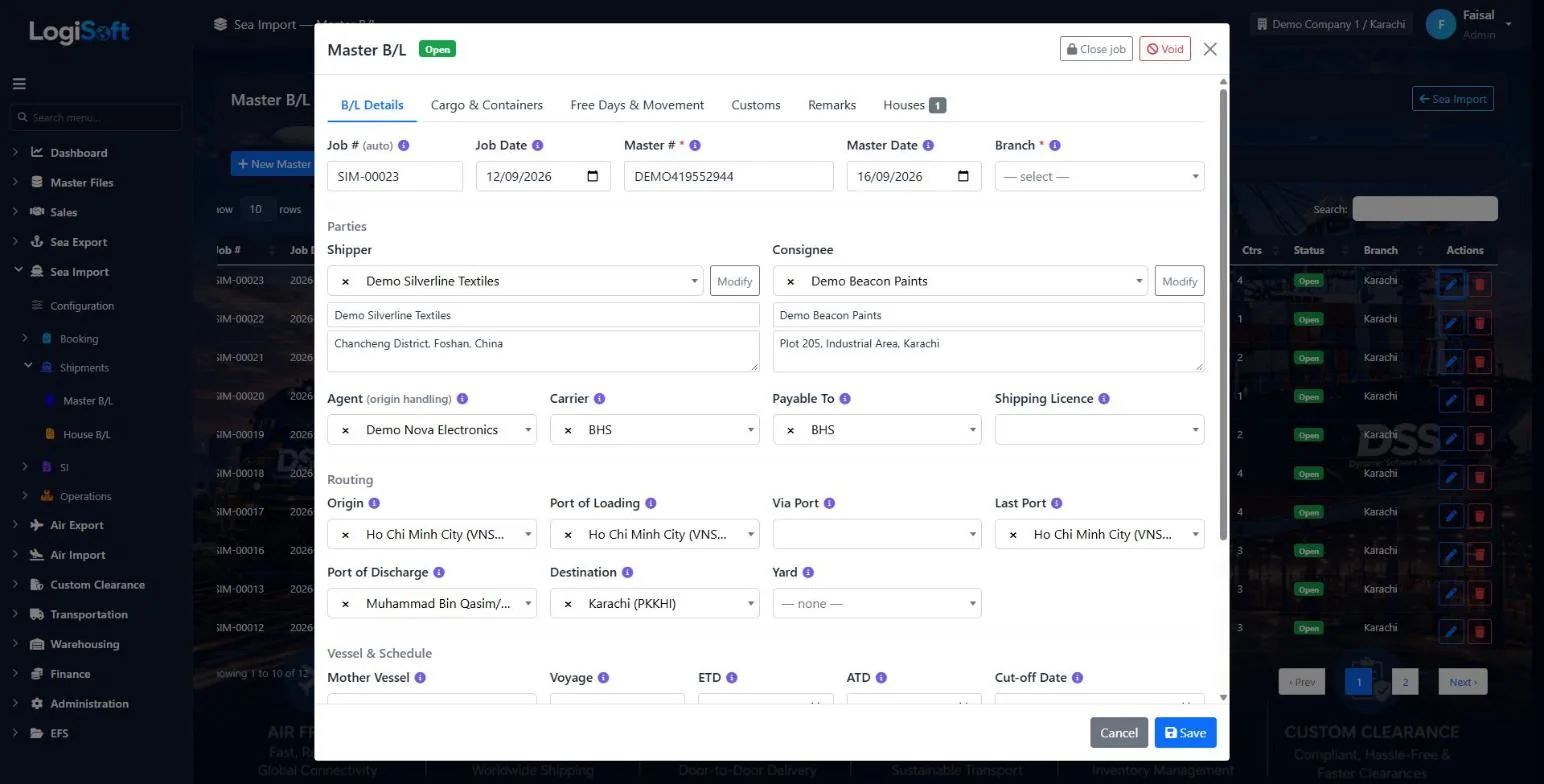
Each shipment becomes a job on the Master B/L, with the House B/Ls, containers and dates attached to it.
- Shipper, consignee, agent, carrier, routing, vessel and schedule
- Tabs for cargo and containers, free days and movement, customs and remarks
- House B/L release status: original, surrendered, express release, sea waybill or bank guarantee
- 05
Track every milestone
?LogiSoft help
Sea Tracking
Update milestone status (Confirmed / Sailed / Arrived / Delivered etc.) for Sea bookings.
Lists Sea bookings of any direction (Import + Export). Each row has quick-action milestone buttons; clicking one logs that milestone with the current timestamp and updates the booking's status badge. Branch-scoped to your allowed branches.
Common tasks
- Pick a booking row.\n- Click the milestone button matching the event (Sailed, Arrived, etc.).\n- The booking's tracking timeline auto-records the click.
The same help appears on this screen inside LogiSoft.
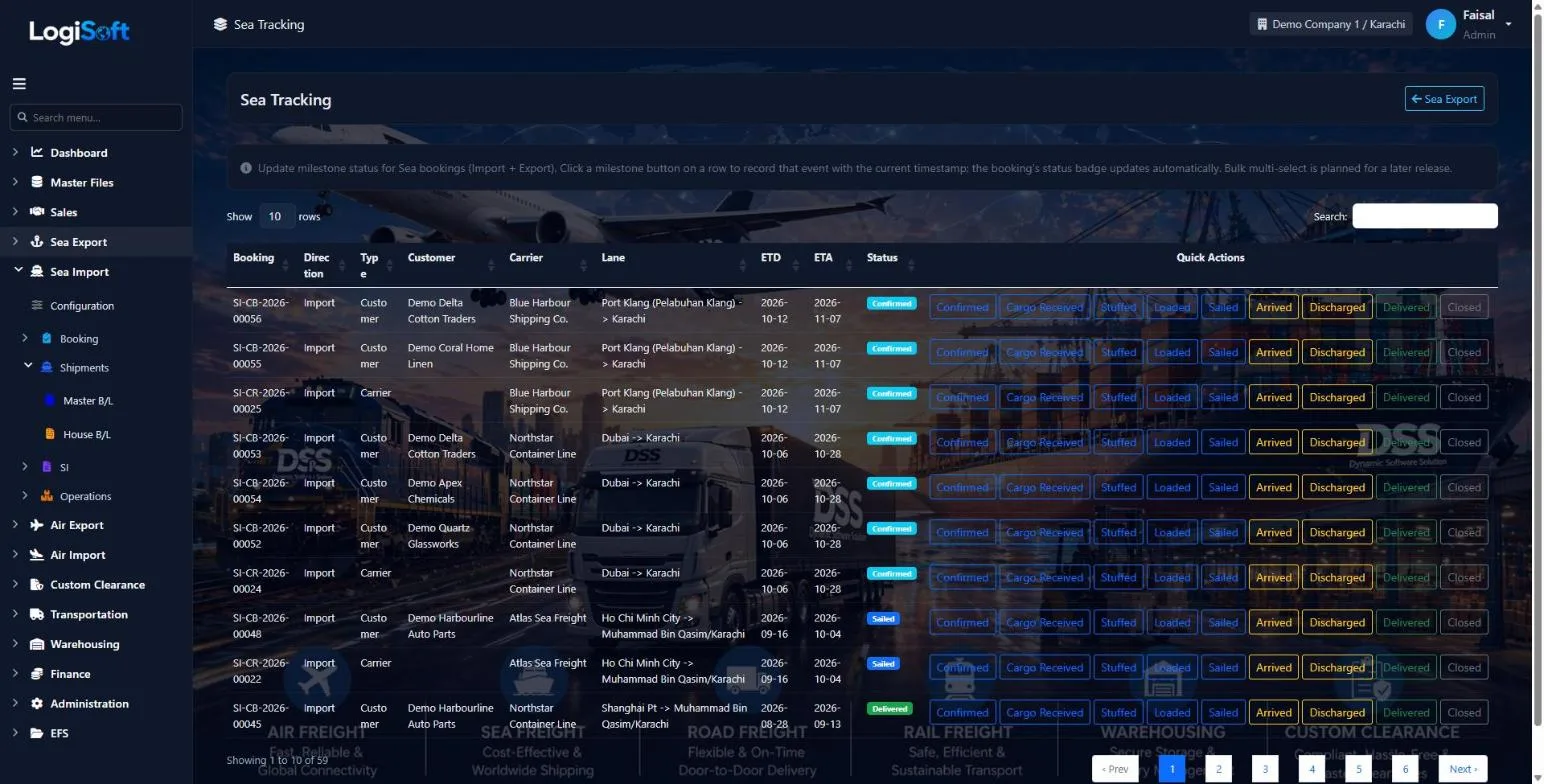
Click a milestone button as each event happens. The booking's status updates on its own.
- Confirmed, cargo received, stuffed, loaded, sailed, arrived, discharged, delivered, closed
- Import and export, customer and carrier bookings on one screen
- 06
Update many shipments at once
?LogiSoft help
Bulk Update Shipments
Update many Sea Import bookings at once when a shipping line changes vessel, voyage, or any tracked schedule field.
- Build filters. Click + Add Filter. Pick a field, an operator, and a value. The filter is enabled by default (the checkbox to the left). Untick to leave a filter as a saved-but-inactive template.
- Review the matching bookings. Tick the Select All header checkbox to toggle. All rows are pre-checked. Untick the ones you want to leave alone.
- Set the new values. In the Change to: panel, fill ONLY the fields you want to overwrite. Empty fields are left as-is on every selected row.
- Confirm. A modal shows how many shipments are about to change. Click Yes, update N shipments.
Common tasks
- Apply an ETD/ETA change to every booking on a rolled vessel.
- Swap Pickup Empty depot for all bookings out of a port for a date range.
- Mark all bookings of a specific customer with a different agent.
The same help appears on this screen inside LogiSoft.
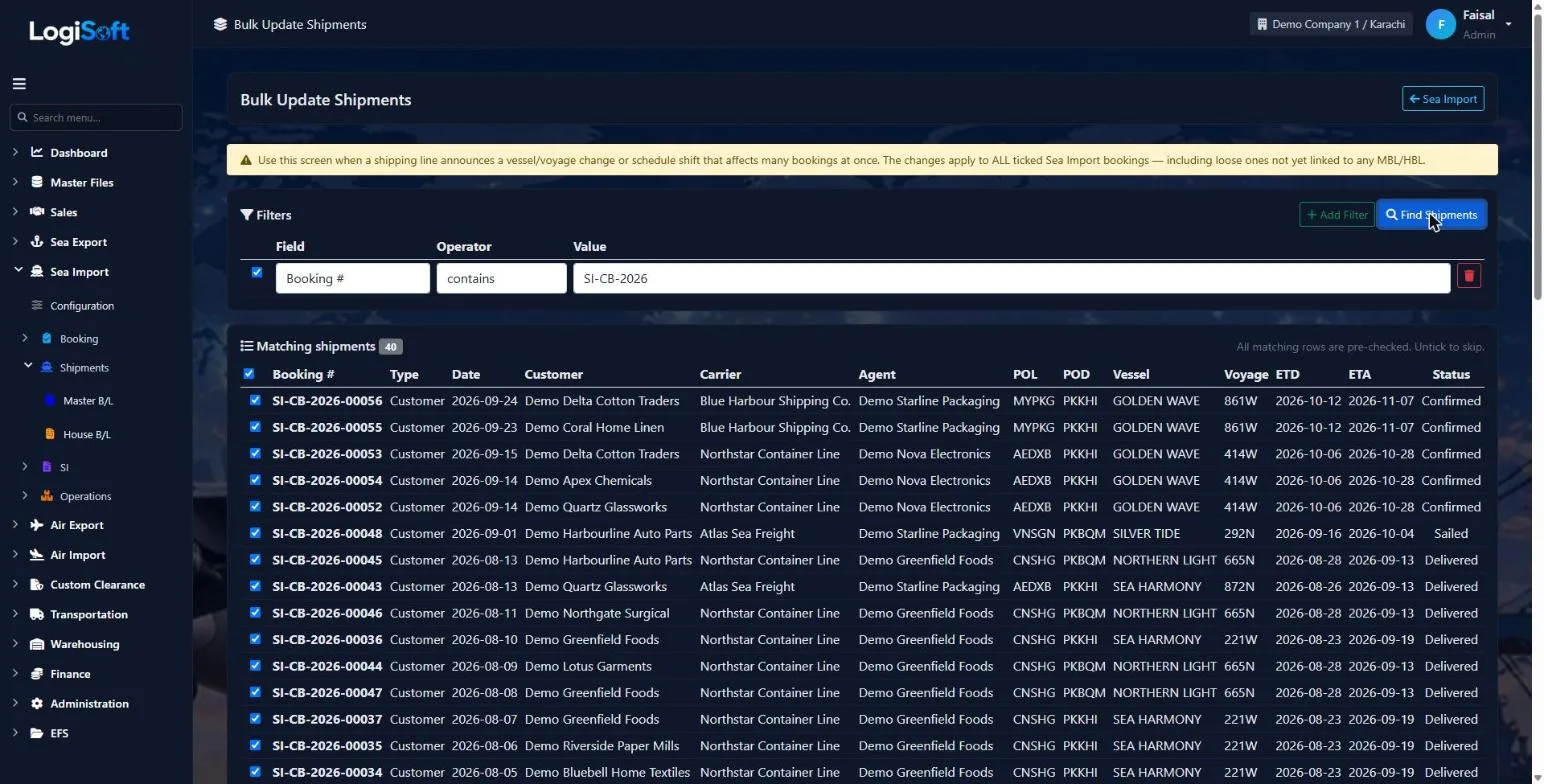
When a shipping line changes a vessel, voyage or schedule, filter the affected bookings and update them together.
- Filter on any booking field
- Tick which fields to overwrite
- Applies to bookings not yet linked to a B/L too
- 07
Invoice the job
?LogiSoft help
Sea Import — House Invoice
Manage Sea Import — House Invoice for Sea Import shipments.
This is one of 8 invoice screens for Sea Import. Each combines:
- Scope (House = per-HBL, Master = per-MBL)
- Document type (Sales Invoice / Sales Credit Note / Vendor Bill / Vendor Debit Note)
Workflow
- Click + New to create a draft invoice.
- Pick the anchor (HBL or MBL) — cargo dimensions auto-populate read-only.
- Pick the Bill To party. Counterparty Type defaults from the party's role.
- Add lines: pick a Charge, set the Calc Basis (per-container / CBM / fixed), enter Rate. Quantity auto-pulls from the linked HBL/MBL.
- Tax auto-applies from the current branch's Tax Group.
- Save — increments InvoiceNumber. If any line is taxed, increments TaxInvoiceNumber too.
- Post the invoice when ready (locks it; required if your tenant runs Draft→Post mode).
Print labels
The PDF title comes from one of these:
- Tax authority title when invoice has tax lines (e.g. "Sindh Sales Tax Invoice")
- InvoiceTypes master local/foreign label (configured under Master Files → Invoice Types)
- Per-invoice override when filled
Rules
- Numbers are sequential. Invoices CANNOT be deleted — use Void instead.
- Credit Notes / Debit Notes must reference an original invoice.
- Foreign vs Local is picked manually from the Local/Foreign dropdown on the invoice header. A local-currency invoice for an overseas customer (and vice-versa) is fully supported.
The same help appears on this screen inside LogiSoft.
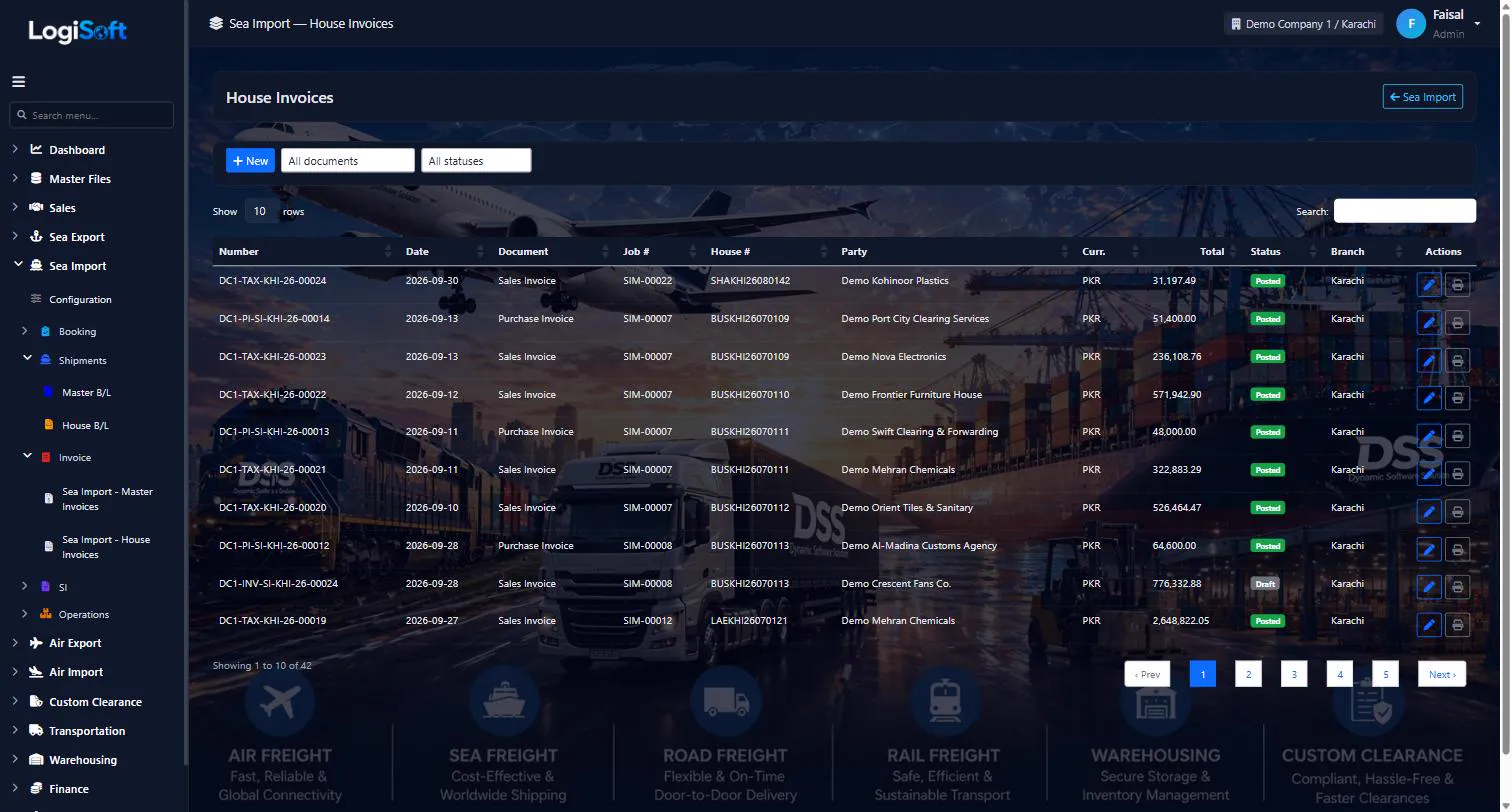
Raise invoices against a House B/L for your customer, or against the Master B/L for your agent. Quantities come from the B/L, so you only enter the rates.
- Sales invoices, credit notes, vendor bills and vendor debit notes
- Charge by container, by CBM or as a fixed amount
- Sales tax applied from the branch, with a separate tax invoice number
- Draft, then post; invoices are voided, never deleted
Every screen
14 screens in Sea Import.
The complete list of screens in this module, described in LogiSoft's own help. Press ? for the full explanation.
Allotment
-
Sea Import Allotments
?LogiSoft help
Sea Import Allotments
Inbound capacity contracts with shipping lines — pre-arranged allotment that incoming bookings draw from. Tracks how much is committed vs. used.
A Sea Import Allotment is a contract with a shipping line for inbound capacity (TEU / FEU / Kg / CBM) over a period. Each Sea Import Carrier Booking that links to this allotment draws from it via AllotmentDraws.
The Allotment Dashboard (Sea Export module — same dashboard for both directions) shows committed vs. used vs. remaining. You don't enter draws manually — they're created automatically when bookings link.
Common tasks
- 1. Click + Add Allotment
- 2. Pick the Carrier
- 3. Set the period (e.g. monthly contract)
- 4. Enter total commitment + chargeable unit
- 5. Optionally break down into capacity lines per container size/type
- 6. Save — incoming bookings can now reference this allotment
The same help appears on this screen inside LogiSoft.
Inbound capacity contracts with shipping lines — pre-arranged allotment that incoming bookings draw from. Tracks how much is committed vs. used.
-
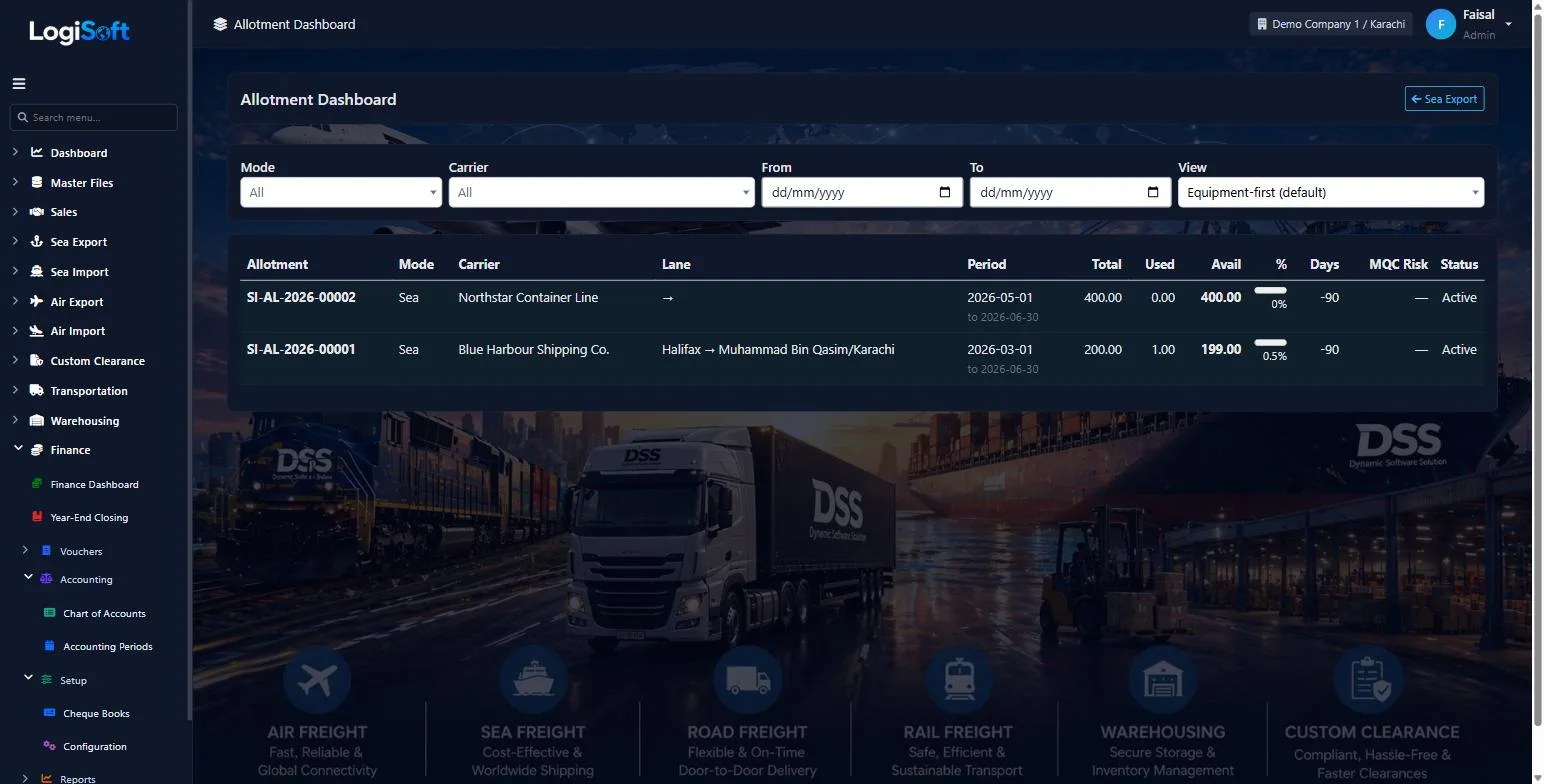
Allotment Dashboard (Sea)
?LogiSoft help
Allotment Dashboard
Live capacity utilization across all carriers, lanes, periods, and modes. Two views: equipment-first (default) and period-first.
Allotment Dashboard is the cockpit view of every allotment in the system. Shows at a glance:
- How much capacity is allocated, used, available
- Utilization % with color coding (🟢 <60% / 🟡 60–85% / 🔴 >85%)
- Days remaining in the period
- MQC penalty exposure (if MQC tracking is enabled on that allotment)
Two opposite kinds of risk visible on one screen:
- Operational risk (🔴 red): allotment nearly exhausted, no space for new customers
- Commercial risk (⚠ warn-low): allotment underused, MQC penalty looming if not consumed
Filter by Mode (Sea/Air/Road), Carrier, Date range. Click any row to drill into the per-equipment capacity breakdown.
Common tasks
- 1. Open the dashboard — filters at the top
- 2. Skim the table for 🔴 (act now) or ⚠ (commercial risk)
- 3. Click a row to see equipment-level breakdown
- 4. Click "Open Allotment" to edit if needed
The same help appears on this screen inside LogiSoft.
Live capacity utilization across all carriers, lanes, periods, and modes. Two views: equipment-first (default) and period-first.
Booking
-
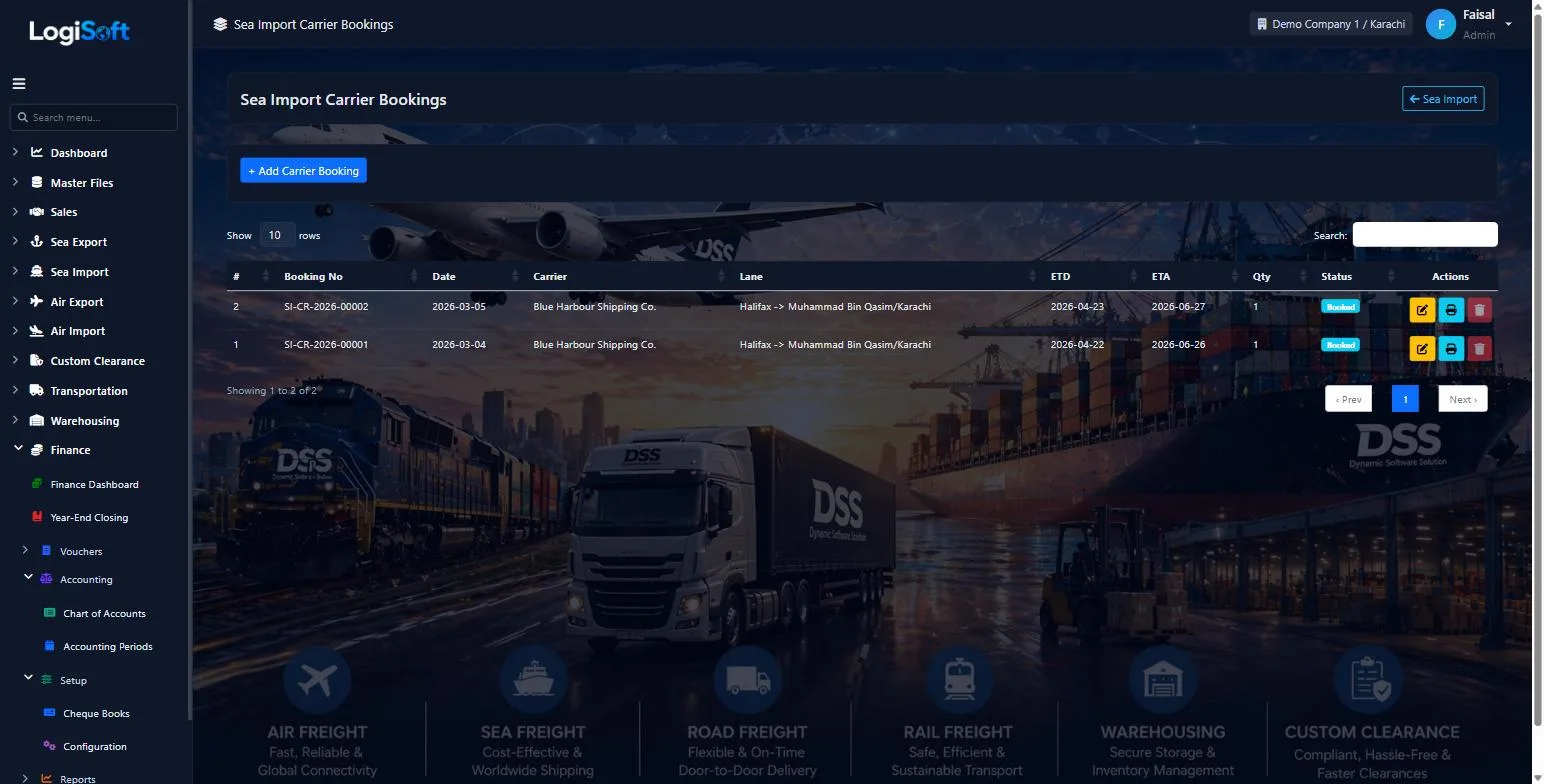
Sea Import Carrier Bookings
?LogiSoft help
Sea Import Carrier Bookings
Inbound bookings made WITH the shipping line — typically by a NVOCC/co-loader on behalf of their downstream agents. Captures the agent name that will flow to the linked Customer Booking.
Carrier Bookings on the import side are for the NVOCC pattern: a customer of yours pre-books allotment with the shipping line, then assigns each shipment to a specific agent (the actual end consignee at destination).
The Agent field is the key field on this screen. It identifies the destination/consignee party and:
- Auto-fills as the Customer on the linked Customer Booking
- Gets saved into the Parties master if it's a new agent (use the + Add new on the dropdown)
The agent allotment for stock tracking is on Sea Import Allotments — link this booking to one of those to draw down its capacity.
Common tasks
- 1. Click + Add Booking
- 2. Pick the Carrier (shipping line)
- 3. Pick the Agent — type a name; if not in the master, click + Add new
- 4. Optionally link an Allotment to track stock against pre-arranged capacity
- 5. Fill in vessel/voyage, container details, ETD/ETA
- 6. Save
The same help appears on this screen inside LogiSoft.
Inbound bookings made WITH the shipping line — typically by a NVOCC/co-loader on behalf of their downstream agents. Captures the agent name that will flow to the linked Customer Booking.
-
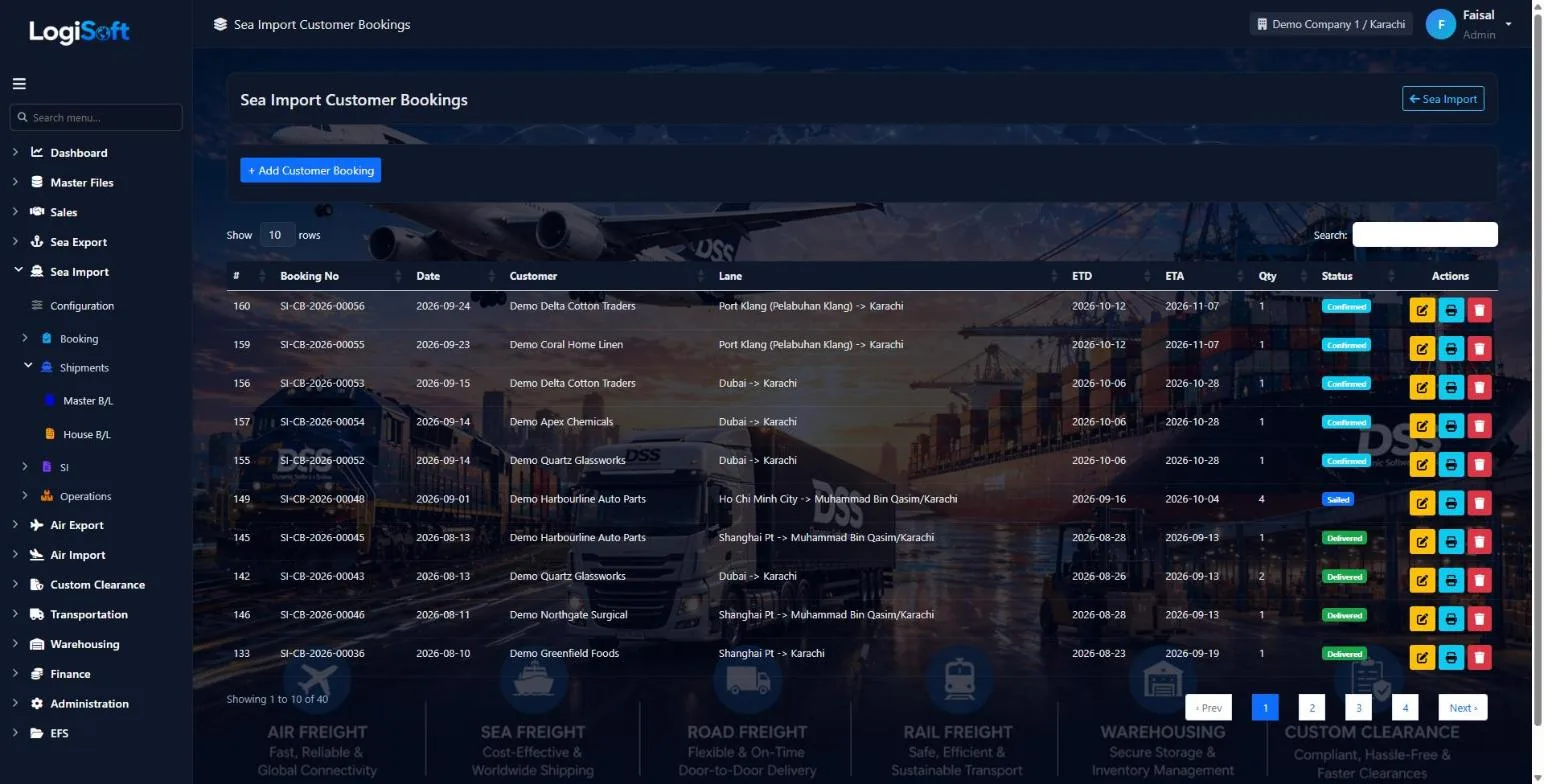
Sea Import Customer Bookings
?LogiSoft help
Sea Import Customer Bookings
Bookings for cargo arriving at your ports — created against a customer who is the consignee. Optionally linked to a parent Carrier Booking so the agent name flows through.
Customer Bookings on the import side represent shipments arriving at your destination ports for a specific customer. Use this screen when you receive a pre-alert or your customer notifies you of an incoming shipment.
When the workflow setting
SeaImport.RequireCarrierBookingLink = true, every Customer Booking must reference a parent Carrier Booking — that links the booking back to a NVOCC/co-loader's allotment. The agent picked on the Carrier Booking auto-fills as the Customer here (read-only).Common tasks
- 1. Click + Add Booking
- 2. Pick the Customer (the consignee receiving the shipment)
- 3. If the workflow requires it, link the parent Carrier Booking — the agent name auto-fills as Customer
- 4. Fill in vessel/voyage, container details, ETD/ETA
- 5. Save — booking is stamped with your active branch from the header switcher
The same help appears on this screen inside LogiSoft.
Bookings for cargo arriving at your ports — created against a customer who is the consignee. Optionally linked to a parent Carrier Booking so the agent name flows through.
Operations
-
Bulk Update Shipments
?LogiSoft help
Bulk Update Shipments
Update many Sea Import bookings at once when a shipping line changes vessel, voyage, or any tracked schedule field.
- Build filters. Click + Add Filter. Pick a field, an operator, and a value. The filter is enabled by default (the checkbox to the left). Untick to leave a filter as a saved-but-inactive template.
- Review the matching bookings. Tick the Select All header checkbox to toggle. All rows are pre-checked. Untick the ones you want to leave alone.
- Set the new values. In the Change to: panel, fill ONLY the fields you want to overwrite. Empty fields are left as-is on every selected row.
- Confirm. A modal shows how many shipments are about to change. Click Yes, update N shipments.
Common tasks
- Apply an ETD/ETA change to every booking on a rolled vessel.
- Swap Pickup Empty depot for all bookings out of a port for a date range.
- Mark all bookings of a specific customer with a different agent.
The same help appears on this screen inside LogiSoft.
Update many Sea Import bookings at once when a shipping line changes vessel, voyage, or any tracked schedule field.
SI
-
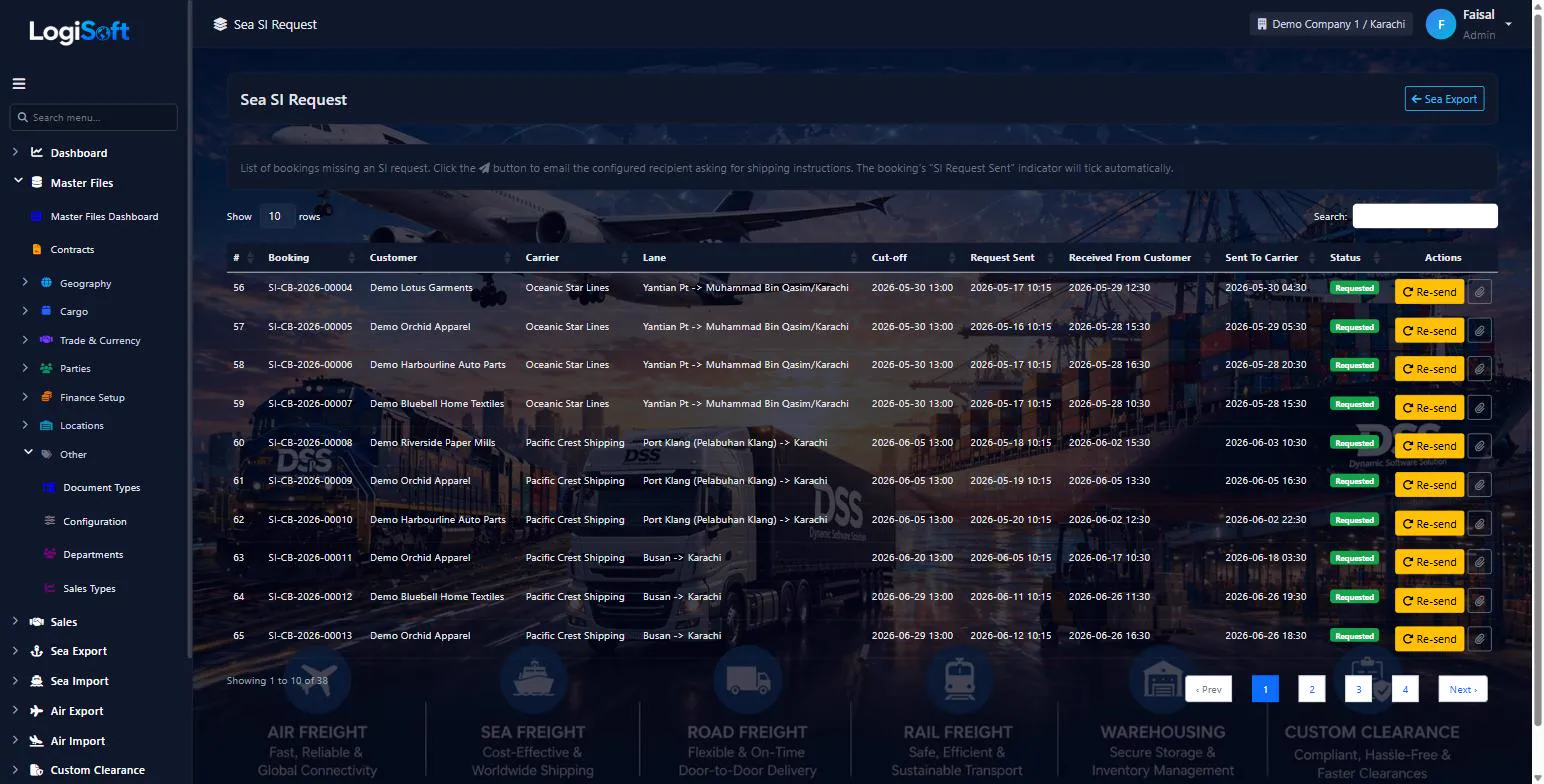
Sea SI Request
?LogiSoft help
Sea SI Request
Email customers/agents asking them to send Shipping Instructions for Sea bookings.
Shows Sea bookings that are still missing a customer SI. Click Send Request on a row to email the configured recipient (Customer for Export; configurable Shipper/Consignee/OriginAgent for Import). The booking's SI Request Sent checkbox auto-ticks once the email goes out.
Common tasks
- Filter to one branch using the Branch filter.\n- Click Send Request on a booking row.\n- The recipient is determined by Direction: Customer for Export, configurable for Import (see ModuleSettings *Import.RequestSiTo*).
The same help appears on this screen inside LogiSoft.
Email customers/agents asking them to send Shipping Instructions for Sea bookings.
-
Sea SI Receive
?LogiSoft help
Sea SI — Inbound (from Customer)
Track which customers have submitted Shipping Instructions for their bookings, and which haven't. Critical when handling 500+ shipments per month.
SI Inbound tracking answers a single question: which of my customers still owe me a Shipping Instruction for this voyage?
Each row represents one Customer Booking. Status colors:
- 🟢 Received — customer sent the SI
- 🟡 Pending — within the cut-off window
- 🔴 Late — past the SI cut-off
Mark received: click the upload button, attach the customer's SI document (PDF/image), add notes, save. The document is stored linked to the booking. Bulk-select rows to send email reminders via the existing Email Templates engine.
Common tasks
- 1. Filter by vessel/voyage to focus on next sailing
- 2. Find the row with status "Pending" or "Late"
- 3. Click ⬆ upload icon → attach SI PDF → save
- 4. For pending ones: tick rows + click "Bulk Email Reminders"
The same help appears on this screen inside LogiSoft.
Track which customers have submitted Shipping Instructions for their bookings, and which haven't. Critical when handling 500+ shipments per month.
-
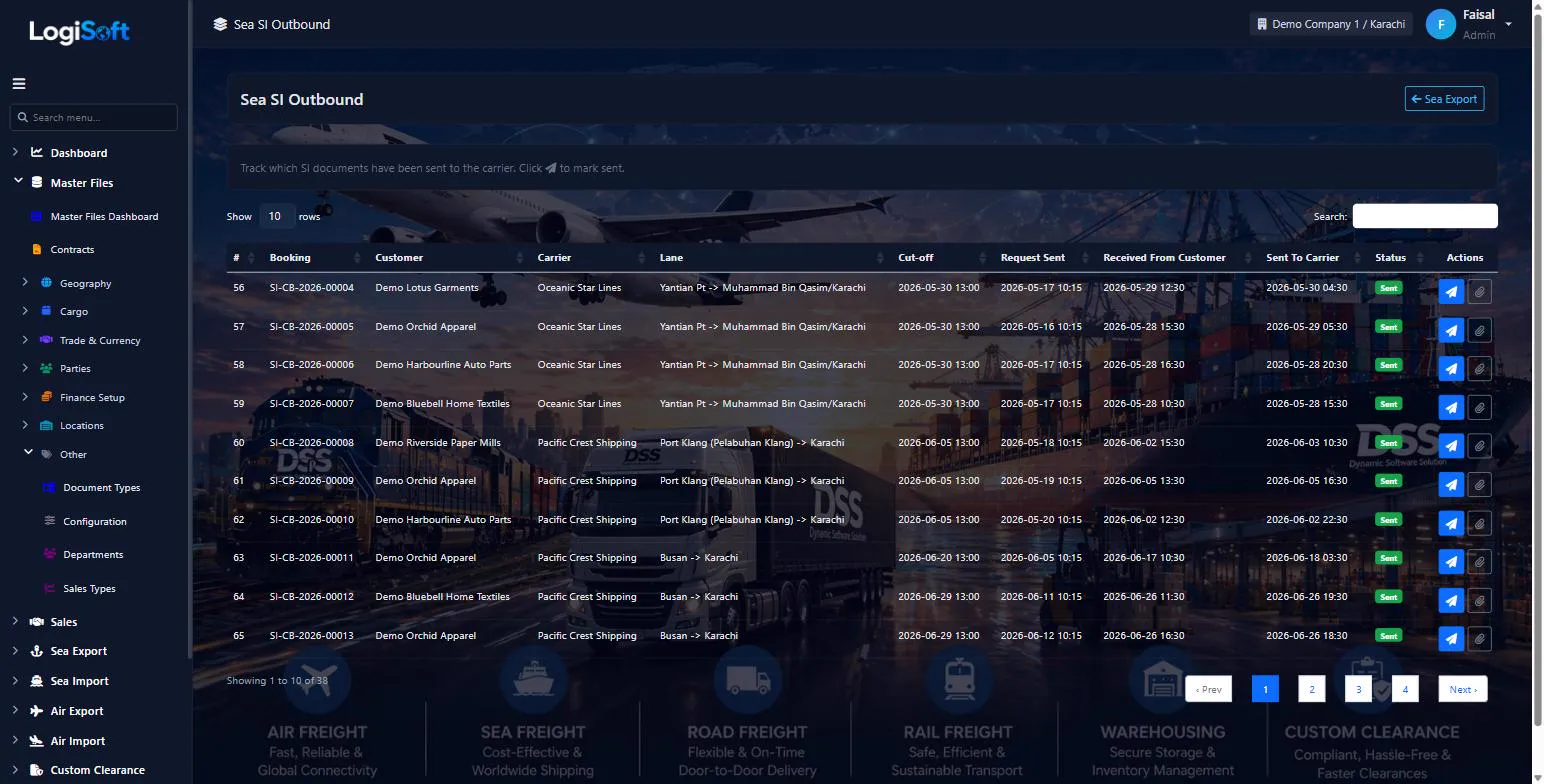
Sea SI Send to Carrier
?LogiSoft help
Sea SI — Outbound (to Carrier)
Track which Shipping Instructions you've forwarded to the shipping line. Closes the loop after receiving SI from customer.
SI Outbound tracking is the second half of the SI workflow. After receiving SI from a customer, you forward it to the carrier (typically by email with PDF attachment, sometimes via EDI).
Status colors:
- 🟢 Sent — SI submitted to carrier
- ⚠ Awaiting Customer — can't send because customer hasn't given us the SI yet
- 🟡 Pending — have customer SI; not yet sent
- 🔴 Overdue — past carrier cut-off; risk of missed sailing
The bulk-send action consolidates multiple bookings on the same vessel/voyage into one PDF attachment to the carrier — much faster than per-booking emails.
Common tasks
- 1. Filter by vessel
- 2. Tick rows whose customer SI is received
- 3. Click "Send Selected to Carrier" → consolidates into one email + PDF
- 4. System stamps SentToCarrierOn timestamp
- 5. When carrier confirms, mark CarrierConfirmedOn (optional)
The same help appears on this screen inside LogiSoft.
Track which Shipping Instructions you've forwarded to the shipping line. Closes the loop after receiving SI from customer.
Documentation
-
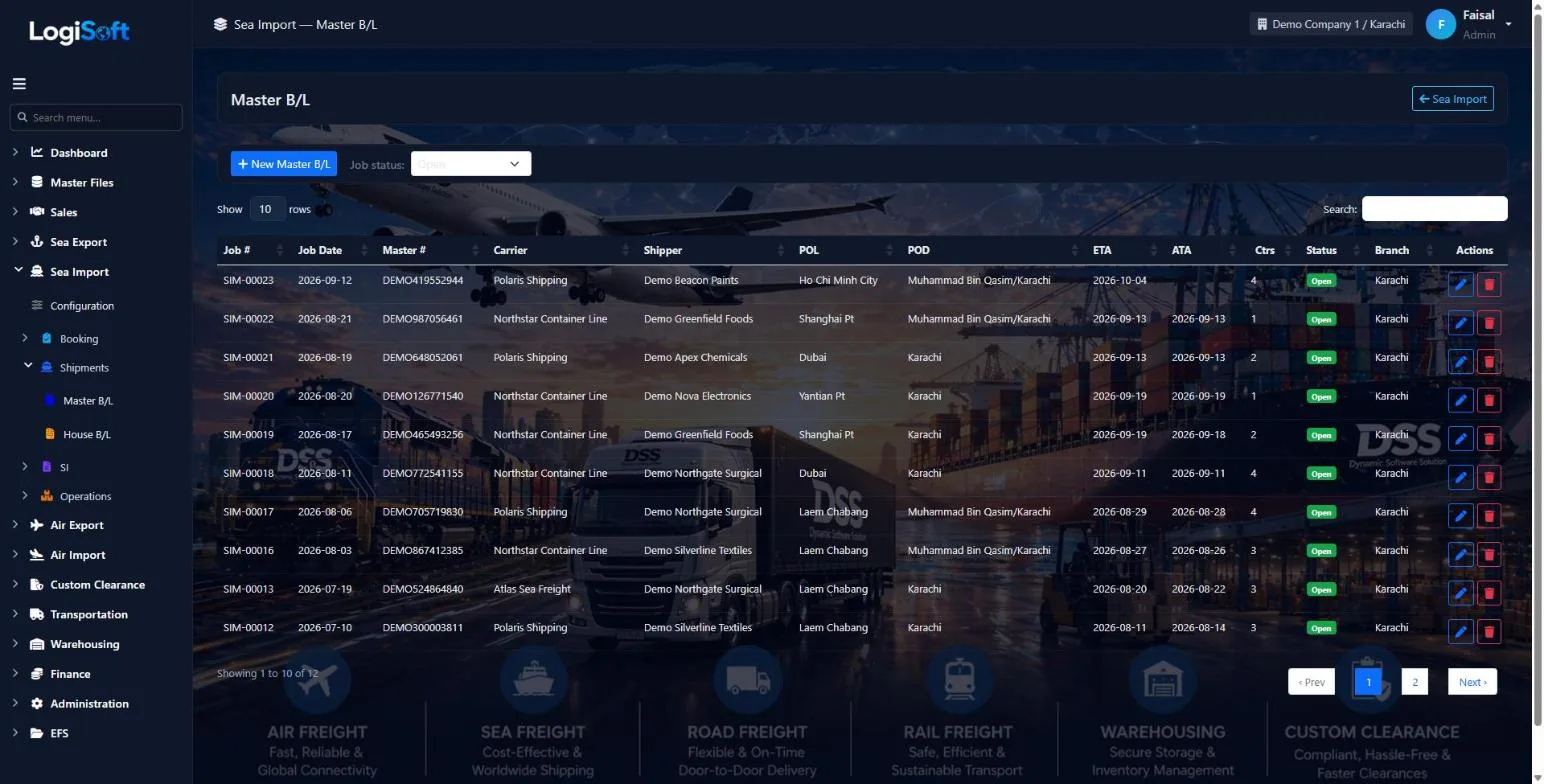
Master B/L
?LogiSoft help
Sea Import — Master B/L (MBL)
Capture the carrier's Master Bill of Lading received from the origin agent. One MBL per shipment; can roll up many House B/Ls.
The Master B/L is the carrier's contract of carriage. Origin agent sends us the MBL copy; you capture its data here for IGM filing, arrival tracking, and release management.
Key tabs:
- Overview — MBL #, mother + feeder vessel, voyage, POL/POD/Transshipment, IGM/VIR (Pakistan customs)
- Parties — Carrier, Origin Agent, Ship Agent, Clearing Agent (all from Parties master)
- Containers — container#, seal, ISO code, weights — per-container detail
- Houses — list of HBLs under this MBL with reconciliation (totals match? ✓)
- Documents & Events — uploaded files + timeline (manifest filed, arrival, release)
Two power features:
- 🪄 Import from File — pick the agent's emailed MBL PDF; AI extracts the data and pre-fills the form (you review + correct)
- 🔗 Link Bookings — for LCL consolidation: tick multiple Carrier Bookings; system auto-creates one HBL per booking
Common tasks
- **Add an MBL**: click + Add MBL, fill Overview tab first (MBL#, vessel, ports), Save, then add Containers and link Bookings.
- **Auto-fill from agent file**: click Import from File, pick PDF/image. AI extracts ~80% of the fields. Yellow highlights = needs verification.
- **LCL consolidation**: in Houses tab → Link Bookings → tick the carrier bookings on this vessel → Apply. System creates draft HBLs from each booking.
- **Status pipeline**: advance Draft → Submitted → IGM Filed → Arrived → Released → Closed via the chips at the top.
The same help appears on this screen inside LogiSoft.
Capture the carrier's Master Bill of Lading received from the origin agent. One MBL per shipment; can roll up many House B/Ls.
-
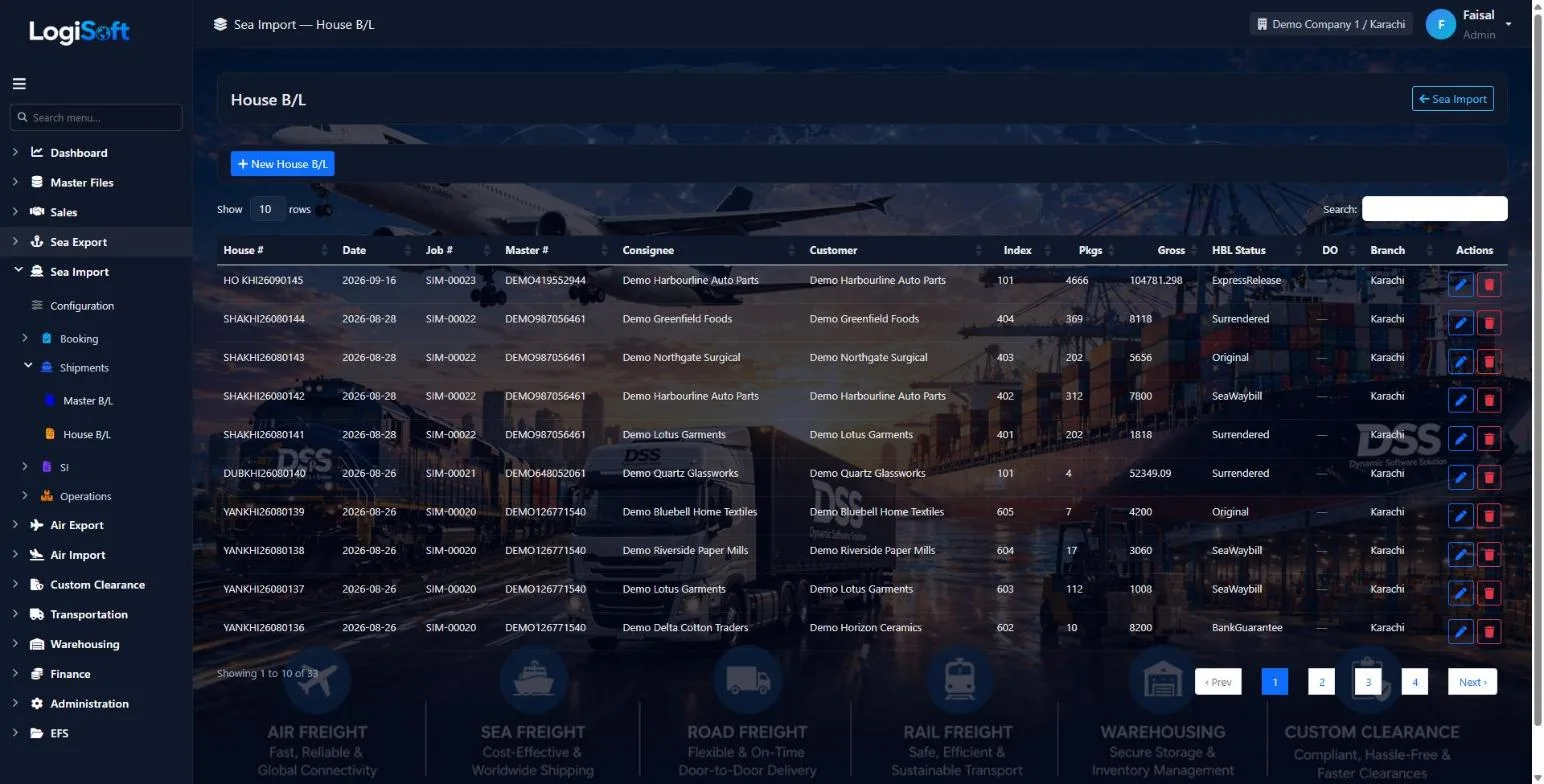
House B/L
?LogiSoft help
Sea Import — House B/L (HBL)
Capture the origin agent's House Bill of Lading. The HBL is what the customer sees; we use it for Arrival Notice, D/O issuance, and customs reference.
The House B/L is issued by the origin agent to the actual shipper. We receive a copy and capture the data for downstream operations (Arrival Notice, D/O, customs, billing).
Key tabs:
- Overview — HBL #, MBL link, switch B/L info, status pipeline
- Parties — Shipper, Consignee, Notify, 2nd Notify, Bill-To, Salesperson, Co-loader
- Routing & Cargo — Place of Receipt → POL → POD → Final Destination + multi-line cargo (HSCode-aware)
- Containers — pulled from Master, allocate per HBL (LCL: one container can be shared across HBLs)
- Operations — D/O issuance, NOC tracking, Arrival Notice/POD events, OBL courier tracking, watch-list, priority
- Charges & Documents — sell-side charges, multi-currency + the docbox for file attachments
Industry-standard rules:
- Soft-locked after Issue: edits create an Amendment record; if configured, an amendment charge is auto-generated.
- NOC tracking for controlled imports — cannot be Released until NOC Approved.
- Watch-list / priority — flag special shipments; appear on dashboard and in filtered list views.
- Auto-fill from booking link — auto-generated HBLs (created from MBL's Link Bookings) come pre-filled; appear in the HBL Completion Report until you finish them.
Common tasks
- **Add an HBL**: from Master B/L → Houses tab → New HBL OR from this list → + Add HBL.
- **Issue an HBL**: status Draft → Issued (locks edit; further changes go through Amend with reason).
- **Amend after issue**: open HBL → Amend button → enter reason → save. Audit row created; if config set, amendment charge added.
- **Issue D/O**: Operations tab → Issue D/O → fills D/O #, valid-until date, prints PDF.
- **NOC**: tick NocRequired → fill authority + reference. Can't mark Released until Approved.
- **Watch list**: tick Watch List + reason; appears on Sea Import dashboard.
The same help appears on this screen inside LogiSoft.
Capture the origin agent's House Bill of Lading. The HBL is what the customer sees; we use it for Arrival Notice, D/O issuance, and customs reference.
Invoicing
-
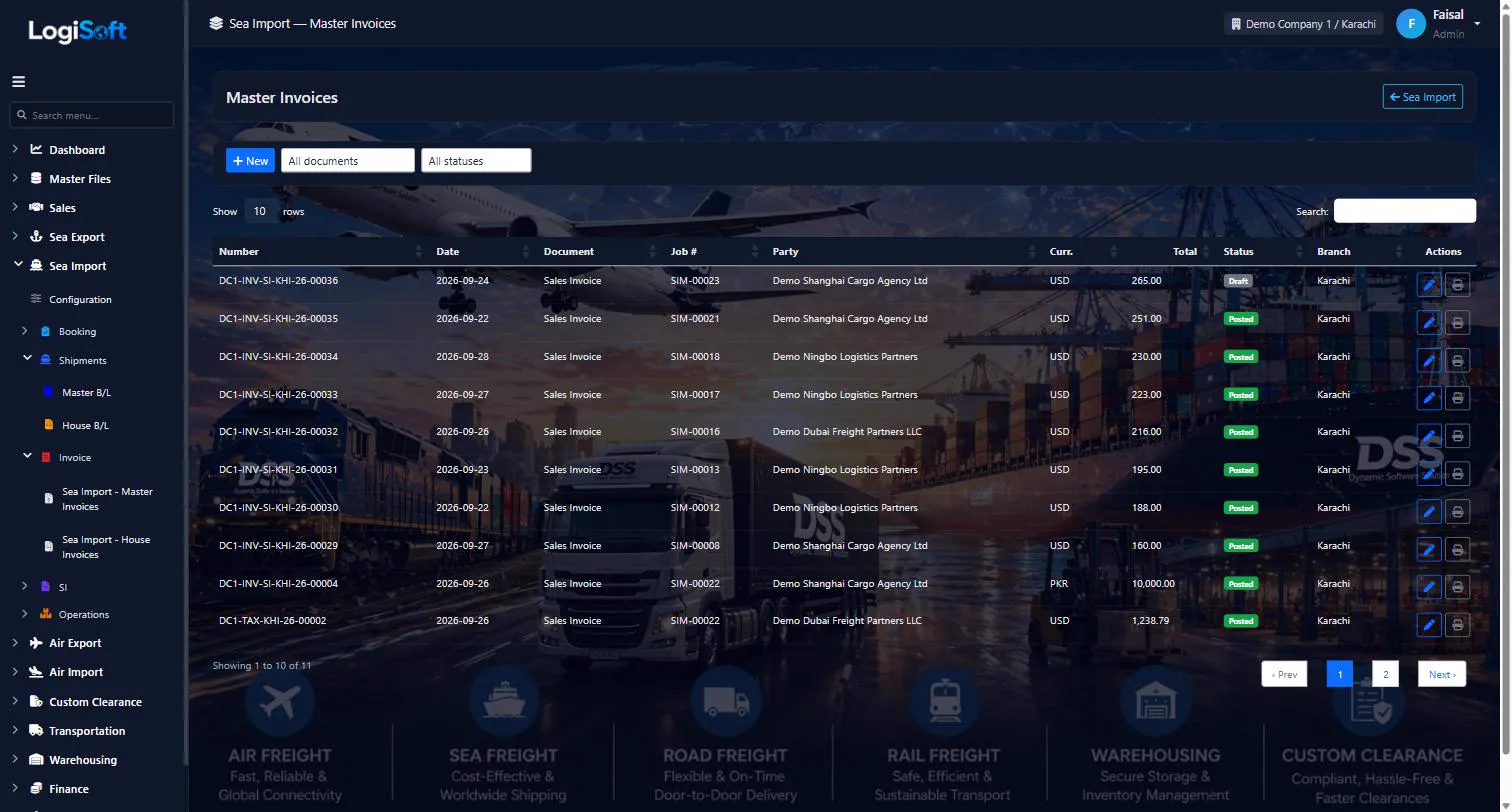
Sea Import - Master Invoices
?LogiSoft help
Sea Import — Master Invoice
Manage Sea Import — Master Invoice for Sea Import shipments.
This is one of 8 invoice screens for Sea Import. Each combines:
- Scope (House = per-HBL, Master = per-MBL)
- Document type (Sales Invoice / Sales Credit Note / Vendor Bill / Vendor Debit Note)
Workflow
- Click + New to create a draft invoice.
- Pick the anchor (HBL or MBL) — cargo dimensions auto-populate read-only.
- Pick the Bill To party. Counterparty Type defaults from the party's role.
- Add lines: pick a Charge, set the Calc Basis (per-container / CBM / fixed), enter Rate. Quantity auto-pulls from the linked HBL/MBL.
- Tax auto-applies from the current branch's Tax Group.
- Save — increments InvoiceNumber. If any line is taxed, increments TaxInvoiceNumber too.
- Post the invoice when ready (locks it; required if your tenant runs Draft→Post mode).
Print labels
The PDF title comes from one of these:
- Tax authority title when invoice has tax lines (e.g. "Sindh Sales Tax Invoice")
- InvoiceTypes master local/foreign label (configured under Master Files → Invoice Types)
- Per-invoice override when filled
Rules
- Numbers are sequential. Invoices CANNOT be deleted — use Void instead.
- Credit Notes / Debit Notes must reference an original invoice.
- Foreign vs Local is picked manually from the Local/Foreign dropdown on the invoice header. A local-currency invoice for an overseas customer (and vice-versa) is fully supported.
The same help appears on this screen inside LogiSoft.
Manage Sea Import — Master Invoice for Sea Import shipments.
-
Sea Import - House Invoices
?LogiSoft help
Sea Import — House Invoice
Manage Sea Import — House Invoice for Sea Import shipments.
This is one of 8 invoice screens for Sea Import. Each combines:
- Scope (House = per-HBL, Master = per-MBL)
- Document type (Sales Invoice / Sales Credit Note / Vendor Bill / Vendor Debit Note)
Workflow
- Click + New to create a draft invoice.
- Pick the anchor (HBL or MBL) — cargo dimensions auto-populate read-only.
- Pick the Bill To party. Counterparty Type defaults from the party's role.
- Add lines: pick a Charge, set the Calc Basis (per-container / CBM / fixed), enter Rate. Quantity auto-pulls from the linked HBL/MBL.
- Tax auto-applies from the current branch's Tax Group.
- Save — increments InvoiceNumber. If any line is taxed, increments TaxInvoiceNumber too.
- Post the invoice when ready (locks it; required if your tenant runs Draft→Post mode).
Print labels
The PDF title comes from one of these:
- Tax authority title when invoice has tax lines (e.g. "Sindh Sales Tax Invoice")
- InvoiceTypes master local/foreign label (configured under Master Files → Invoice Types)
- Per-invoice override when filled
Rules
- Numbers are sequential. Invoices CANNOT be deleted — use Void instead.
- Credit Notes / Debit Notes must reference an original invoice.
- Foreign vs Local is picked manually from the Local/Foreign dropdown on the invoice header. A local-currency invoice for an overseas customer (and vice-versa) is fully supported.
The same help appears on this screen inside LogiSoft.
Manage Sea Import — House Invoice for Sea Import shipments.
Tracking
-
Sea Tracking
?LogiSoft help
Sea Tracking
Update milestone status (Confirmed / Sailed / Arrived / Delivered etc.) for Sea bookings.
Lists Sea bookings of any direction (Import + Export). Each row has quick-action milestone buttons; clicking one logs that milestone with the current timestamp and updates the booking's status badge. Branch-scoped to your allowed branches.
Common tasks
- Pick a booking row.\n- Click the milestone button matching the event (Sailed, Arrived, etc.).\n- The booking's tracking timeline auto-records the click.
The same help appears on this screen inside LogiSoft.
Update milestone status (Confirmed / Sailed / Arrived / Delivered etc.) for Sea bookings.
Settings
-
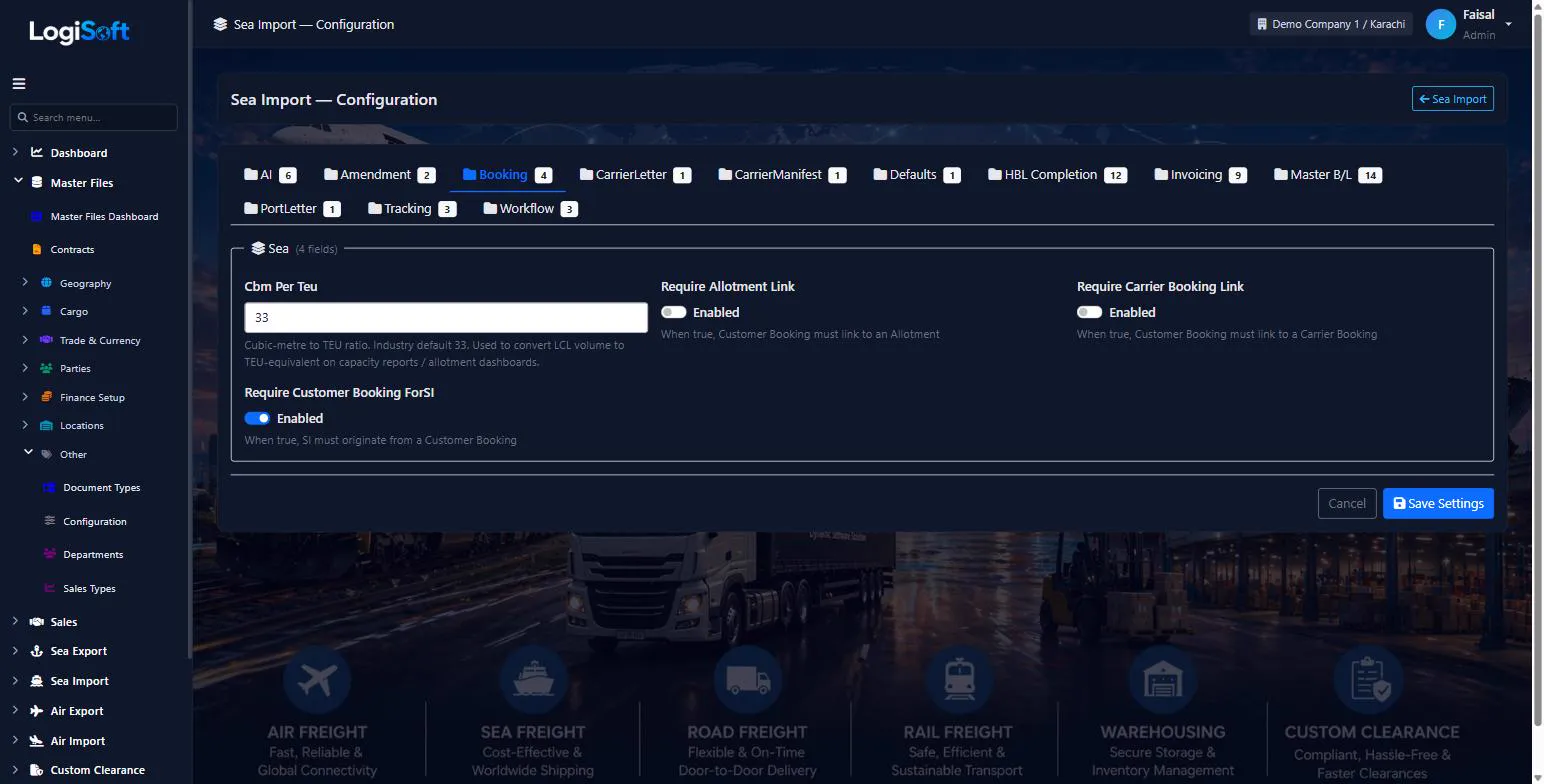
Configuration
?LogiSoft help
Sea Import — Configuration
Module-specific settings for Sea Import.
Settings that apply across the entire Sea Import module. Each setting is grouped under a Category tab — pick the tab, change the value, click Save Settings.
Common tasks
- Browse the tabs to see what's configurable
- Change a setting and Save
The same help appears on this screen inside LogiSoft.
Module-specific settings for Sea Import.
What's included
Everything in the Sea Import module.
Bookings
- Carrier and customer bookings
- Booking templates for repeat lanes
- Containers and charges per booking
- Cut-off alerts
Documents
- Master B/L jobs
- House B/Ls with packages, weight and volume
- Release status per House B/L
- Free days and container movement
Tracking
- Nine one-click milestones
- Shipping instruction status
- Bulk vessel, voyage and port updates
- Job close and void
Invoicing
- House and Master B/L invoices
- Credit notes and vendor bills
- Branch sales tax with its own numbering
- Local or foreign currency
Reports
- Sea import shipment reports
- Statistics reports
- Profit & loss reports
- FBR e-invoicing (sending tax invoices to the FBR electronically)
- Sea Export module
- AI reading of B/L PDFs to fill the Master and House B/L
- Customs clearance with WeBOC file preparation
- Air freight and road transport modules
Does it handle both carrier and customer bookings?
Yes. You create the carrier booking against the shipping line, then one or more customer bookings that sell that space. The two stay linked.
Can we see which customers have not sent their shipping instructions?
Yes. The SI screen shows the cut-off, when the request was sent, when the customer's SI arrived and when it went to the carrier, with reminders for the ones still pending.
What happens when a shipping line changes the vessel?
Use Bulk Update Shipments: filter the affected bookings, tick the fields to change such as vessel and voyage, and apply it to all of them at once.
Can we invoice from the shipment?
Yes. Open a House or Master B/L and raise a sales invoice, credit note, vendor bill or vendor debit note. Quantities come from the B/L and sales tax is applied from your branch. Sending invoices to the FBR electronically (e-invoicing) is coming soon.
Is sea export, air or road freight covered?
Sea Import is ready today. Sea Export, air freight and road transport modules are coming soon.
Works together with
See all features →Warehousing
Receive, store and deliver goods for your customers, with stock tracked by warehouse, owner, product, batch and location.
Explore WarehousingSales CRM
Your sales team works in the same system as operations and accounts: leads, opportunities, quotations and tenders, with a clear pipeline for every salesperson.
Explore Sales CRMMaster Files
Every list your team picks from, kept in one place: parties, ports, cities, HS codes, currencies, container types and more, with imports so you do not start from scratch.
Explore Master FilesReady to retire your desktop freight tools?
See LogiSoft on your own workflow in a 30-minute screen share with the founder. No commitment.