
Know what is in every bin.
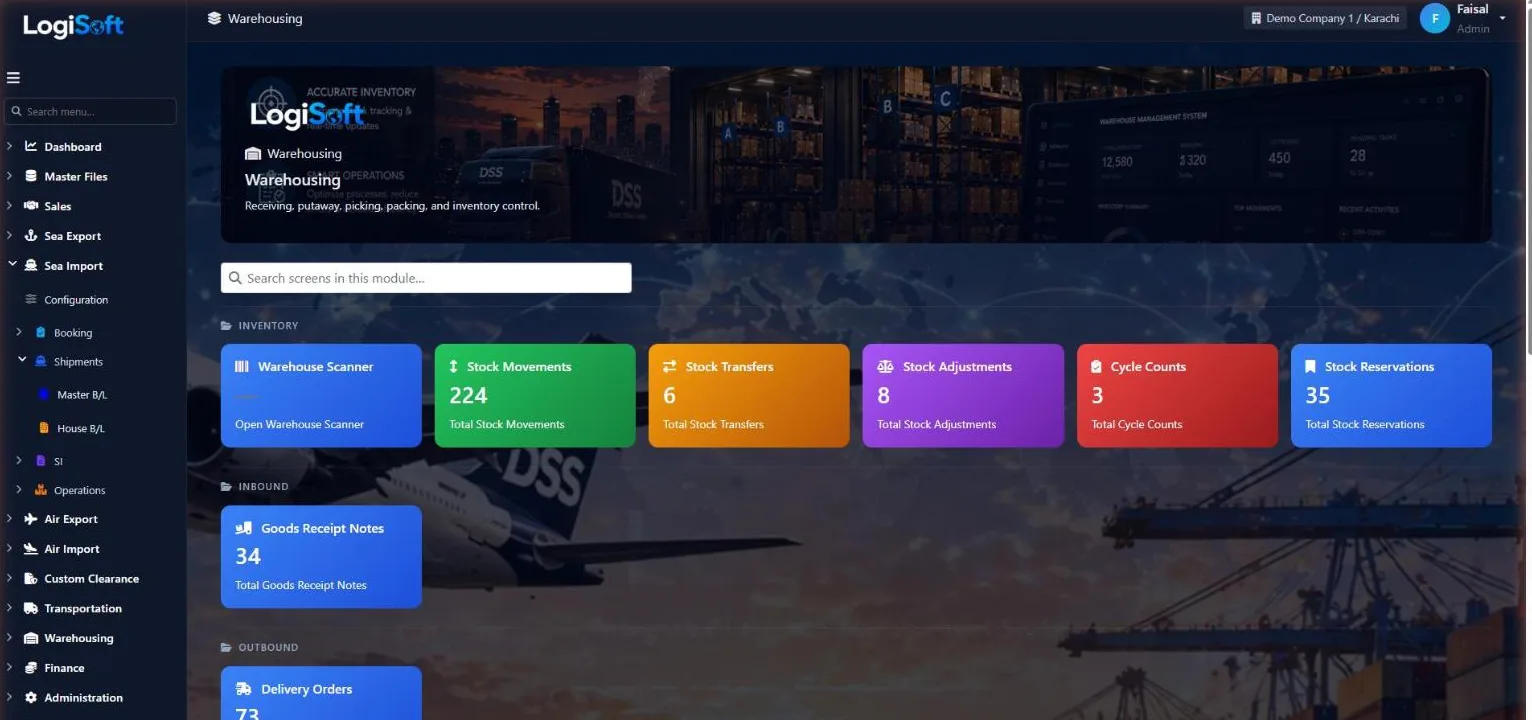
Receive, store and deliver goods for your customers, with stock tracked by warehouse, owner, product, batch and location.
- stock reports
- 18
- stock reports
- batches & expiry
- FIFO
- batches & expiry
- for the floor
- Scanner
- for the floor
How it works
4 steps, one system.
Press ? on any step to read the same help your team sees inside LogiSoft.
- 01
Receive goods
?LogiSoft help
Goods Receipt Notes (GRN)
Inbound documents — cargo arriving at the warehouse. Lines reference Product + Batch + Location.
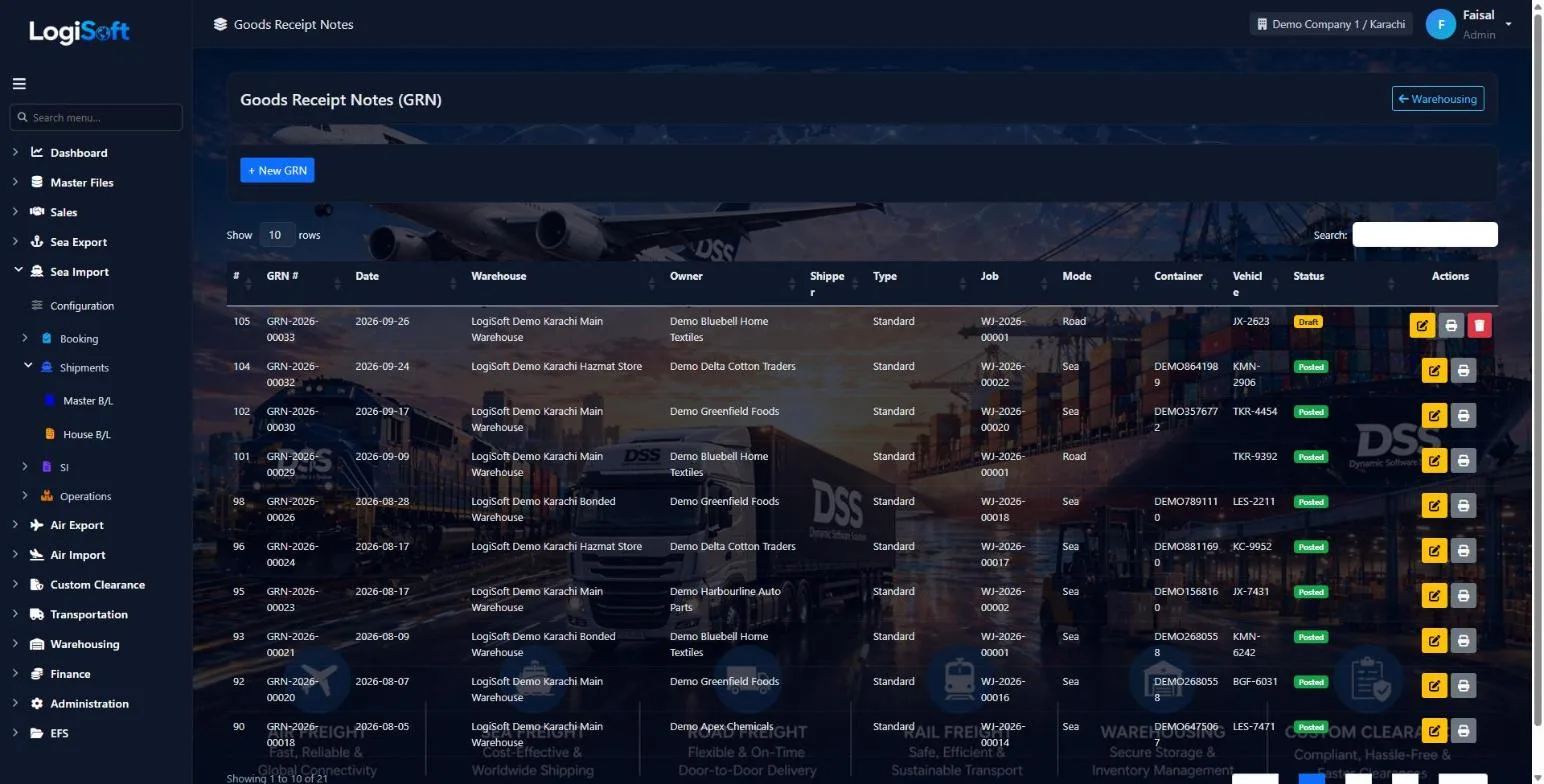
A Goods Receipt Note (GRN) records cargo arriving at a warehouse — quantity received, batch number, target bin location.
Common tasks
- Issue a GRN every time goods arrive at a warehouse
- Reference an inbound Booking or Contract if applicable
- Upload supporting docs (packing list, CMR)
The same help appears on this screen inside LogiSoft.
Record each goods receipt against the warehouse and the owner, by sea or road, with container and vehicle.
- Draft, then posted to stock
- Linked to the warehouse job
- Print the receipt
- 02
Deliver to customers
?LogiSoft help
Delivery Orders (DC)
Outbound documents — cargo leaving the warehouse. Releases inventory and triggers storage-charge cut-off.
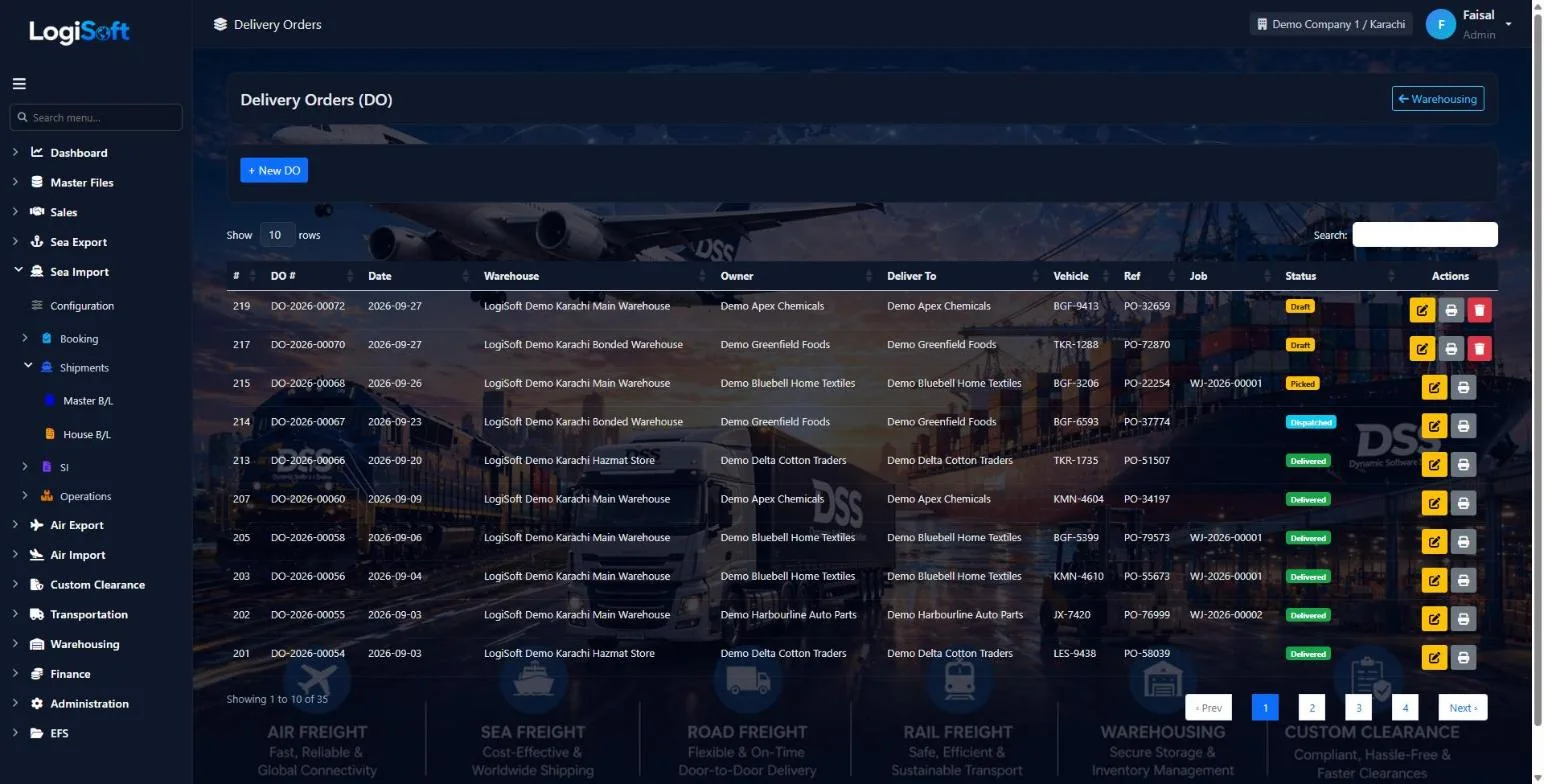
A Delivery Order / Challan (DC) authorises cargo to leave the warehouse — to the consignee, to another warehouse, or back to the shipper.
Job No. links the DO to the customer's job, so the job shows goods in and out and the balance still in store. Commitment lines with direction Out (e.g. 2 trucks a week) count dispatched DOs. The job can be changed on a dispatched DO as well.
Departure mode sets the transport document label (B/L, AWB, CMR / bilty). Reverse (post right) puts a dispatched DO's stock back into the same batch and bin.
Common tasks
- Issue a DC against a sales order, transfer, or return
- The DC release stops storage-time accrual for those quantities
The same help appears on this screen inside LogiSoft.
Create delivery orders and follow them through picking and dispatch to delivery.
- Draft, picked, dispatched and delivered
- Vehicle and customer reference
- Stock reservations
- 03
Watch capacity
?LogiSoft help
Warehouse Reports
Stock-on-hand, ageing, movement summary, dead-stock, storage-charge bills.
Warehouse Reports consolidate physical-inventory views: stock-on-hand by product/batch/location, ageing buckets, dead-stock candidates, and the per-period storage-charge bill per customer.
The same help appears on this screen inside LogiSoft.
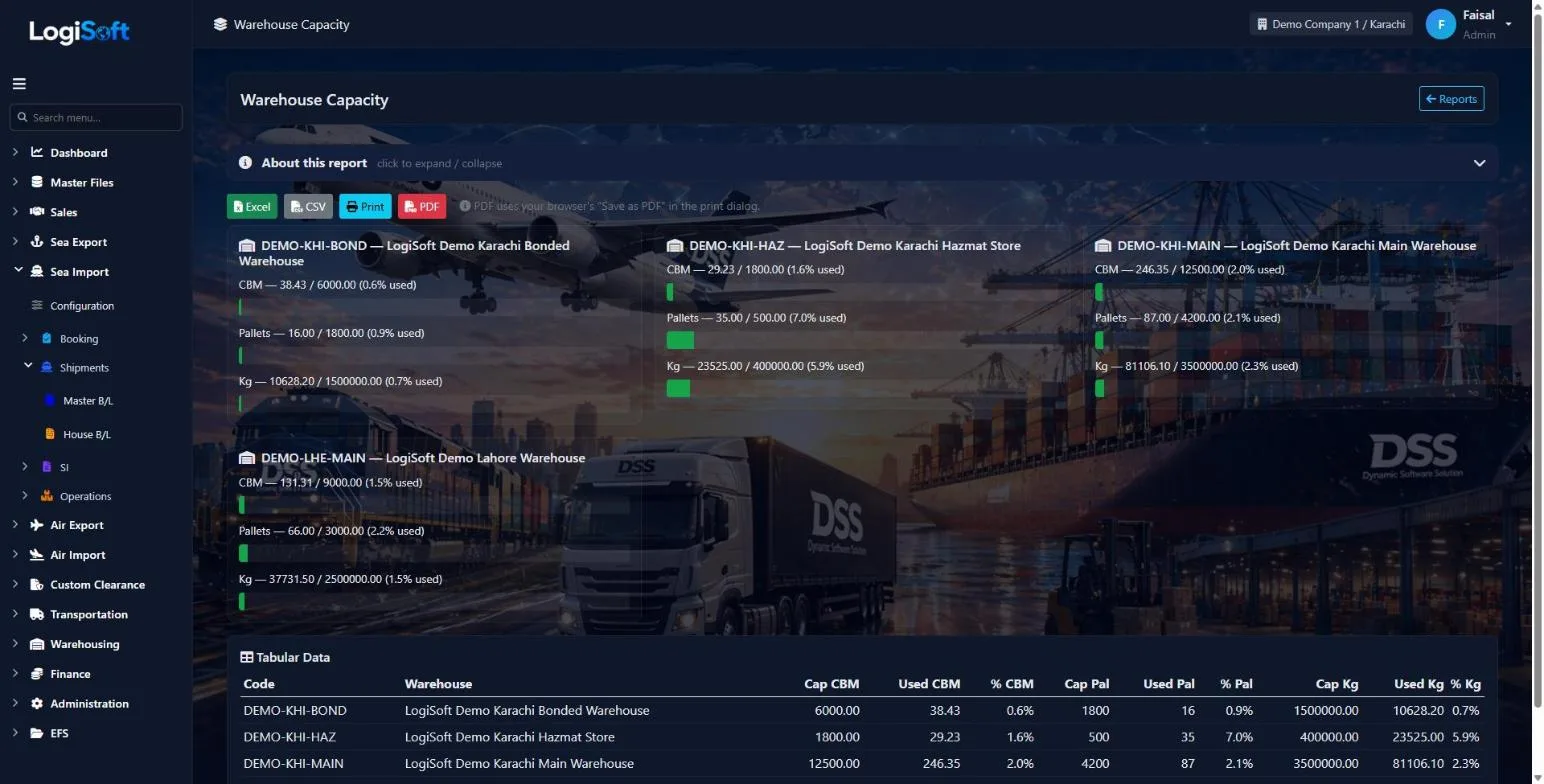
See how full each warehouse is by volume, pallets and weight.
- 04
Report on your stock
?LogiSoft help
Warehouse Reports
Stock-on-hand, ageing, movement summary, dead-stock, storage-charge bills.
Warehouse Reports consolidate physical-inventory views: stock-on-hand by product/batch/location, ageing buckets, dead-stock candidates, and the per-period storage-charge bill per customer.
The same help appears on this screen inside LogiSoft.
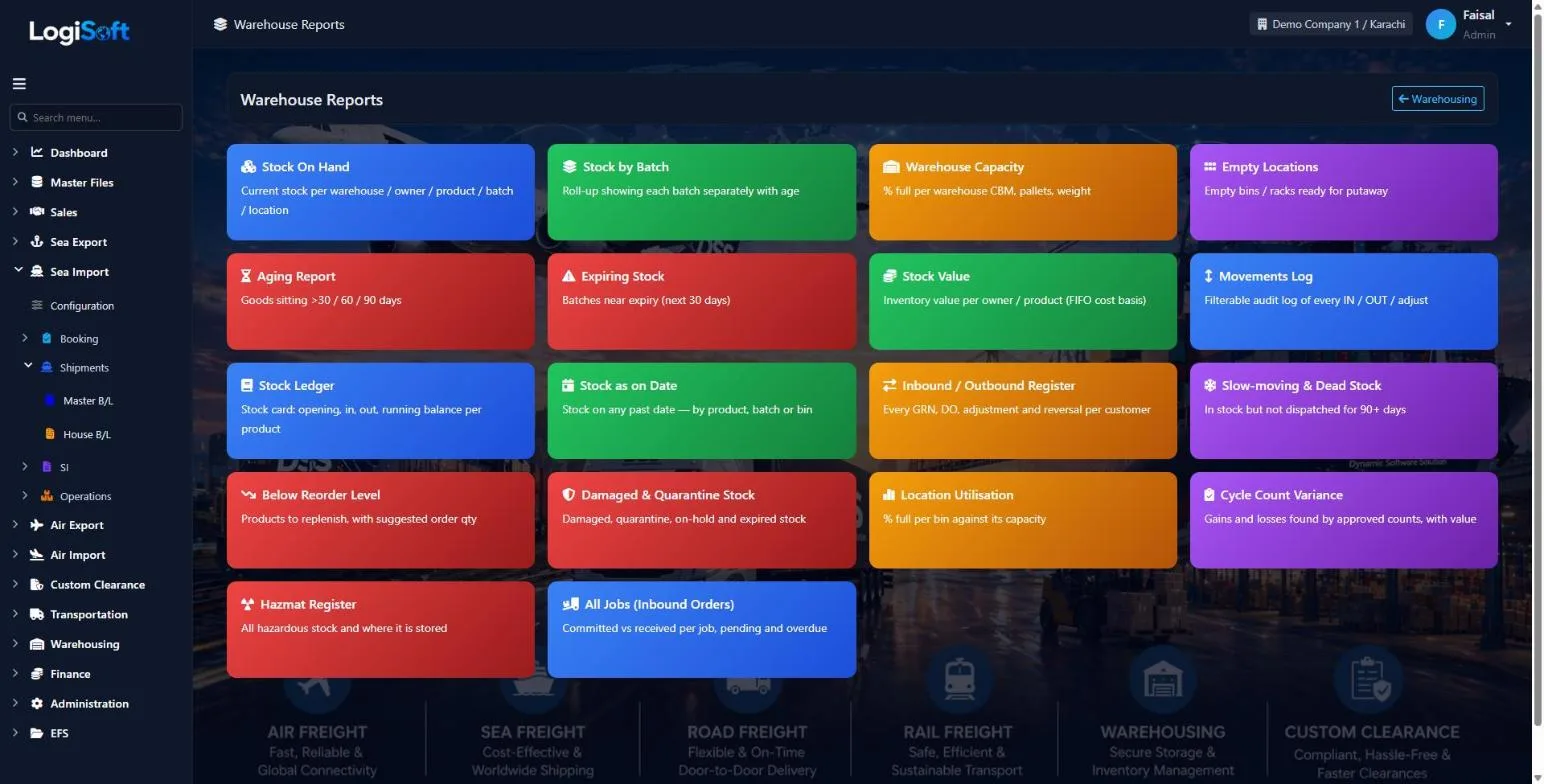
Eighteen stock reports, each exportable to Excel, CSV or PDF.
- Stock on hand, by batch and as on any date
- Aging, expiring, slow-moving and below reorder level
- Stock value, stock ledger, cycle count variance and hazmat register
Every screen
16 screens in Warehousing.
The complete list of screens in this module, described in LogiSoft's own help. Press ? for the full explanation.
Dashboard
-
Warehousing Dashboard
?LogiSoft help
Warehousing
Warehouse and bin management, products, batches, GRN / DC, stock movements, storage tariffs.
The Warehousing module handles physical inventory inside your warehouses.
- Warehouses + Locations — physical buildings and bin/rack locations.
- Products + Batches — what you store, by lot/batch where applicable.
- GRN (Goods Receipt Note) — inbound to warehouse.
- DC (Delivery Challan) — outbound from warehouse.
- Stock Movements / Reservations — inter-location and held stock.
- Storage Tariffs — daily/monthly rental rates.
Common tasks
- Set up Warehouses + Locations once
- Define Products + Storage Tariffs
- Issue GRN when goods arrive
- Issue DC when goods ship out
- Run periodic Stock Movement reports
The same help appears on this screen inside LogiSoft.
Warehouse and bin management, products, batches, GRN / DC, stock movements, storage tariffs.
Inventory
-
Warehouse Scanner
?LogiSoft help
Warehouse Scanner
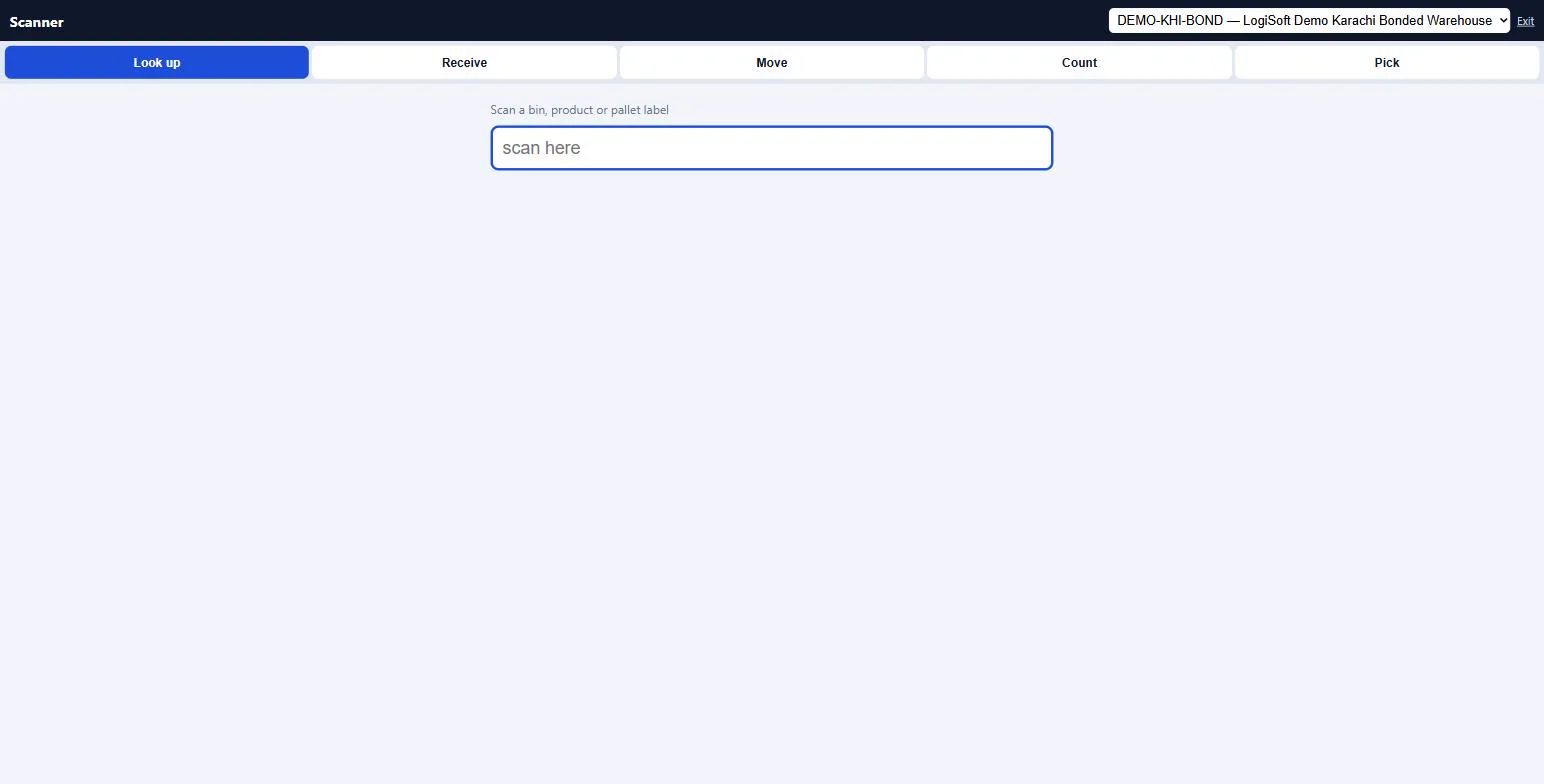
Big-button page for handheld scanners and phones: look up, receive, move, count and pick by scanning.
Works with any keyboard-wedge scanner (the scanner types the code and presses Enter) — no app to install. Choose the warehouse once, then a mode:
- Look up — scan a bin, product barcode or pallet label to see the stock.
- Receive — enter a draft GRN number, scan the bin, then each product. Lines are added to the GRN; post it from the GRN screen.
- Move — scan From bin, product, To bin, confirm the quantity. A Stock Transfer is created and posted (needs the post right on Stock Transfers).
- Count — enter a draft Cycle Count number, scan the bin and products, enter what you counted.
- Pick — enter the DO number, scan the bin and the product for each line. When every line is picked the DO becomes Picked.
A carton barcode counts as its Units per pack (set on the Product's barcodes).
The same help appears on this screen inside LogiSoft.
Big-button page for handheld scanners and phones: look up, receive, move, count and pick by scanning.
-
Stock Movements
?LogiSoft help
Stock Movements
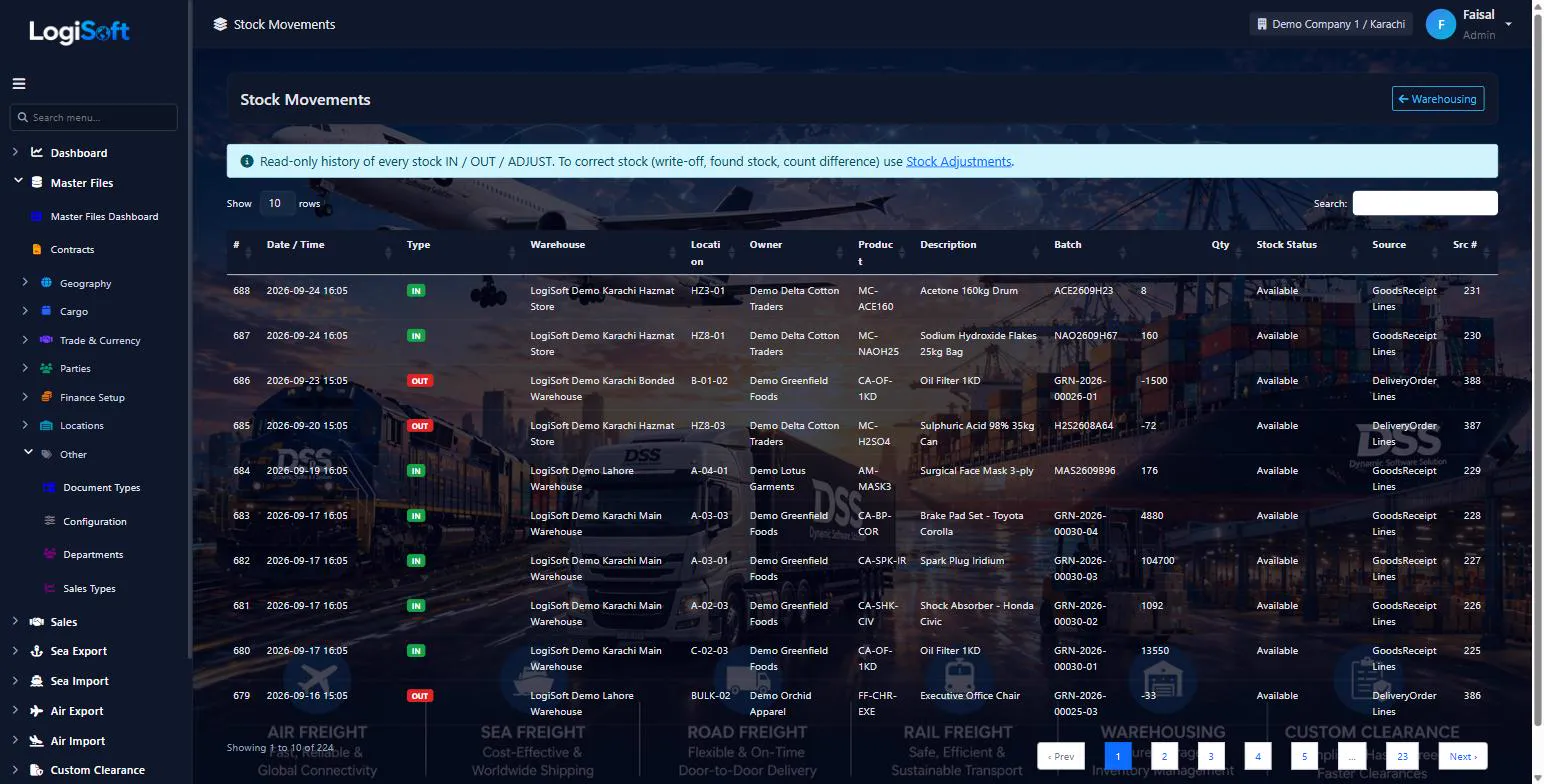
Internal location-to-location moves inside / between warehouses. Does not change ownership.
Stock Movements are internal location-to-location moves — e.g. bin A12 → B07 for picking, or Warehouse 1 → Warehouse 2 for consolidation. Ownership does not change; only physical location.
The same help appears on this screen inside LogiSoft.
Internal location-to-location moves inside / between warehouses. Does not change ownership.
-
Stock Transfers
?LogiSoft help
Stock Transfers
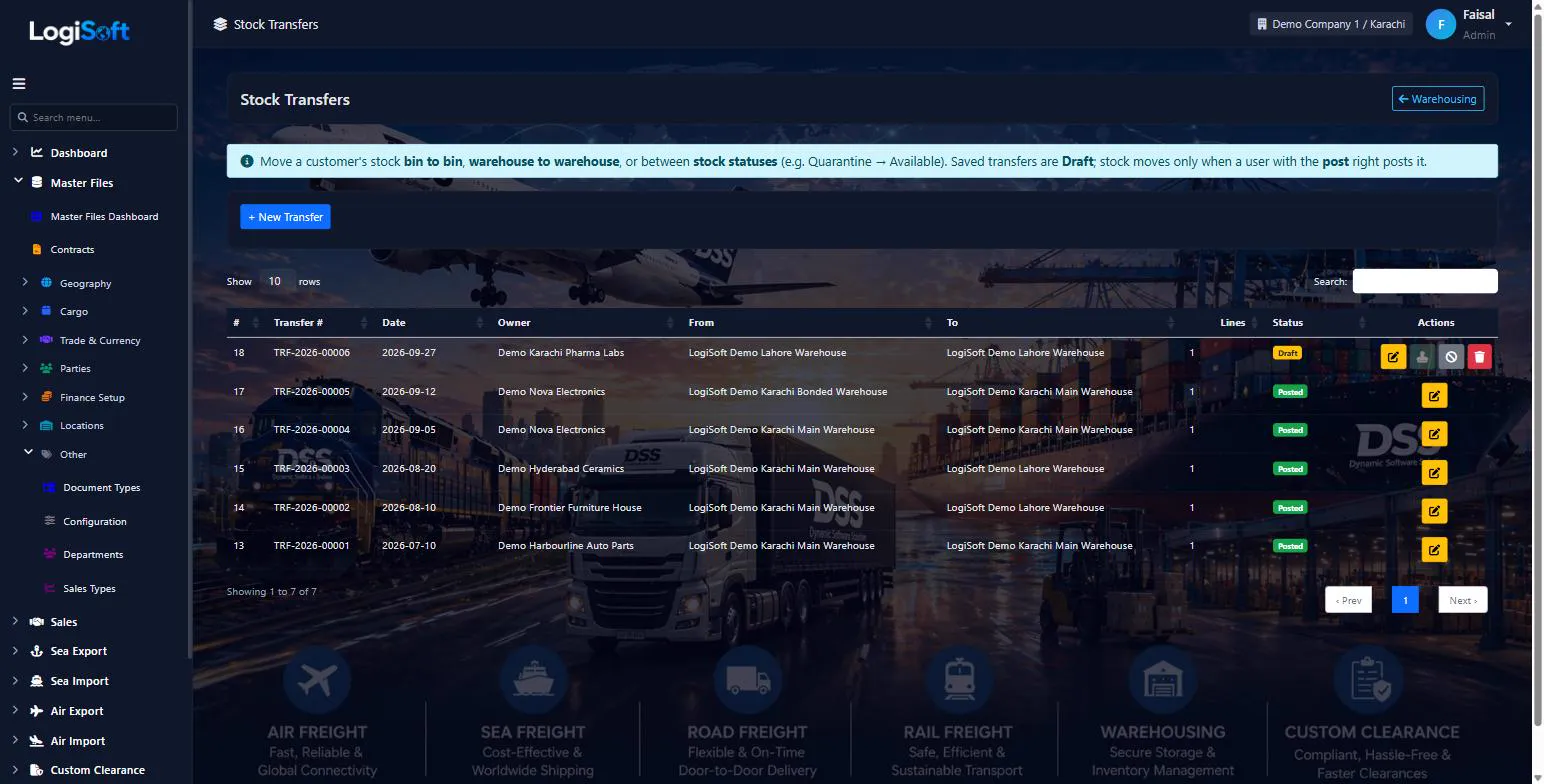
Move a customer's stock between bins, between warehouses, or between stock statuses (for example Quarantine to Available).
Stock Transfers move stock without it leaving the customer's ownership.
- Bin to bin: same warehouse in From and To, choose the To bin on each line.
- Warehouse to warehouse: choose a different To warehouse.
- Status change: keep the bin, change From status / To status, e.g. release inspected goods from Quarantine to Available.
Save keeps the transfer as Draft. Post moves the stock (needs the post right) and cannot take more than exists. Leave batch or From bin empty to take the oldest stock first. Hazardous products can only go into a Hazmat warehouse or a hazmat-approved bin.
The same help appears on this screen inside LogiSoft.
Move a customer's stock between bins, between warehouses, or between stock statuses (for example Quarantine to Available).
-
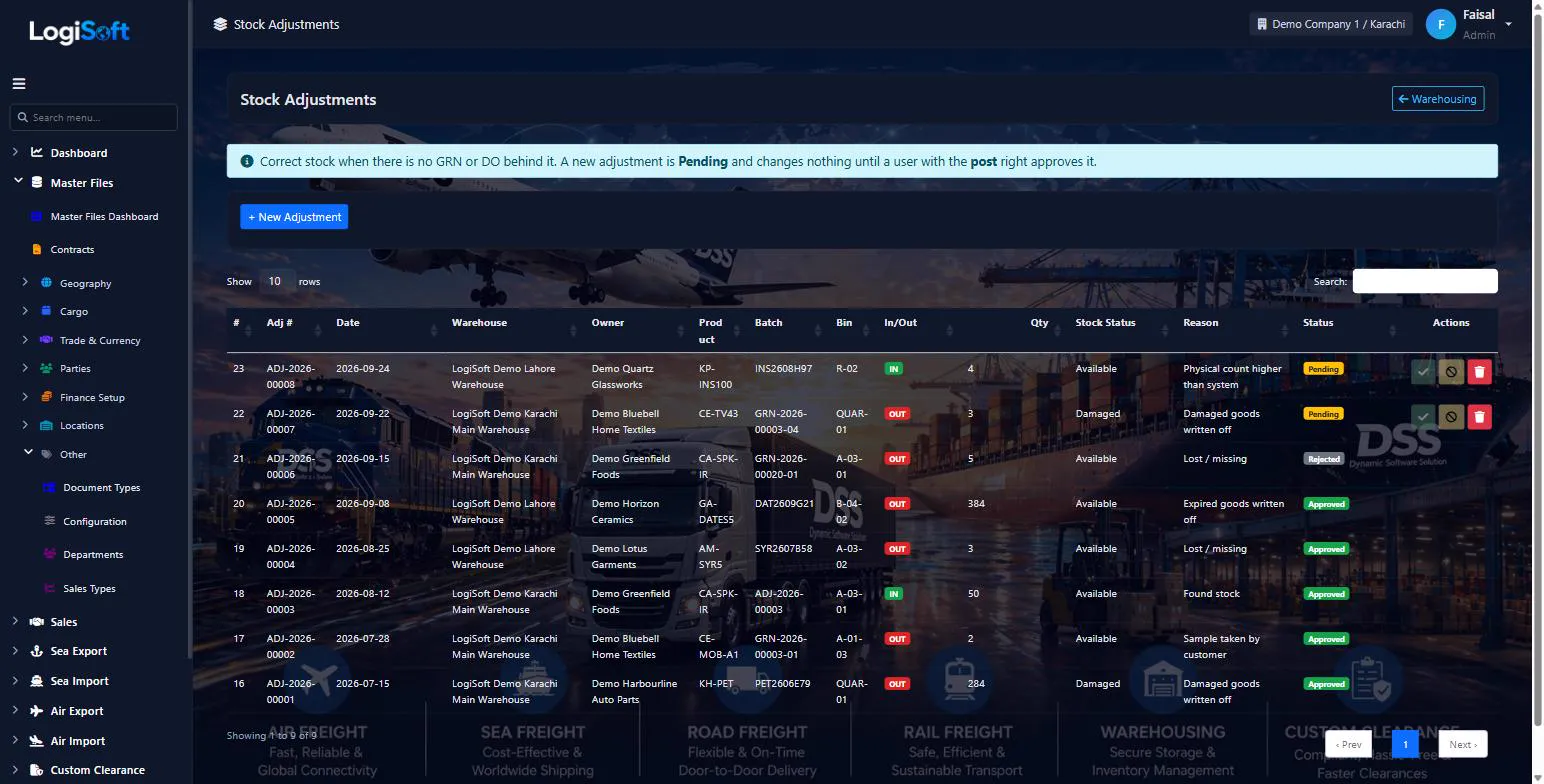
Stock Adjustments
?LogiSoft help
Stock Adjustments
Correct stock without a GRN or DO: write-offs, found stock, count differences. Every adjustment needs a reason and an approval.
Stock Adjustments change stock when there is no GRN or Delivery Order behind it.
- Click + New Adjustment, pick warehouse, customer, product, IN or OUT, quantity and a reason.
- The adjustment is saved as Pending — stock does not change yet.
- A user with the post right clicks Approve. Only then is the stock movement created.
- Reject keeps the request on record with the rejection reason.
OUT adjustments cannot take more than is in the chosen batch / bin / stock status. Leave batch or bin empty to take the oldest stock first.
The same help appears on this screen inside LogiSoft.
Correct stock without a GRN or DO: write-offs, found stock, count differences. Every adjustment needs a reason and an approval.
-
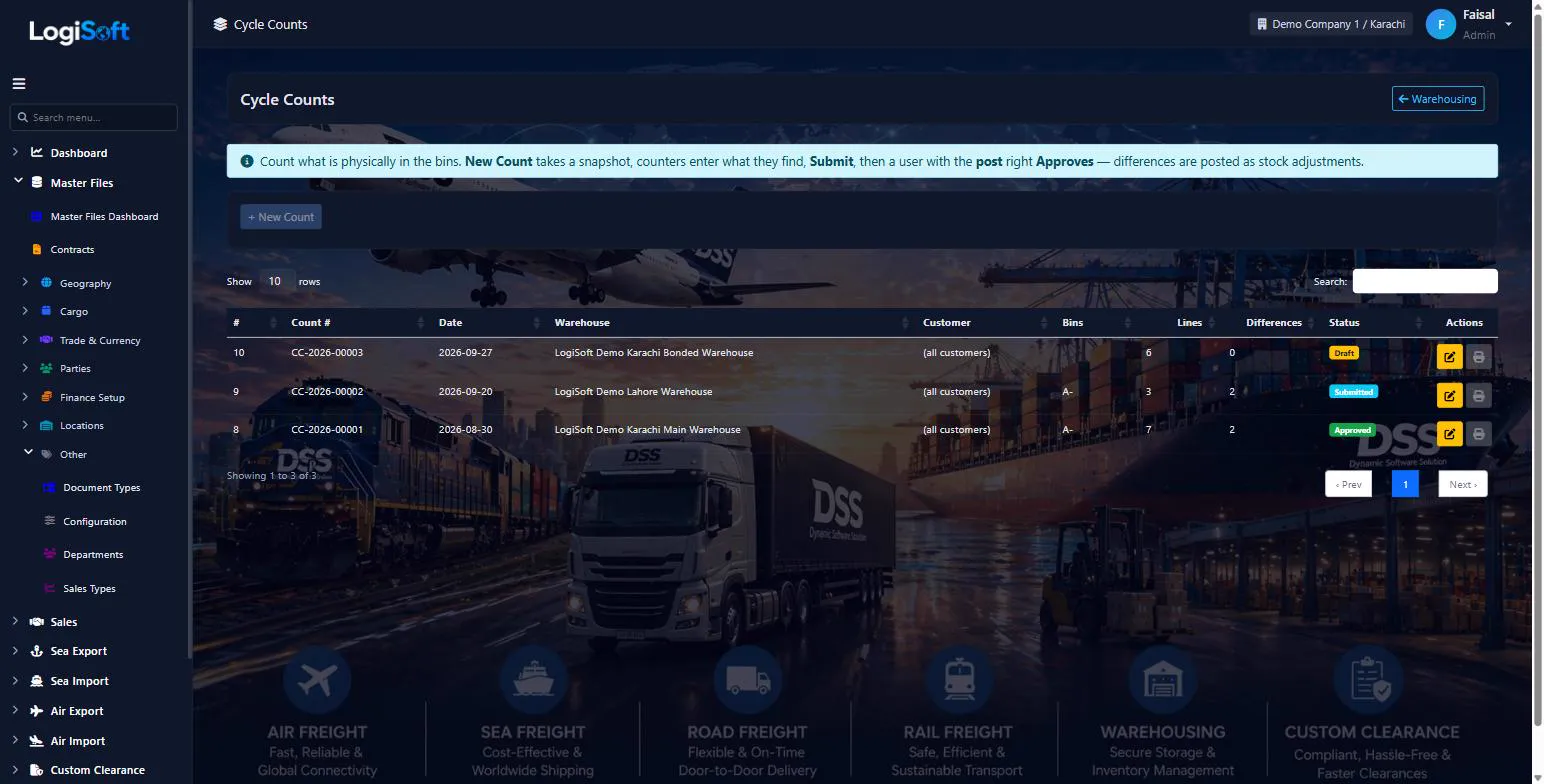
Cycle Counts
?LogiSoft help
Cycle Counts
Count what is physically in the bins, compare with the system and correct the difference with one approval.
- + New Count — choose warehouse, optionally a customer and a bin prefix (e.g.
A-01counts every bin starting with A-01). The system takes a snapshot of what should be there. - Print the count sheet and count. With Blind count the sheet and screen hide the system quantity so counters are not influenced.
- Enter the Counted quantity on every line. Stock found that is not on the sheet: + Found stock.
- Submit — then a user with the post right Approves. Differences are posted as adjustments (ADJUST_IN / ADJUST_OUT).
Approve is refused if stock was moved after the snapshot so that a correction would take a bin below zero — recount that line.
The same help appears on this screen inside LogiSoft.
Count what is physically in the bins, compare with the system and correct the difference with one approval.
- + New Count — choose warehouse, optionally a customer and a bin prefix (e.g.
-
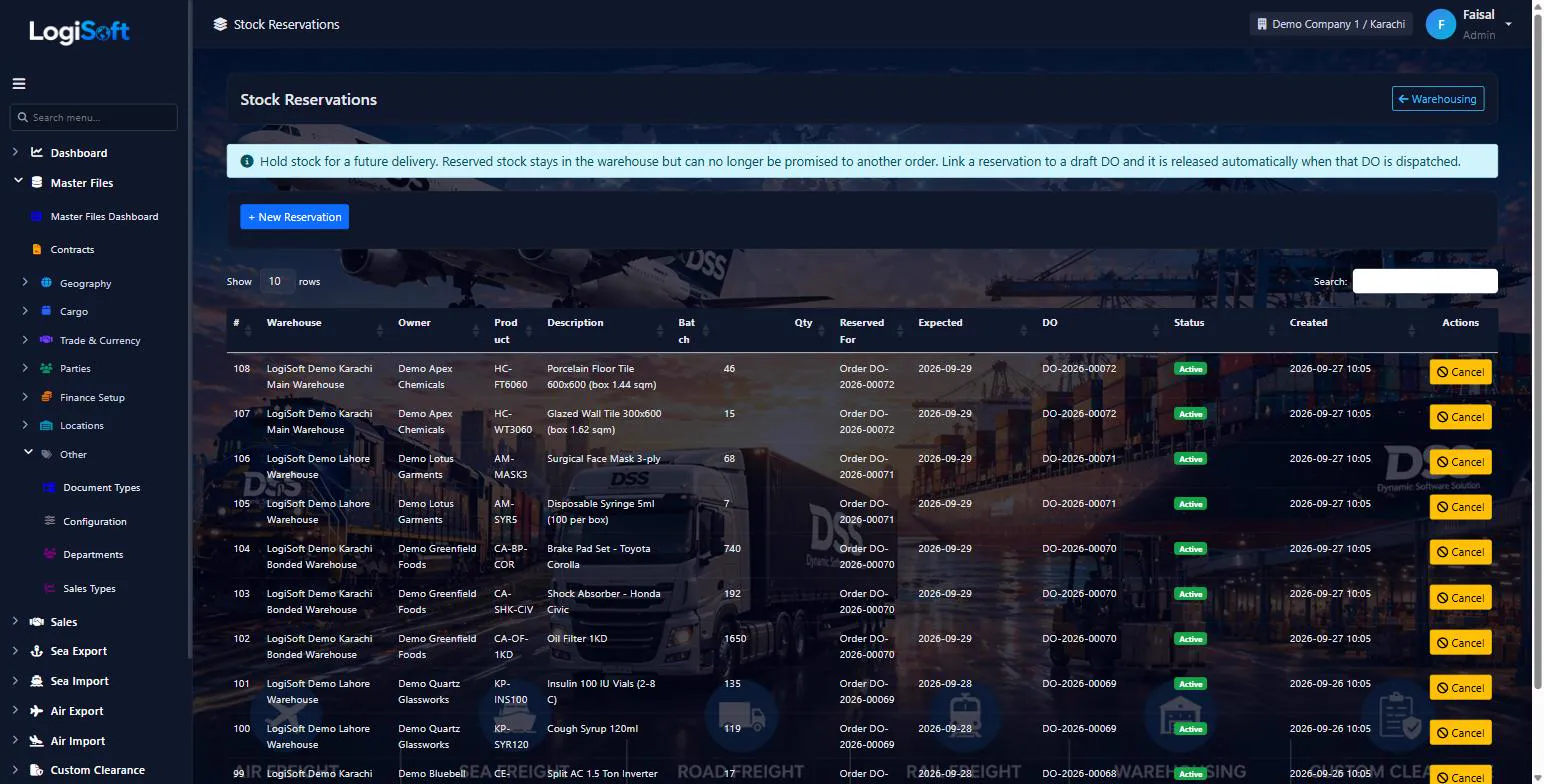
Stock Reservations
?LogiSoft help
Stock Reservations
Holds against on-hand inventory: committed to a sales order / DC / booking, not yet shipped.
Stock Reservations are soft holds against on-hand inventory. A reservation says "this many units of this product/batch are committed to Order X — do not promise them again." Released automatically when the DC ships, or manually when the order is cancelled.
The same help appears on this screen inside LogiSoft.
Holds against on-hand inventory: committed to a sales order / DC / booking, not yet shipped.
Inbound
-
Goods Receipt Notes
?LogiSoft help
Goods Receipt Notes (GRN)
Inbound documents — cargo arriving at the warehouse. Lines reference Product + Batch + Location.
A Goods Receipt Note (GRN) records cargo arriving at a warehouse — quantity received, batch number, target bin location.
Common tasks
- Issue a GRN every time goods arrive at a warehouse
- Reference an inbound Booking or Contract if applicable
- Upload supporting docs (packing list, CMR)
The same help appears on this screen inside LogiSoft.
Inbound documents — cargo arriving at the warehouse. Lines reference Product + Batch + Location.
Outbound
-
Delivery Orders
?LogiSoft help
Delivery Orders (DC)
Outbound documents — cargo leaving the warehouse. Releases inventory and triggers storage-charge cut-off.
A Delivery Order / Challan (DC) authorises cargo to leave the warehouse — to the consignee, to another warehouse, or back to the shipper.
Job No. links the DO to the customer's job, so the job shows goods in and out and the balance still in store. Commitment lines with direction Out (e.g. 2 trucks a week) count dispatched DOs. The job can be changed on a dispatched DO as well.
Departure mode sets the transport document label (B/L, AWB, CMR / bilty). Reverse (post right) puts a dispatched DO's stock back into the same batch and bin.
Common tasks
- Issue a DC against a sales order, transfer, or return
- The DC release stops storage-time accrual for those quantities
The same help appears on this screen inside LogiSoft.
Outbound documents — cargo leaving the warehouse. Releases inventory and triggers storage-charge cut-off.
Reports
-
Warehouse Reports
?LogiSoft help
Warehouse Reports
Stock-on-hand, ageing, movement summary, dead-stock, storage-charge bills.
Warehouse Reports consolidate physical-inventory views: stock-on-hand by product/batch/location, ageing buckets, dead-stock candidates, and the per-period storage-charge bill per customer.
The same help appears on this screen inside LogiSoft.
Stock-on-hand, ageing, movement summary, dead-stock, storage-charge bills.
Warehousing
-
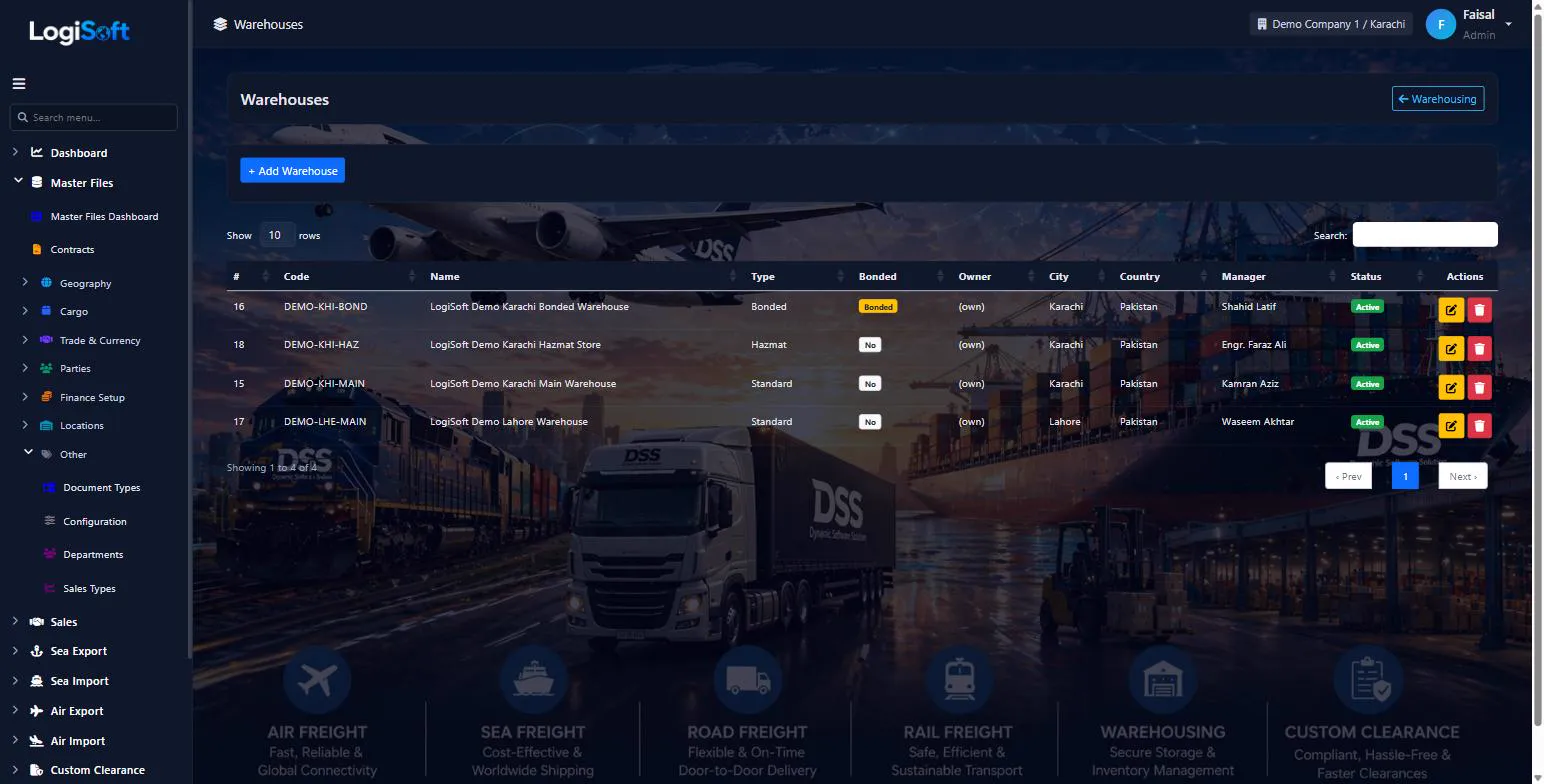
Warehouses
?LogiSoft help
Warehouses
Physical buildings where you store cargo. Each warehouse has locations (bins/racks) and a manager.
A Warehouse is a physical storage building. One Branch can have many Warehouses.
Every Goods Receipt Note (GRN) and Delivery Challan (DC) is scoped to a Warehouse.
The same help appears on this screen inside LogiSoft.
Physical buildings where you store cargo. Each warehouse has locations (bins/racks) and a manager.
-
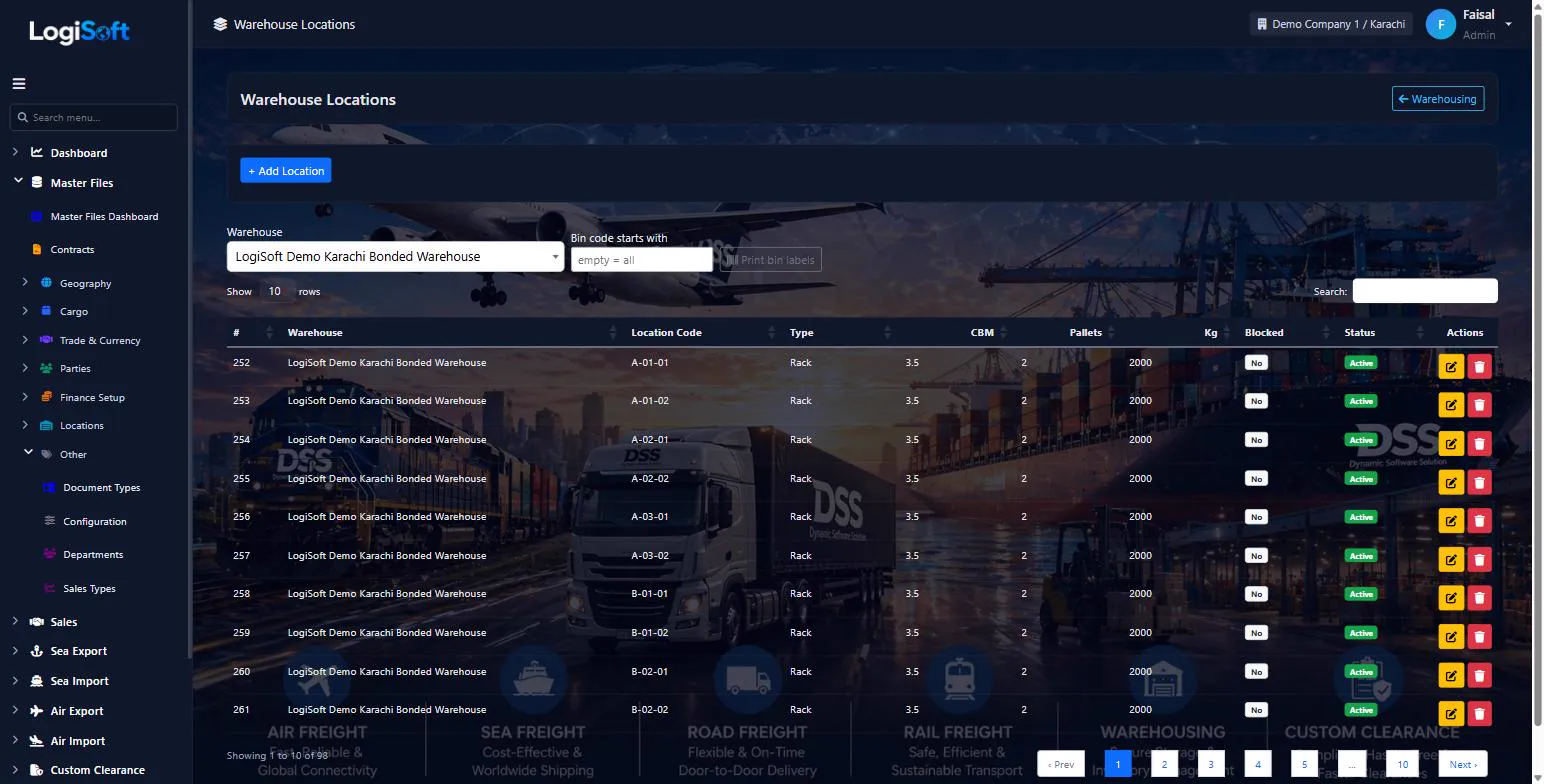
Warehouse Locations
?LogiSoft help
Warehouse Locations
Bin / rack / aisle locations inside a warehouse. Used by GRN and Stock Movement for precise placement.
Warehouse Locations are the bin-level breakdown of a Warehouse — racks, aisles, bins, cold-storage zones, hazmat areas.
The same help appears on this screen inside LogiSoft.
Bin / rack / aisle locations inside a warehouse. Used by GRN and Stock Movement for precise placement.
-
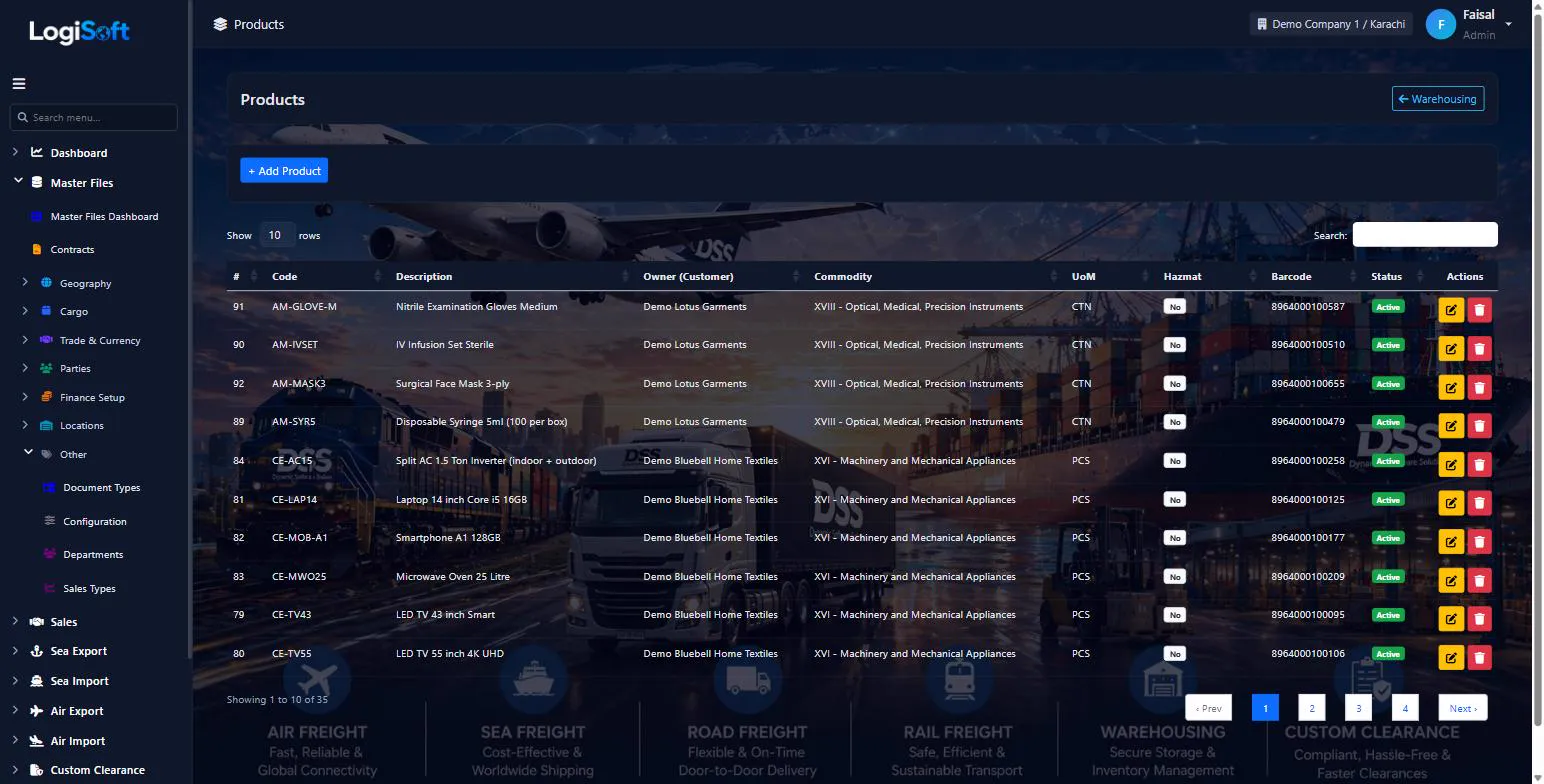
Products
?LogiSoft help
Products
What you store in the warehouse — SKU, description, default UoM, batch-tracked or not.
A Product is a stock-keeping unit (SKU) you handle in the warehouse. Fields cover SKU code, description, default Unit of Measure, batch-tracking on/off, and hazmat flag.
The same help appears on this screen inside LogiSoft.
What you store in the warehouse — SKU, description, default UoM, batch-tracked or not.
-
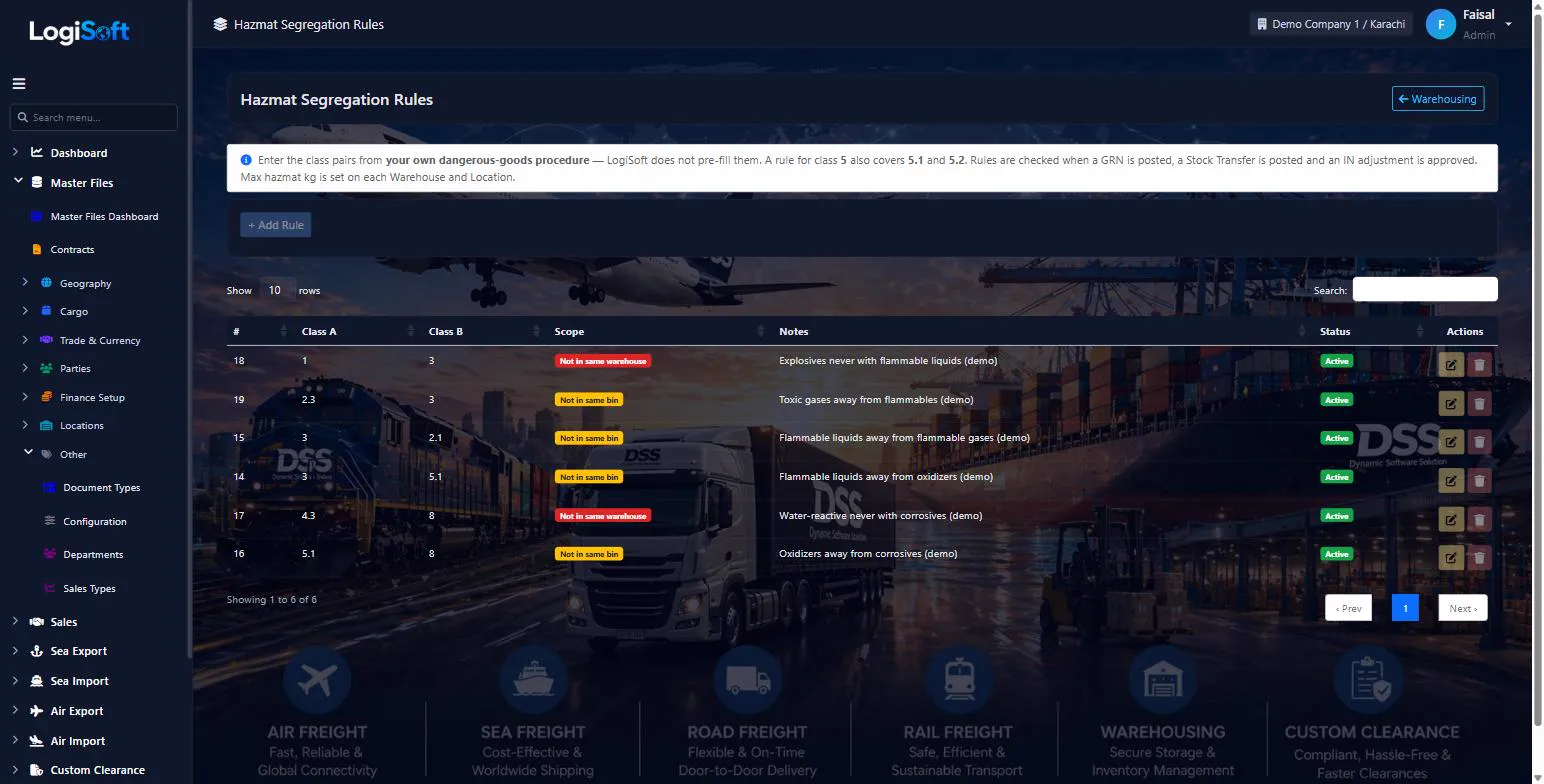
Hazmat Segregation Rules
?LogiSoft help
Hazmat Segregation Rules
Which dangerous-goods classes must not be stored together. The system blocks put-away that breaks a rule.
Enter the class pairs from your own dangerous-goods procedure (for example the IMDG segregation table your safety officer follows). LogiSoft does not pre-fill these rules.
- Class A / Class B: the product UN class, e.g.
3or5.1. A rule for5also covers5.1and5.2. - Scope Bin: the two classes may not share a bin. Scope Warehouse: they may not be in the same warehouse at all.
Checked when a GRN is posted, a Stock Transfer is posted and an IN adjustment is approved.
The same help appears on this screen inside LogiSoft.
Which dangerous-goods classes must not be stored together. The system blocks put-away that breaks a rule.
- Class A / Class B: the product UN class, e.g.
-
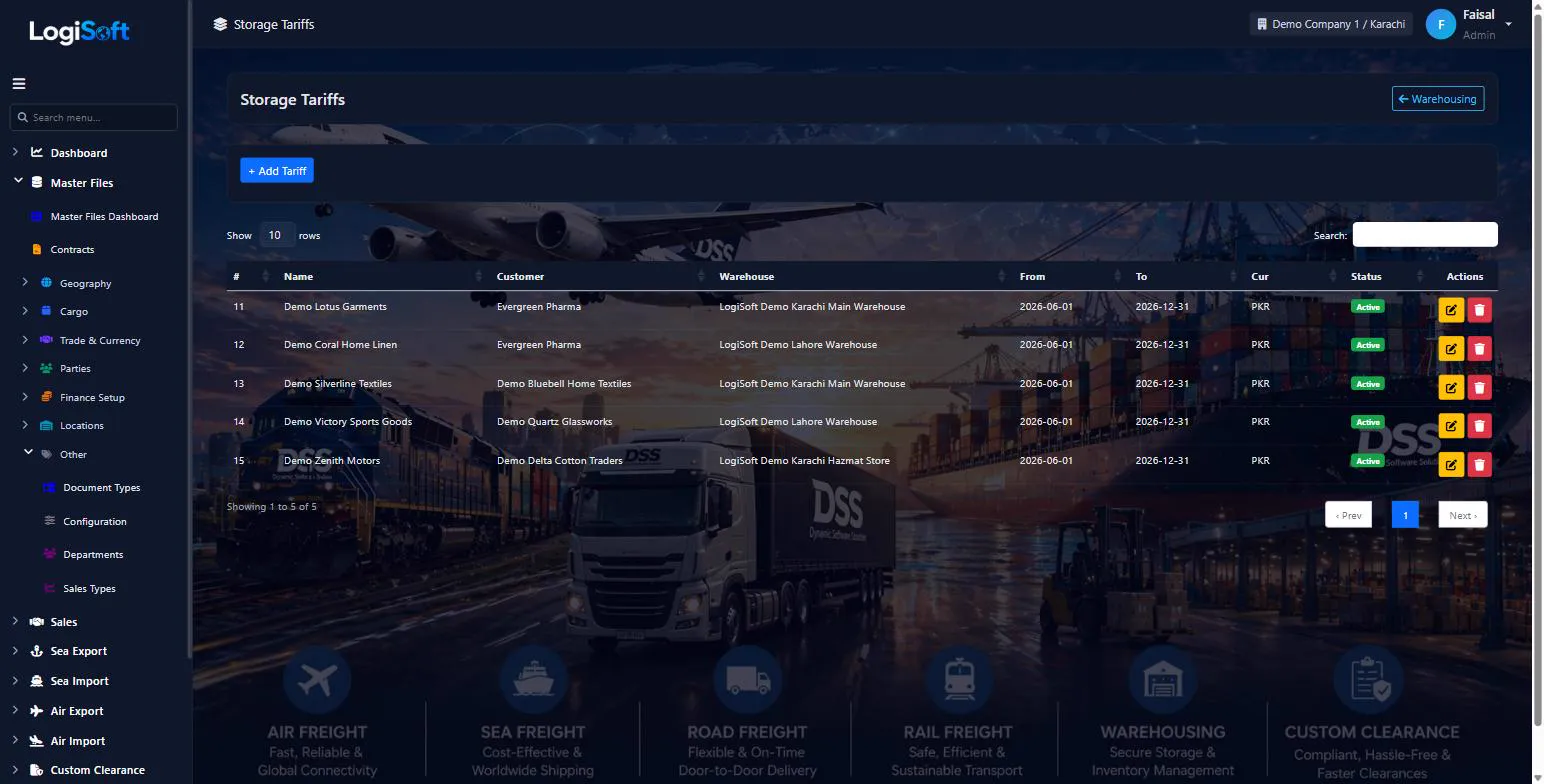
Storage Tariffs
?LogiSoft help
Storage Tariffs
Per-day or per-month rental rates per warehouse, product class, and pallet size.
Storage Tariffs define what you charge customers for keeping cargo in your warehouse. Rates can be daily or monthly, vary by warehouse, by pallet/CBM/ton, and by product class (general / cold / hazmat).
The same help appears on this screen inside LogiSoft.
Per-day or per-month rental rates per warehouse, product class, and pallet size.
Settings
-
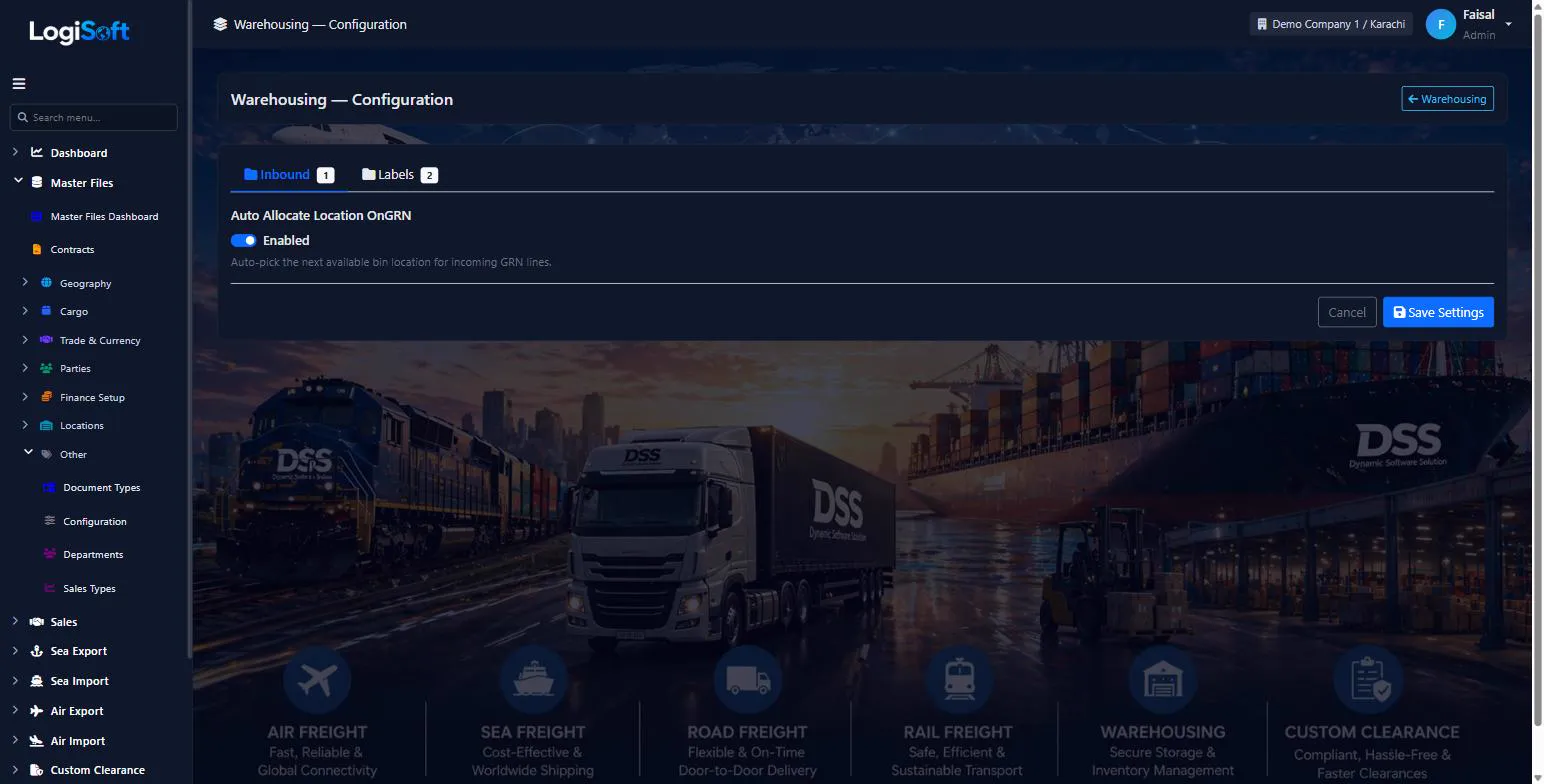
Configuration
?LogiSoft help
Warehousing — Configuration
Module-specific settings for Warehousing.
Settings that apply across the entire Warehousing module. Each setting is grouped under a Category tab — pick the tab, change the value, click Save Settings.
Common tasks
- Browse the tabs to see what's configurable
- Change a setting and Save
The same help appears on this screen inside LogiSoft.
Module-specific settings for Warehousing.
What's included
Everything in the Warehousing module.
Storage
- Warehouses, locations and bins
- Capacity by volume, pallets and weight
- Hazmat segregation rules
- Storage tariffs
Inbound & outbound
- Goods receipt notes
- Delivery orders
- Stock reservations
- Scanner screen for receive, move, count and pick
Stock control
- Stock movements and transfers
- Adjustments and cycle counts
- Batches with FIFO and expiry
- Eighteen stock reports
Can we store stock for many customers?
Yes. Every receipt, delivery and stock line carries the owner, and the reports break stock down by owner.
Does it support batches and expiry dates?
Yes. Stock is kept by batch with FIFO, and the Expiring Stock report lists batches near expiry.
Is there a handheld or scanner screen?
Yes. The warehouse scanner screen covers look-up, receiving, moving, counting and picking.
Works together with
See all features →Sea Import
Book space against your carrier contracts, sell it to customers, collect shipping instructions, open the Master and House B/Ls, track every milestone and invoice the job, all in one flow.
Explore Sea ImportMaster Files
Every list your team picks from, kept in one place: parties, ports, cities, HS codes, currencies, container types and more, with imports so you do not start from scratch.
Explore Master FilesAdministration
Run several companies and branches in one system, decide exactly who can do what, and keep a record of every change.
Explore AdministrationReady to retire your desktop freight tools?
See LogiSoft on your own workflow in a 30-minute screen share with the founder. No commitment.