Module · Construction & Real Estate Suite

BMS (Building Management) – Scope of Work

Runs every building after possession: residents and tenants, maintenance and service charges with every option, utility billing by sub-meter until own connections are installed, receipts and overdue reminders on WhatsApp, complaints with target times, work orders with store materials, preventive maintenance and AMC contracts, parking and amenity booking, visitor passes and the gate desk with access-control integration, and community meetings, notices and polls. Anything not written on this page is not part of this module.

What BMS covers

01

Buildings

Handed over · settings · utilities mode

02

Residents

Owner · tenant · family · vehicles · cards

03

Billing

Charges · utilities · receipts · reminders

04

Maintenance

Complaints · work orders · PM · AMC

05

Gate & facilities

Visitors · parking · amenities

06

Community

Meetings · notices · polls · events

How it fitsWhat BMS uses or gives
Property SalesUnits and the current owner come from the Sales unit file when a unit is handed over (Sync from Sales) – no re-entry; when BMS is used on its own they are entered or imported from Excel. Parking sold with a unit comes from its other spaces.
FinanceBMS bills, receipts, cheques / PDC and late surcharge post to the company’s books with the BMS project as cost centre; vendor bills (AMC, repairs) come through purchase invoices.
Supply Chain & InventoryMaterials for repairs are issued from the BMS store against the work order; the cost goes to the building.
HR & PayrollBMS staff – security, cleaning, technicians – are employees with attendance on the same devices.
AdministrationWhatsApp (Meta WhatsApp Cloud API), SMS and e-mail gateways are the same as for the rest of LogiSoft.
The GIFs play the steps of each screen automatically; the orange box shows where to look in each step. Click any picture to open it full size. Screens are a preview of the planned design – names, rates and amounts are sample data.

Part A

Buildings and residents

Who lives where – filled from Property Sales at possession.

A1Buildings & BMS settings

Where

BMS › Buildings.

Why

Each handed-over building is run with its own settings.

How

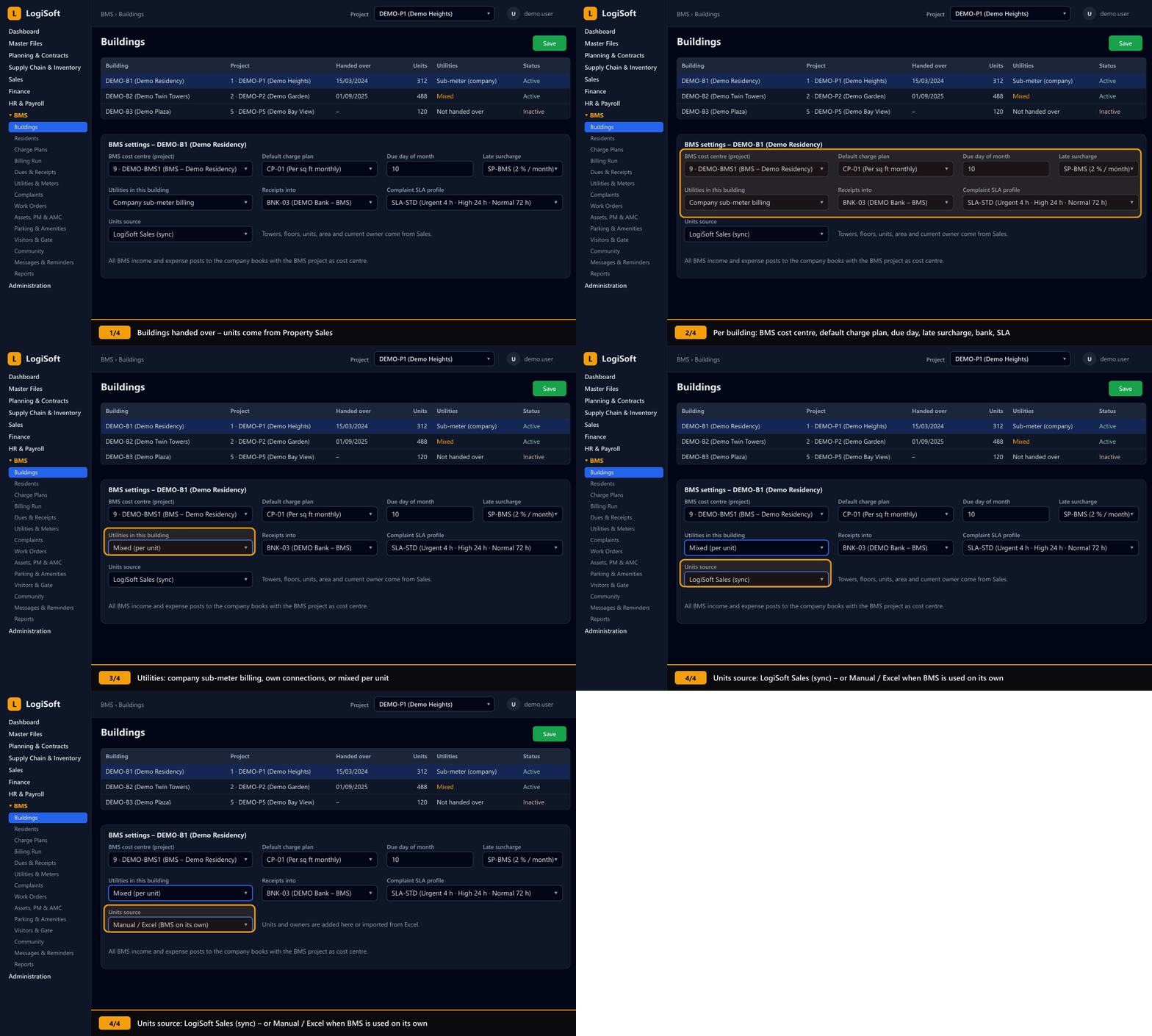
Building, project, handover date, number of units. Settings per building: BMS cost centre (project), default charge plan, due day of month, late surcharge policy, bank account for receipts, complaint target times (SLA). Utilities: company sub-meter billing, own connections, or mixed per unit. Units source: “LogiSoft Sales (sync)” or “Manual / Excel” when BMS is used on its own.
Buildings & BMS settings

A2Units & residents

Where

BMS › Residents.

Why

Bills, alerts and gate approvals need the right person for every unit.

How

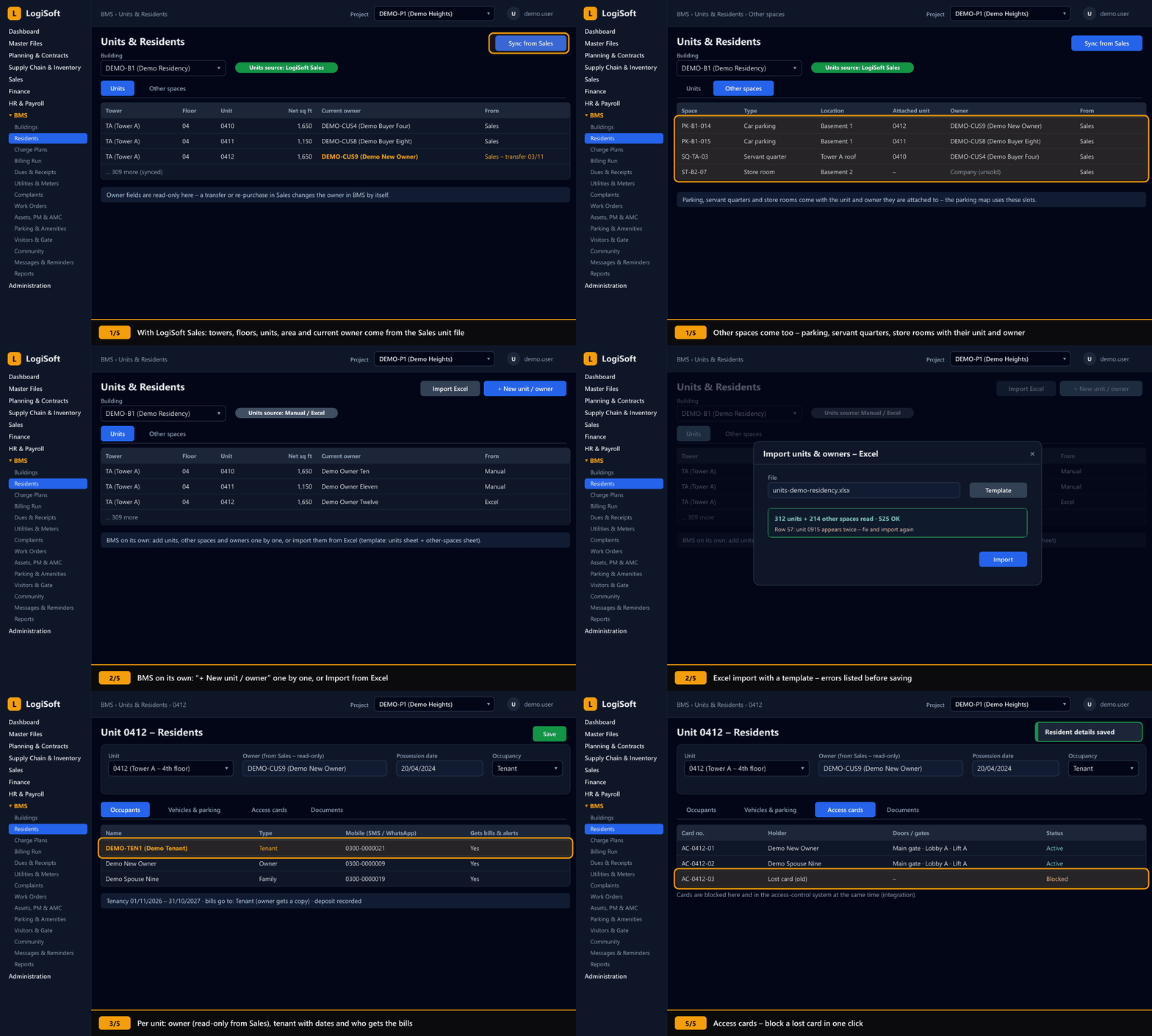
With LogiSoft Sales: “Sync from Sales” brings towers, floors, units, area, the CURRENT owner and the OTHER SPACES (parking, servant quarters, store rooms – with the unit and owner they are attached to) from Sales after possession; transfers and re-purchases in Sales change the owner here by themselves, and owner fields are read-only in BMS. BMS used on its own: “+ New unit / owner” and “+ New space” one by one, or Import from Excel with a template – units sheet and other-spaces sheet (errors listed before saving). Per unit: owner-living or rented – tenant with tenancy dates, who receives the bills (owner gets a copy), deposit. Occupants and family with mobile for WhatsApp / SMS; vehicles with stickers and parking slot; access cards – block a lost card here and in the access-control system at once; documents.

Units & residents

Part B

Charges, utilities and collection

Every charge option, monthly billing in one run, and reminders until paid.

B1Charge plans – every option

Where

BMS › Charge Plans.

Why

Buildings charge in different ways – all must be possible.

How

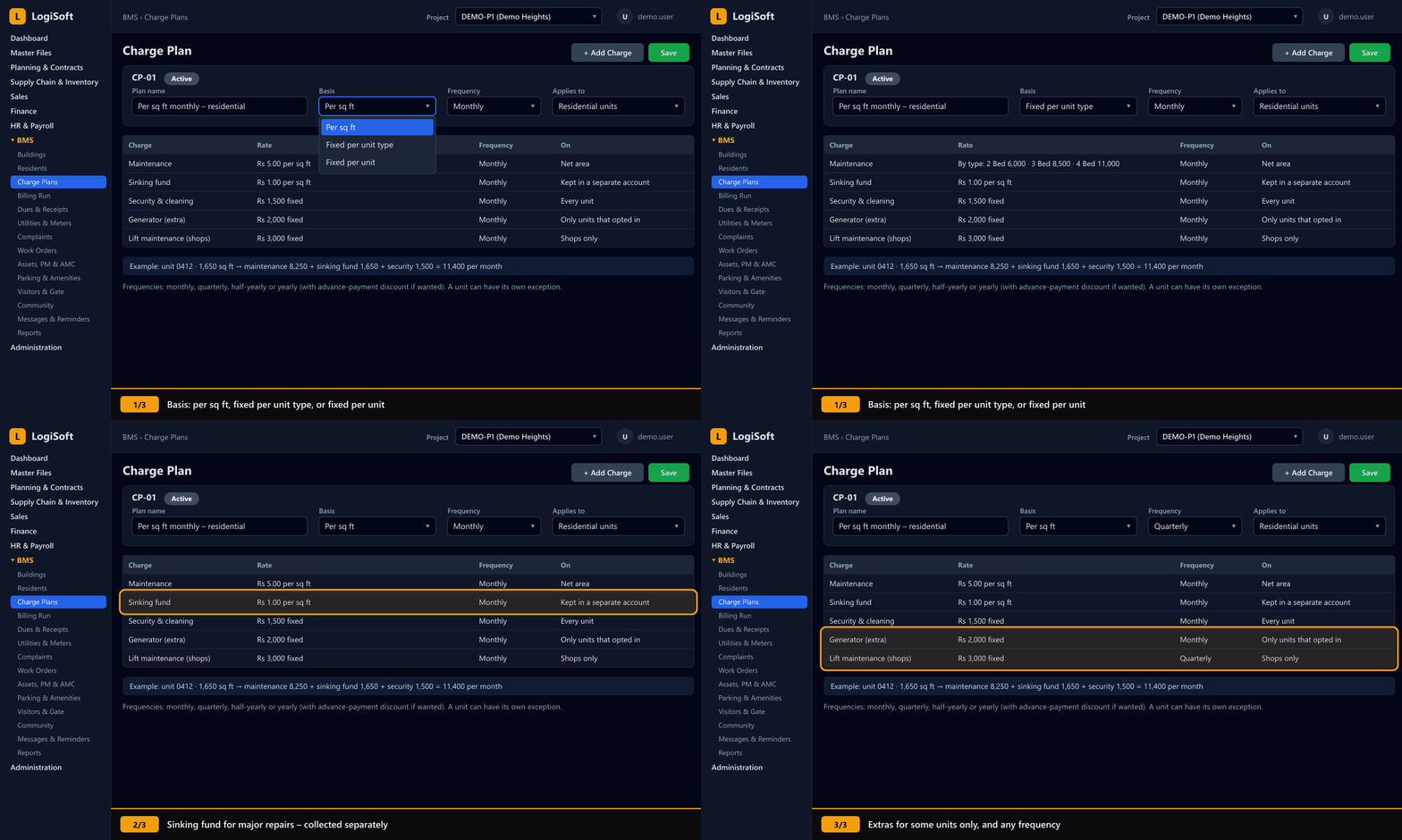
Basis per charge: per sq ft, fixed per unit type, or fixed per unit; frequency monthly / quarterly / half-yearly / yearly (advance-payment discount optional). Charges such as maintenance, sinking fund (kept in a separate account for major repairs), security & cleaning, and extras for opted-in units only (generator, shop lift). A unit can have its own exception.

Charge plans – every option

B2Monthly billing run

Where

BMS › Billing Run.

Why

Hundreds of bills in one go, never typed one by one.

How

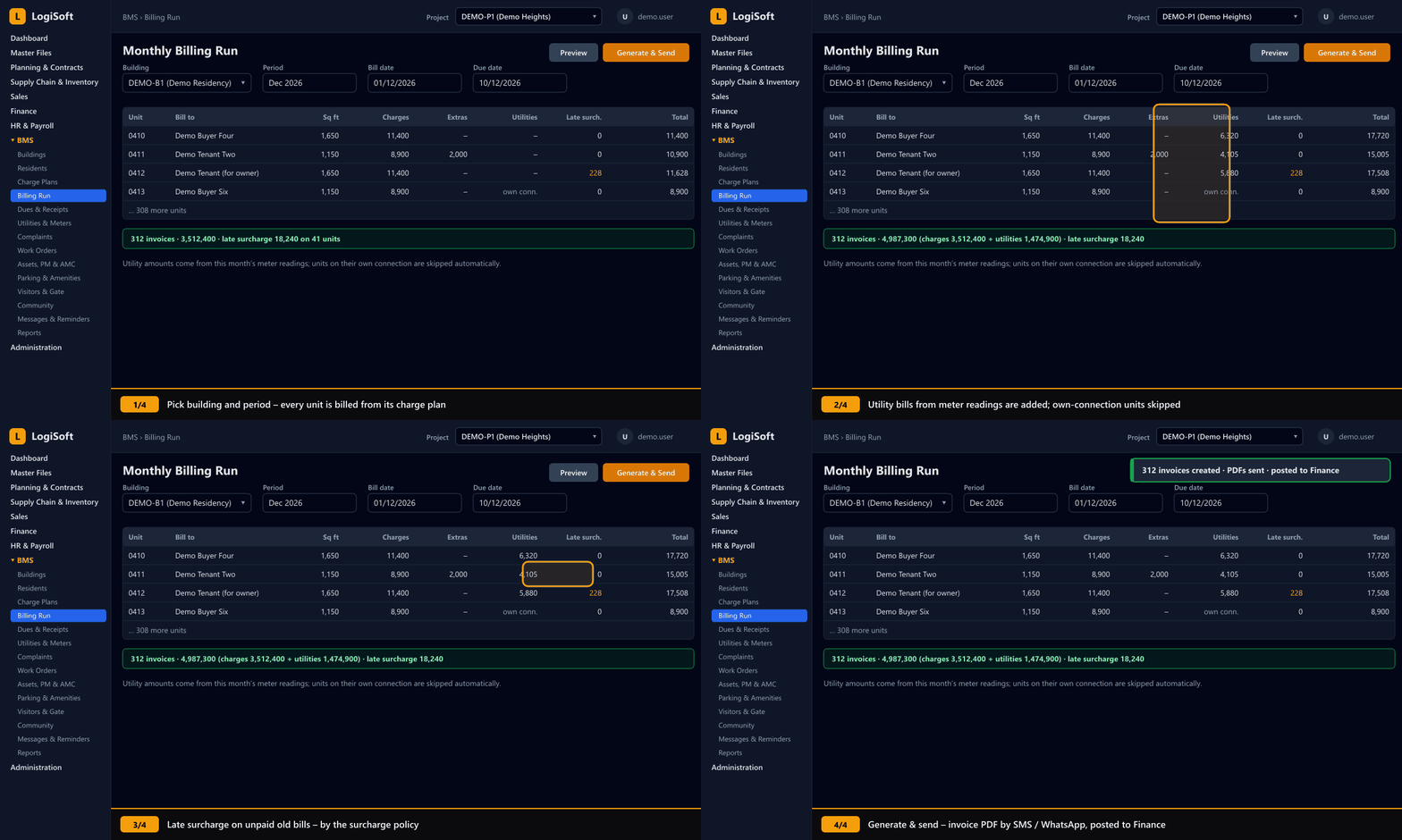
Pick building and period: every unit is billed from its charge plan, utility bills from this month’s meter readings are added (own-connection units skipped), late surcharge on old unpaid bills by the surcharge policy. Preview, then Generate & Send – invoice PDF to each resident by WhatsApp / SMS; posted to Finance.

Monthly billing run

B3Dues & receipts

Where

BMS › Dues & Receipts.

Why

One place to see what a unit owes and to receive it.

How

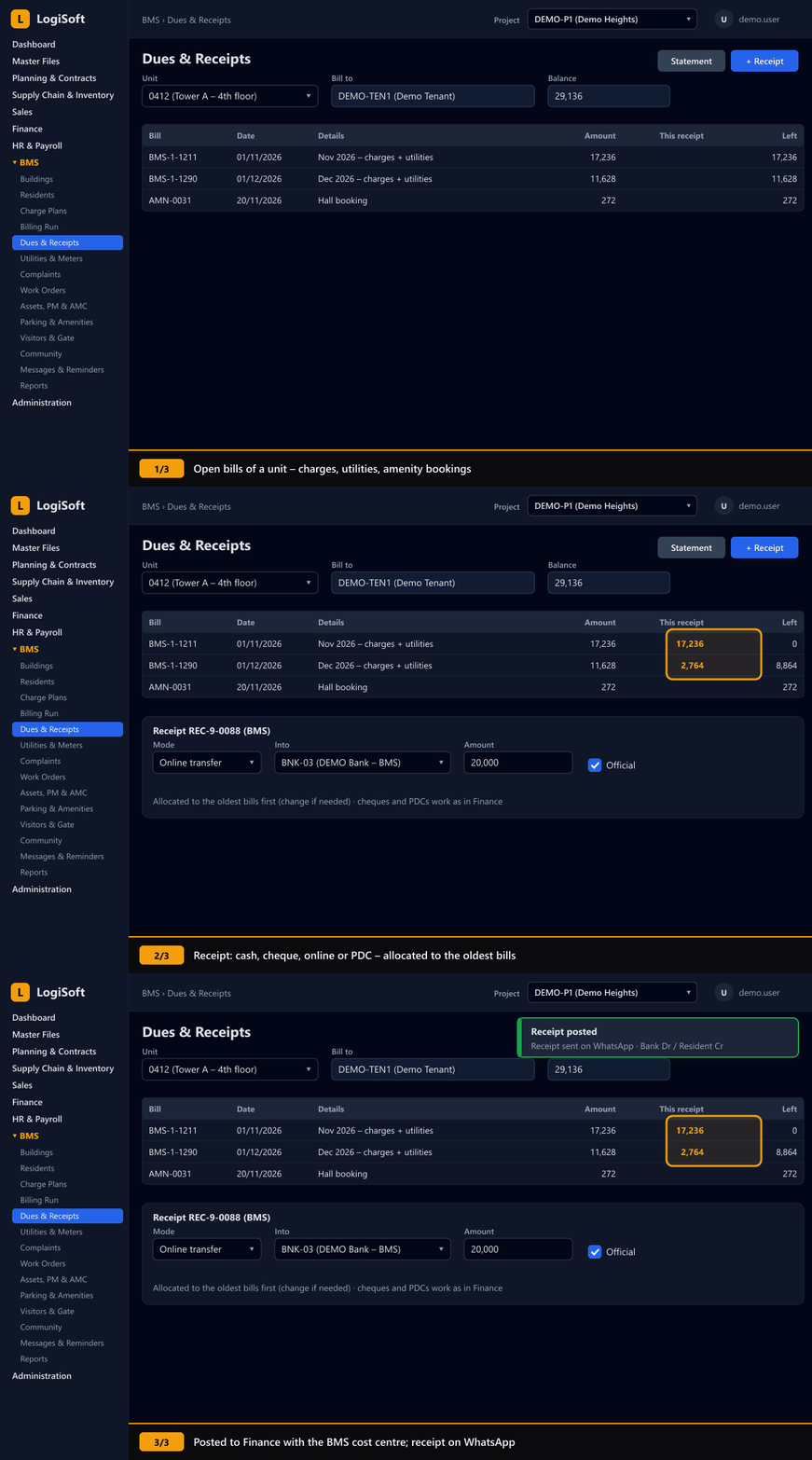
Open bills of a unit (charges, utilities, amenity bookings), statement on screen or PDF. Receipt by cash, cheque, online transfer or PDC with the Official tick – allocated to the oldest bills first (changeable); receipt sent on WhatsApp; posted to Finance with the BMS cost centre.

Dues & receipts

B4Utilities – sub-meter or own connection

Where

BMS › Utilities & Meters.

Why

Buildings are often delivered before the utility companies connect each unit.

How

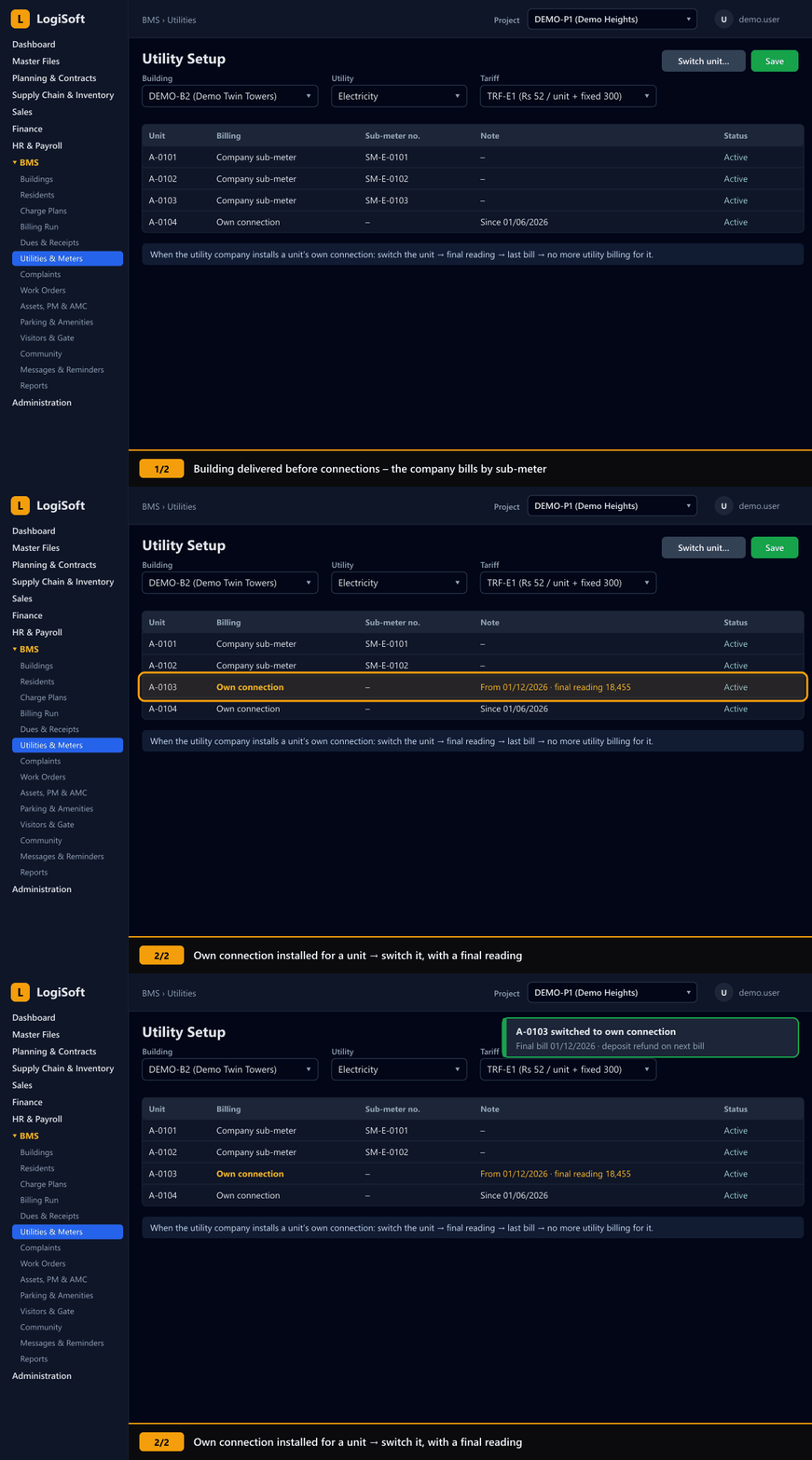
Per building and per unit: company sub-meter billing or own connection, with meter number and tariff (rate per unit + fixed). When a unit gets its own connection: switch it with a final reading – last bill issued, deposit adjusted, no more utility billing for that unit. Electricity, water and gas alike.

Utilities – sub-meter or own connection

B5Meter readings

Where

BMS › Utilities & Meters › Readings.

Why

Utility bills must follow real use.

How

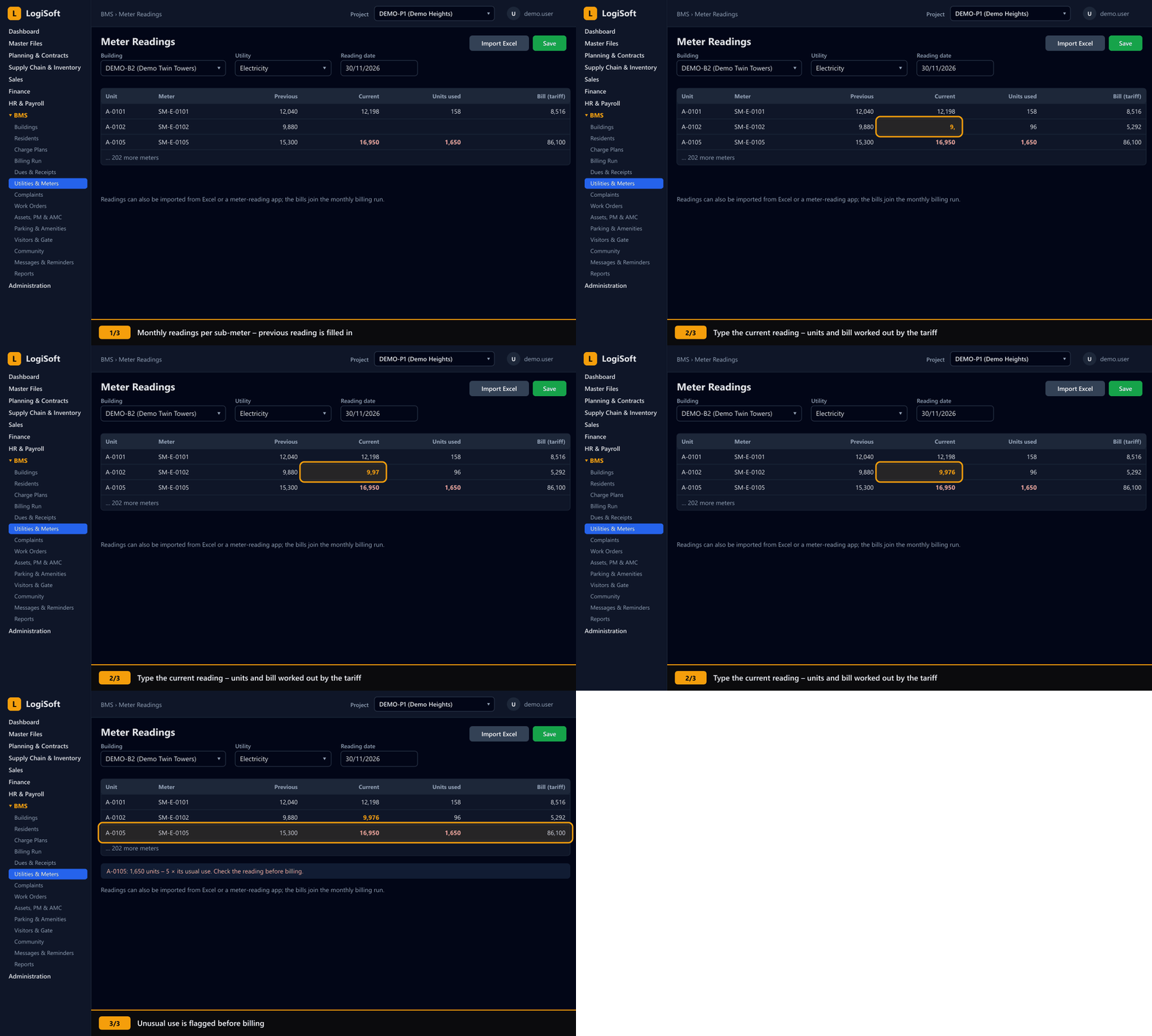
Monthly reading per sub-meter with the previous reading filled in; units used and bill worked out by the tariff; unusual use flagged before billing. Readings can be typed, imported from Excel or a meter-reading app; bills join the monthly billing run.

Meter readings

Part C

Complaints and maintenance

From a resident’s complaint to a closed job – and machines kept running before they break.

C1Complaint / service request

Where

BMS › Complaints.

Why

Every complaint gets a number and a target time.

How

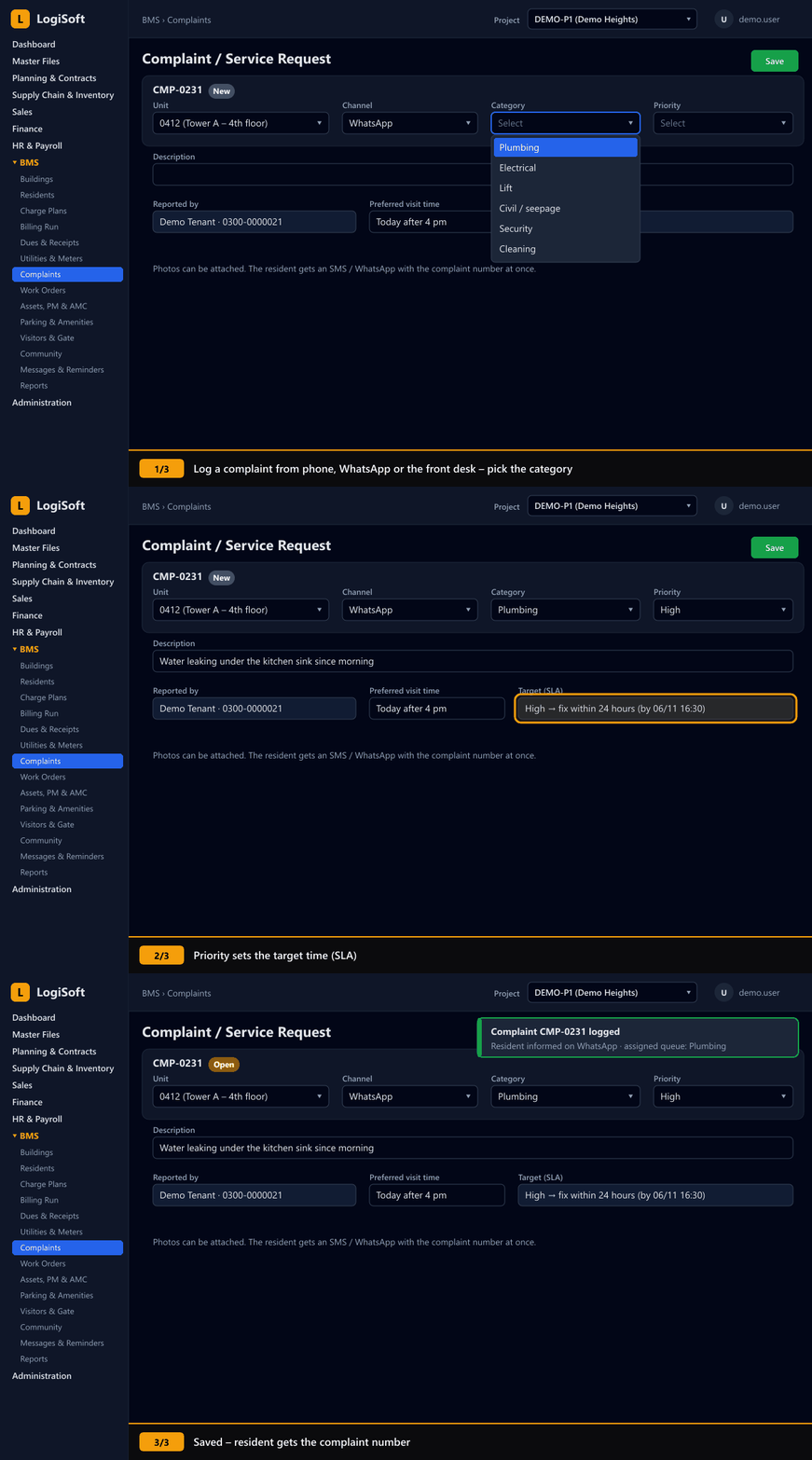
Logged from phone, WhatsApp or the front desk: unit, channel, category (plumbing, electrical, lift, civil / seepage, security, cleaning …), priority, description, photos, preferred visit time. Priority sets the target time (SLA); the resident gets the complaint number on WhatsApp at once.

Complaint / service request

C2Complaint board

Where

BMS › Complaints › Board.

Why

The BMS manager sees every open job and what is late.

How

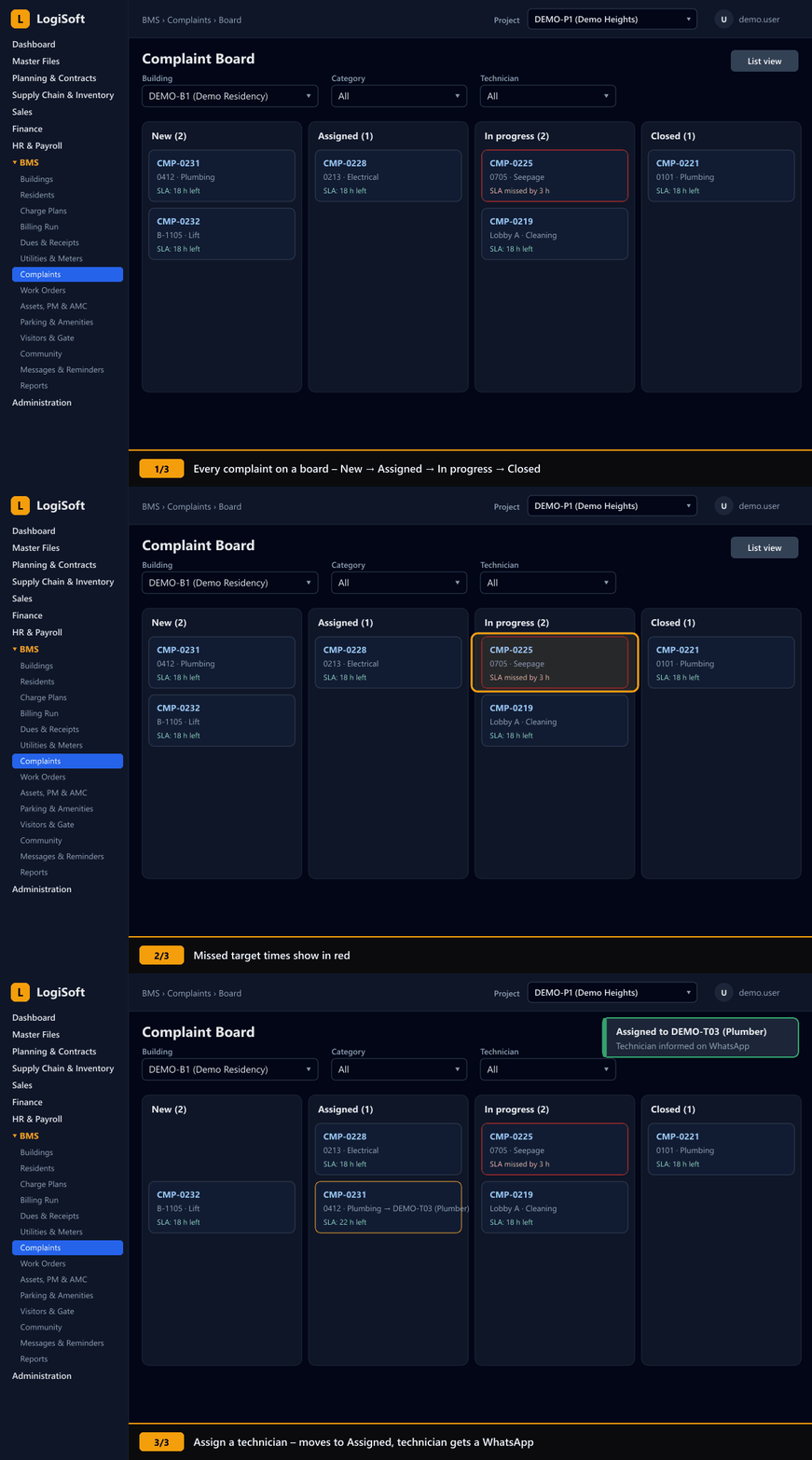
Board New → Assigned → In progress → Closed with time left against the target; missed targets in red. Assign a technician (the technician is told on WhatsApp); filters by building, category and technician; list view too.

Complaint board

C3Work order, materials and closure

Where

BMS › Work Orders.

Why

Know what each repair used and cost, and whether the resident was happy.

How

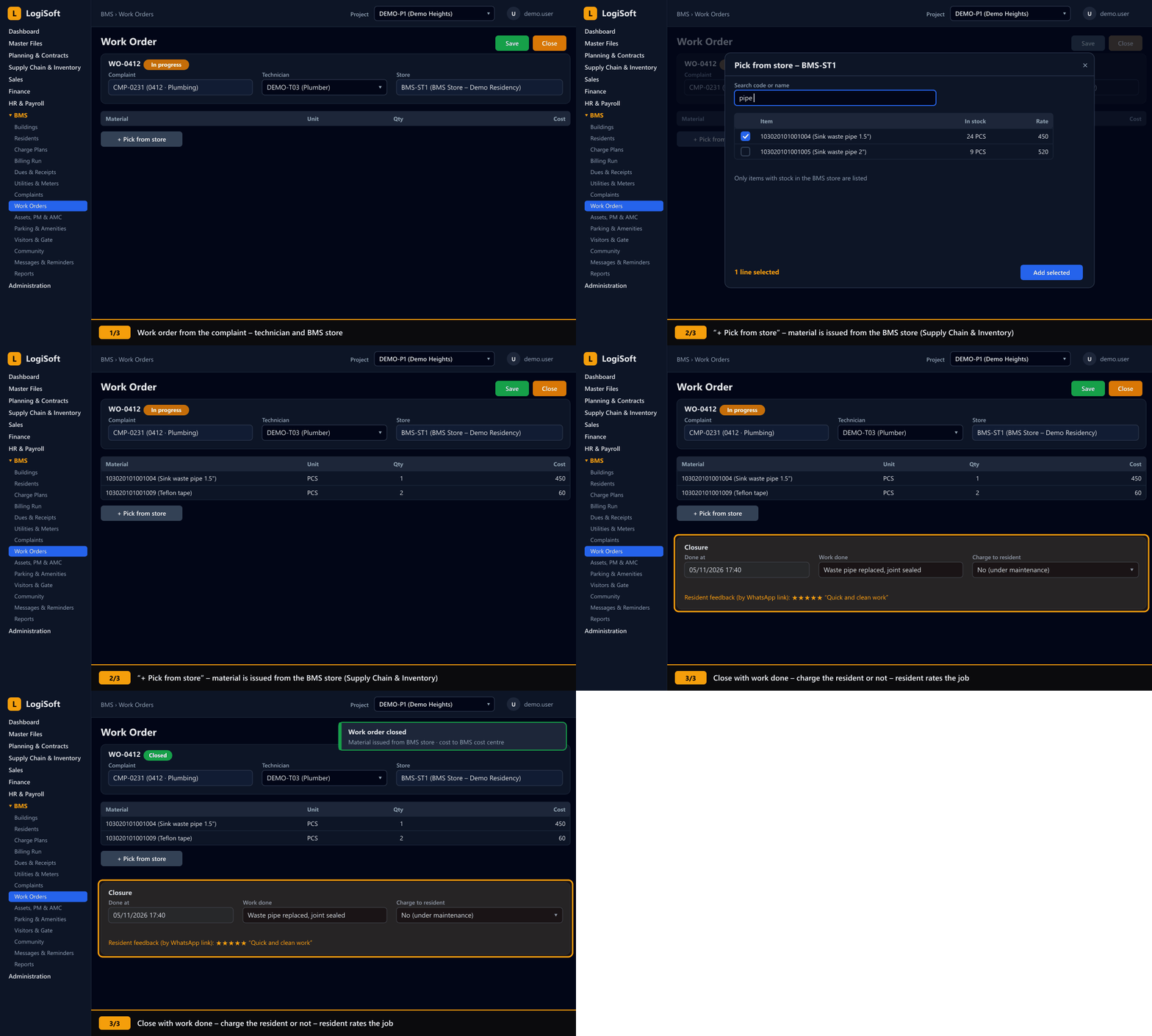
Work order from the complaint: technician and BMS store; “+ Pick from store” issues material from the BMS store (Supply Chain & Inventory) – cost to the building. Close with work done and whether the resident is charged (then billed on the next run); the resident rates the job by a WhatsApp link.

Work order, materials and closure

C4Asset register

Where

BMS › Assets, PM & AMC.

Why

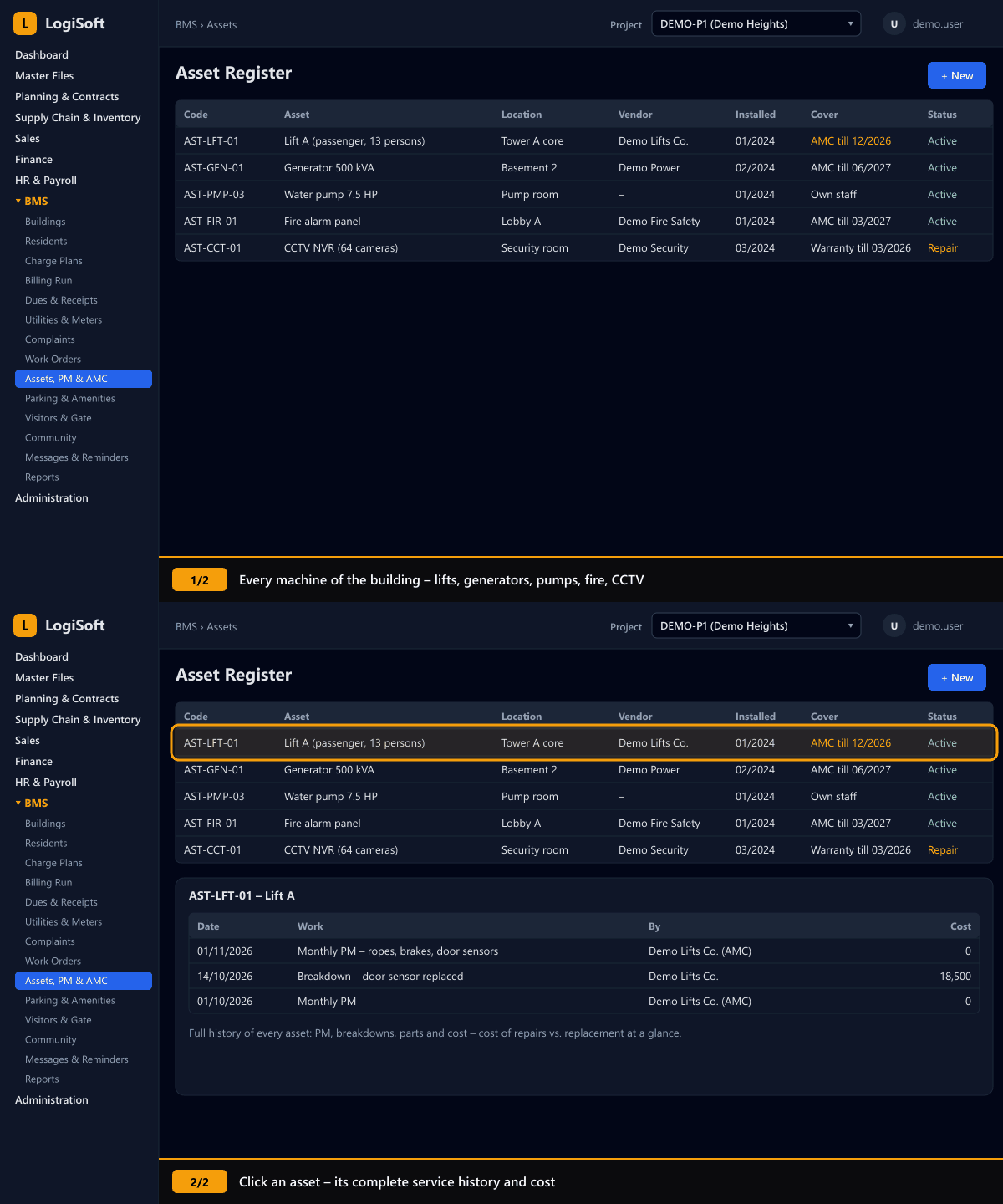
Every machine of the building with its full history.

How

Lifts, generators, pumps, fire system, CCTV and more: code, location, vendor, installation date, AMC / warranty cover, status. Each asset shows all preventive jobs, breakdowns, parts and cost – repair vs replace at a glance.

Asset register

C5Preventive maintenance

Where

BMS › Assets, PM & AMC › Preventive Maintenance.

Why

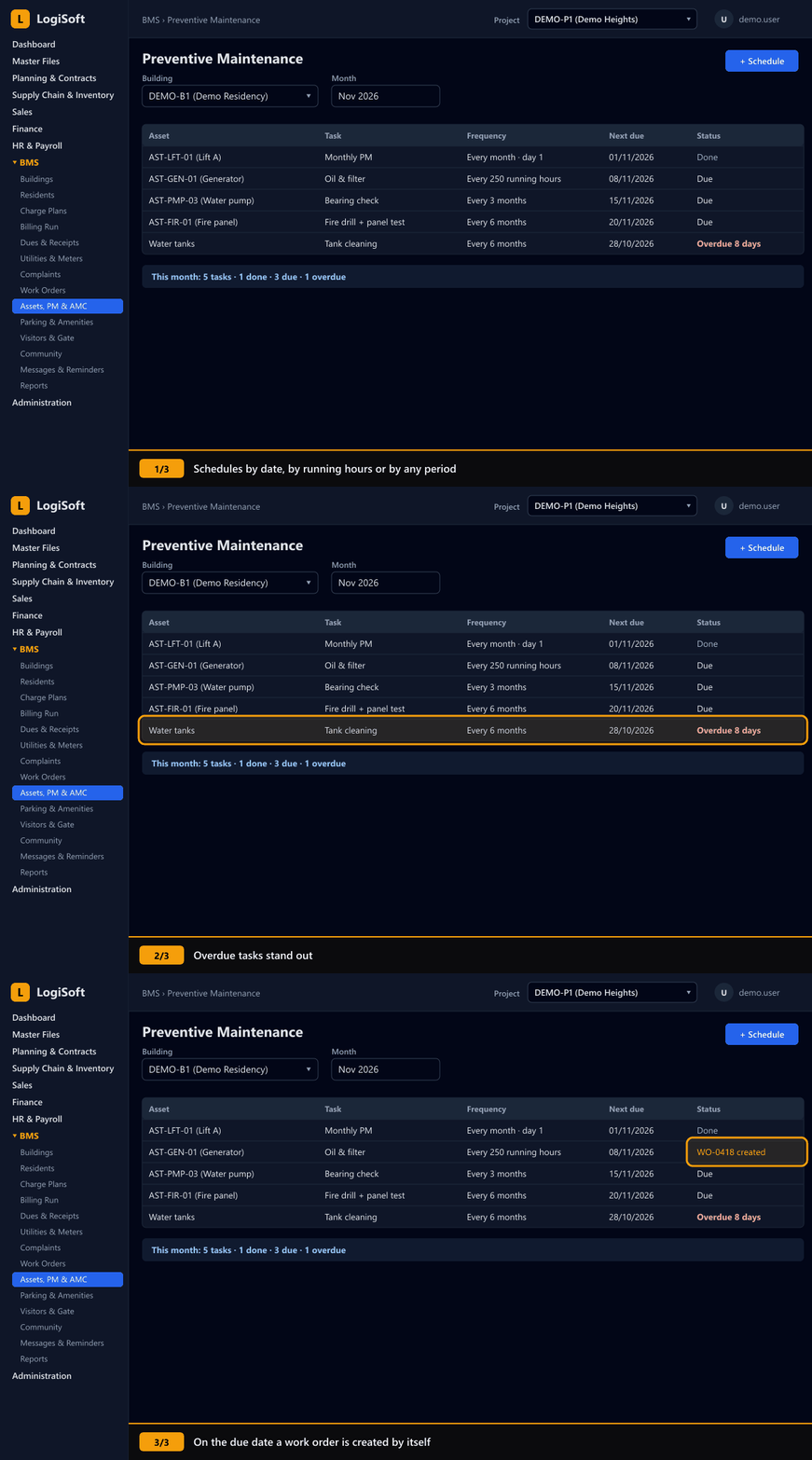
Fix before it breaks.

How

Schedules by date, by running hours or by any period (monthly lift service, generator oil every 250 hours, tank cleaning every 6 months, fire drill). On the due date a work order is created by itself; overdue tasks stand out; done vs due per month.

Preventive maintenance

C6AMC contracts

Where

BMS › Assets, PM & AMC › AMC Contracts.

Why

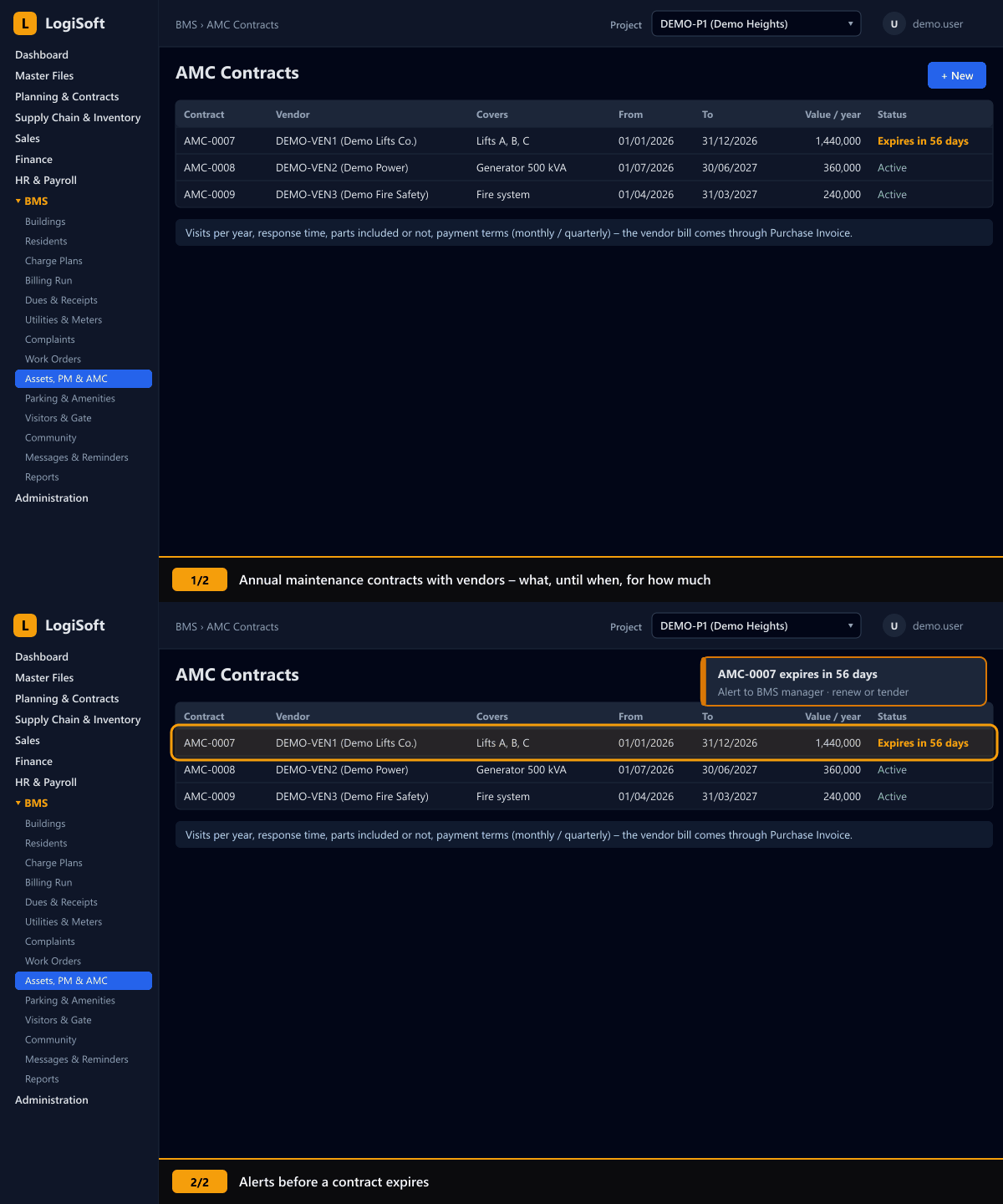
Annual maintenance contracts must not lapse.

How

Vendor, assets covered, from – to, value per year, visits per year, response time, parts included or not, payment terms; vendor bills come through purchase invoices. Alert to the BMS manager before expiry.

AMC contracts

Part D

Facilities, visitors and gate

Parking, amenities and a gate that knows who is expected.

D1Parking allocation

Where

BMS › Parking & Amenities.

Why

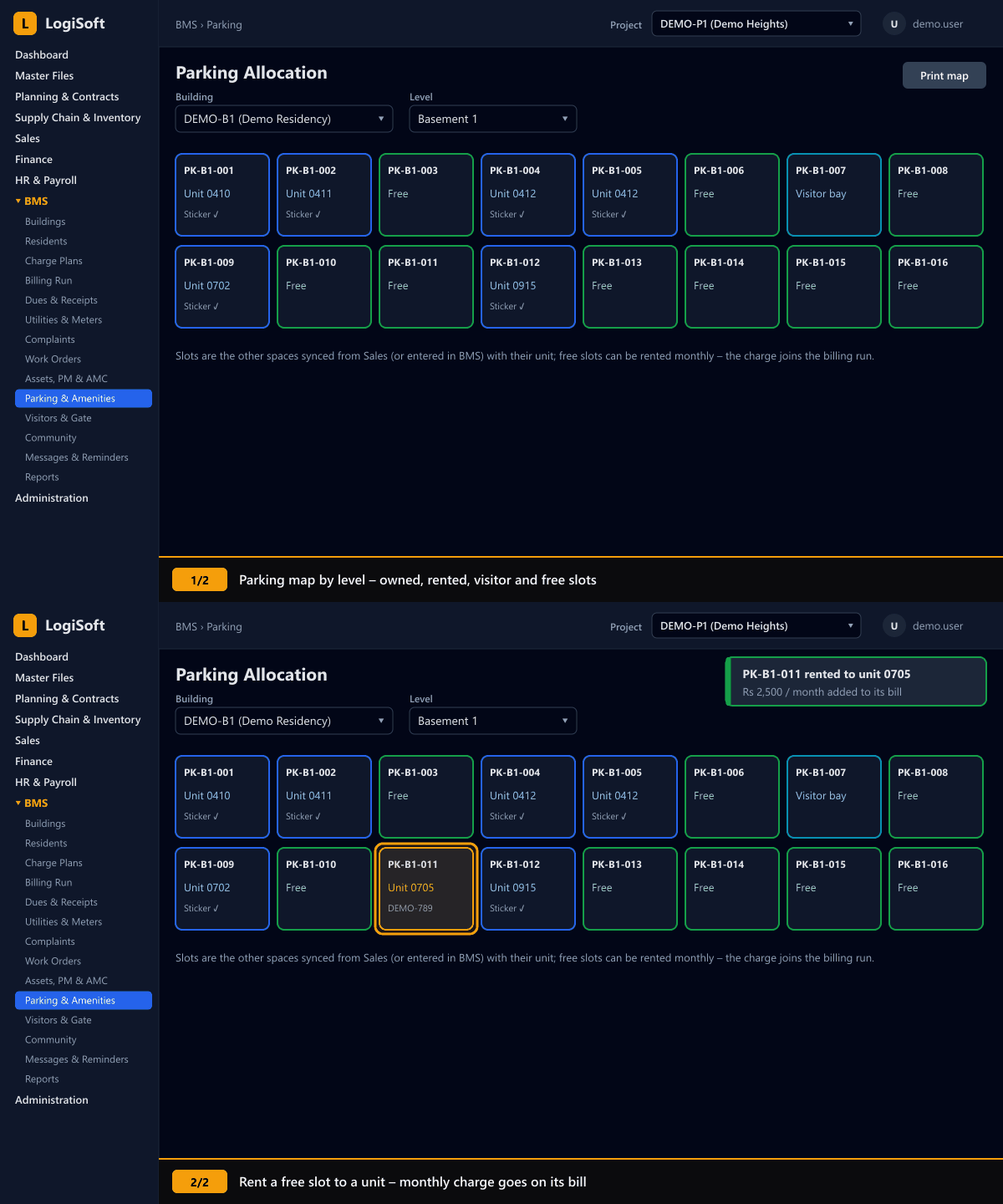
Who parks where – owned, rented, visitor and free slots.

How

Parking map per level. Slots are the other spaces synced from Sales (or entered in BMS) with the unit they belong to; free slots can be rented monthly to a unit – the charge joins the billing run; visitor bays; stickers checked.

Parking allocation

D2Amenity booking

Where

BMS › Parking & Amenities › Amenities.

Why

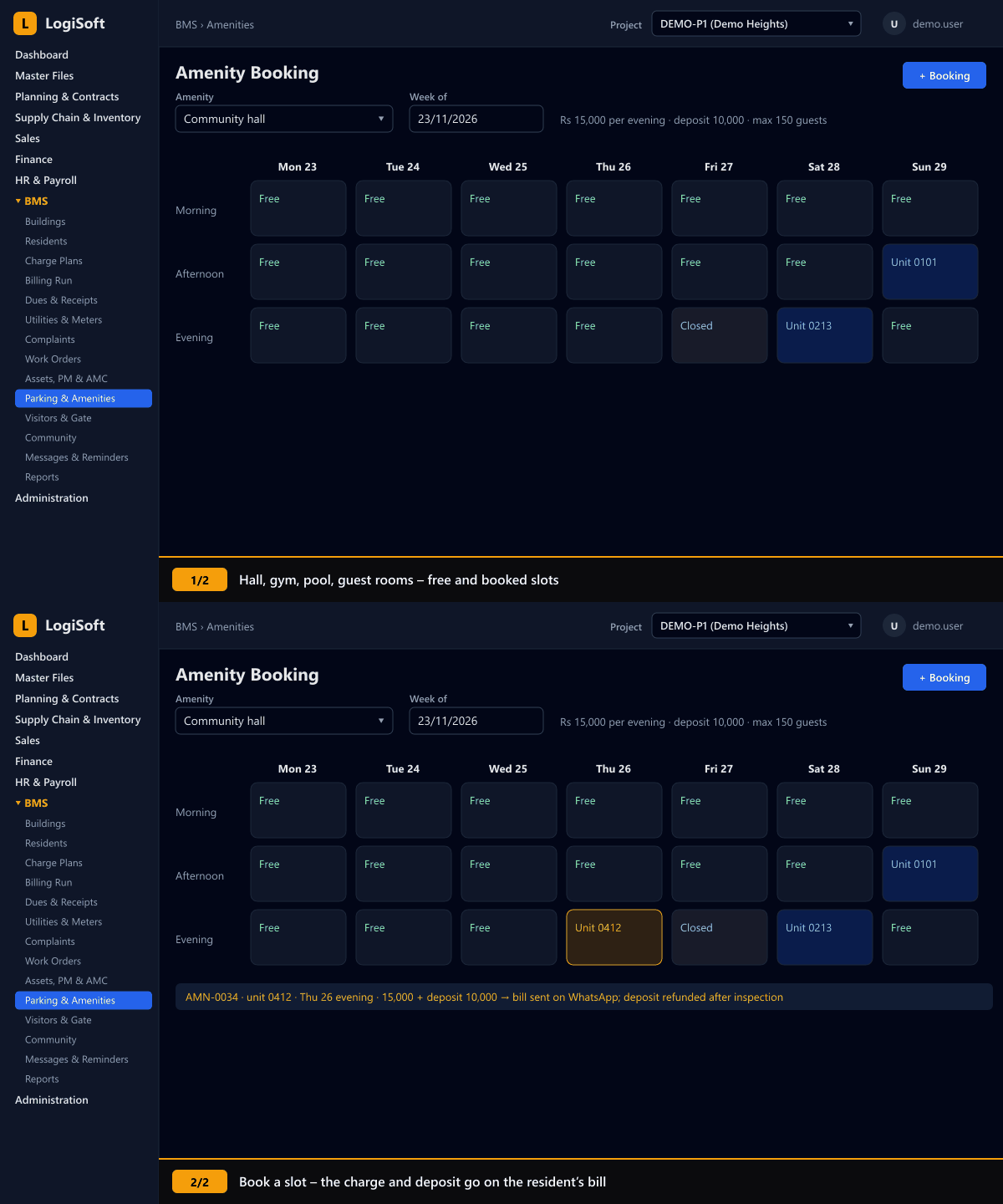
Hall, gym, pool and guest rooms booked without clashes.

How

Calendar of free and booked slots per amenity, rules (charge per slot, deposit, maximum guests, closed for maintenance). A booking puts the charge and deposit on the resident’s bill; the deposit is refunded after inspection.

Amenity booking

D3Visitor pre-registration & gate pass

Where

BMS › Visitors & Gate › Pre-registration.

Why

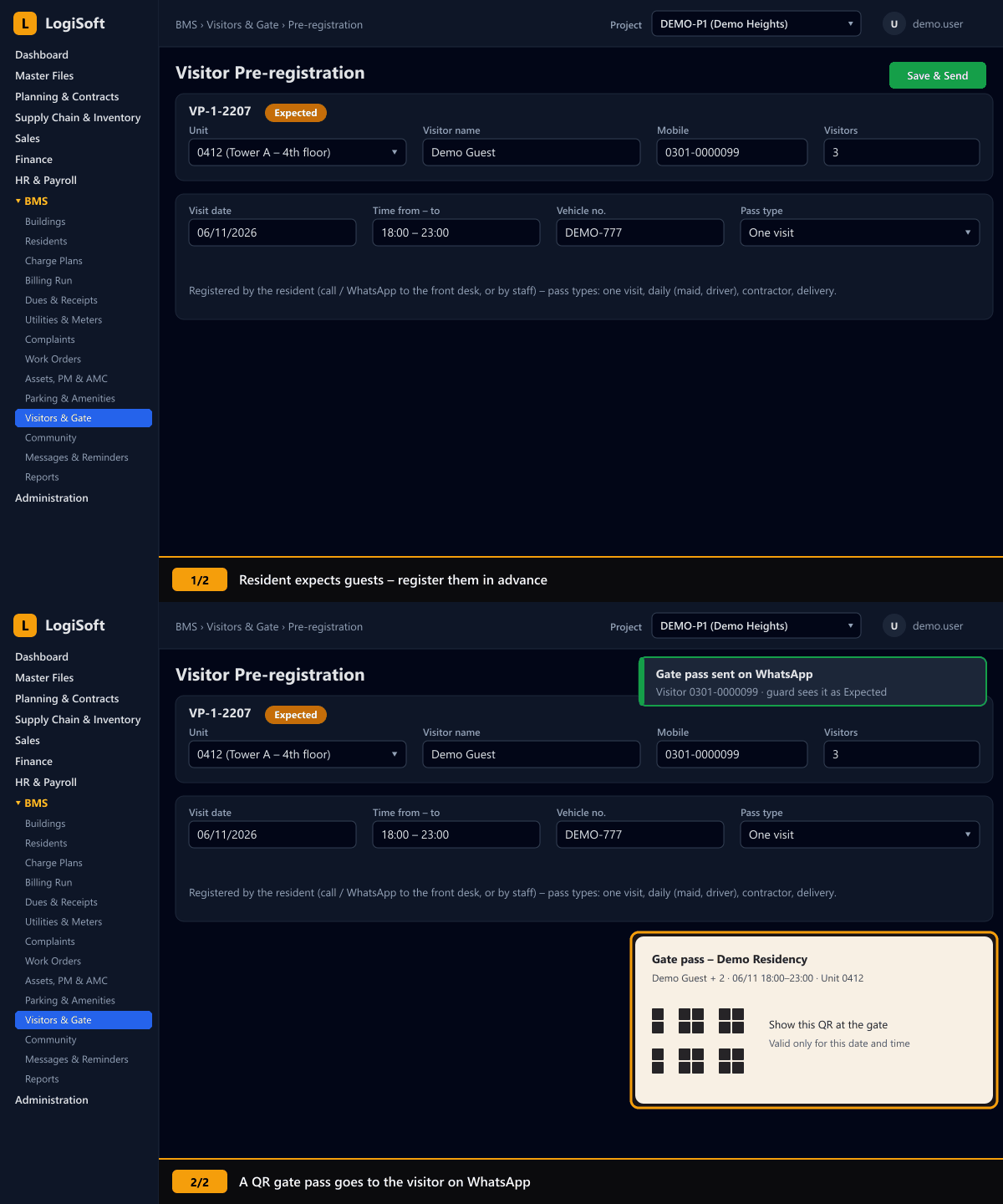
Expected guests get in quickly; unknown ones do not.

How

Resident (through the front desk, a call or WhatsApp) registers visitors: name, mobile, number of visitors, date and time window, vehicle. Pass types: one visit, daily (maid, driver), contractor, delivery. A QR gate pass goes to the visitor on WhatsApp – valid only for its date and time.

Visitor pre-registration & gate pass

D4Gate desk

Where

BMS › Visitors & Gate › Gate Desk.

Why

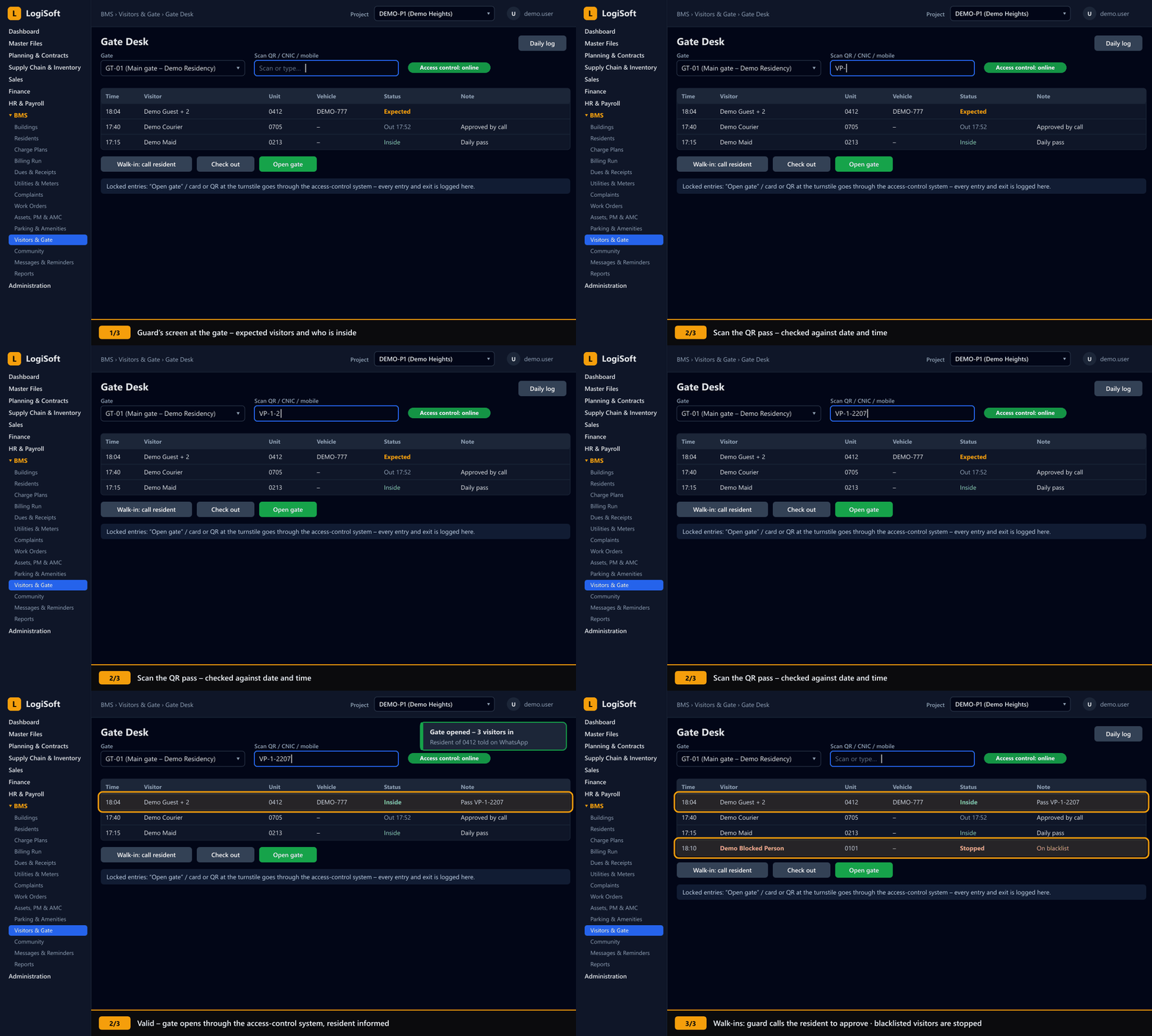
One screen for the guard – every entry and exit logged.

How

Scan QR / CNIC / mobile → pass checked against date and time → gate opens through the access-control system and the resident is told on WhatsApp. Walk-ins: the guard calls the resident to approve. Blacklisted visitors are stopped. Vehicle entry, check-out, who is inside now, daily visitor log; cards and QR at locked turnstiles go through the access-control integration.

Gate desk

Part E

Community and communication

Meetings, notices, polls and every message to residents – including overdue reminders.

E1Meetings

Where

BMS › Community › Meetings.

Why

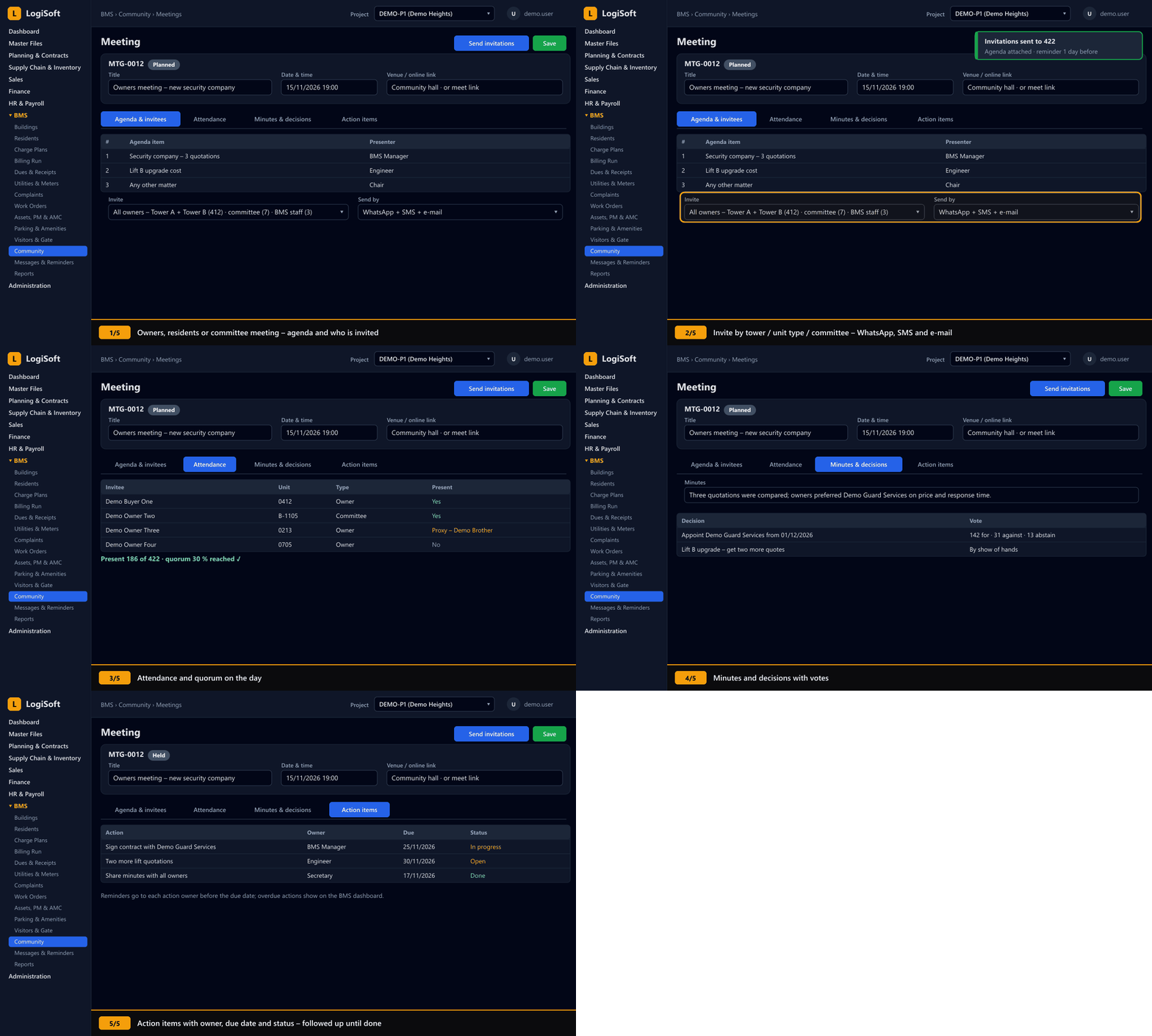
Owners’, residents’ and committee meetings with a record of what was decided.

How

Title, building, date and time, venue or online link, agenda items with presenter. Invitees by building / tower / unit type, committee and staff; invitation by WhatsApp / SMS / e-mail with the agenda and a reminder. Attendance with proxies and quorum; minutes and decisions with votes; action items with owner, due date and status – reminded until done; attachments.

Meetings

E2Notices & circulars

Where

BMS › Community › Notices.

Why

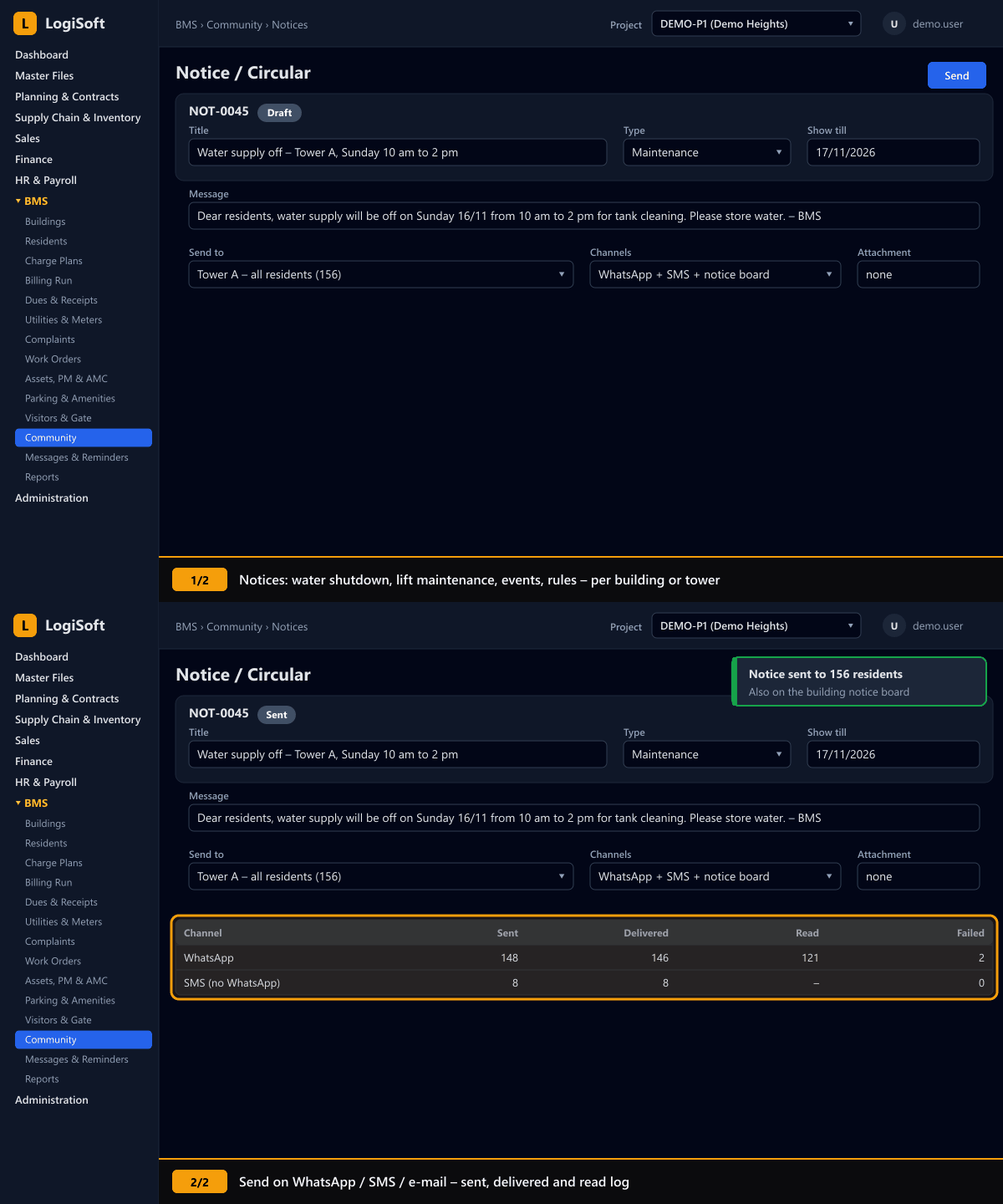
Everyone affected hears about a water shutdown or lift work in time.

How

Notice per building or tower (maintenance, events, rules) with a show-till date; send by WhatsApp / SMS / e-mail to selected residents and show on the notice board; sent, delivered, read and failed log.

Notices & circulars

E3Polls, surveys and events

Where

BMS › Community › Polls / Events.

Why

Decide together and keep everyone informed.

How

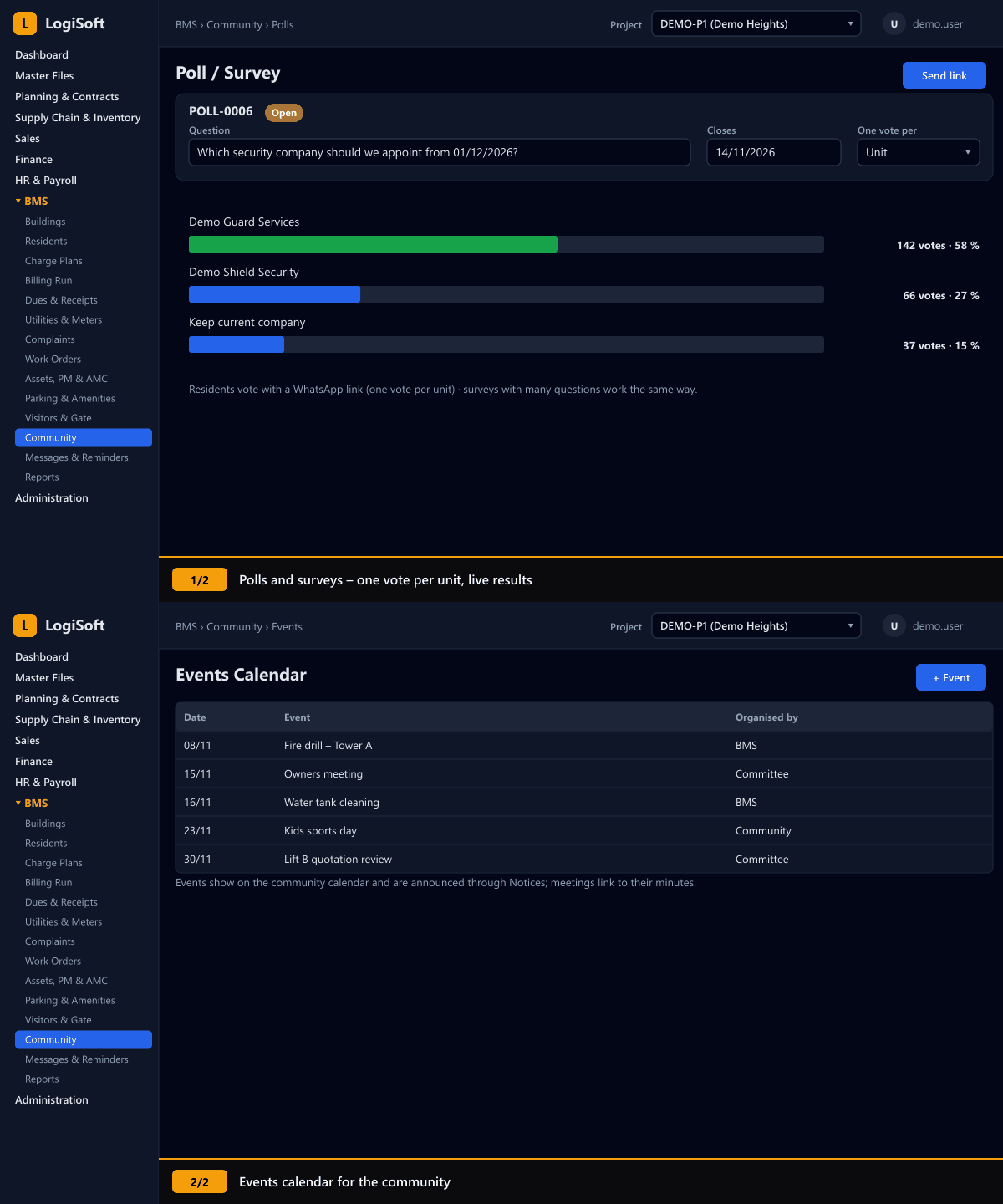
Polls and surveys by WhatsApp link with one vote per unit and live results (e.g. choosing a new security company). Community events calendar – drills, cleaning, meetings, events – announced through notices.

Polls, surveys and events

E4Message templates

Where

BMS › Messages & Reminders › Templates.

Why

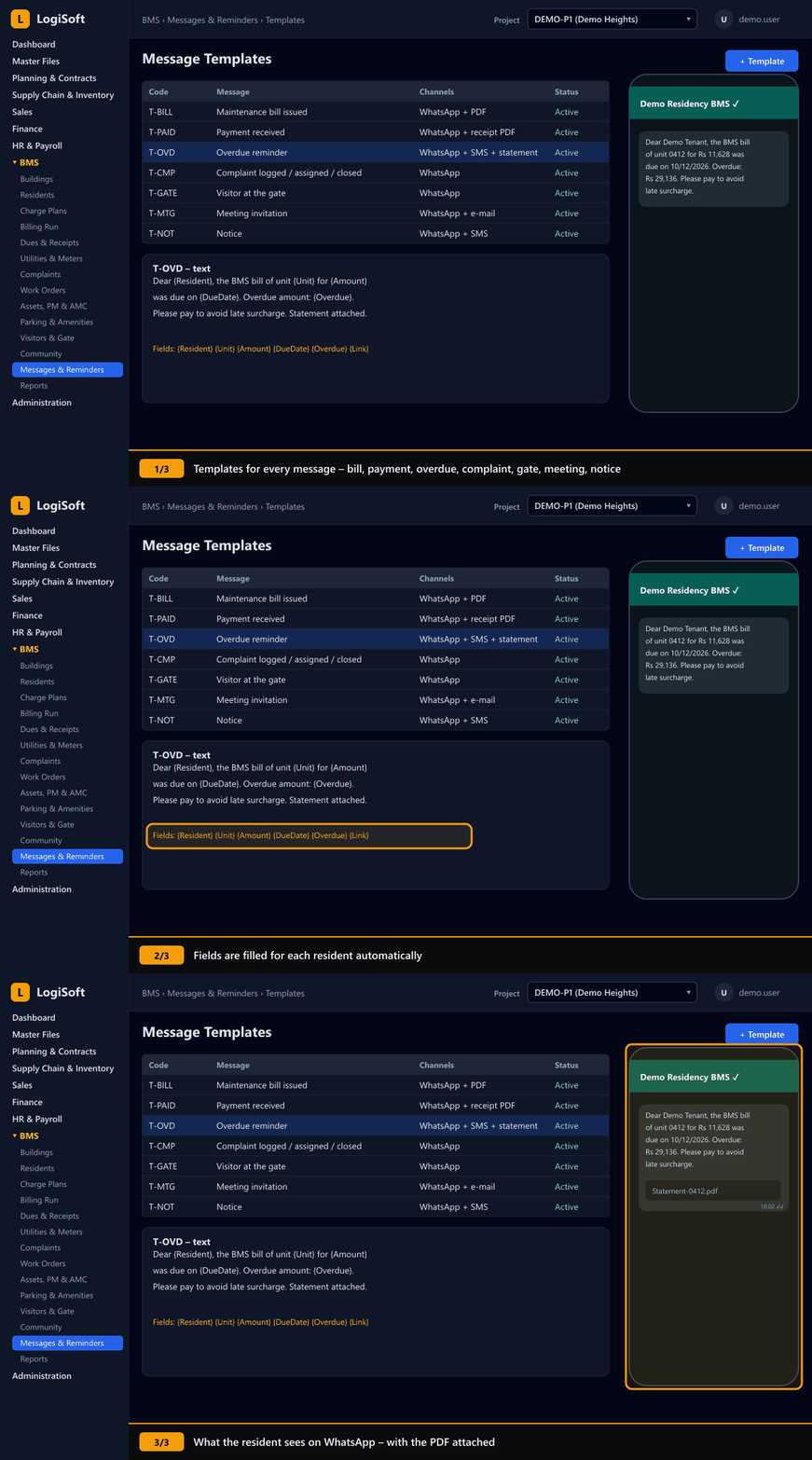
Every message to residents looks right and is filled in by itself.

How

WhatsApp / SMS / e-mail templates for: bill issued (with bill PDF), payment received (receipt PDF), overdue reminder (statement PDF), complaint logged / assigned / closed, visitor at the gate, meeting invitation, notice. Fields {Resident} {Unit} {Amount} {DueDate} {Overdue} {Link} are filled for each resident. Same WhatsApp Cloud API gateway as Administration.

Message templates

E5Overdue reminders & bulk send

Where

BMS › Messages & Reminders › Policy / Bulk send.

Why

Collections improve when reminders go out on time, every time.

How

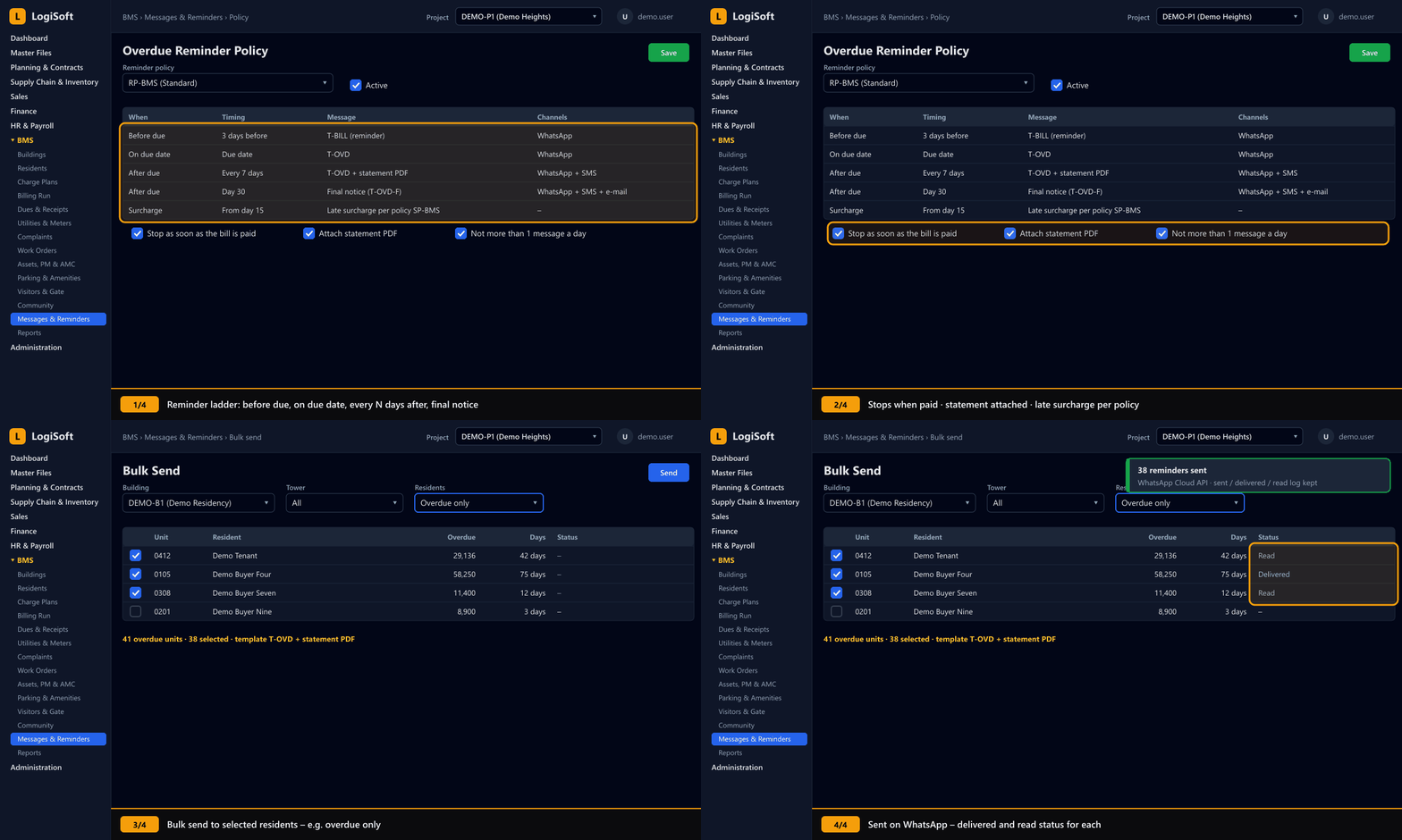
Reminder policy: X days before due, on the due date, every N days after due (e.g. 7 / 15 / 30), final notice; stops as soon as the bill is paid; statement PDF attached; not more than one message a day; late surcharge per the surcharge policy. Bulk send to selected residents (building / tower / overdue only) with sent, delivered and read status for each.

Overdue reminders & bulk send

Part F

Reports

How each building is doing – money, service and use.

F1BMS reports & dashboard

Where

BMS › Reports.

Why

Management sees collection and service levels at a glance.

How

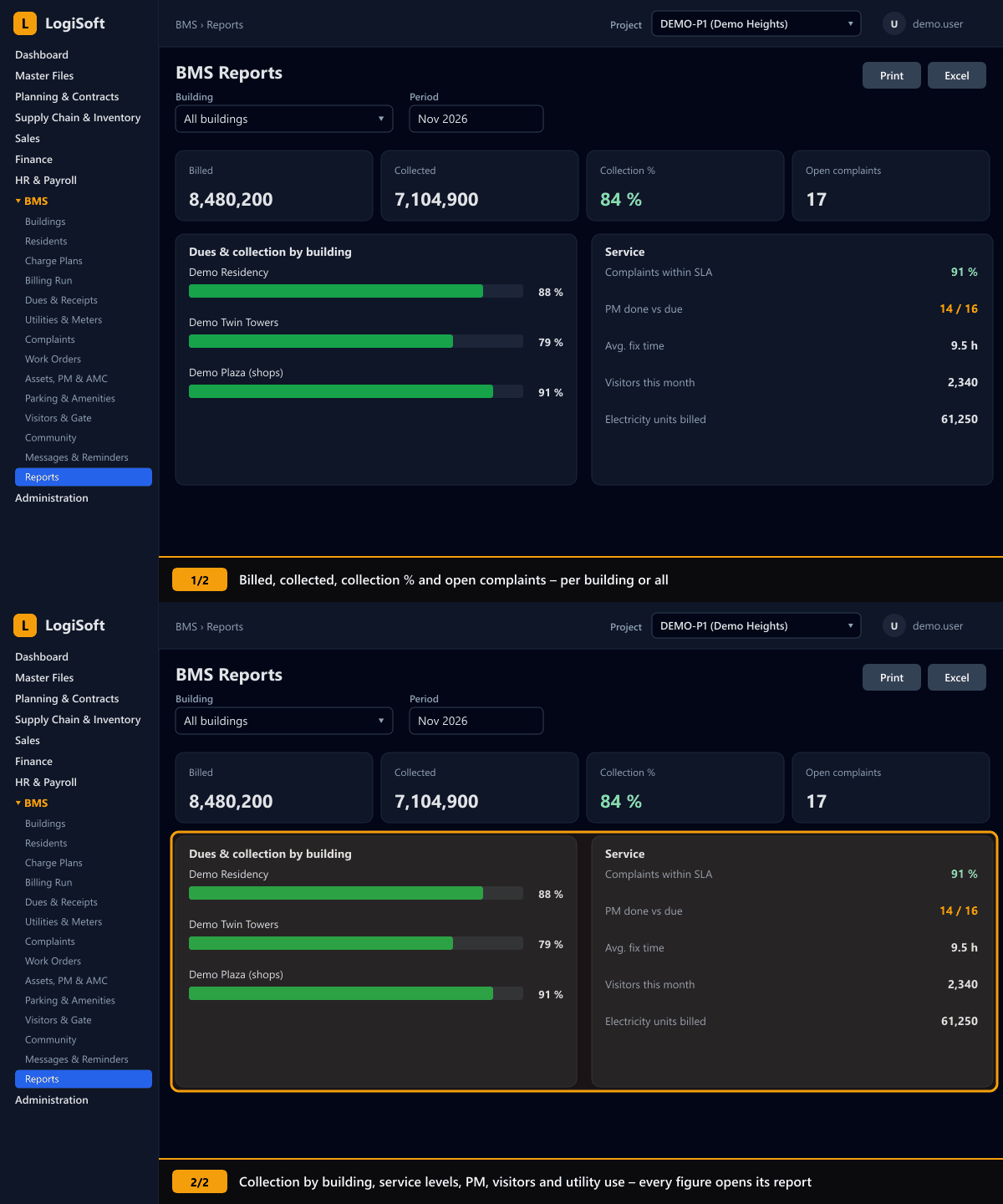
Billed, collected, collection % and open complaints per building or all; dues and collection by building; complaints within target time, average fix time, PM done vs due, visitors, utility use – every figure opens its report.

BMS reports & dashboard

Part G

Accounting entries and reports

Every BMS document posts to Finance on approval, with the building’s BMS project as cost centre.

Accounting entries

DocumentDebitCredit
BMS bill (charges / utilities / amenities)Resident (unit)Maintenance income · sinking fund liability · utility recovery · amenity income
Late surchargeResident (unit)Late surcharge income
BMS receiptBank / cashResident (unit)
Material issued to a work orderRepairs & maintenance (building cost centre)BMS store inventory
Vendor bill (AMC / repairs / utilities)Repairs, AMC or utility cost (building)Vendor (WHT per Finance)
Resident charged for a repairResident (unit)Recovery of repair cost

Reports

R1Dues and collection per building / tower / unit; resident statements
R2Aging of BMS dues; overdue list for reminders
R3Billing register per month – charges, utilities, surcharge
R4Utility consumption and recovery per building and per unit
R5Complaints: by category, within target time, average fix time, technician performance
R6Preventive maintenance done vs due; asset history and repair cost
R7AMC contracts and expiry list
R8Cost per building (repairs, materials, AMC, utilities, staff)
R9Visitor log, gate entries by unit, blacklist hits
R10Messages sent / delivered / read; meeting attendance and action items

All reports: filters (building, tower, unit, period, category), print / PDF / Excel, company logo.

Not included

  • Resident mobile app and self-service portal (bills, complaints, visitor passes online) – part of CRM later.
  • Supply and installation of access-control hardware, turnstiles, cameras or meters – only integration with the system already installed.
  • Online payment gateway for residents.
  • Live CCTV viewing inside LogiSoft.

Acceptance

The module is accepted when: a handed-over unit appears with its owner from Property Sales and a tenant is added → a monthly billing run bills every unit from its charge plan with utilities from meter readings and sends the PDFs on WhatsApp → a unit is switched to its own connection with a final reading → a receipt is allocated and posted to Finance with the BMS cost centre → overdue reminders go out by the policy and stop when paid → a complaint is logged, assigned, closed with store material and rated → a PM task creates its work order on the due date and an AMC expiry alert is raised → a parking slot is rented and an amenity booked onto the bill → a QR pass lets a visitor in through the access-control system and a blacklisted visitor is stopped → a meeting is held with attendance, minutes and action items.

Open points

For your decision

01

Charge basis per building

For each building: per sq ft, fixed per unit type or fixed per unit – and the frequency (monthly / quarterly / yearly)?

02

Utilities by sub-meter today

Which buildings / units are billed by company sub-meters today, and which have their own connections?

03

Access-control system

Brand and model of the access-control system at each gate, so the integration can be planned.

04

Amenities

Which amenities are booked (hall, gym, pool, guest rooms …) and their charges and deposits?

Prepared by Dynamic Software Solution · 05 Nov 2026 · Document version 0.1

Powered by Dynamic Software Solution · www.dynamicsoft.biz