Module 0 · Construction & Real Estate Suite

Core Setup – Scope of Work

The foundation every module stands on: the group, its companies and projects, who may work where and on which dates, how documents are approved and numbered, and the master files shared by everyone – parties, currencies and one chart of accounts. Built for any number of companies, in any currency, in any industry. Anything not written on this page is not part of this module.

All modules
CS
Core Setup

Set up in this order

01

Company Group

Group currency for combined reports

02

Companies

Base currency · financial year · logo

03

Projects

Cost centres · short number 1, 2, 3

04

Users & roles

Allowed projects · rights · date access

05

Approvals

Levels and users per document

06

Numbering

Per project · optional yearly reset

How it fits in LogiSoftWhat Core Setup gives it
Every modulePlanning & Contracts, Supply Chain & Inventory, Sales, Finance, HR and Payroll all read companies, projects, users, rights, approvals, numbering, parties and currencies from Core Setup – nothing is set up twice.
Project drop-downAt the top of every screen; lists only the projects the user is allowed. The user's default project is pre-selected.
FinanceOne Chart of Accounts for all companies; every entry carries its company and project (cost centre). Reports can convert all companies to the group currency.
TaxesMaster Files › Tax Master and Tax Groups. Parties carry NTN, sales-tax registration, STRN, WHT type and filer status.
The GIFs play the steps of each screen automatically; the orange box shows where to look in each step. Click any picture to open it full size. Screens are a preview of the planned design – names, rates and amounts are sample data.

Part A

Organisation

Who you are: the group, its companies and their projects. Set up once; every module uses it.

A1Company Group

Where

Administration › Company Groups.

Why

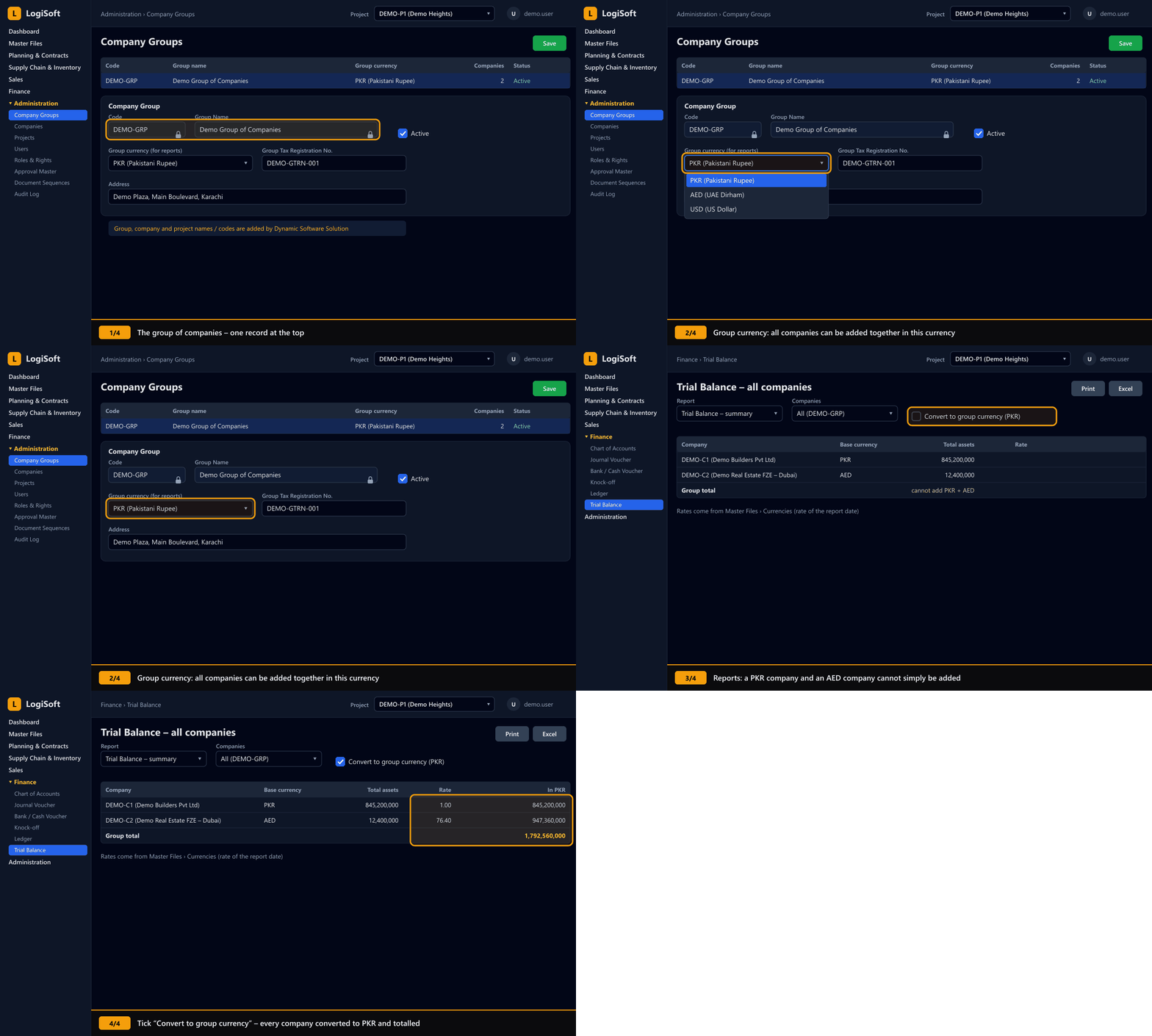
One place for the whole group – and one currency to see all companies together.

How

Code and name (added by Dynamic Software Solution), group currency, group tax registration, address. In reports a “Convert to group currency” tick converts every company at the rate of the report date and adds them up – e.g. a PKR company and an AED company in one trial balance. Transactions between group companies are shown as they are – nothing is hidden or cancelled.
Company Group

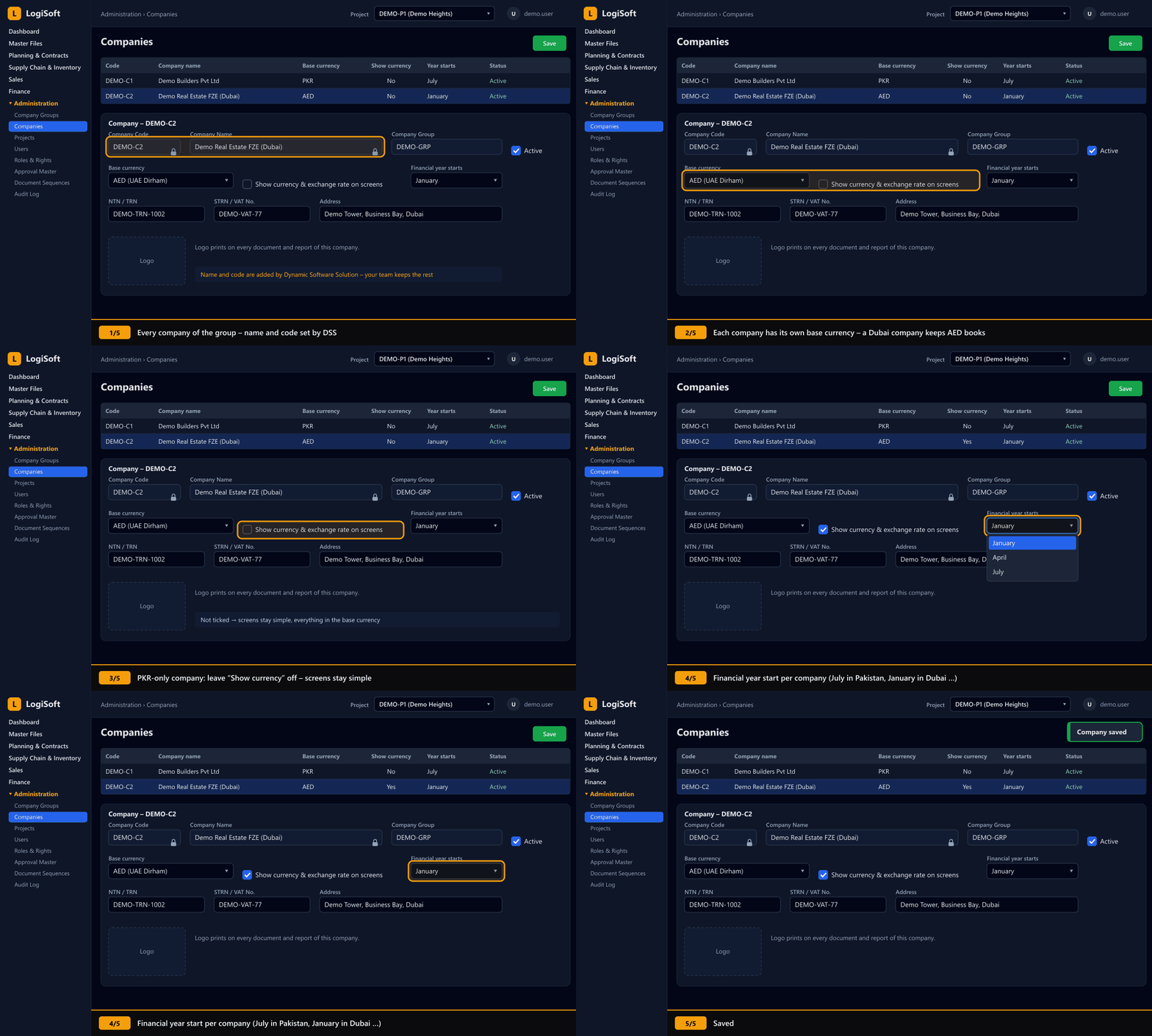
A2Companies

Where

Administration › Companies.

Why

Each company keeps its own books in its own currency and financial year – a company opened in Dubai later works from day one.

How

Name and code are added by Dynamic Software Solution; your team keeps address, NTN / TRN, STRN / VAT, logo. Base currency per company. “Show currency & exchange rate on screens” – off for a single-currency company so screens stay simple, on when the company deals in many currencies. Base currency and financial year start are chosen here and can be changed until the company has its first entry – then they lock, so posted figures never change meaning.

Companies

Today LogiSoft has one base currency for the whole system – base currency per company and group currency are new.

A3Projects / Cost Centres

Where

Administration › Projects.

Why

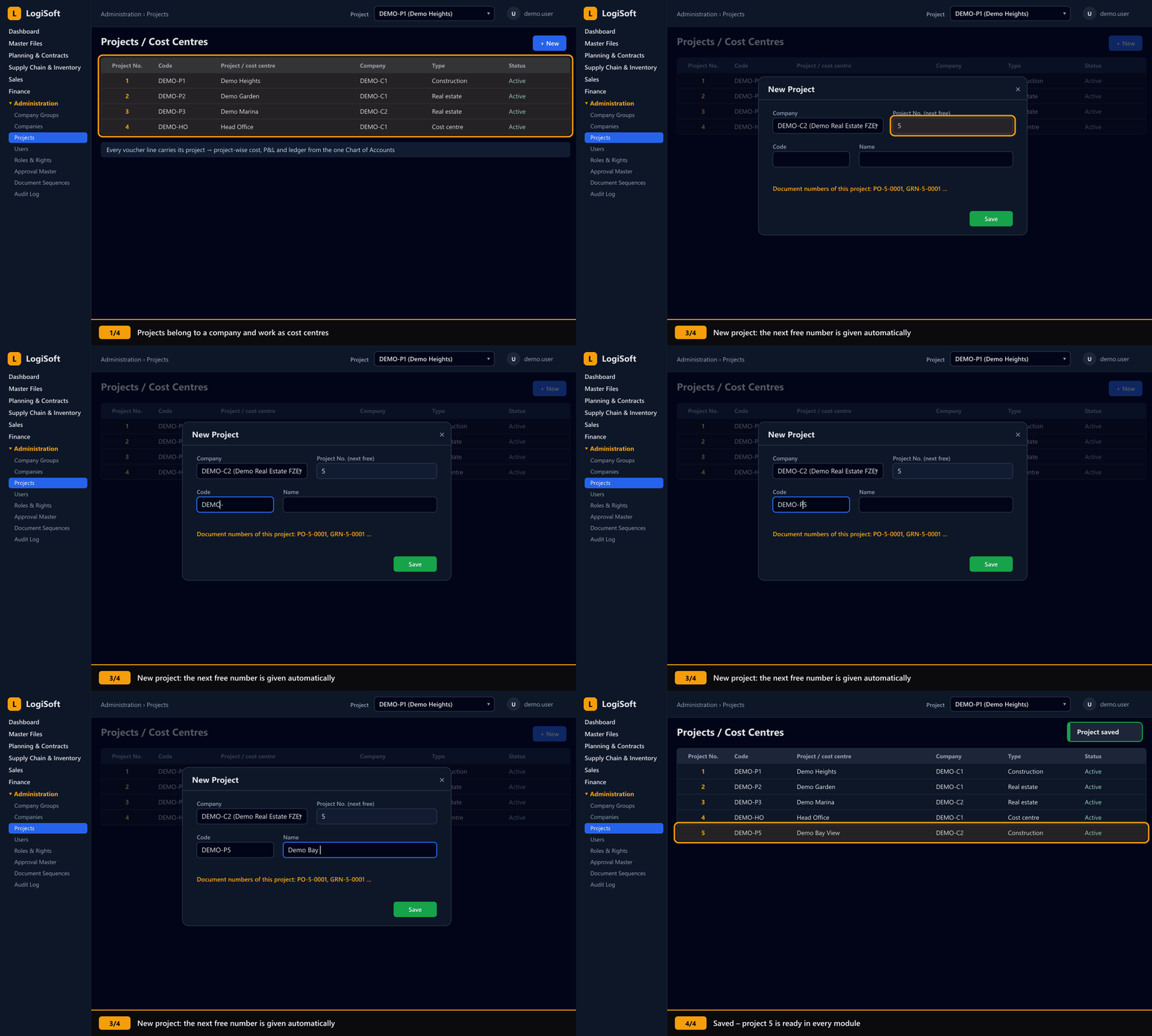
Every rupee is booked to a project, so project cost and profit come straight from the books.

How

Each project belongs to one company and works as its cost centre (a head office can be a cost centre too). A short project number 1, 2, 3 … is given automatically – one series for all companies, so a number never repeats – and is used inside every document number (PO-1-0001).

Projects / Cost Centres

Part B

Users and control

Who may do what, on which project and on which dates – and a record of everything they did.

B1Users

Where

Administration › Users.

Why

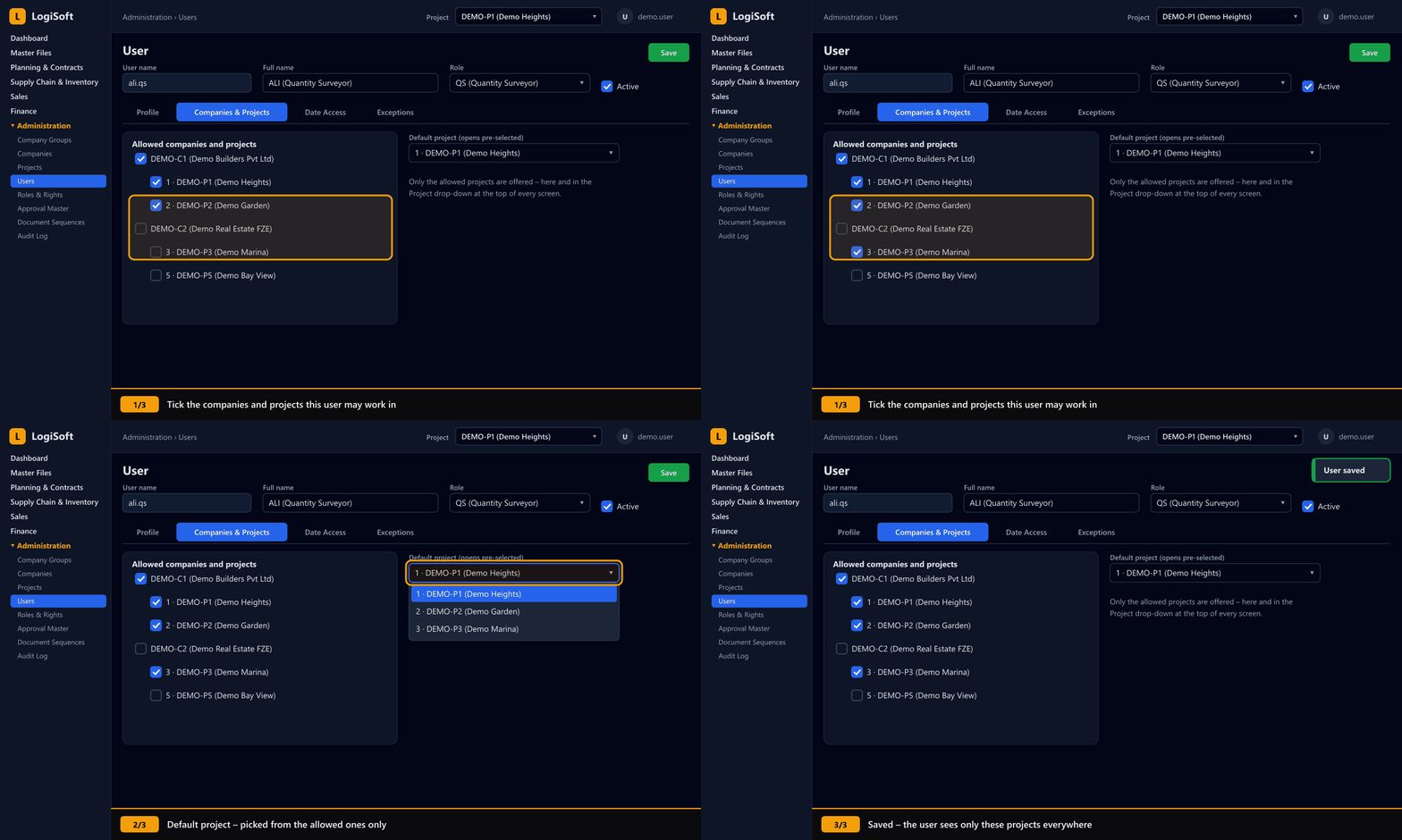
A user works only in the companies and projects given to them.

How

Allowed companies and projects as a tick tree. Default project (from the allowed ones) opens pre-selected on every screen. Role decides the screen rights; exceptions can be added for one user.

Users

B2Date Access

Where

Administration › Users › Date Access (already in LogiSoft).

Why

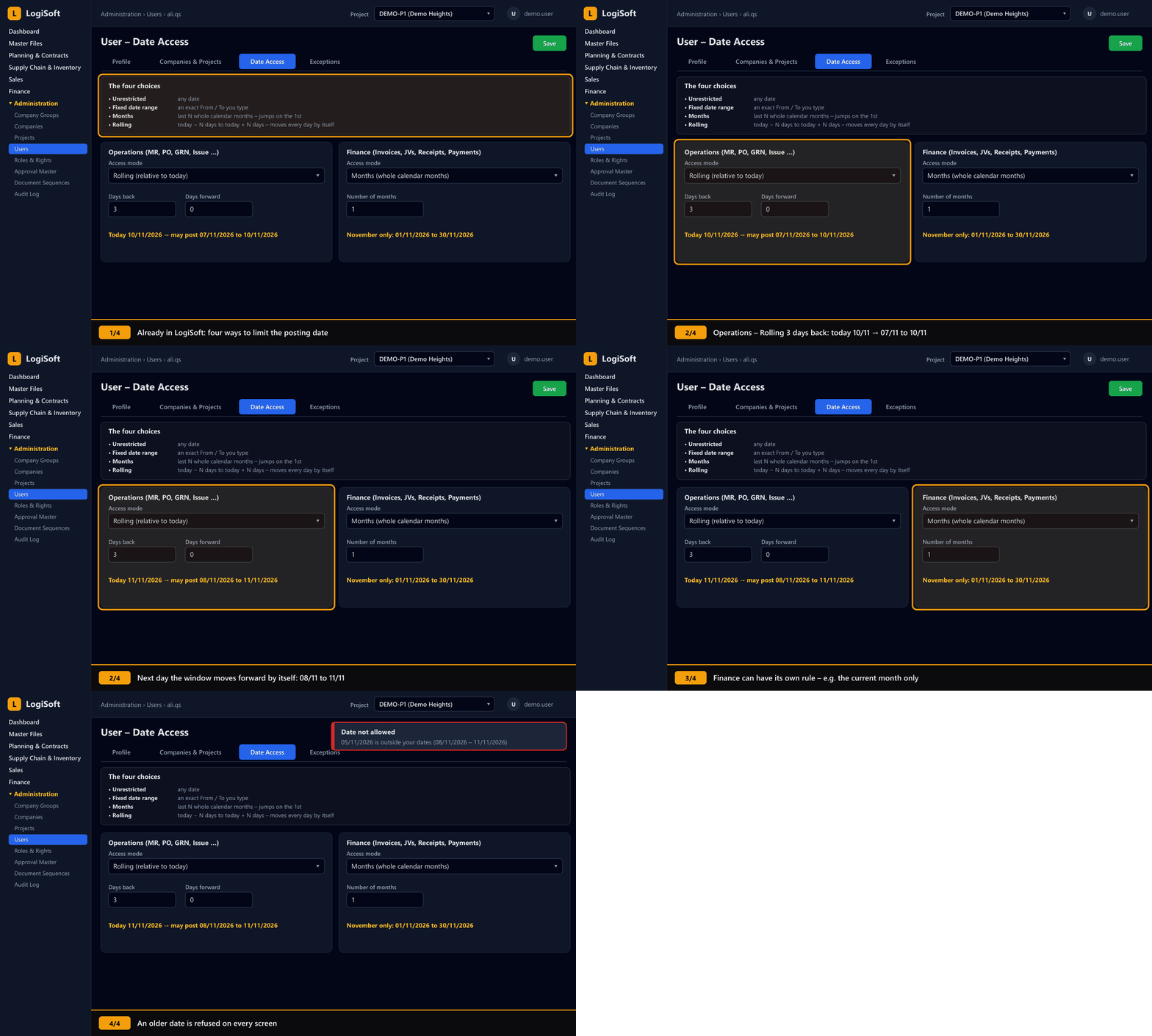
Stop back-dated or future-dated entries without closing whole months.

How

Separately for Operations and Finance: Unrestricted, Fixed date range, Months (last N whole months – jumps on the 1st) or Rolling (today − N days to today + N days – moves forward every day by itself). A date outside the window is refused on every screen.

Date Access

Month-end closing (locking a whole month for everyone) is not part of this scope – see Not included.

B3Roles & Screen Rights

Where

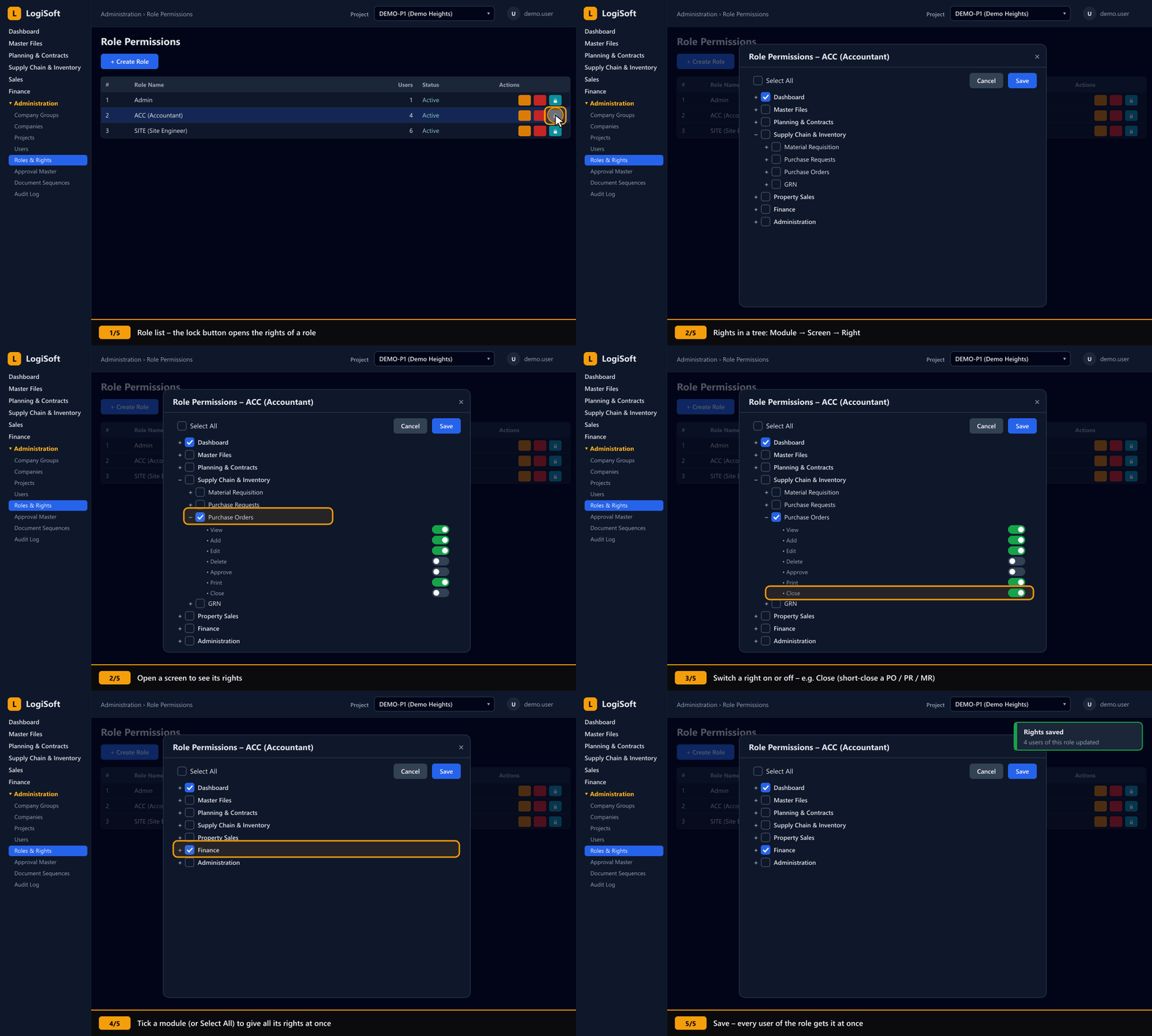
Administration › Role Permissions – the lock button on a role opens its rights.

Why

Set rights once for a role instead of user by user.

How

A pop-up tree, as in LogiSoft today: Select All, then Module → Screen → Rights. Open a module, open a screen, and switch each right on or off: View, Add, Edit, Delete, Approve, Print and Close (short-close of MR / PR / PO). Ticking a module or screen gives all its rights at once. Every user of the role gets the change at once; one-off exceptions are set on the user.

Roles & Screen Rights

B4Approval Master

Where

Administration › Approval Master (shared by all modules).

Why

Every document type is approved the same way, with as many levels as you need.

How

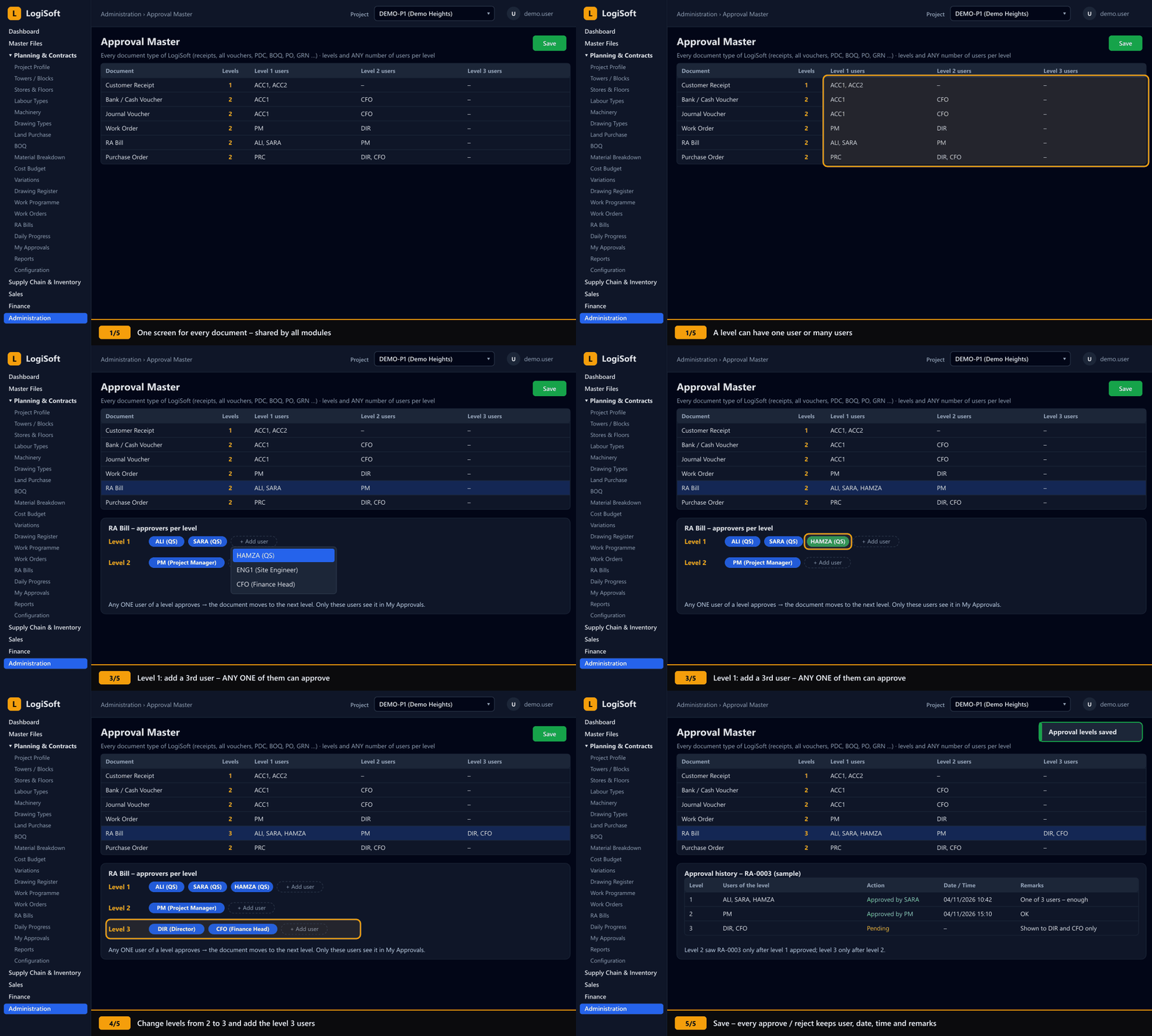
For each document: number of levels and any number of users per level. Any ONE user of a level approves and the document moves to the next level; level 2 sees it only after level 1. Only those users see it in My Approvals. Every approve / reject keeps user, date, time and remarks.

Approval Master

B5Document Sequences

Where

Administration › Document Sequences.

Why

Short, readable numbers that tell you the project at a glance.

How

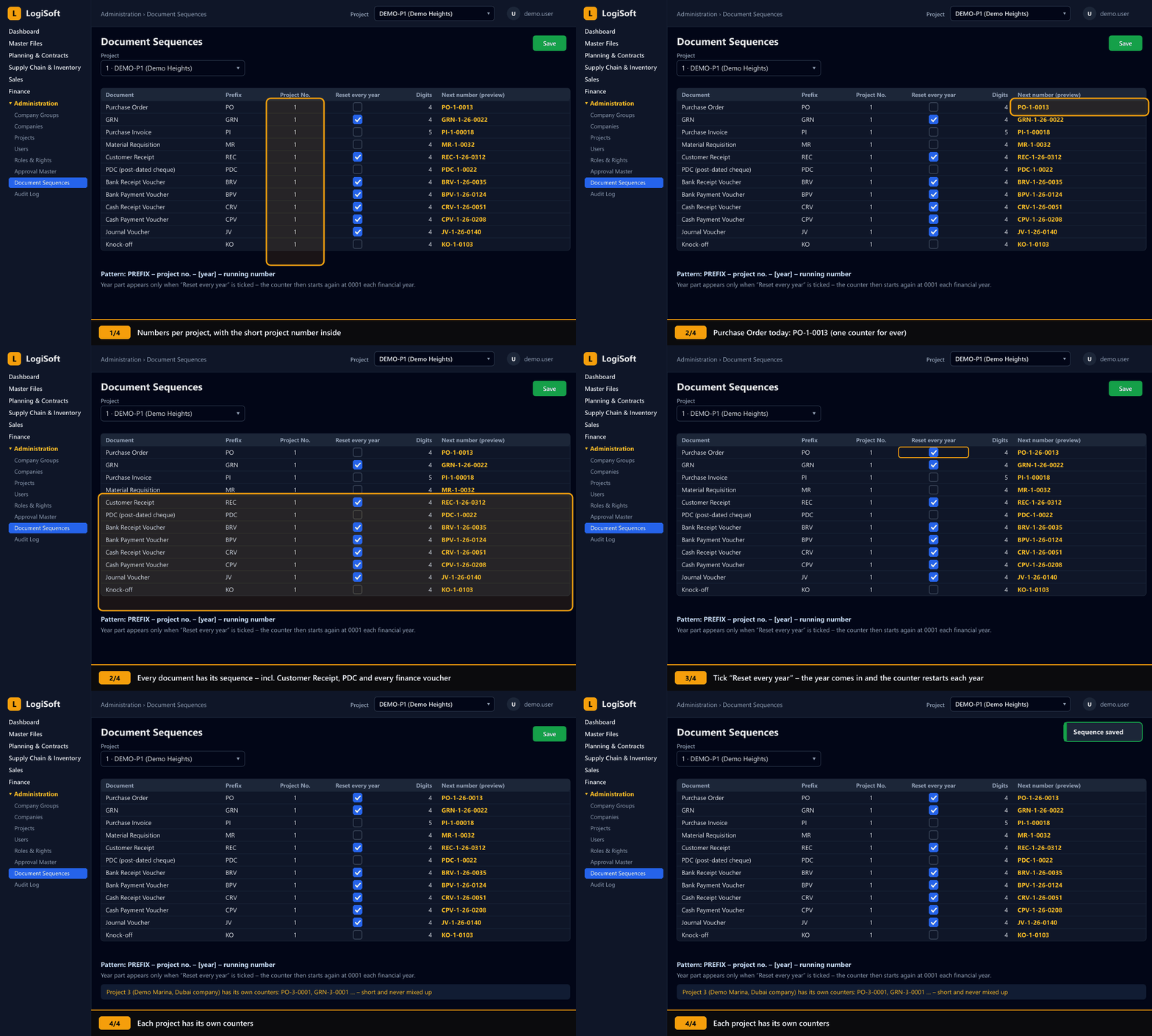
Per project and document: prefix, short project number, digits. Tick “Reset every year” on any sequence you want to restart each financial year – the year then appears in the number: PO-1-0013 (one counter for ever) or PO-1-26-0013 (restarts every year). Live preview of the next number. Your team sets this per sequence – no change from us needed.

Document Sequences

B6Audit Log

Where

Administration › Audit Log.

Why

Know who changed what, and when.

How

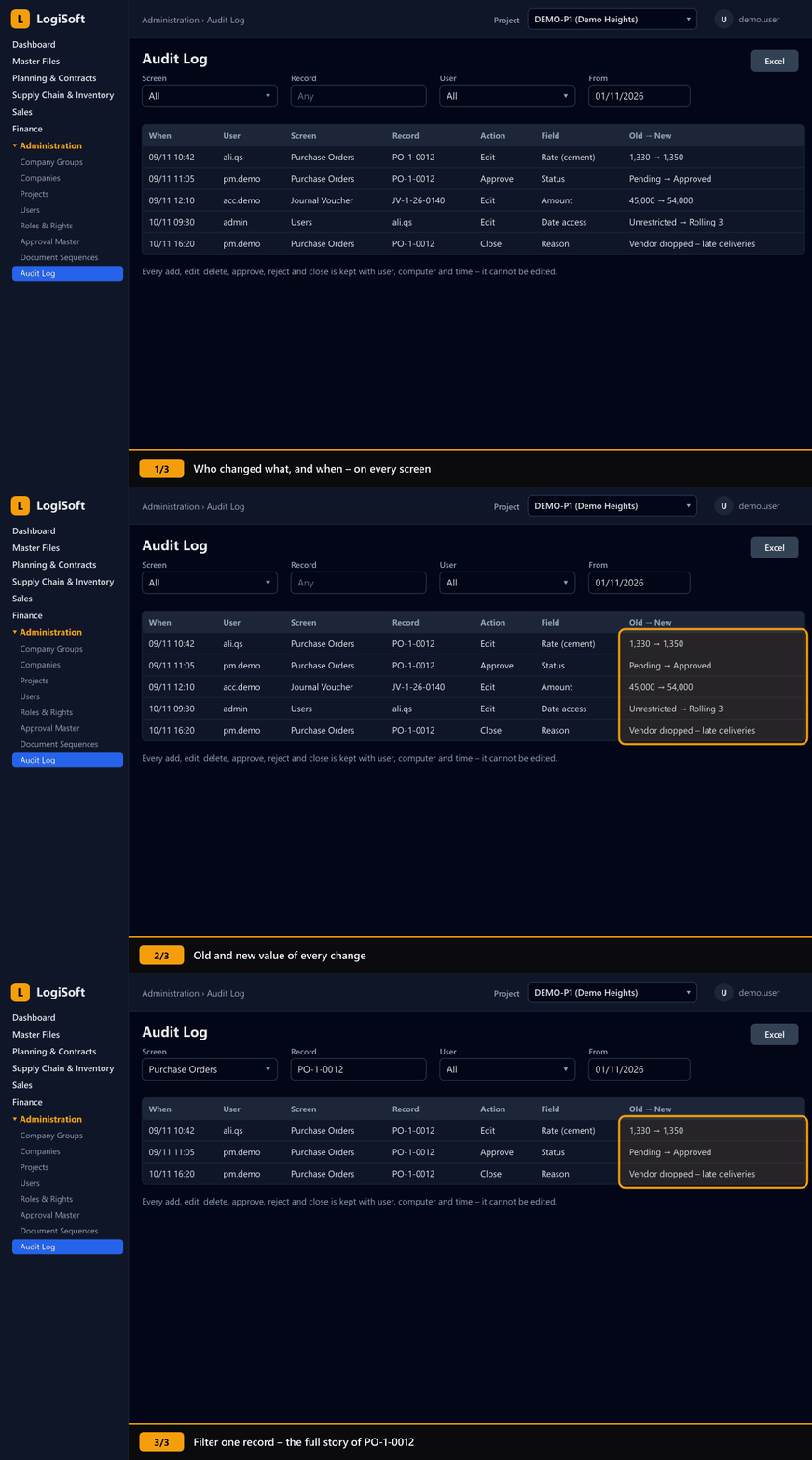
Every add, edit, delete, approve, reject and close with user, computer, time, field and old → new value. Filter by screen, record, user and date. Read-only – it cannot be edited.

Audit Log

Part C

Shared master files

Files used by every company and every module.

C1Parties

Where

Master Files › Parties.

Why

One vendor or customer is entered once – for every company of the group.

How

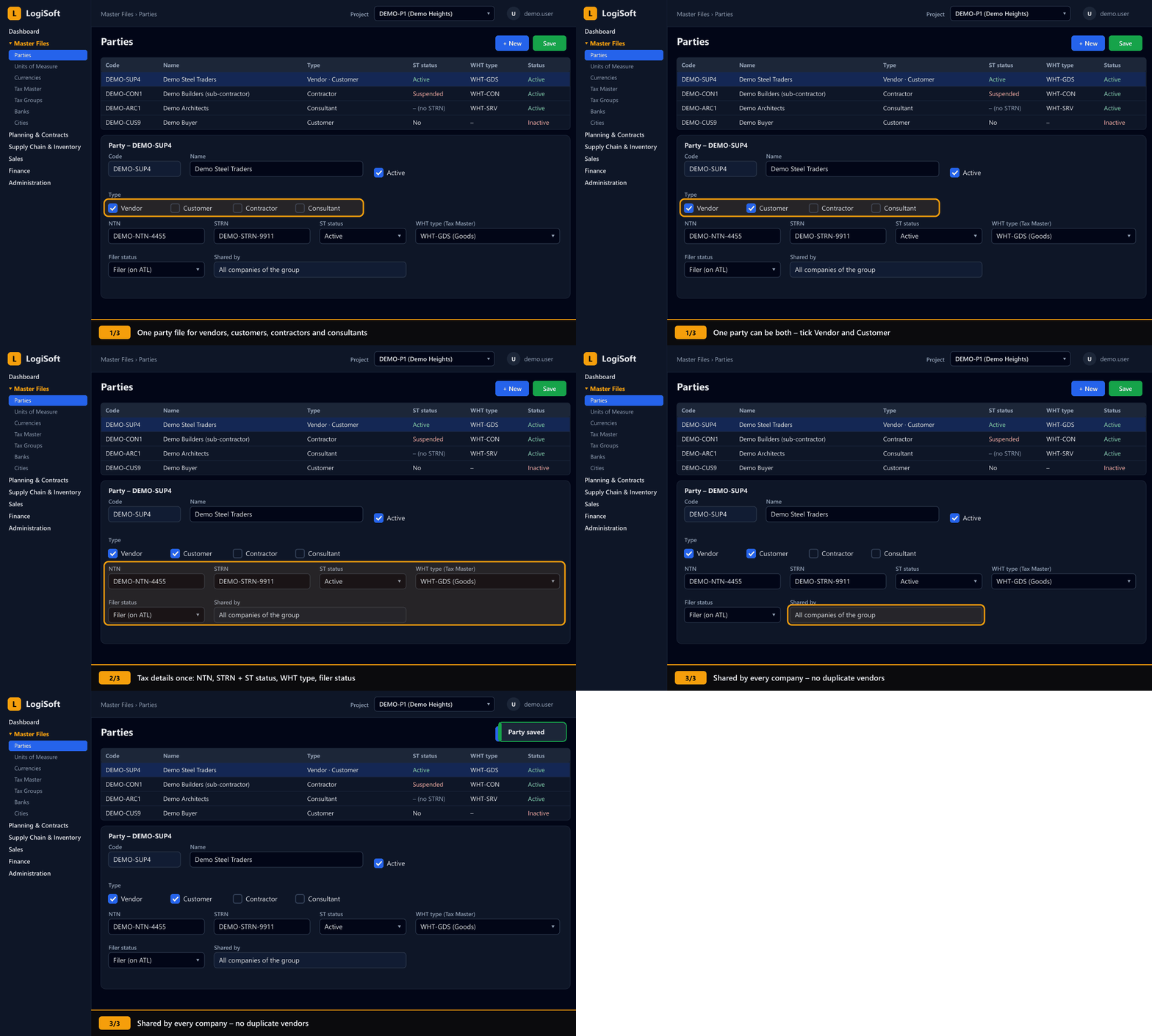
One file for vendors, customers, contractors and consultants – a party can have more than one type. NTN, STRN (filled = sales-tax registered) with ST status Active / Suspended / Blacklisted, WHT type (from the Tax Master), filer status, Active / Inactive.

Parties

C2Currencies & Exchange Rates

Where

Master Files › Currencies.

Why

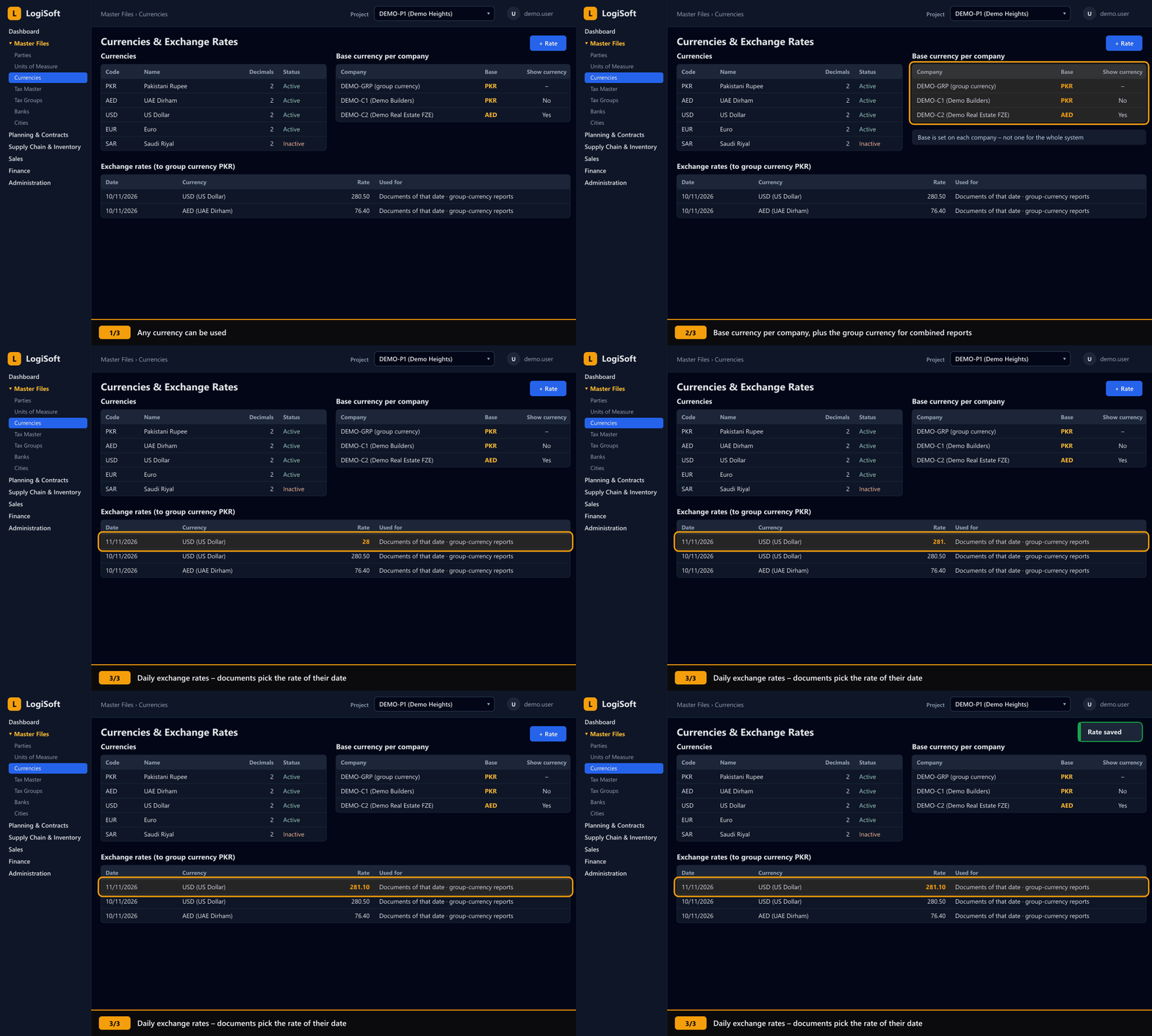
Any currency can be used; documents and reports use the rate of their date.

How

Currency code, name, decimals, Active / Inactive. Base currency is set on each company (not once for the system) and the group currency on the Company Group. Daily exchange rates to the group currency.

Currencies & Exchange Rates

C3Chart of Accounts

Where

Finance › Chart of Accounts.

Why

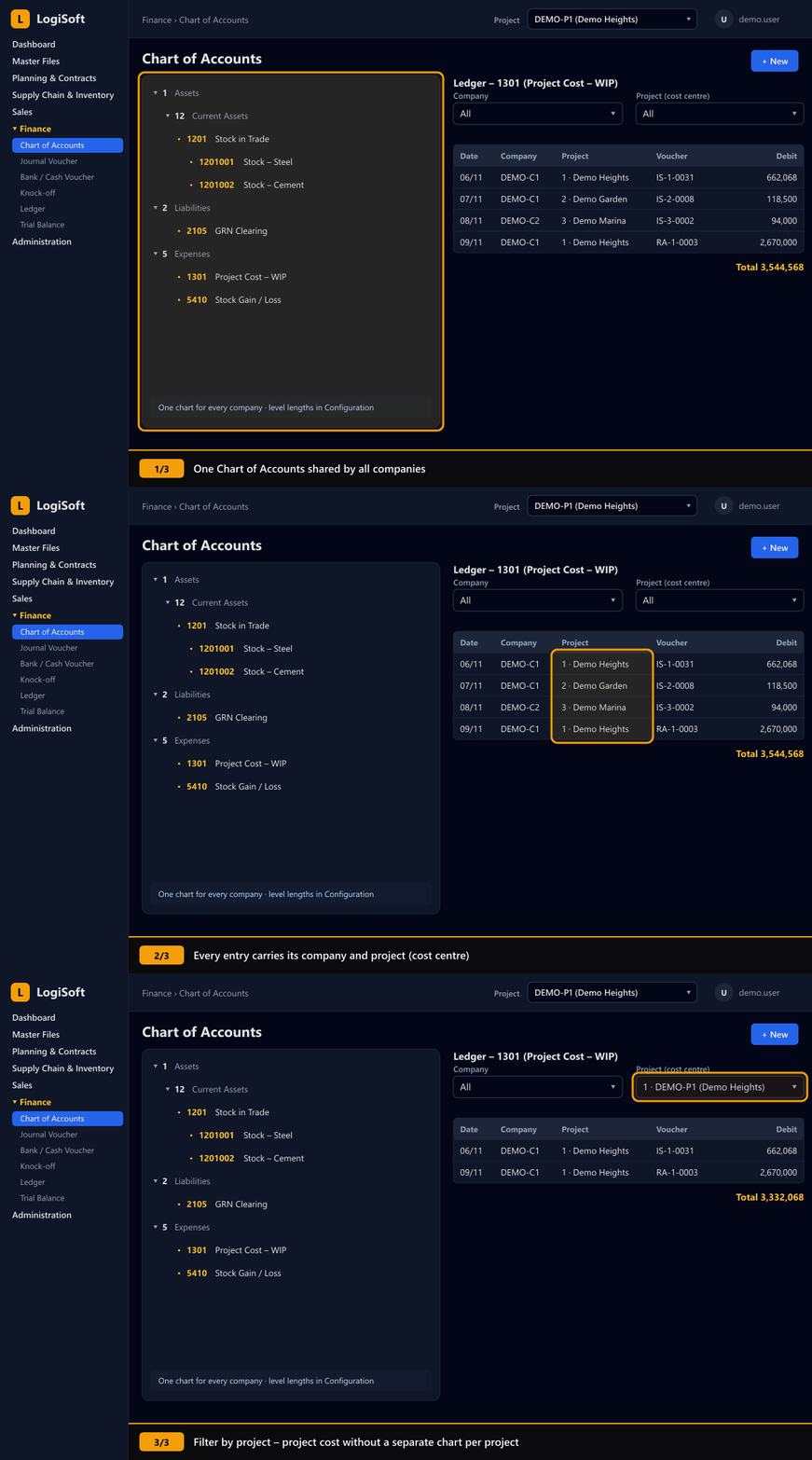
One chart for the whole group keeps reports comparable between companies.

How

Shared by all companies; level lengths set once in Configuration. Every entry carries its company and project (cost centre), so a ledger or P&L can be filtered by company or by project without a separate chart for each.

Chart of Accounts

C4Units of Measure

Where

Master Files › Units of Measure.

Why

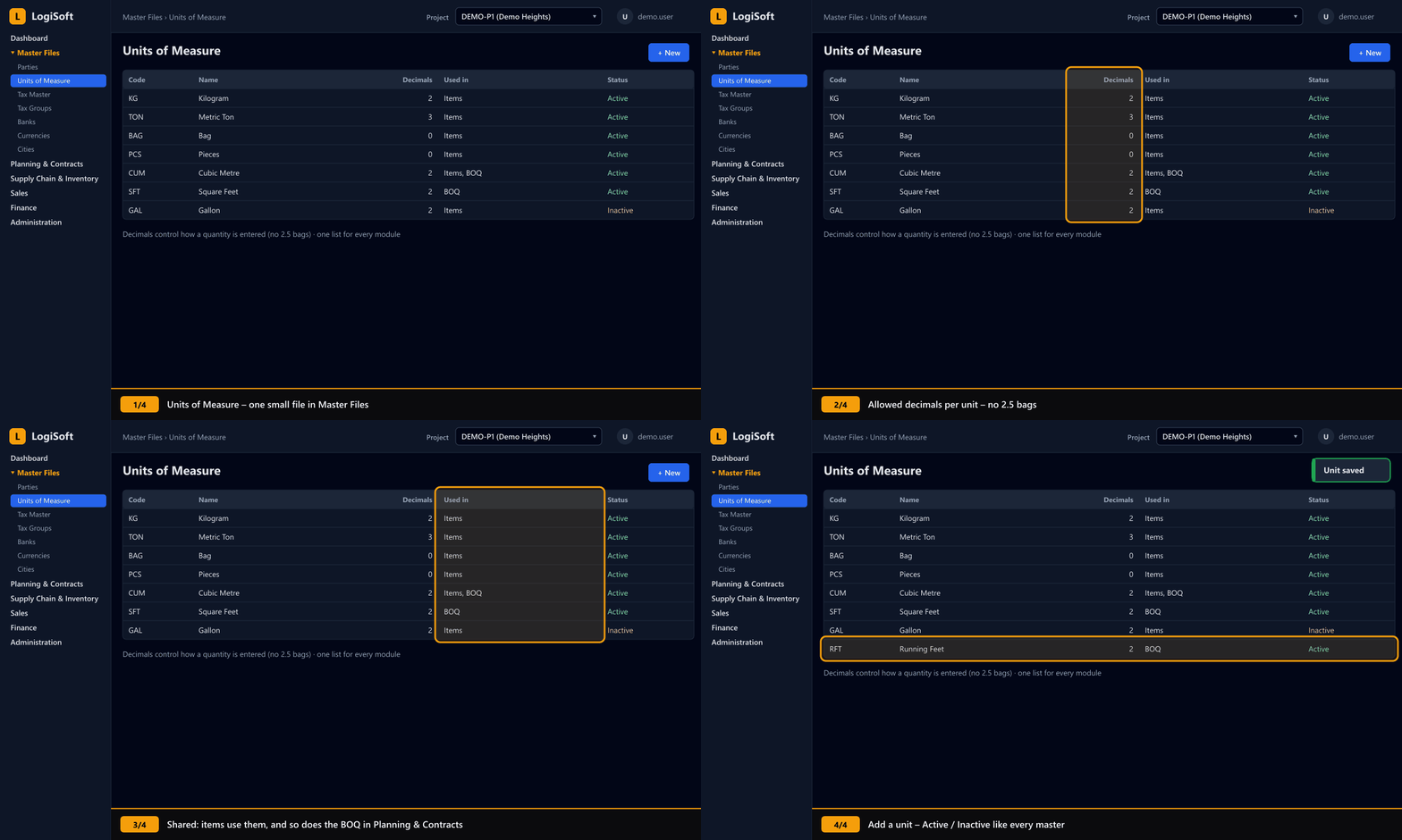
One list of units for items and BOQ.

How

Code, name, allowed decimals (no 2.5 bags), Active / Inactive.

Units of Measure

Part D

Reports

Control reports for the administrator. Every report prints, or exports to PDF and Excel.

R1Users with their companies, projects, role and date access
R2Rights per role and per user (who can approve / delete / close what)
R3Approval levels and users per document type
R4Document sequences with last number issued per project
R5Audit log by screen, record, user and date
R6Party list with tax details (NTN, STRN, WHT type, filer)
R7Exchange rate history

Not included

  • Month-end / year-end closing lock for all users (date access per user is included).
  • Adding new companies or projects by your team – names and codes are added by Dynamic Software Solution.
  • Batching plant (concrete sales) – separate project, not part of this scope.

Acceptance

The module is accepted when: the group, two companies (one in another currency) and their projects are set up → a user is given two projects with a default project and Rolling date access → a date outside the window is refused → a role's rights and one user exception work → a document goes through two approval levels → document numbers come out per project, with and without yearly reset → a party used by both companies → a trial balance of both companies is shown in the group currency → every change appears in the Audit Log.

Prepared by Dynamic Software Solution · 05 Nov 2026 · Document version 0.1

Powered by Dynamic Software Solution · www.dynamicsoft.biz