Module · Construction & Real Estate Suite

CRM – Scope of Work

Turns enquiries into bookings: buyer leads and seller leads entered by your sales staff (or from Excel) with a duplicate check, fair assignment, follow-ups and site visits with reminders, matching available and resale units from Property Sales, sharing unit sheets and payment plans on WhatsApp, one-click hold or booking, company buy-back through Re-Purchase or resale listing for sellers, campaigns, greetings and dashboards. Anything not written on this page is not part of this module.

What CRM covers

01

Leads

Buyer and seller · by hand or Excel · duplicate check

02

Assign

Round-robin · by project · manual

03

Follow up

Calls · WhatsApp · meetings · site visits

04

Match

Available and resale units for the budget

05

Close

Booking · re-purchase · resale · lost reason

06

Grow

Campaigns · greetings · dashboards

How it fitsWhat CRM uses or gives
Property SalesAvailable units, prices, payment plans, floor plans and videos come live from Sales; Hold / Token and Convert to booking open the Sales screens filled in; seller leads read the unit, current owner and dues from Sales and a buy-back opens the Re-Purchase.
Core SetupOnly company staff use CRM – users, rights and allowed projects from Core Setup; each salesperson sees his own leads, team leads see the team.
AdministrationWhatsApp (Meta WhatsApp Cloud API), SMS and e-mail gateways are the same as for the rest of LogiSoft.
Sales commissionBookings made from a lead carry the salesperson into the booking’s Commission tab.
The GIFs play the steps of each screen automatically; the orange box shows where to look in each step. Click any picture to open it full size. Screens are a preview of the planned design – names, rates and amounts are sample data.

Part A

Setup and leads

Two kinds of lead – a BUYER who wants a unit and a SELLER (owner) who wants to sell his unit. Entered by company staff.

A1CRM settings

Where

CRM › Settings.

Why

Sources, lost reasons and rules are set once by your team.

How

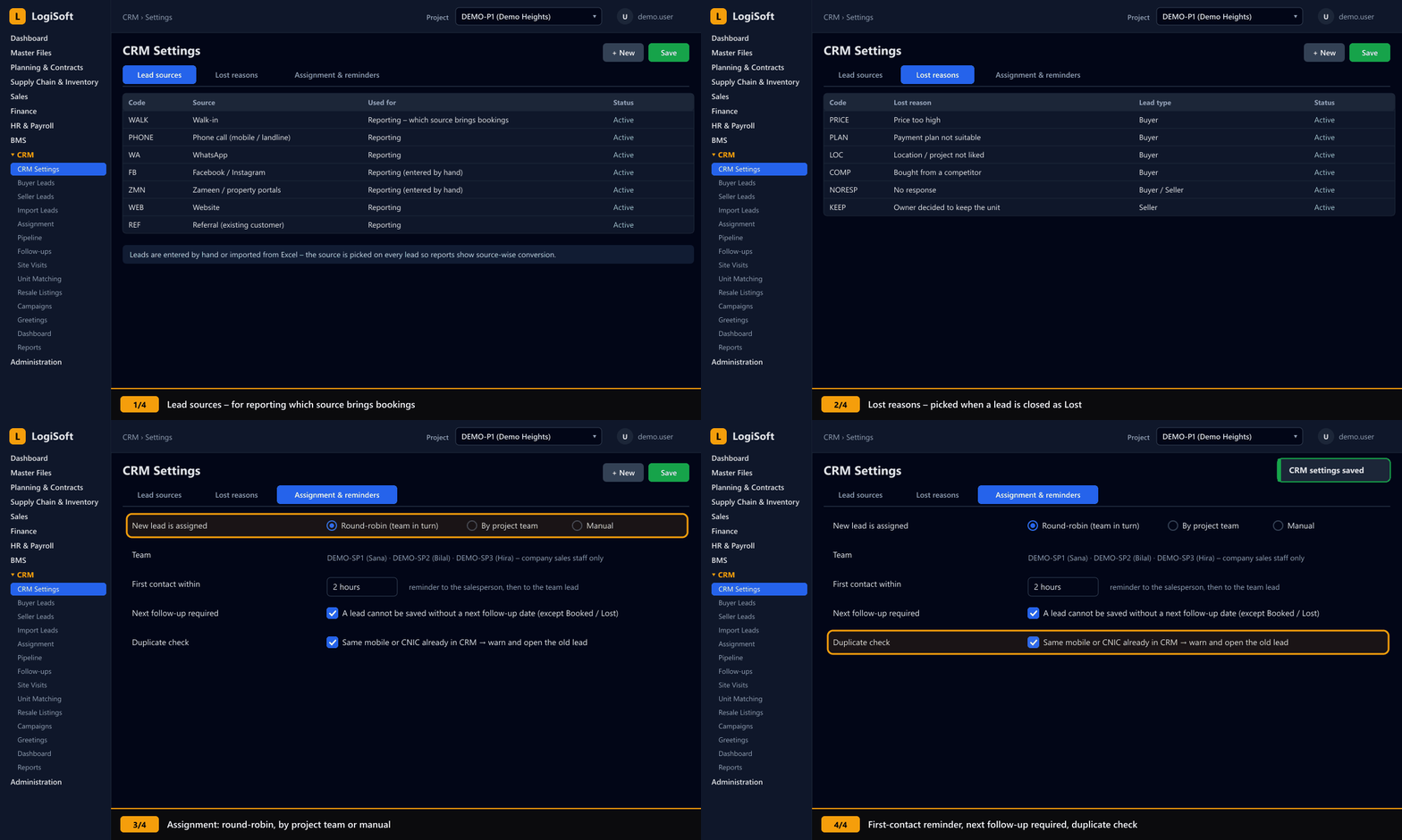
Lead sources (walk-in, phone, WhatsApp, Facebook / Instagram, Zameen / portals, website, referral) – picked on every lead for source-wise reports. Lost reasons per lead type. Assignment rule: round-robin, by project team or manual. First-contact reminder time, next follow-up required on every open lead, duplicate check by mobile / CNIC. Active / Inactive on every list.
CRM settings

A2Buyer lead

Where

CRM › Buyer Leads.

Why

Every enquiry is captured once with what the buyer wants.

How

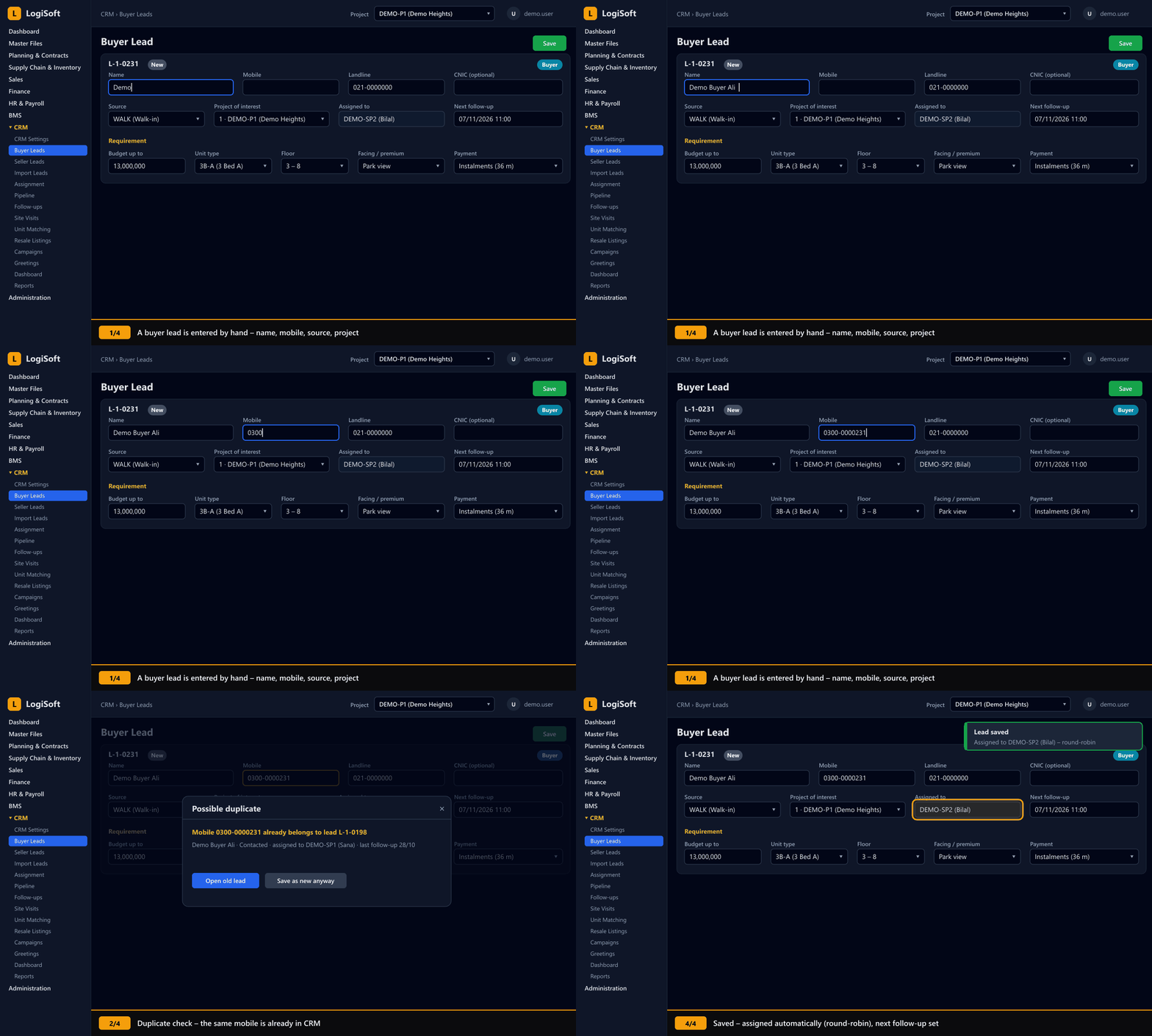
Name, mobile, landline, CNIC (optional), source, project of interest, next follow-up; requirement: budget, unit type, floor range, facing / premium, payment (cash or instalments). Duplicate check: if the mobile or CNIC already exists the old lead opens. Saved leads are assigned by the rule.

Buyer lead

A3Import leads from Excel

Where

CRM › Import Leads.

Why

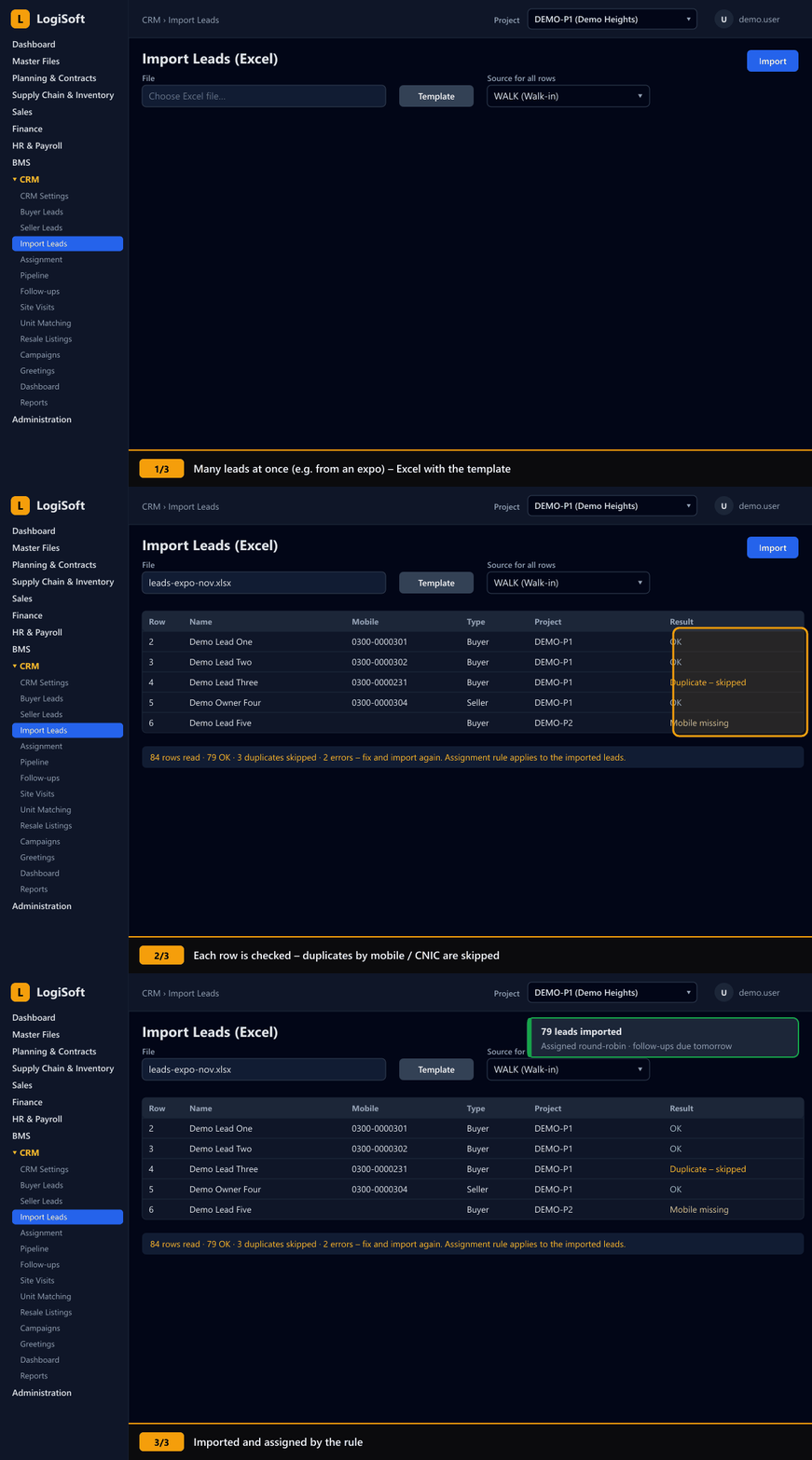
Many leads at once – e.g. after an expo or a campaign sheet.

How

Template with name, mobile, type (buyer / seller), project, requirement. Every row is checked; duplicates are skipped and errors listed before anything is saved. The assignment rule applies to imported leads. No automatic import from Facebook or portals in this phase.

Import leads from Excel

A4Assignment and re-assignment

Where

CRM › Assignment.

Why

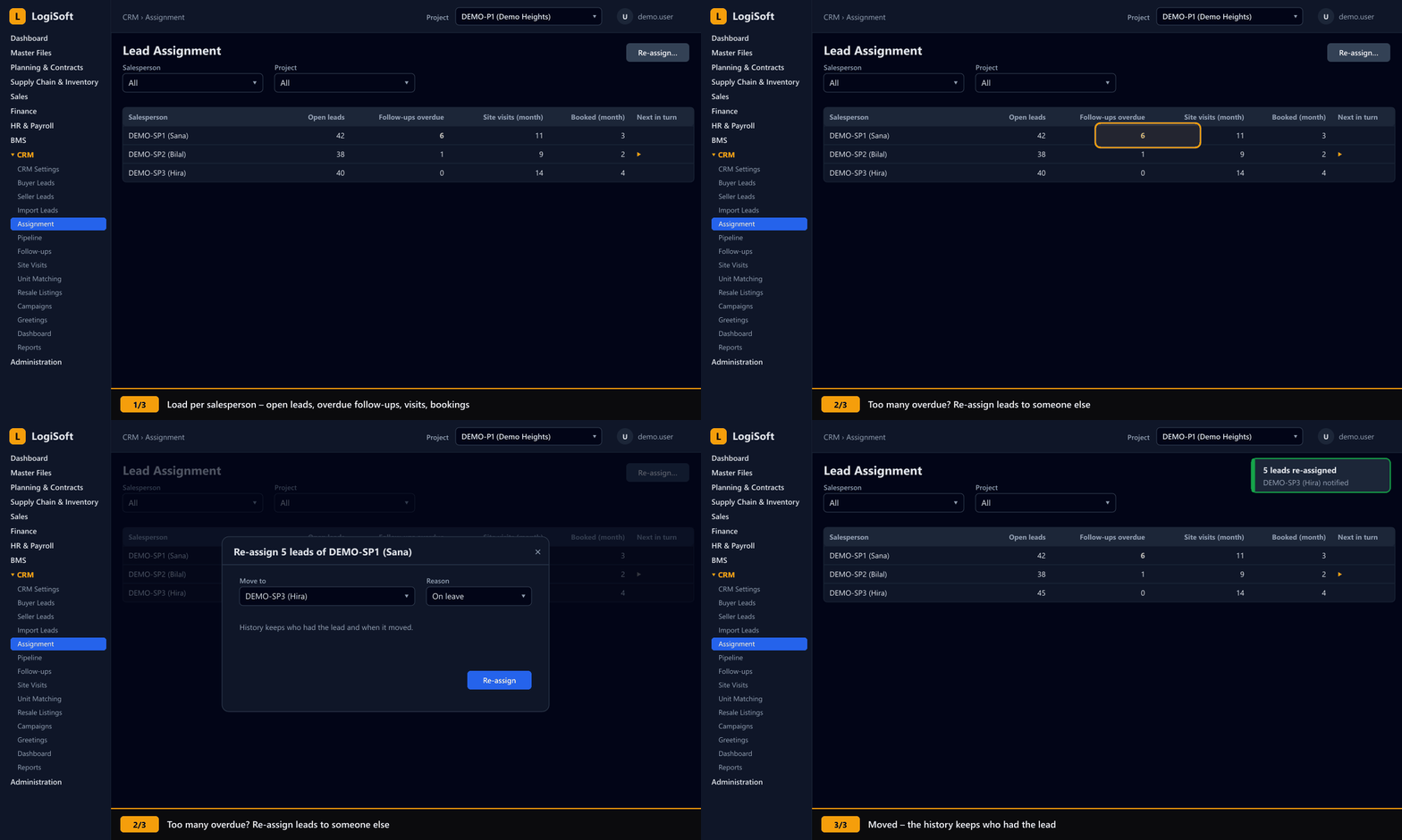
Fair load per salesperson and no lead left waiting.

How

Open leads, overdue follow-ups, site visits and bookings per salesperson; next in turn for round-robin. Re-assign selected leads (e.g. salesperson on leave) with a reason – the history keeps who had the lead and when.

Assignment and re-assignment

Part B

Buyer journey

From first call to booking – every step logged, nothing forgotten.

B1Buyer pipeline

Where

CRM › Pipeline.

Why

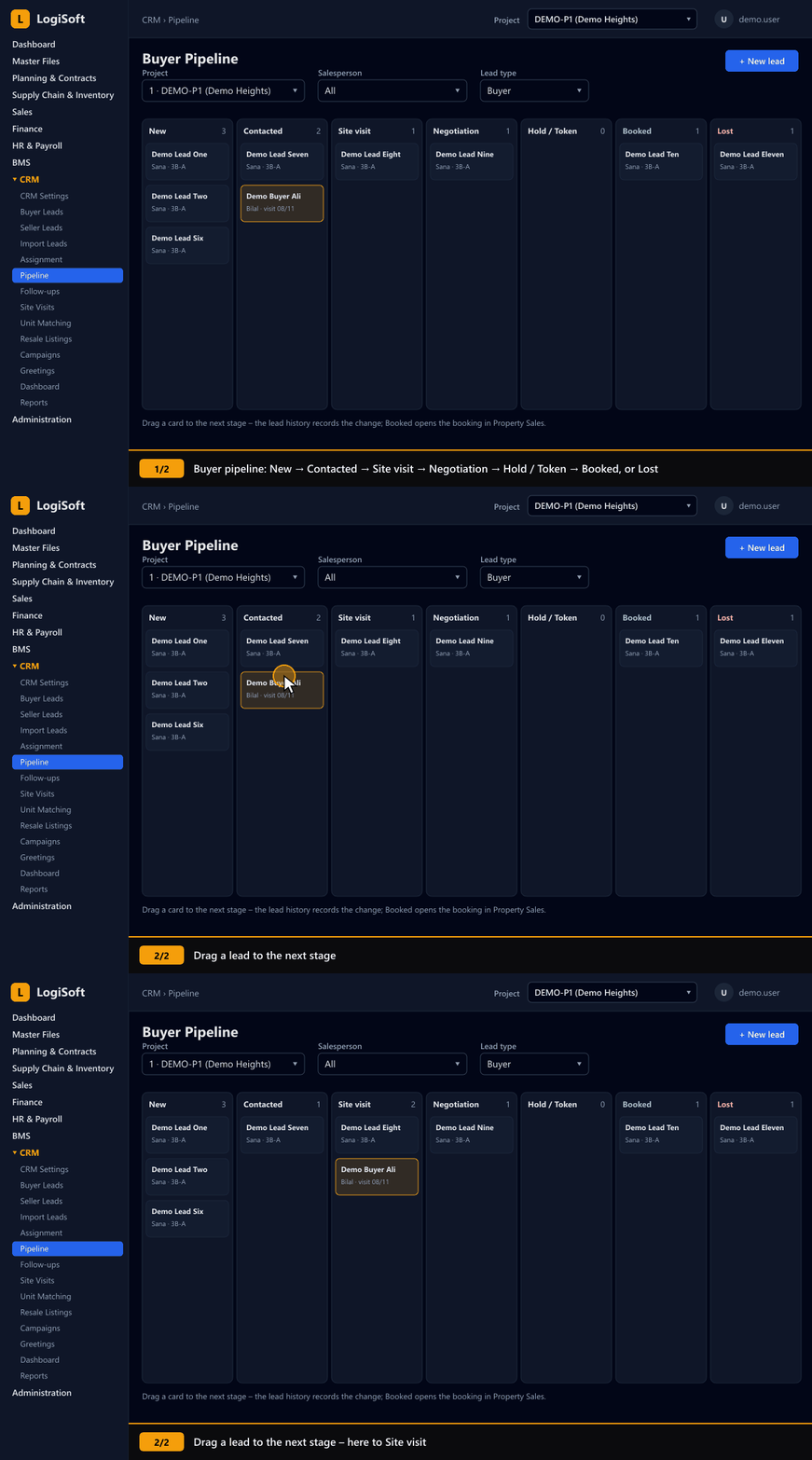
One look shows where every buyer stands.

How

Stages New → Contacted → Site visit → Negotiation → Hold / Token → Booked, or Lost. Drag a card to the next stage; filters by project and salesperson; each change is kept in the lead history.

Buyer pipeline

B2Follow-ups and activities

Where

Lead › Activities · CRM › Follow-ups.

Why

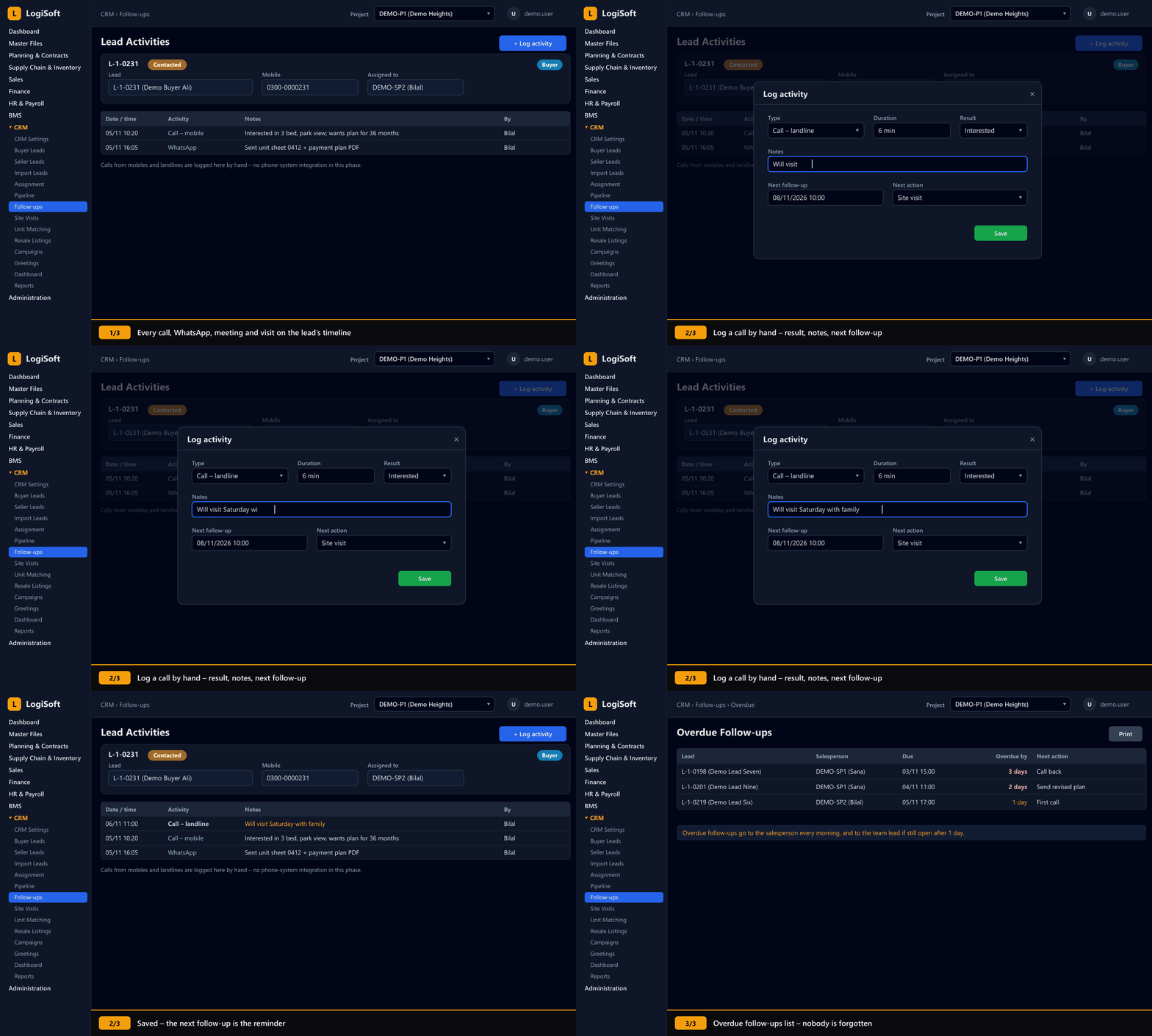
Calls and promises are not lost in personal phones.

How

Timeline of calls (mobile / landline, logged by hand – no phone-system link in this phase), WhatsApp, meetings and site visits with result and notes; every activity sets the next follow-up. Overdue follow-ups list every morning to the salesperson and, after one day, to the team lead.

Follow-ups and activities

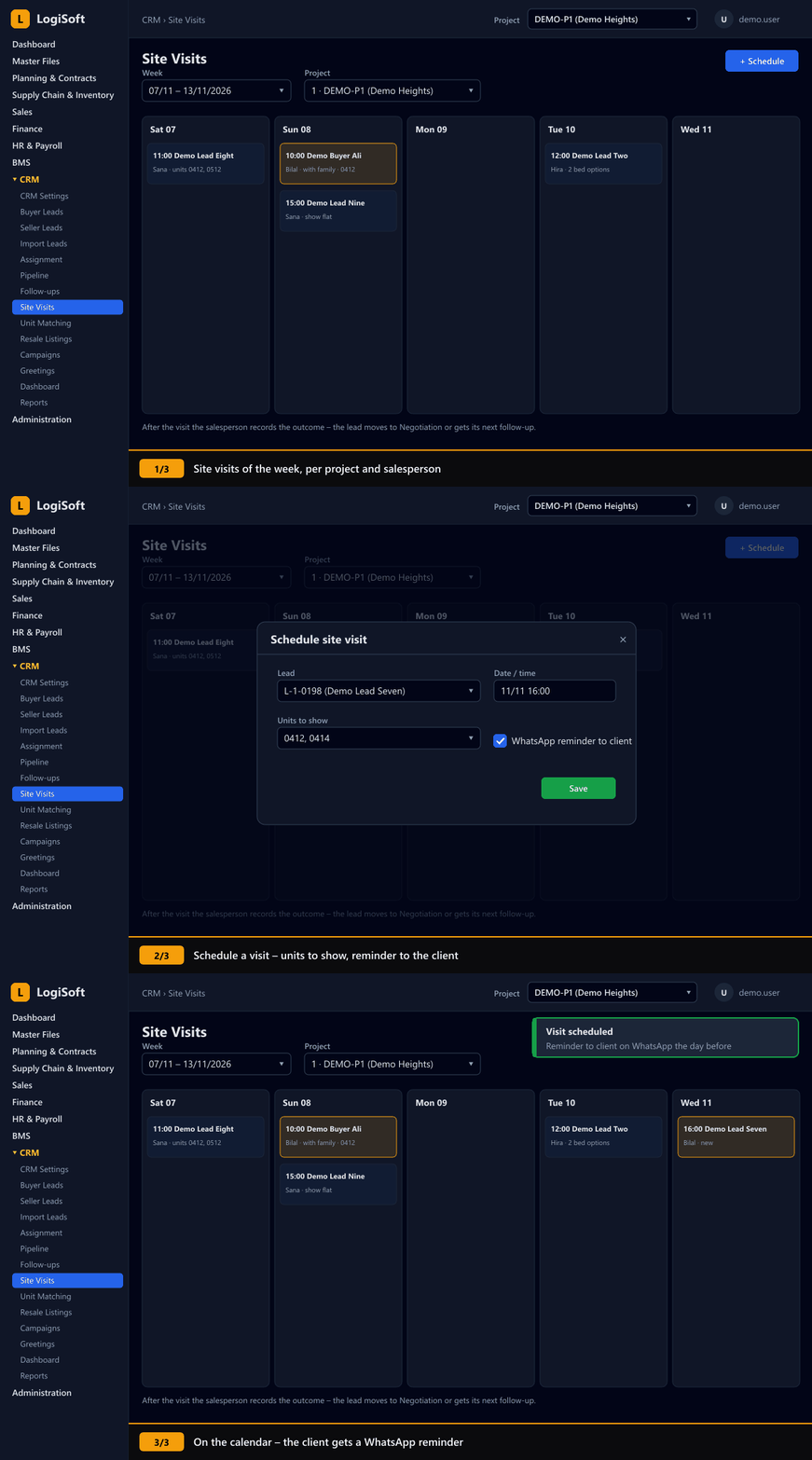
B3Site visits

Where

CRM › Site Visits.

Why

Visits are planned, confirmed and followed up.

How

Weekly calendar per project and salesperson; schedule a visit with the units to show; WhatsApp reminder to the client the day before; the outcome after the visit moves the lead on.

Site visits

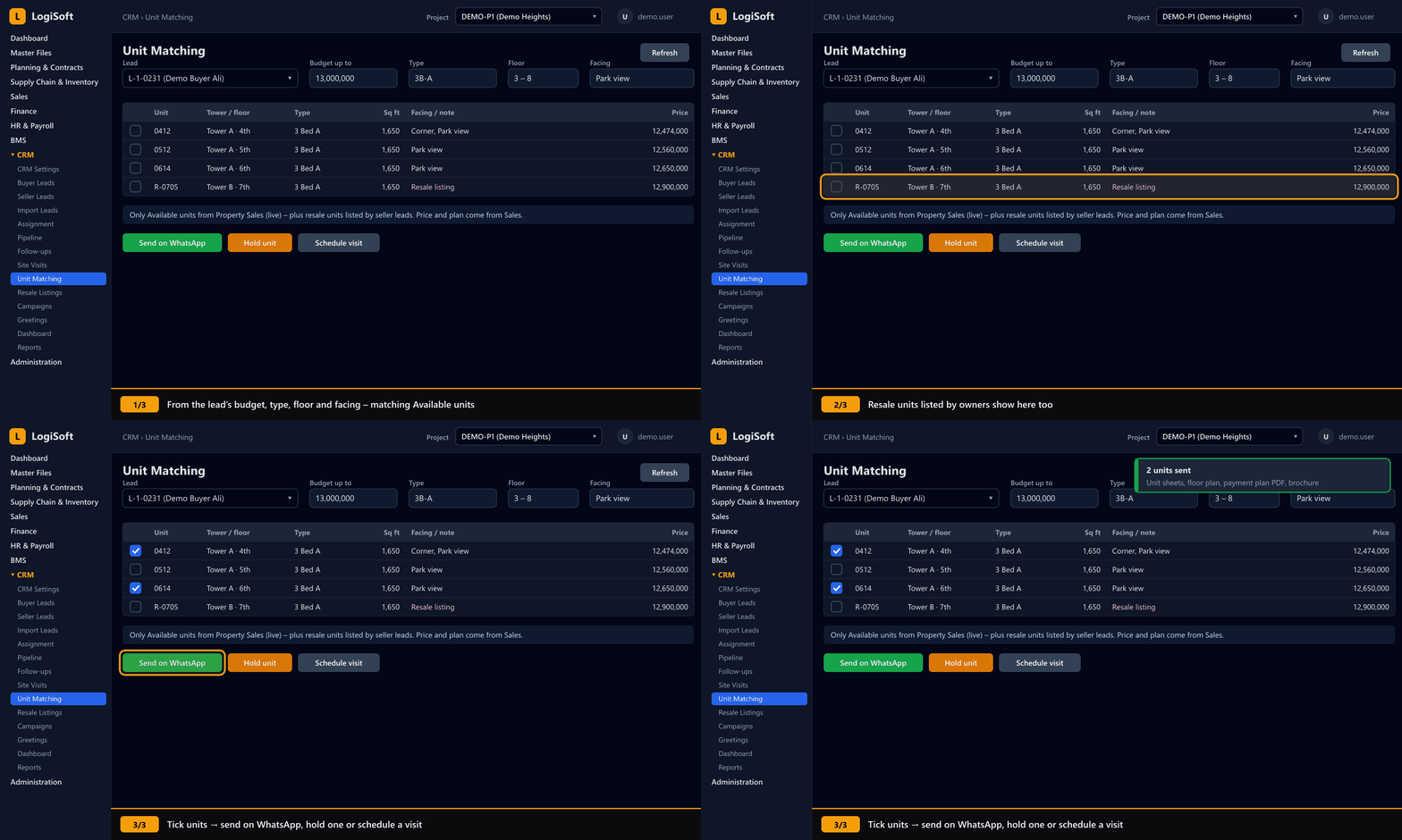
B4Unit matching

Where

Lead › Unit Matching.

Why

Offer the right units in seconds.

How

From the lead’s budget, type, floor and facing: matching Available units live from Property Sales, plus resale units listed by seller leads. Tick units → send on WhatsApp, hold a unit or schedule a visit.

Unit matching

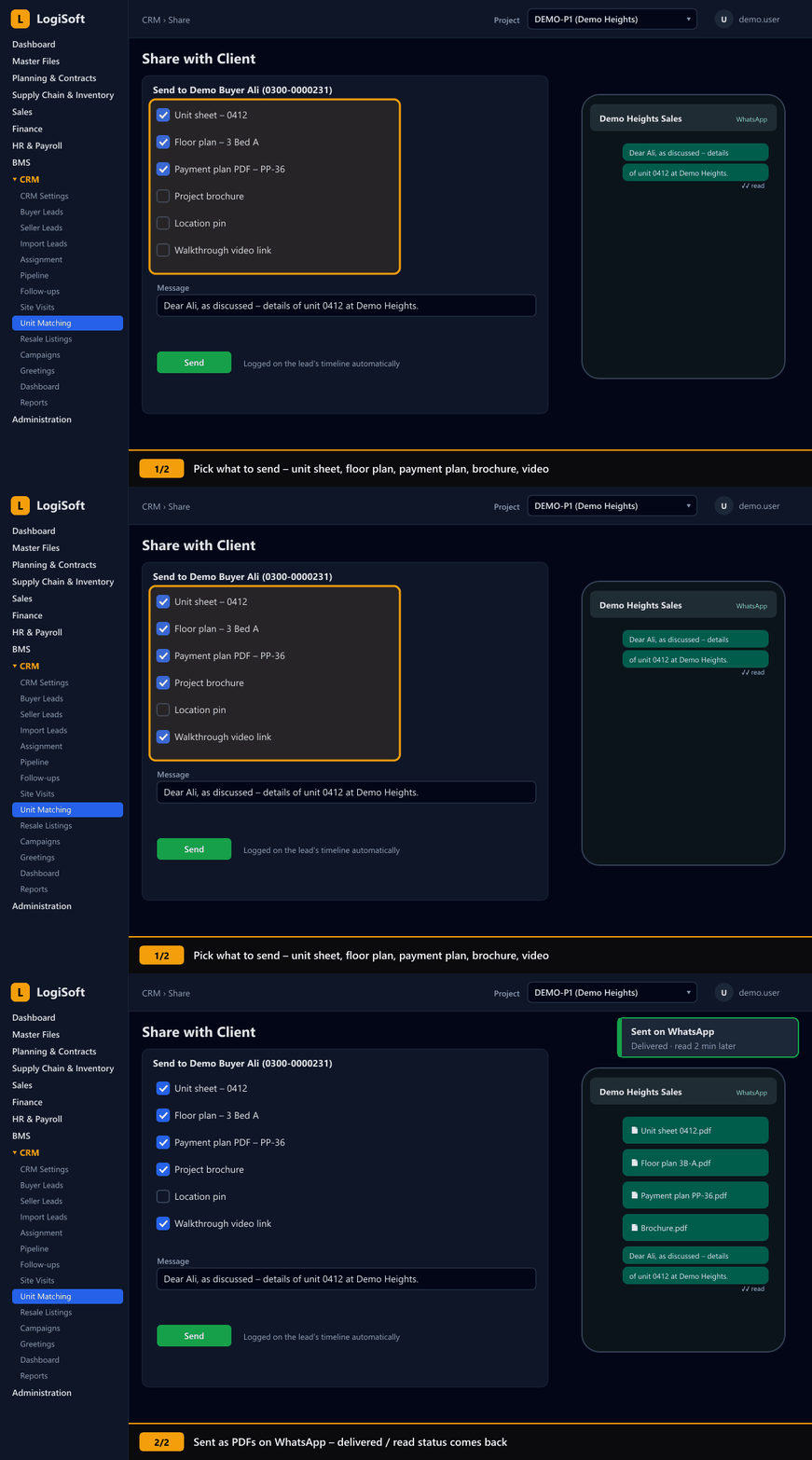
B5Share with the client on WhatsApp

Where

Lead › Share.

Why

The client gets proper documents, not screenshots.

How

Pick unit sheet, floor plan, payment plan PDF, brochure, location pin, walkthrough video link; add a message; sent as PDFs on WhatsApp with delivered / read status; logged on the lead’s timeline.

Share with the client on WhatsApp

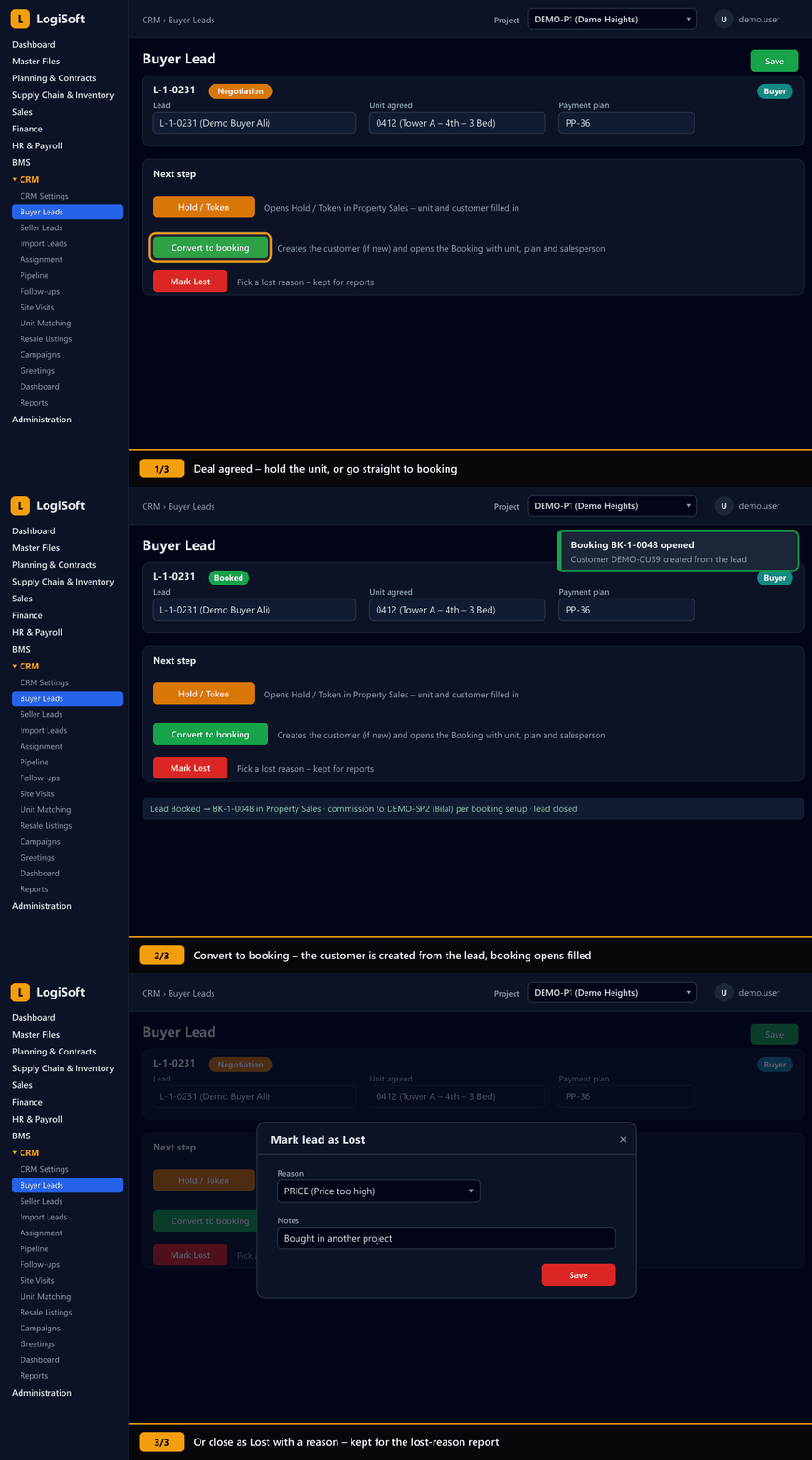
B6Hold, booking or lost

Where

Lead › Next step.

Why

No re-typing when the deal is done.

How

Hold / Token opens the Sales hold with unit and customer filled in; Convert to booking creates the customer from the lead (if new) and opens the Booking with unit, plan and salesperson (for commission). Lost needs a lost reason – kept for reports.

Hold, booking or lost

Part C

Seller leads and resale

When an owner wants to sell, the company can buy the unit back or list it for resale.

C1Seller lead

Where

CRM › Seller Leads.

Why

Owners who want to sell are handled properly and fast.

How

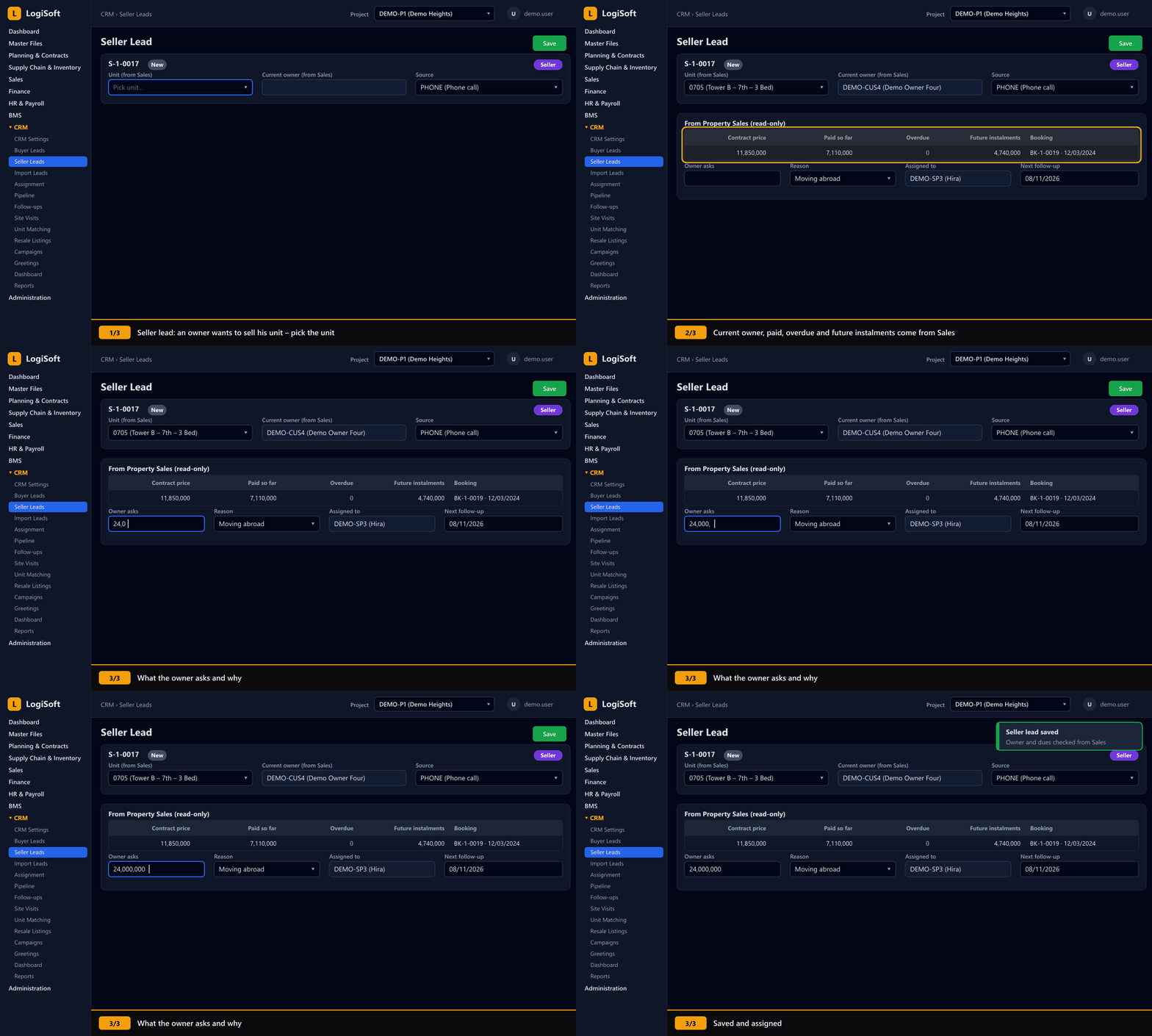
Pick the unit – the current owner, contract price, paid, overdue and future instalments come from Property Sales (read-only). Owner’s asking price, reason, assigned salesperson and next follow-up.

Seller lead

C2Seller pipeline – buy back or list

Where

Seller Lead › Pipeline.

Why

A clear decision for every seller.

How

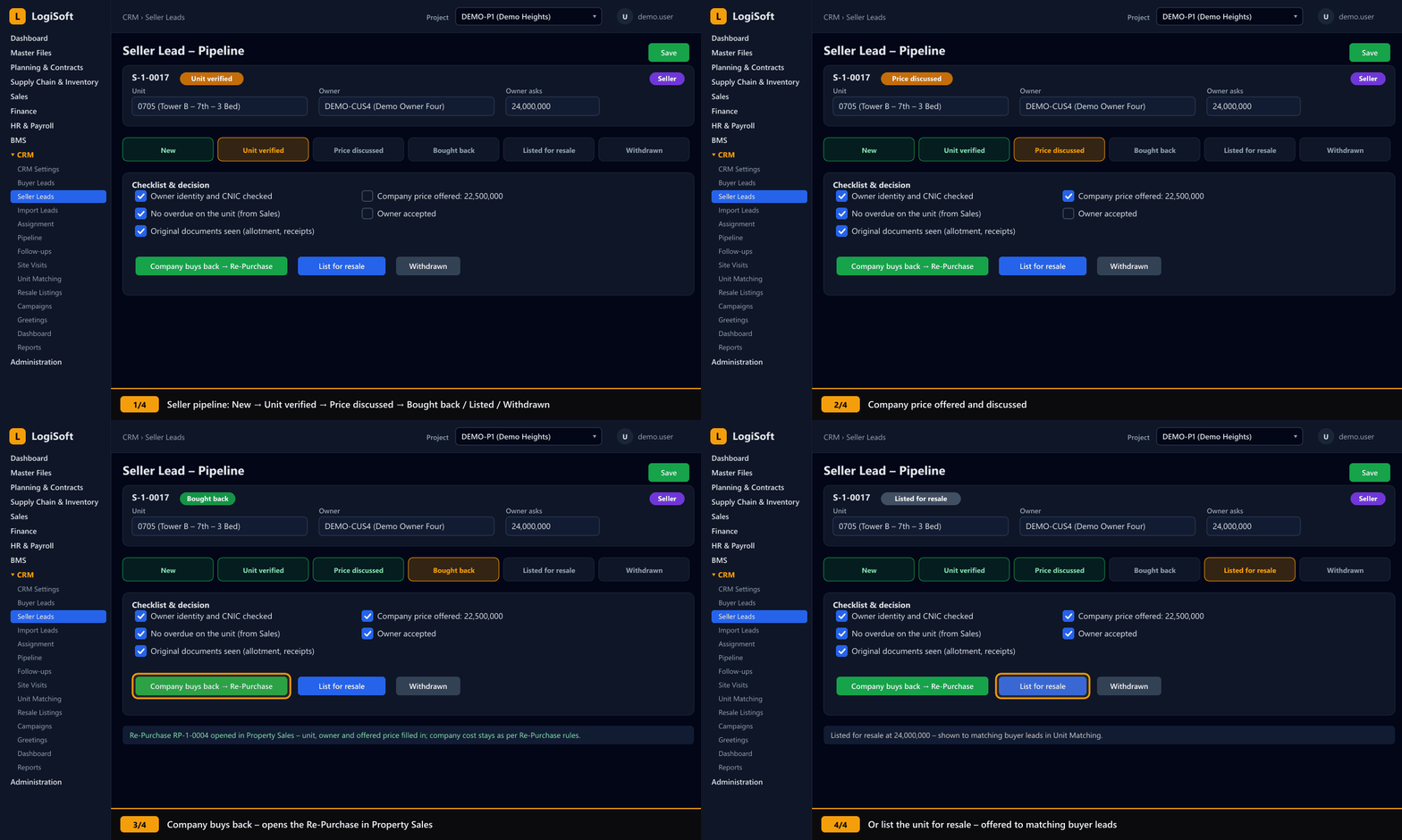
New → Unit verified (identity, no overdue, original documents) → Price discussed → Company buys back (opens Re-Purchase in Property Sales with unit, owner and price filled) OR Listed for resale OR Withdrawn.

Seller pipeline – buy back or list

C3Resale listings

Where

CRM › Resale Listings.

Why

One owner’s sale is another customer’s purchase.

How

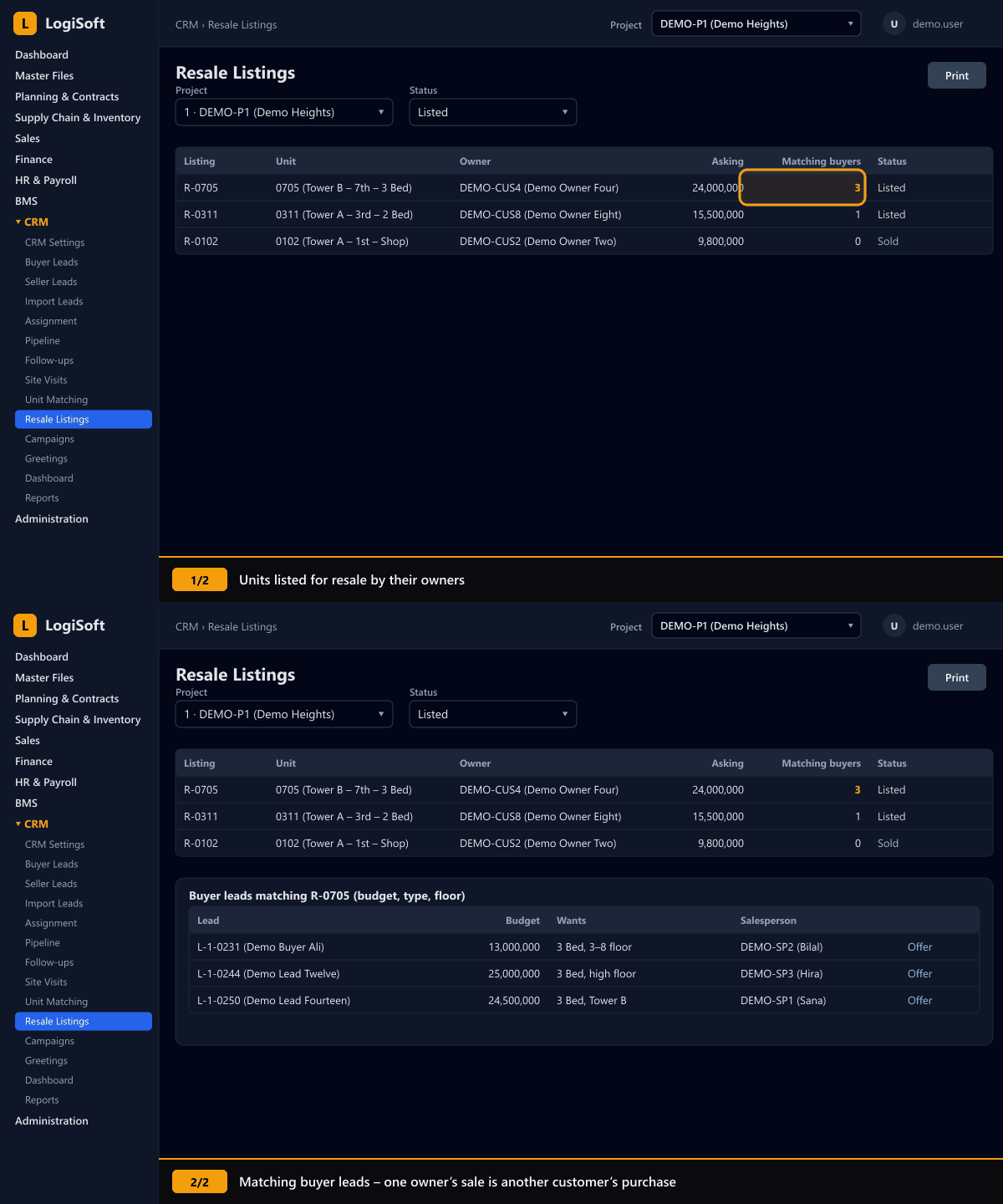
Units listed by their owners with asking price and status; matching buyer leads (budget, type, floor) are shown so salespeople can offer them; the listing also appears in Unit Matching.

Resale listings

Part D

Campaigns and insight

Reach many leads at once and see what really brings bookings.

D1Campaigns

Where

CRM › Campaigns.

Why

Launches and offers reach the right people.

How

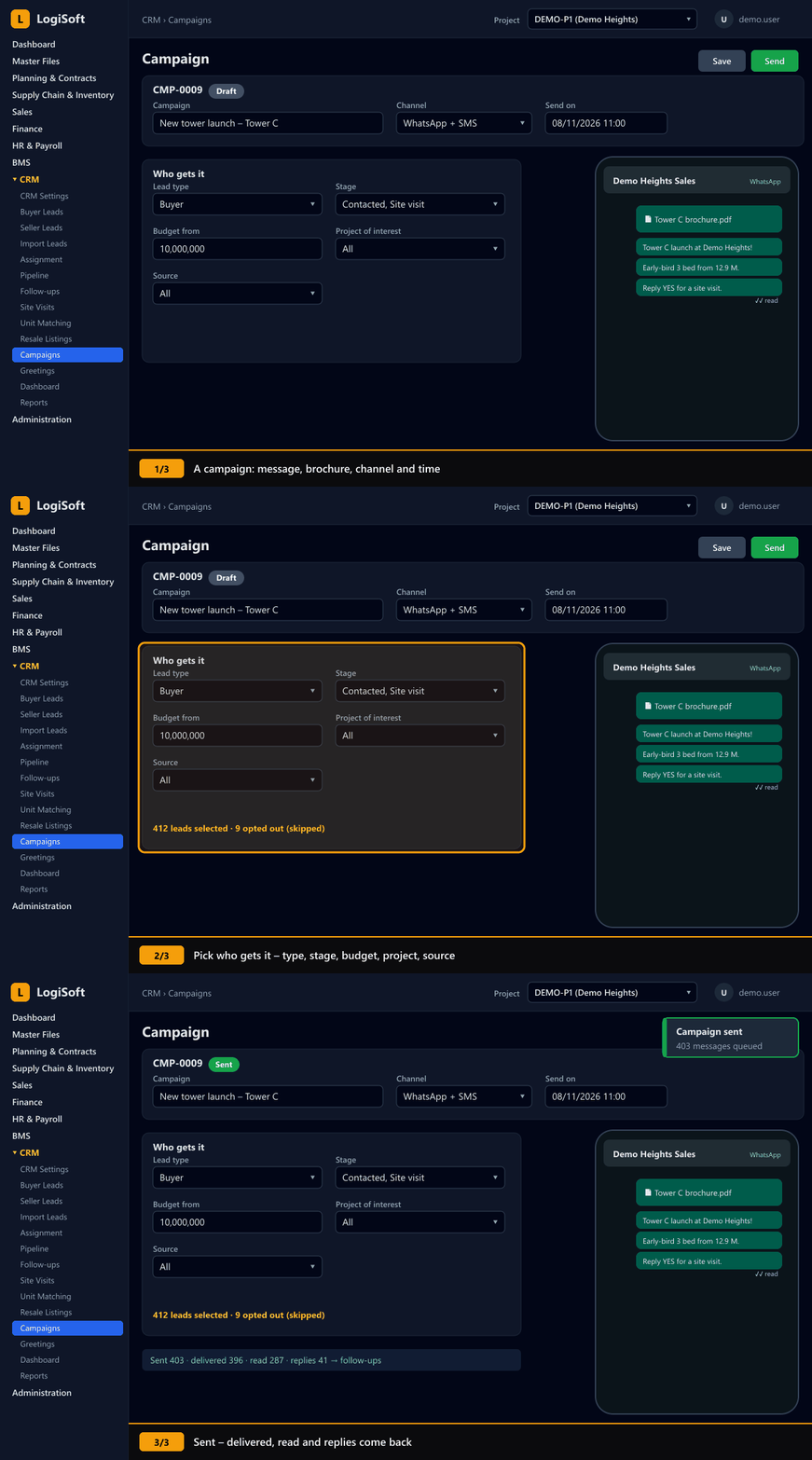
Message, brochure, channel (WhatsApp, SMS, e-mail) and time; who gets it by lead type, stage, budget, project and source; opted-out numbers are skipped; sent / delivered / read and replies come back – replies create follow-ups for the assigned salesperson.

Campaigns

D2Greetings

Where

CRM › Greetings.

Why

Keeps the relationship warm without extra work.

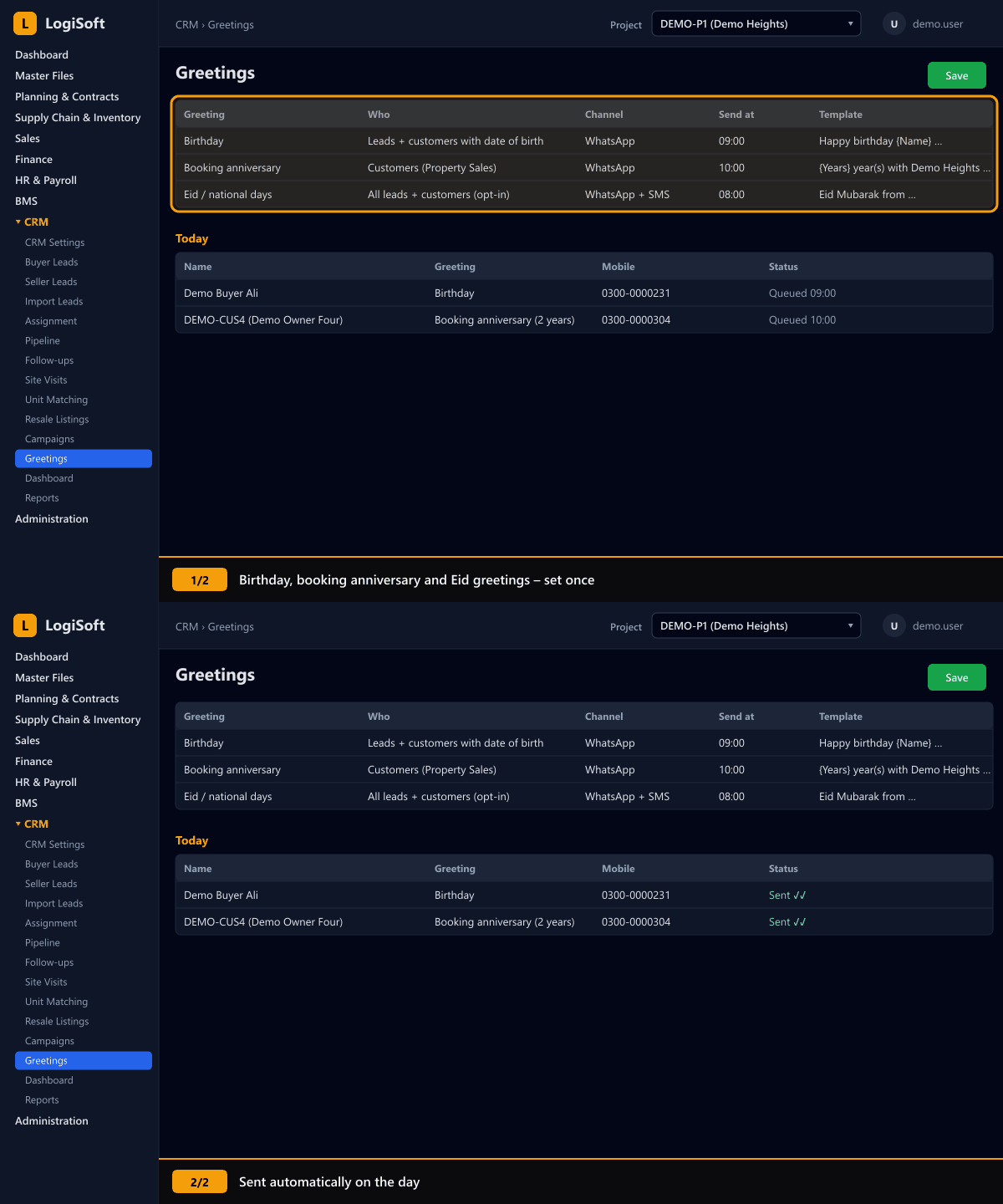
How

Birthday, booking anniversary and Eid / national-day greetings with templates; sent automatically on the day; opt-in respected.

Greetings

D3CRM dashboard

Where

CRM › Dashboard.

Why

Management sees the funnel, sources and team at a glance.

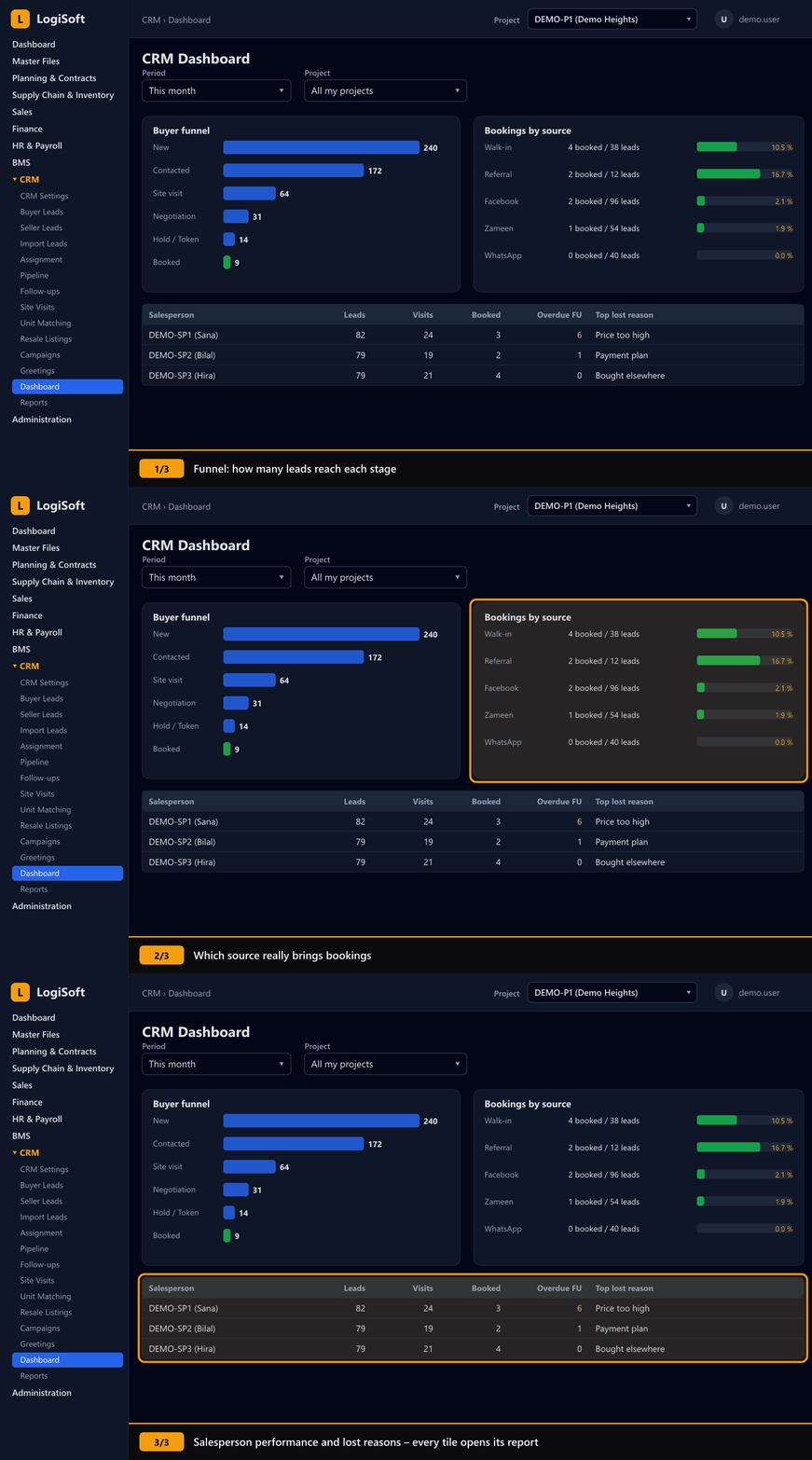
How

Buyer funnel by stage, bookings by source (conversion %), salesperson performance (leads, visits, bookings, overdue follow-ups), lost reasons, site visits – filtered by the user’s projects; every figure opens its report.

CRM dashboard

Part E

Reports

CRM itself posts nothing to Finance – bookings, receipts and re-purchases post from Property Sales.

R1Lead register – by source, project, stage, salesperson, date
R2Funnel and conversion – lead to visit to booking, by source and project
R3Follow-ups due and overdue; activity log per salesperson
R4Site visits – scheduled, done, no-show, outcome
R5Lost leads by reason
R6Seller leads – bought back, listed, withdrawn; resale listings and matches
R7Campaign results – sent, delivered, read, replies, bookings
R8Salesperson performance – leads, visits, bookings, booking value

All reports: filters (project, salesperson, source, stage, period), print / PDF / Excel, company logo.

Not included

  • Customer portal (statement, schedule, receipts, documents online) – later phase.
  • Automatic lead import from Facebook / Instagram lead ads, Zameen or the website – leads are entered by hand or by Excel in this phase.
  • Phone-system / call-centre integration (automatic call logging, click-to-call, call recording) – calls are logged by hand.
  • Outside agents using CRM – only company staff.

Acceptance

The module is accepted when: a buyer lead is entered, a duplicate mobile is caught and the lead is assigned by the rule → an Excel sheet of leads is imported with duplicates skipped → a call is logged with the next follow-up and an overdue follow-up shows on the list → a site visit is scheduled with a WhatsApp reminder → matching units are found and the unit sheet, floor plan and payment plan PDF are sent on WhatsApp → the lead is converted and the booking opens in Property Sales with the customer and salesperson filled in → a lead is closed as Lost with a reason → a seller lead reads the owner and dues from Sales, is bought back through Re-Purchase or listed for resale and offered to a matching buyer → a campaign is sent and its delivered / read / replies come back → the dashboard shows the funnel, sources and salesperson figures.

Open points

For your decision

01

Lost reasons and sources

Please confirm the list of lead sources and lost reasons your team wants to report on.

02

Assignment rule

Round-robin for all leads, or by project team (e.g. one team per project)?

Prepared by Dynamic Software Solution · 05 Nov 2026 · Document version 0.1

Powered by Dynamic Software Solution · www.dynamicsoft.biz