Module · Construction & Real Estate Suite

Finance – Scope of Work

One chart of accounts for the whole group with the project on every line; cash, bank and journal vouchers; post-dated cheques that turn into receipts without re-entry; payments that settle bills and deduct withholding tax; bank reconciliation by hand or by statement import; opening balances and year-end; and reports from one project up to the whole group – including projected cash flow. Every other module posts here automatically. Anything not written on this page is not part of this module.

All modules
FI
Finance

What Finance covers

01

Chart of Accounts

One chart · project on every line

02

Vouchers

Cash / bank · journal · Official tick

03

Post-dated cheques

Receive → deposit → clear / bounce

04

Knock-off & WHT

WHT deducted at payment

05

Bank reconciliation

Manual or statement import

06

Reports & cash flow

Project · company · group

How it fits in LogiSoftWhat Finance uses or receives
Core SetupCompanies (base currency, financial year), projects as cost centres, users with date access, approval levels, document numbering, parties with tax details, currencies.
Other modulesApproved documents of Planning & Contracts, Supply Chain & Inventory and Property Sales post their entries here automatically – with company and project on every line.
TaxesWithholding tax comes from the Tax Master and the party; it is shown on the bill and deducted when the bill is paid. Sales tax settings are on the company.
CurrenciesEach company keeps its books in its own base currency. Currency and exchange-rate fields appear only for companies that use other currencies. Reports can convert all companies to the group currency.
The GIFs play the steps of each screen automatically; the orange box shows where to look in each step. Click any picture to open it full size. Screens are a preview of the planned design – names, rates and amounts are sample data.

Part A

Ledger and vouchers

One chart of accounts for the whole group; every entry line carries its project.

A1Chart of Accounts

Where

Finance › Chart of Accounts.

Why

One chart for every company keeps reports comparable and the chart short.

How

Tree of Control and Detail accounts; code levels set once and codes made automatically. Postings only on Detail accounts. The project (cost centre) is chosen on each entry line, not as separate accounts. Accounts in use cannot be deleted – they are made Inactive.
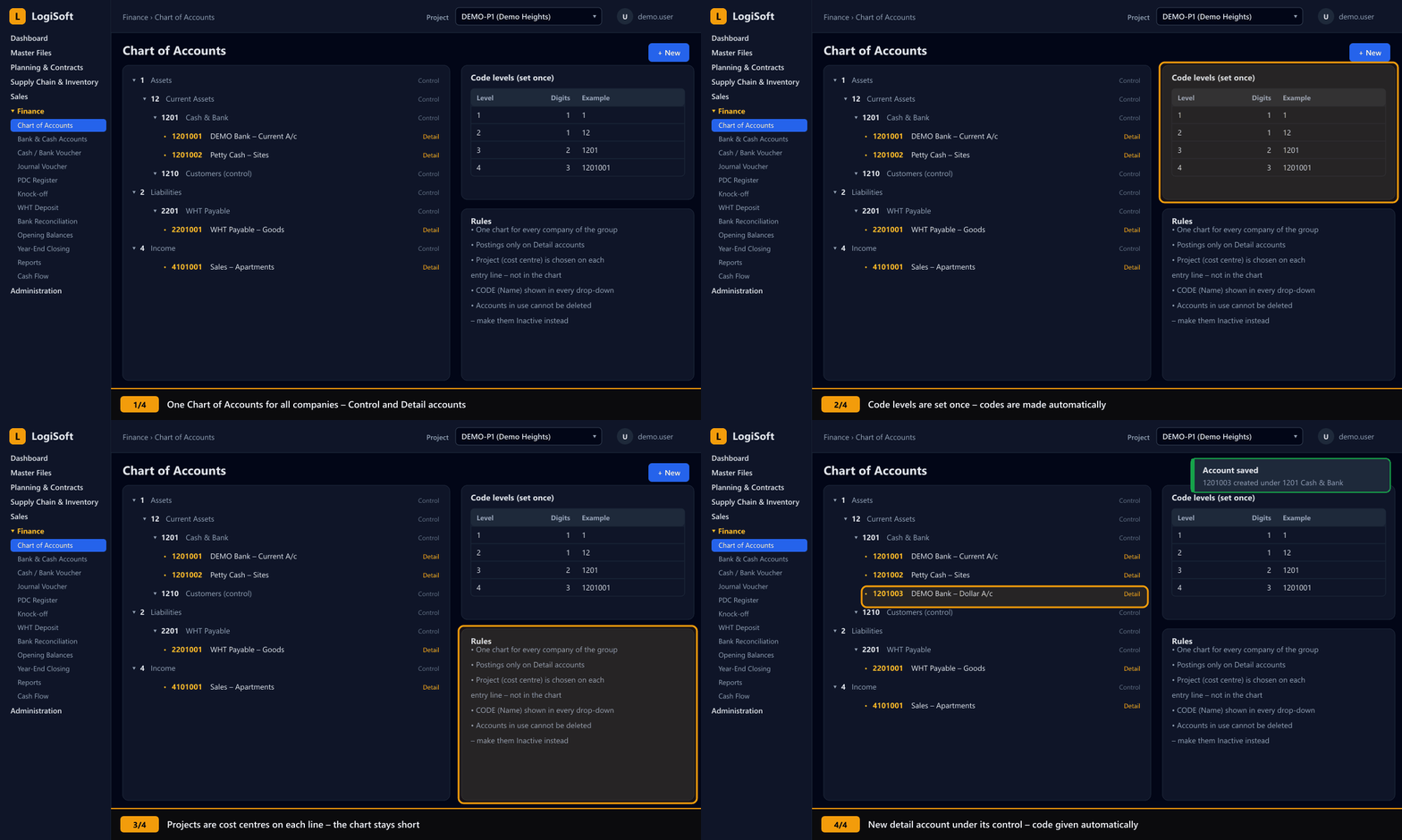
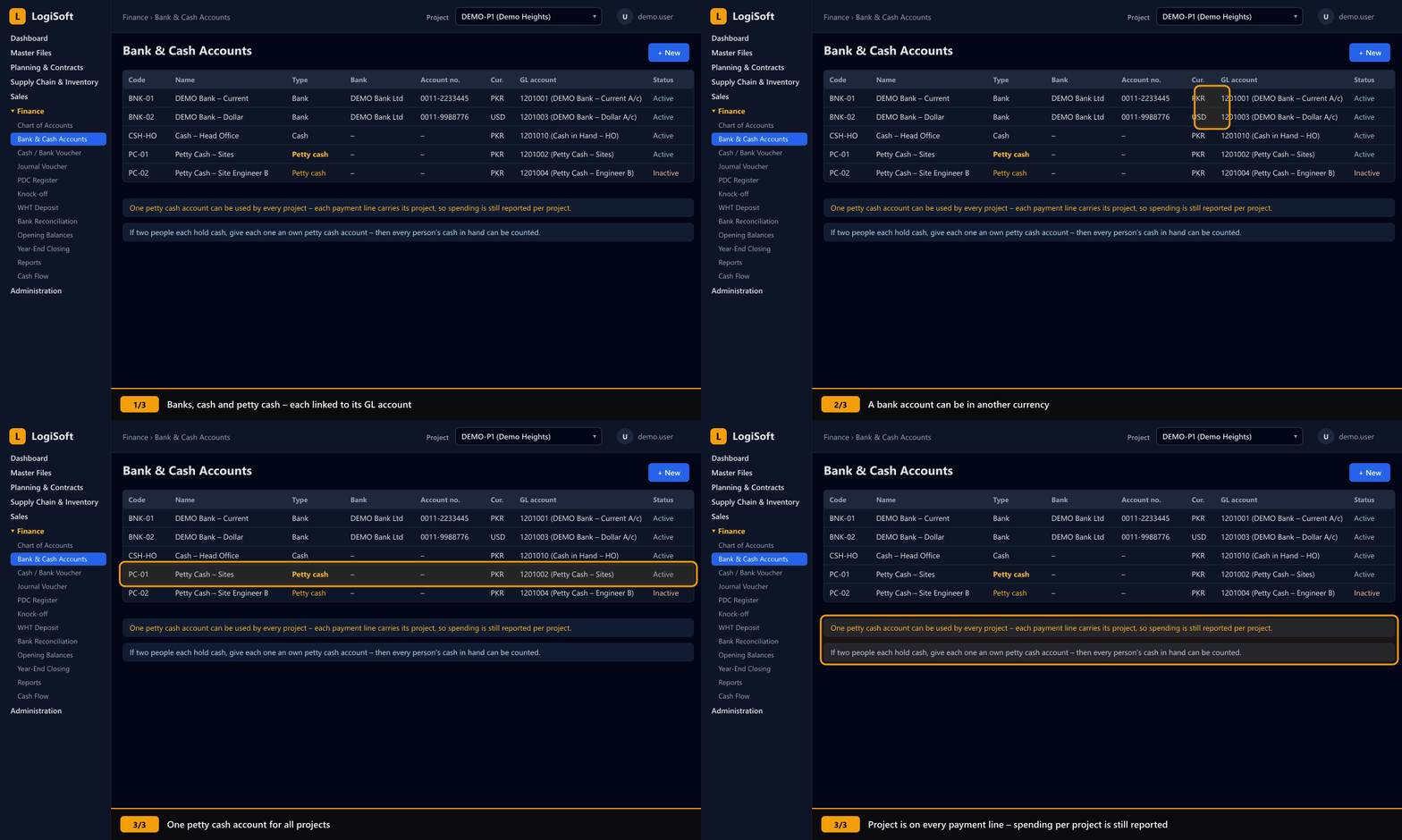
Chart of Accounts

A2Bank & Cash Accounts

Where

Finance › Bank & Cash Accounts.

Why

Every bank, cash and petty cash account in one list, linked to its GL account.

How

Code, name, type (bank / cash / petty cash), bank, account number, currency, GL account, Active / Inactive. One petty cash account can be used by all projects – every payment line carries its project. If two people each hold cash, each gets an own petty cash account so their cash in hand can be counted.

Bank & Cash Accounts

A3Cash / Bank Voucher

Where

Finance › Cash / Bank Voucher (receipt and payment).

Why

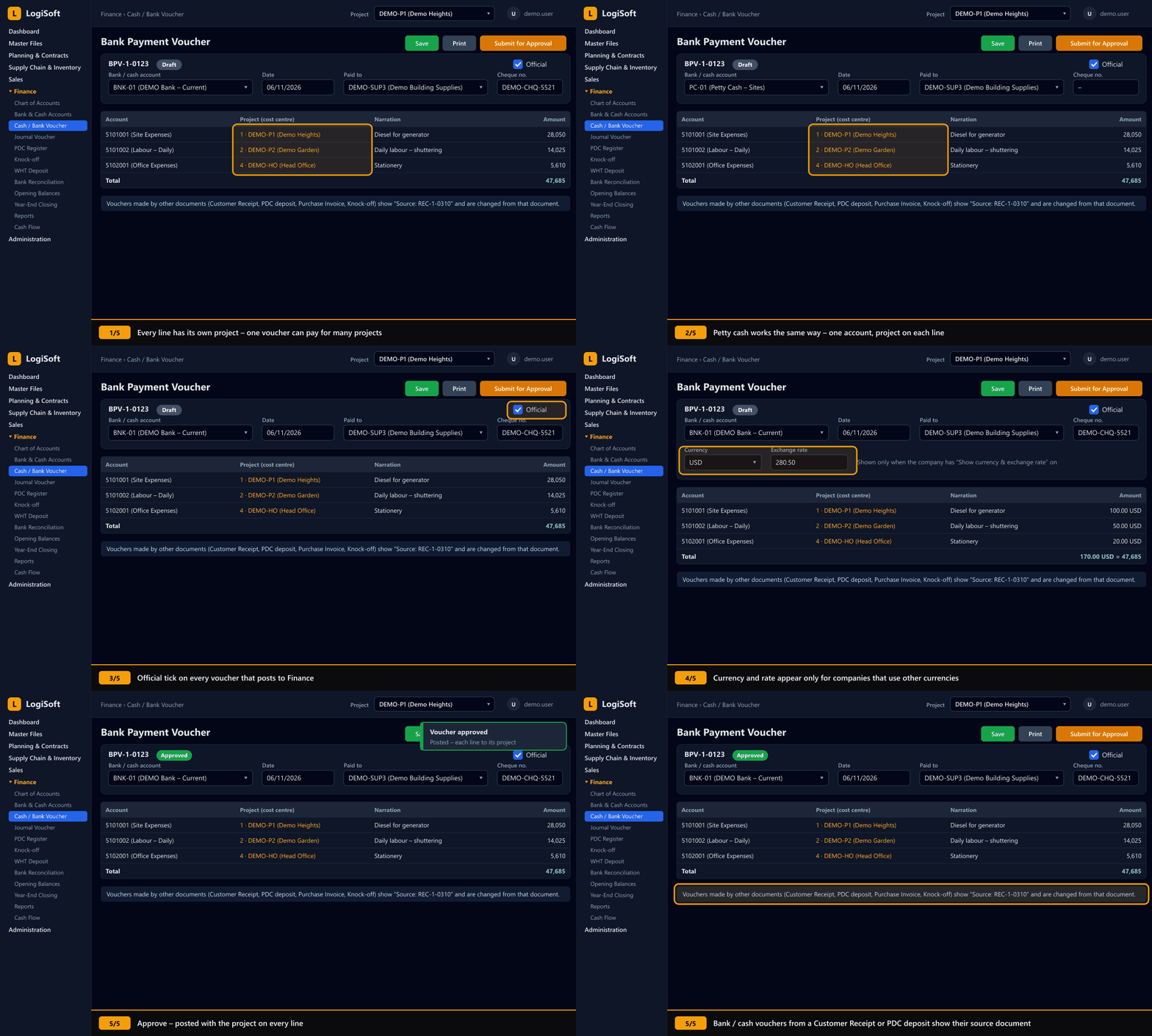
One voucher can pay for many projects – each line is charged to its own project.

How

Bank or cash account, date, party, cheque no.; lines with account, project, narration and amount. Official tick on every voucher that posts to Finance. Currency and exchange rate appear only for companies that use other currencies. Approval through the Approval Master; posted on final approval. Vouchers created by other documents (Customer Receipt, PDC deposit, Purchase Invoice, Knock-off) show their source – e.g. “Source: REC-1-0310” – and are changed from that document, not here.

Cash / Bank Voucher

A4Journal Voucher

Where

Finance › Journal Voucher.

Why

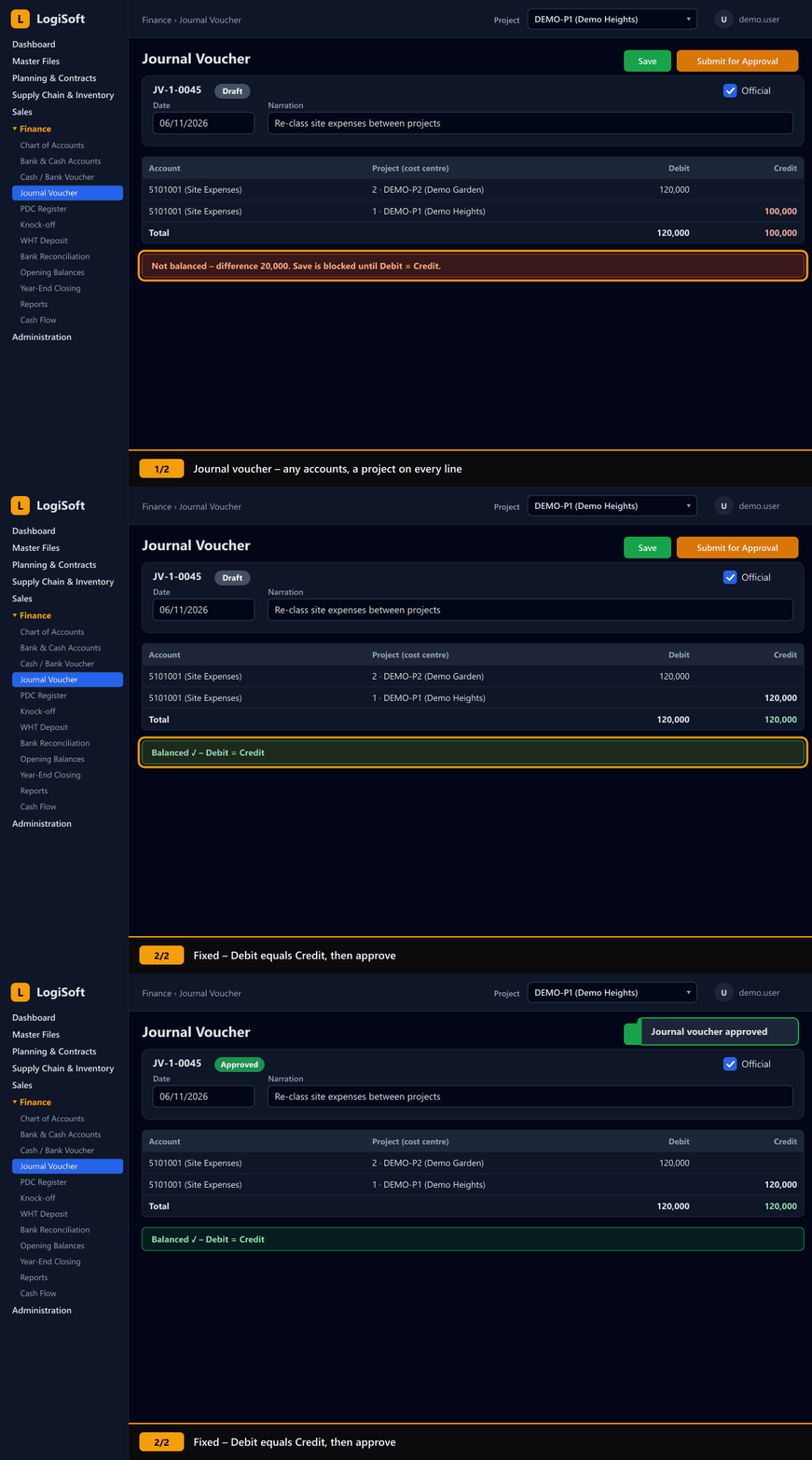
Adjustments and re-classes between accounts or projects.

How

Account, project, debit, credit per line. Cannot be saved unless Debit = Credit. Official tick, approval and posting as on every voucher.

Journal Voucher

Part B

Cheques, payments and withholding tax

Post-dated cheques without re-entry, payments that settle bills, and WHT from deduction to deposit.

B1PDC Register – receive

Where

Finance › PDC Register.

Why

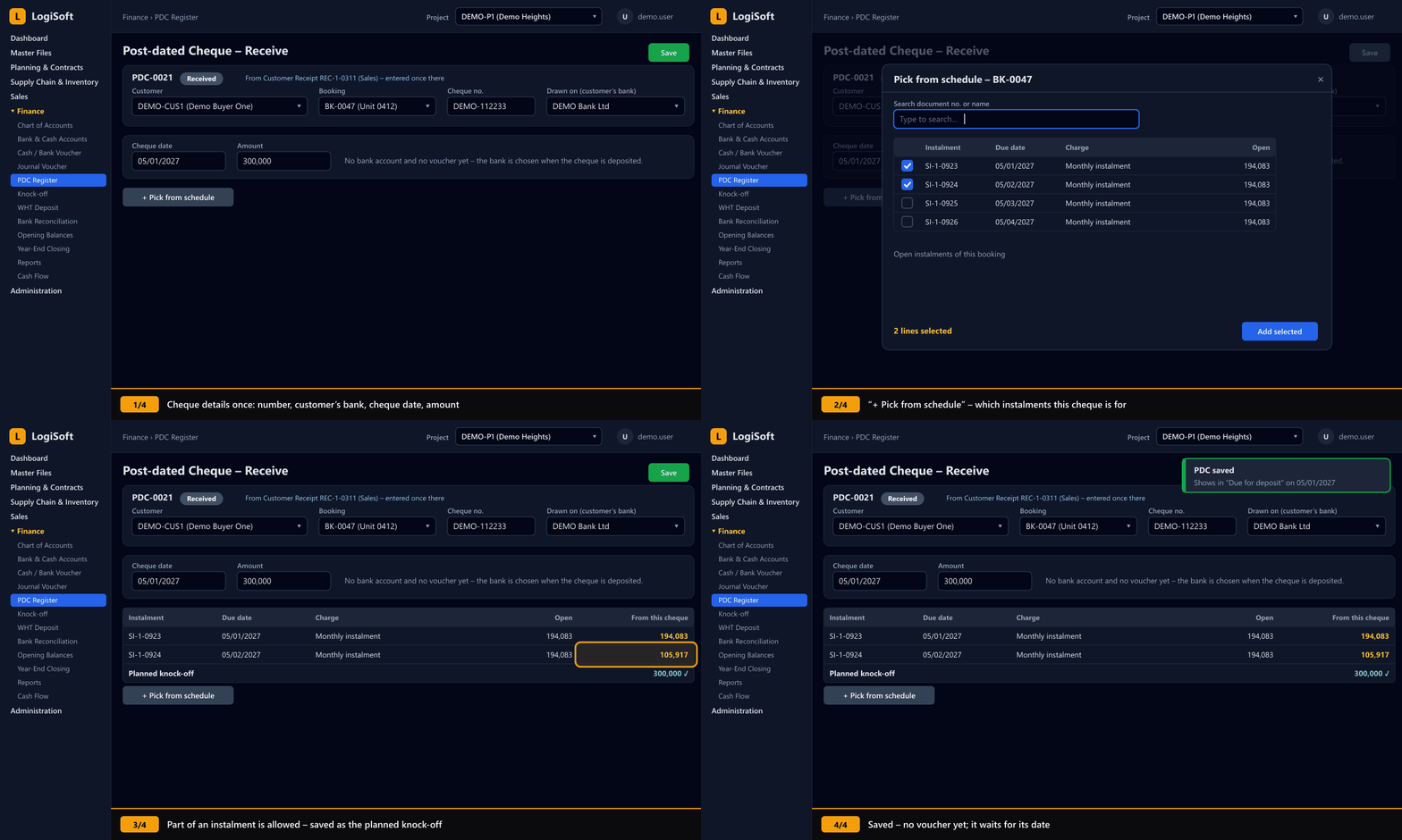
Buyers give post-dated cheques for future instalments – the cheque is recorded once.

How

Customer, booking, cheque no., the customer’s bank, cheque date and amount. “+ Pick from schedule” chooses the instalments it is for – part of an instalment is allowed – saved as the planned knock-off. No bank account and no voucher yet. A PDC is normally entered once on the Sales › Customer Receipt (mode PDC) and appears here with its source receipt; it can also be entered here directly.

PDC Register – receive

B2PDC – due for deposit

Where

Finance › PDC Register › Due for deposit.

Why

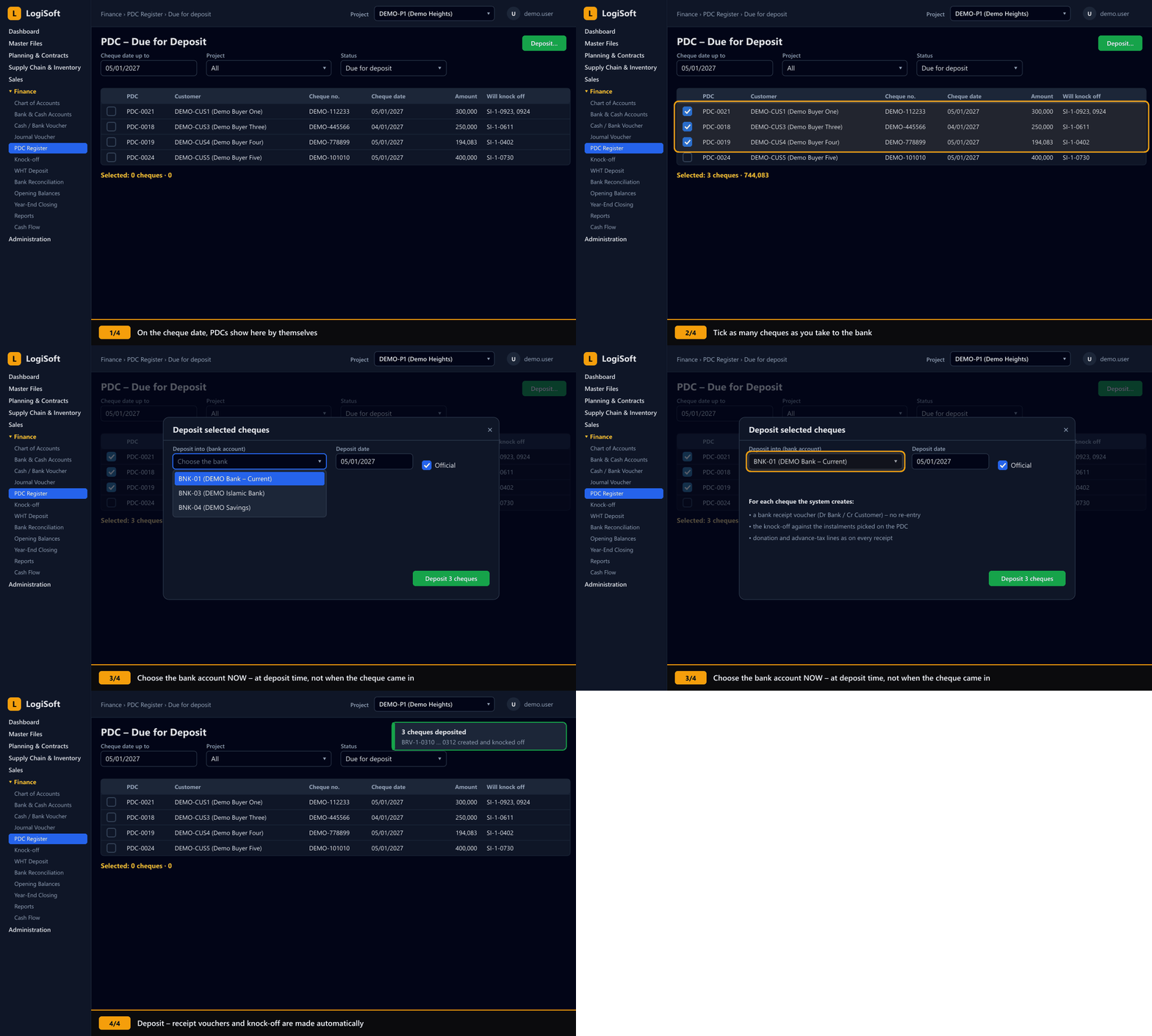
No voucher is typed again when the cheque is banked.

How

On the cheque date the PDC shows in the list by itself. Tick any number of cheques, choose the bank account to deposit into – at deposit time, not when the cheque came in – and the deposit date. For each cheque the system makes the bank receipt voucher and the knock-off against the planned instalments (with donation and advance-tax lines as on every receipt). The instalments can be changed before depositing.

PDC – due for deposit

B3PDC – clear or bounce

Where

Finance › PDC Register › Deposited.

Why

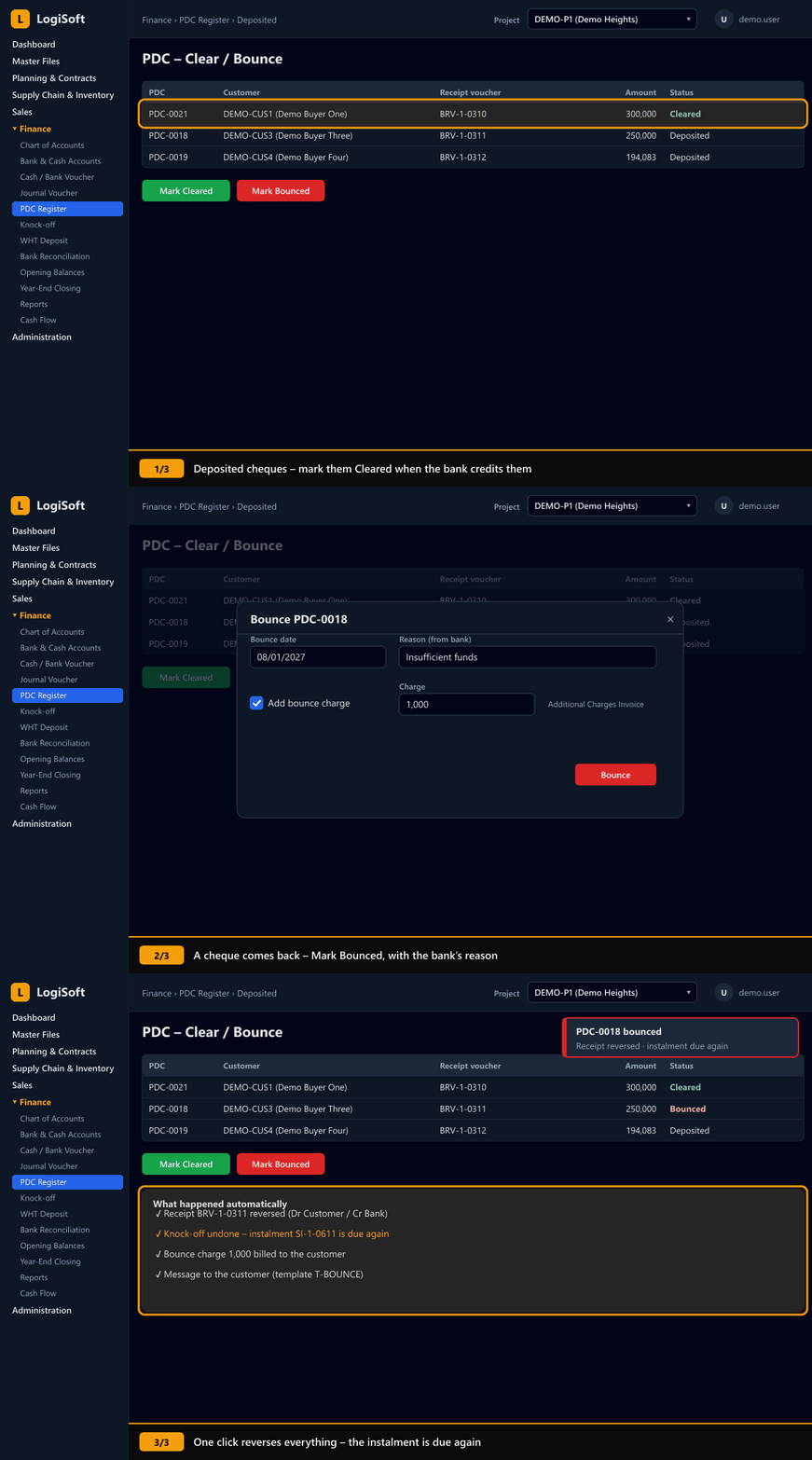
A bounced cheque must undo everything it settled – without manual vouchers.

How

Mark Cleared when the bank credits it. Mark Bounced with the bank’s reason: the receipt is reversed, the knock-off is undone and the instalment is due again; an optional bounce charge is billed and the customer is messaged.

PDC – clear or bounce

B4Payment with knock-off and WHT

Where

Finance › Knock-off (also from the payment voucher).

Why

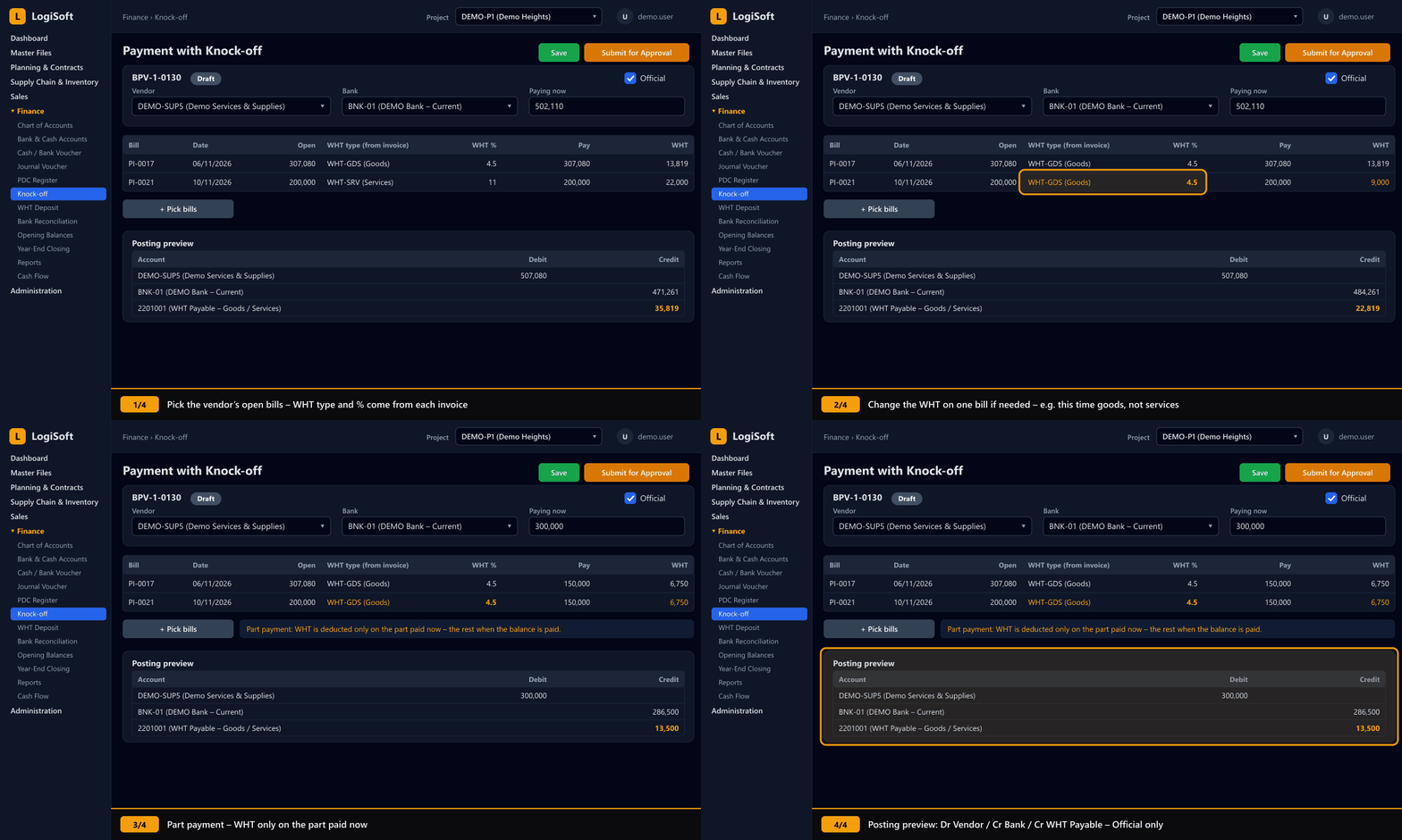
Pay the vendor’s bills and deduct withholding tax in the same step.

How

“+ Pick bills” lists the vendor’s open bills. WHT type and % come from each invoice (set from the party) and can be changed on one bill. On a part payment WHT is deducted only on the part paid now. Posting preview: Dr Vendor / Cr Bank / Cr WHT Payable. WHT applies to Official entries.

Payment with knock-off and WHT

B5WHT payable and deposit

Where

Finance › WHT Deposit.

Why

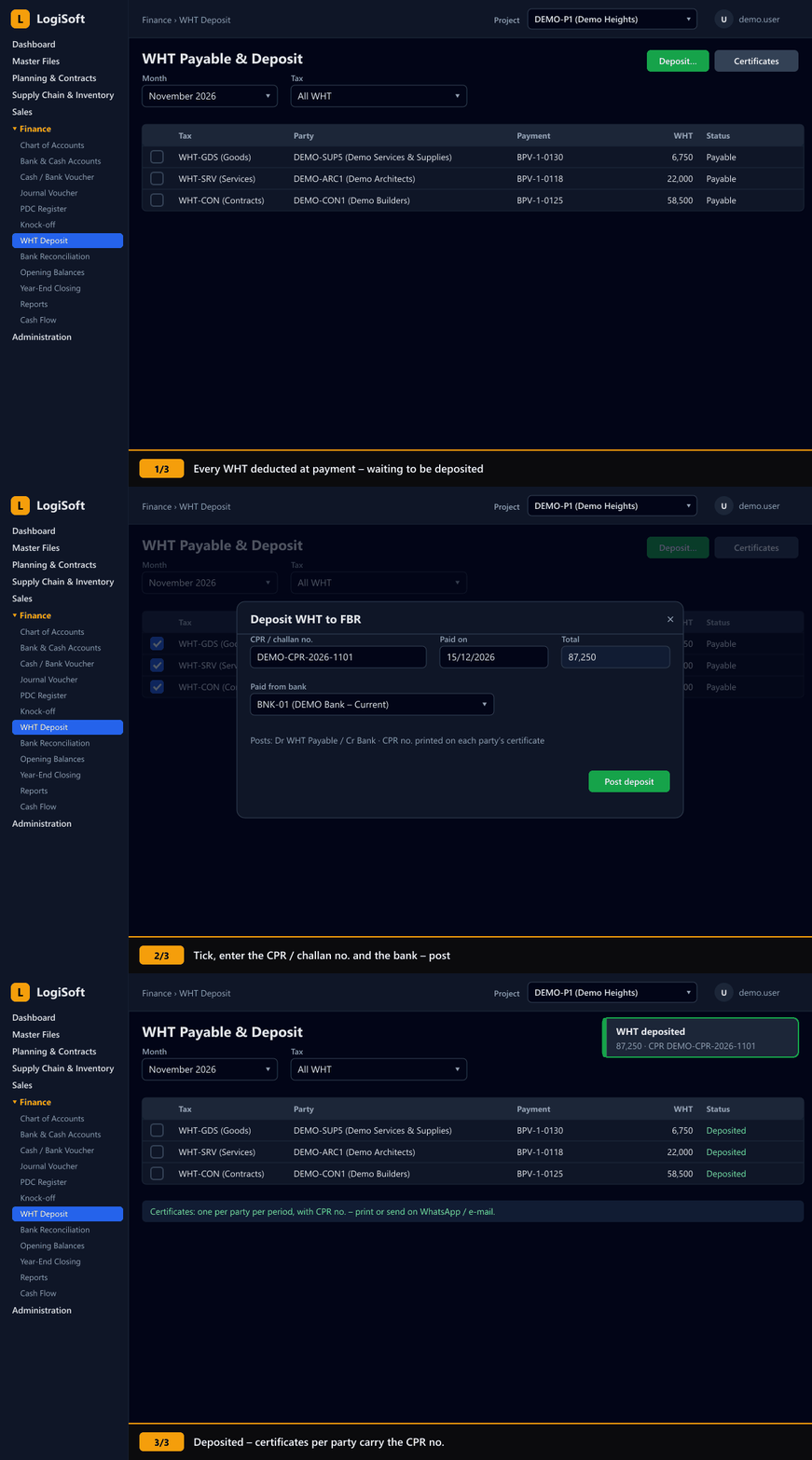
Every rupee deducted is deposited and proven to the party.

How

All WHT deducted and not yet deposited, by tax and party. Tick, enter the CPR / challan no., date and bank → Dr WHT Payable / Cr Bank. Certificates per party per period carry the CPR no. – print or send on WhatsApp / e-mail.

WHT payable and deposit

Part C

Bank reconciliation and periods

Agree the books with the bank, start with correct balances, close the year cleanly.

C1Bank reconciliation – manual

Where

Finance › Bank Reconciliation.

Why

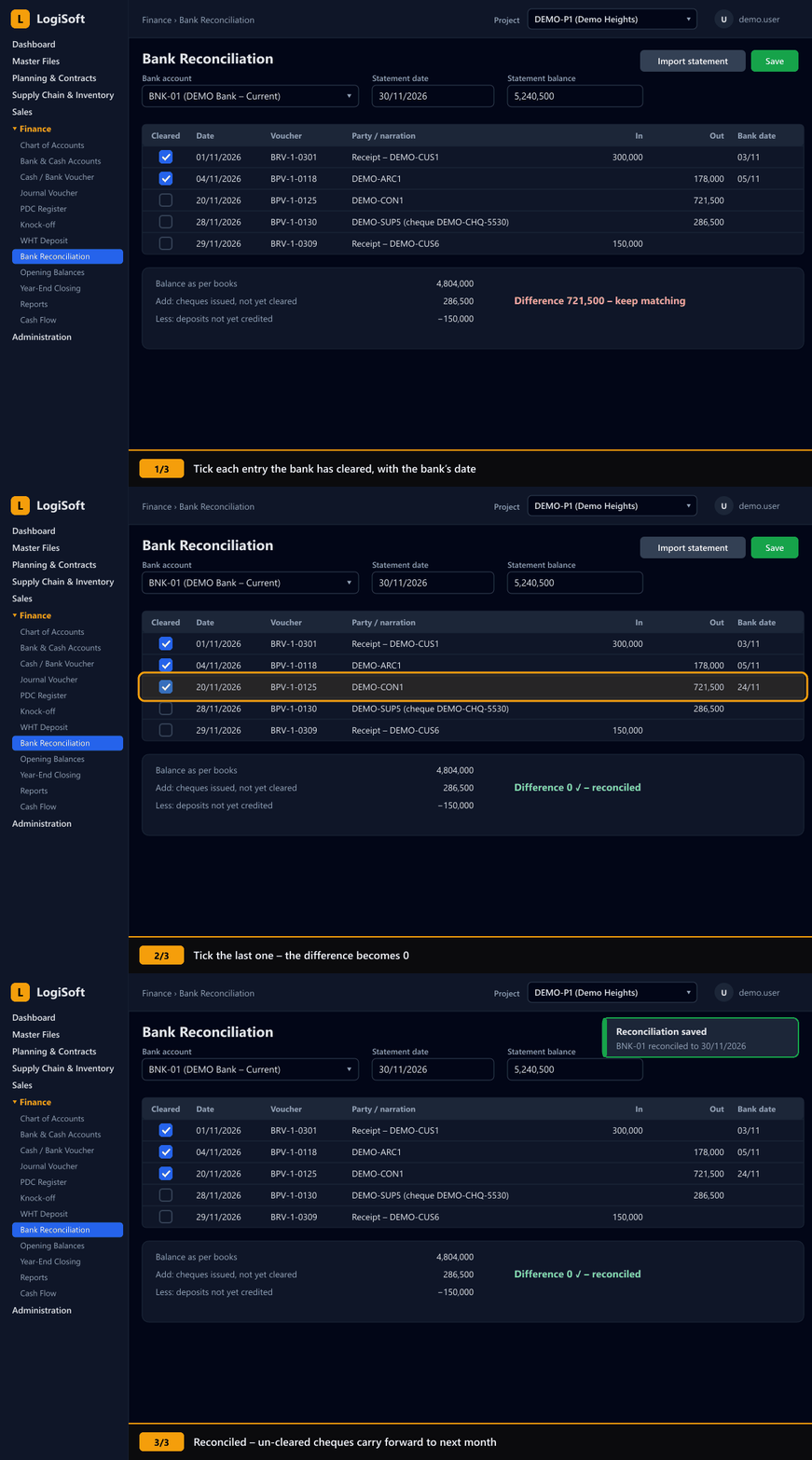
Know exactly why the bank balance and the book balance differ.

How

Bank account, statement date and statement balance. Tick each entry the bank has cleared, with the bank’s date. Book balance + uncleared cheques − uncleared deposits = statement balance; the difference must become 0. Uncleared items carry forward.

Bank reconciliation – manual

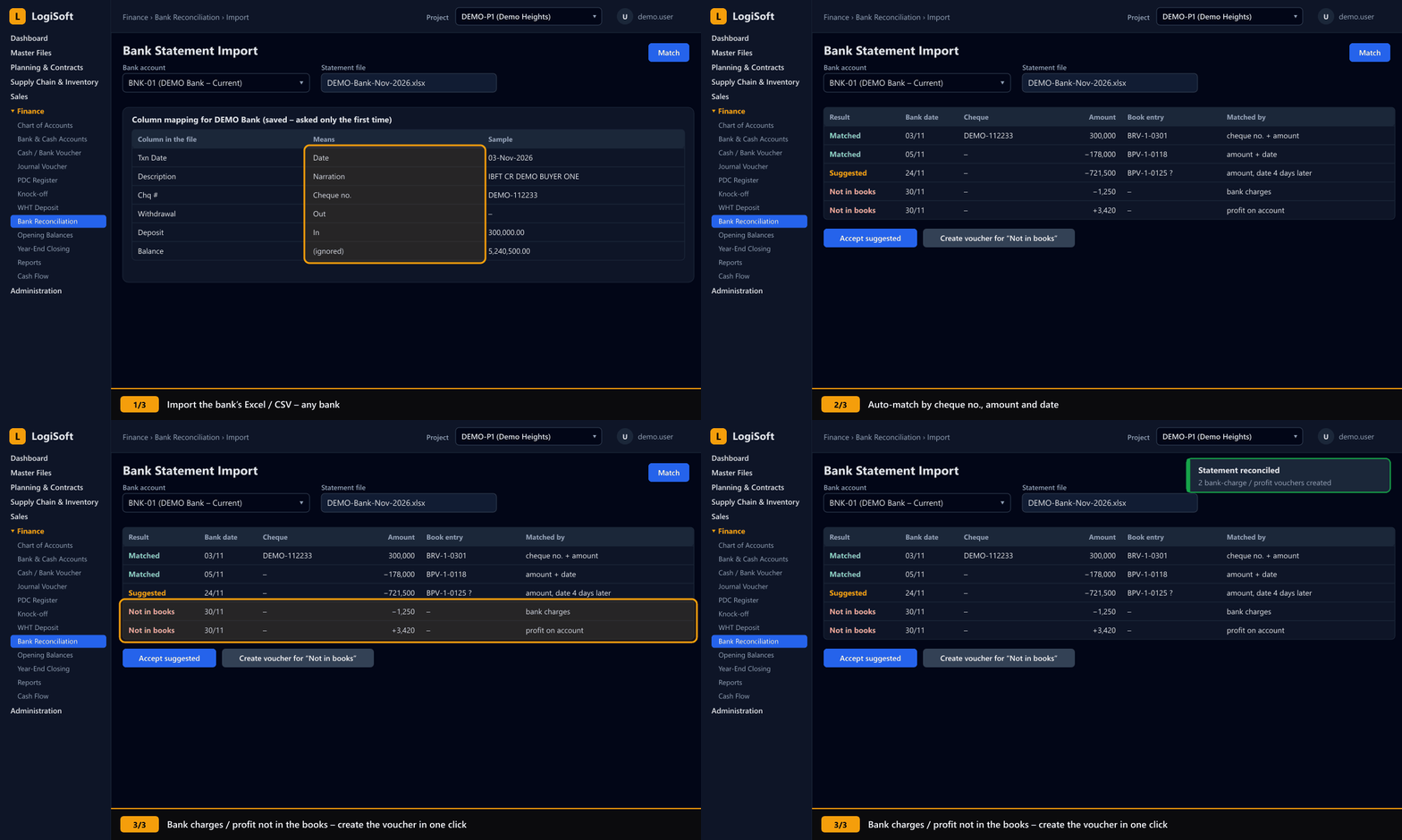
C2Bank statement import

Where

Finance › Bank Reconciliation › Import statement.

Why

Any bank – no typing of statement lines.

How

Upload the bank’s Excel / CSV. The column mapping (date, narration, cheque no., in, out) is set once per bank and saved. Auto-match by cheque no., amount and date; suggested matches to accept; lines not in the books (bank charges, profit) become a voucher in one click.

Bank statement import

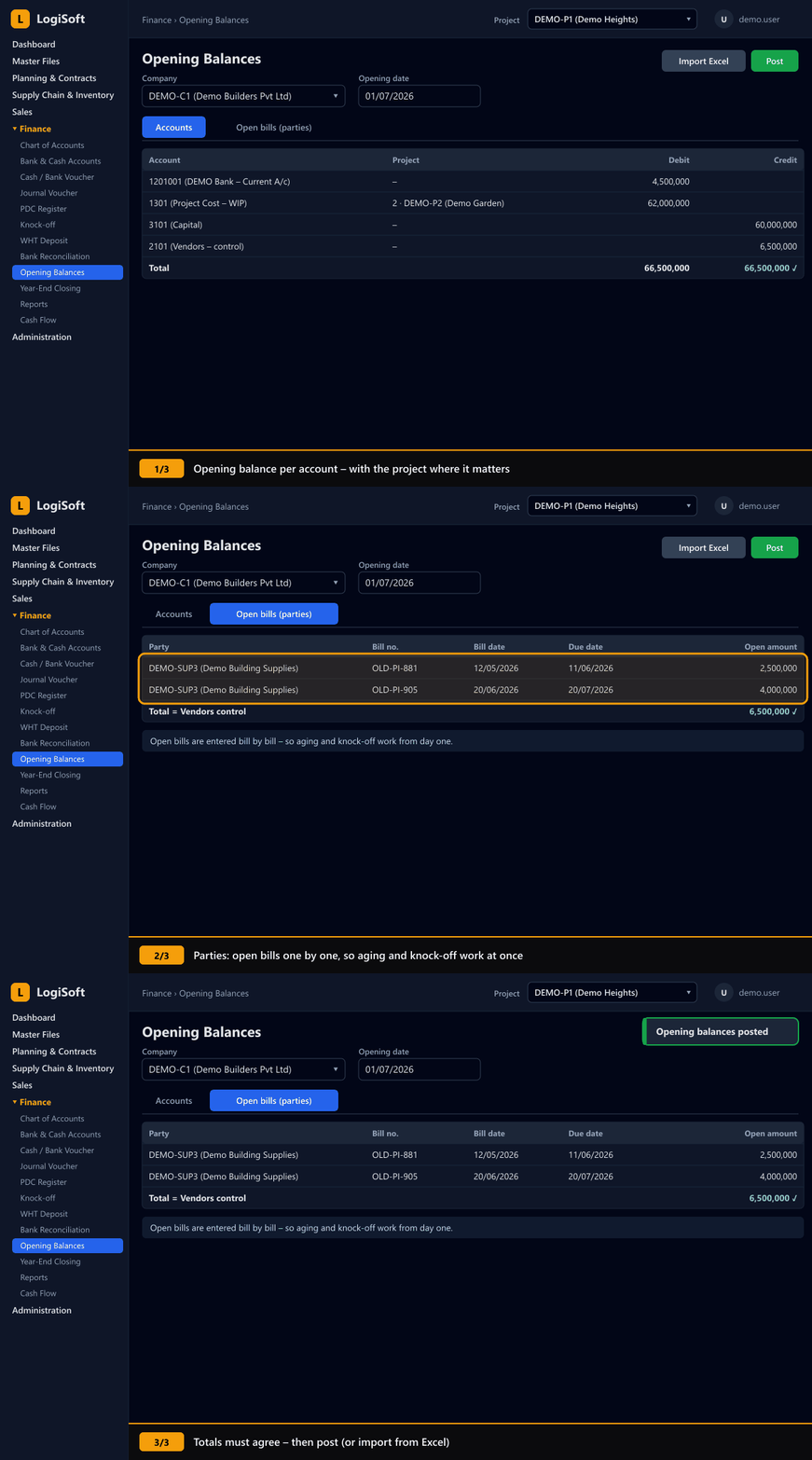
C3Opening balances

Where

Finance › Opening Balances.

Why

Start with correct balances – and open bills that can be knocked off.

How

Per company: opening debit / credit per account, with the project where it matters. Parties are entered bill by bill (bill no., date, due date, open amount) so aging and knock-off work from day one. Totals must agree; can be imported from Excel.

Opening balances

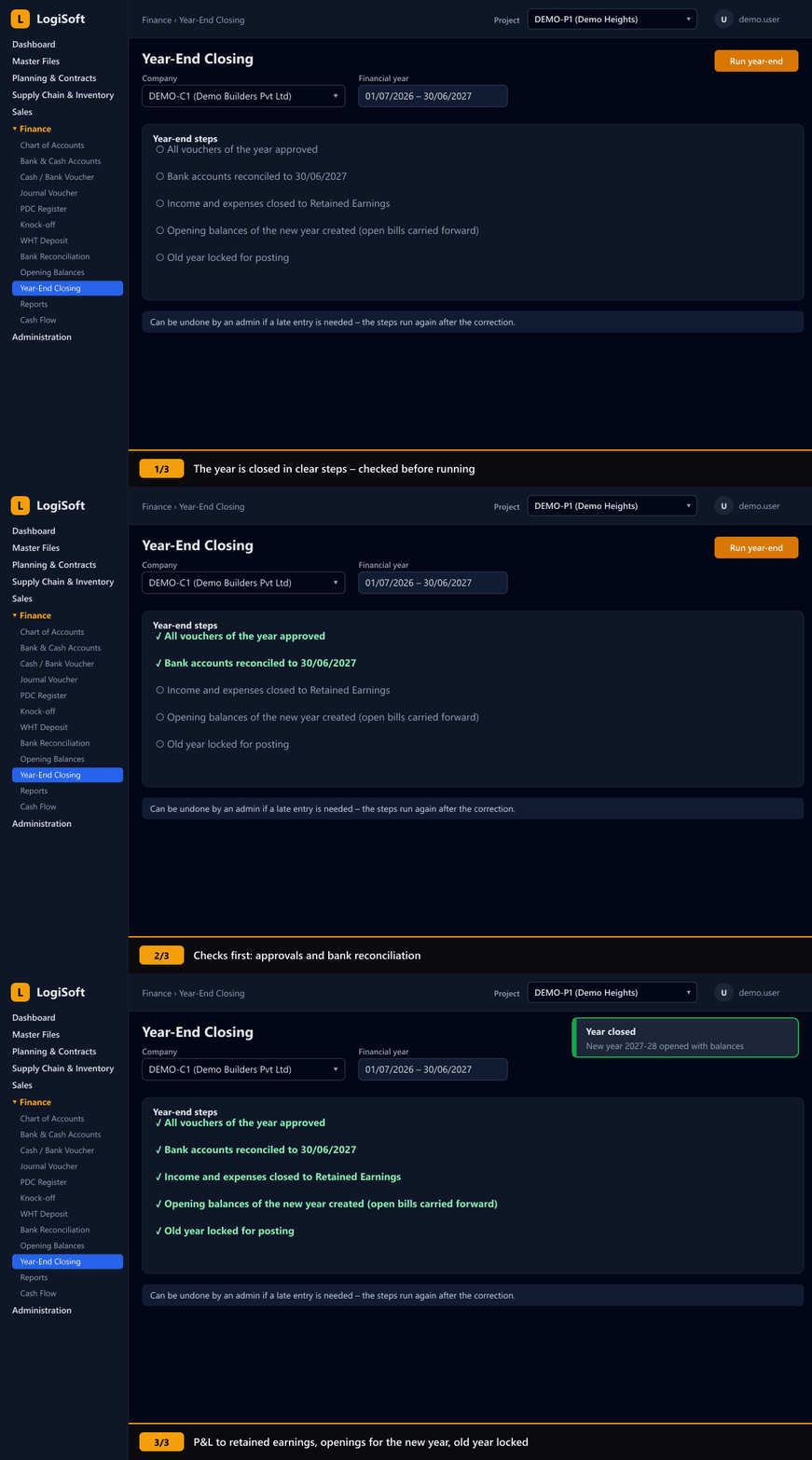
C4Year-end closing

Where

Finance › Year-End Closing.

Why

Close the year in clear, checked steps.

How

Checks first (all vouchers approved, banks reconciled), then income and expenses closed to retained earnings, opening balances of the new year created with open bills carried forward, and the old year locked for posting. An admin can undo it for a late entry.

Year-end closing

Part D

Reports and cash flow

The same filters everywhere: project, company or the whole group.

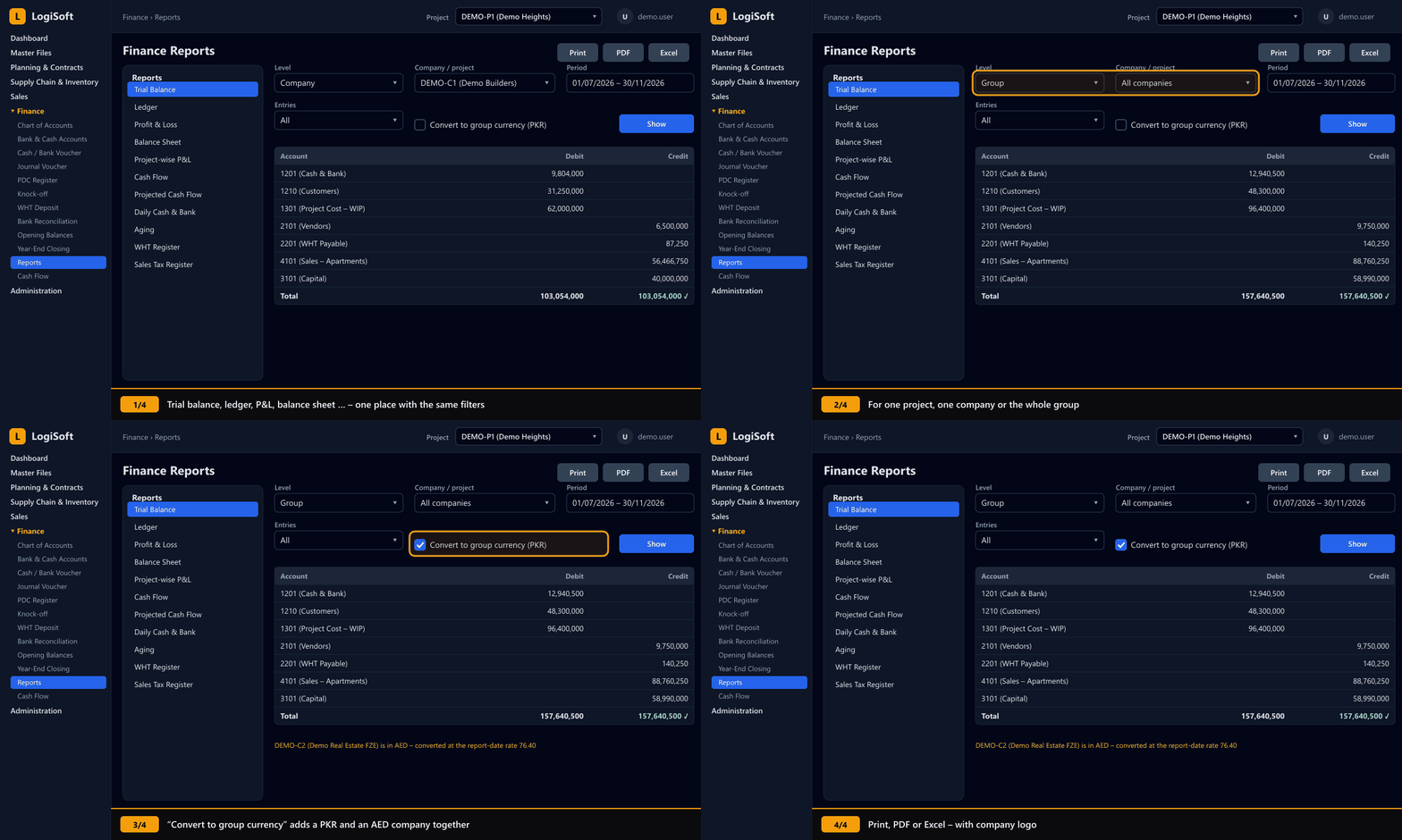
D1Finance reports

Where

Finance › Reports.

Why

Every finance report in one place with the same filters.

How

Trial Balance, Ledger, Profit & Loss, Balance Sheet, project-wise P&L, WHT and sales-tax registers. Level: project, company or group; period; Entries: All / Official only. “Convert to group currency” adds companies in different currencies together at the report-date rate. Print, PDF or Excel with the company logo.

Finance reports

D2Cash flow statement

Where

Finance › Cash Flow.

Why

Where the money actually came from and went.

How

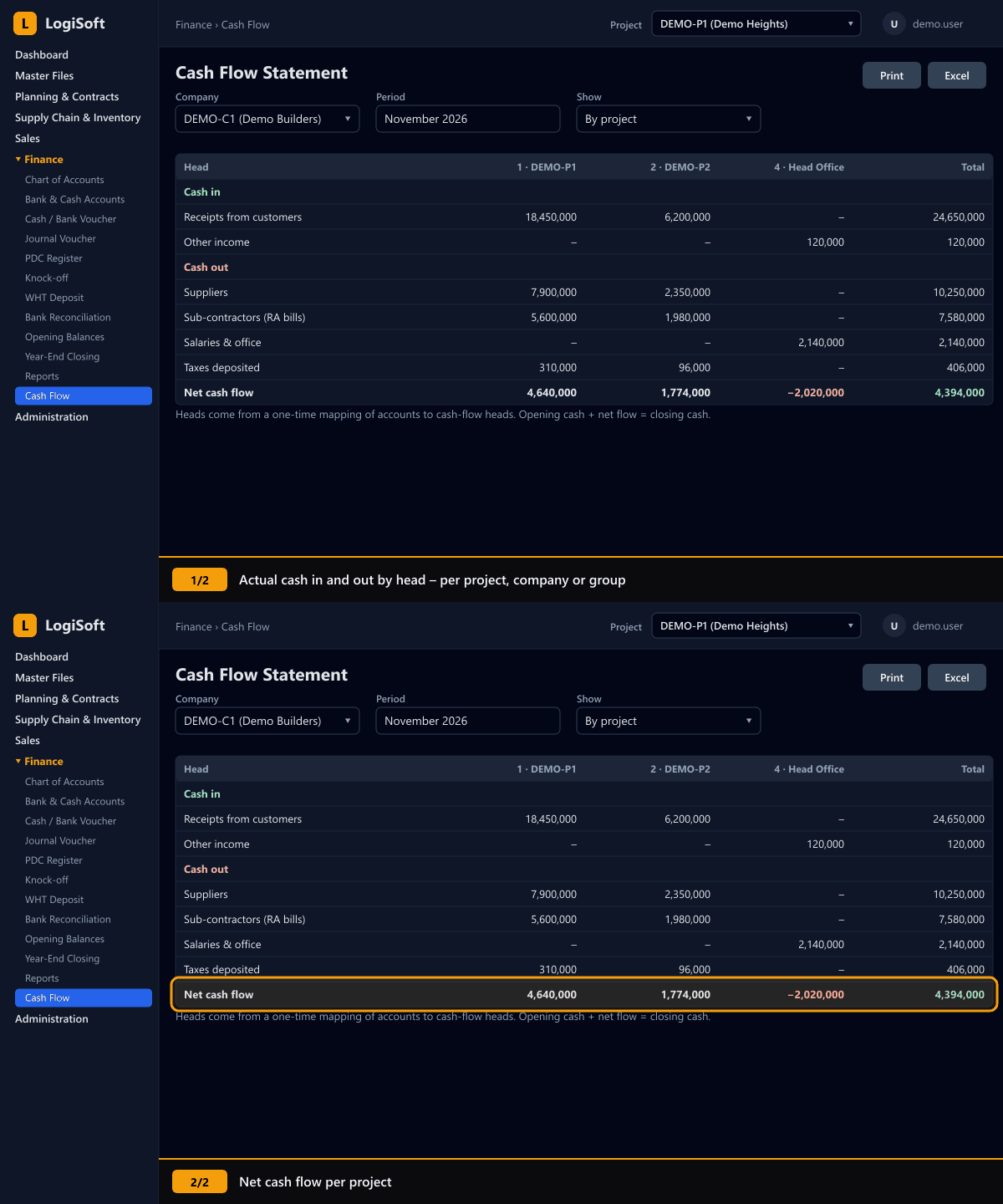
Cash in and out by head (customers, suppliers, sub-contractors, salaries, taxes …) per project, company or group. Heads come from a one-time mapping of accounts to cash-flow heads; opening cash + net flow = closing cash.

Cash flow statement

D3Projected cash flow

Where

Finance › Cash Flow › Projected.

Why

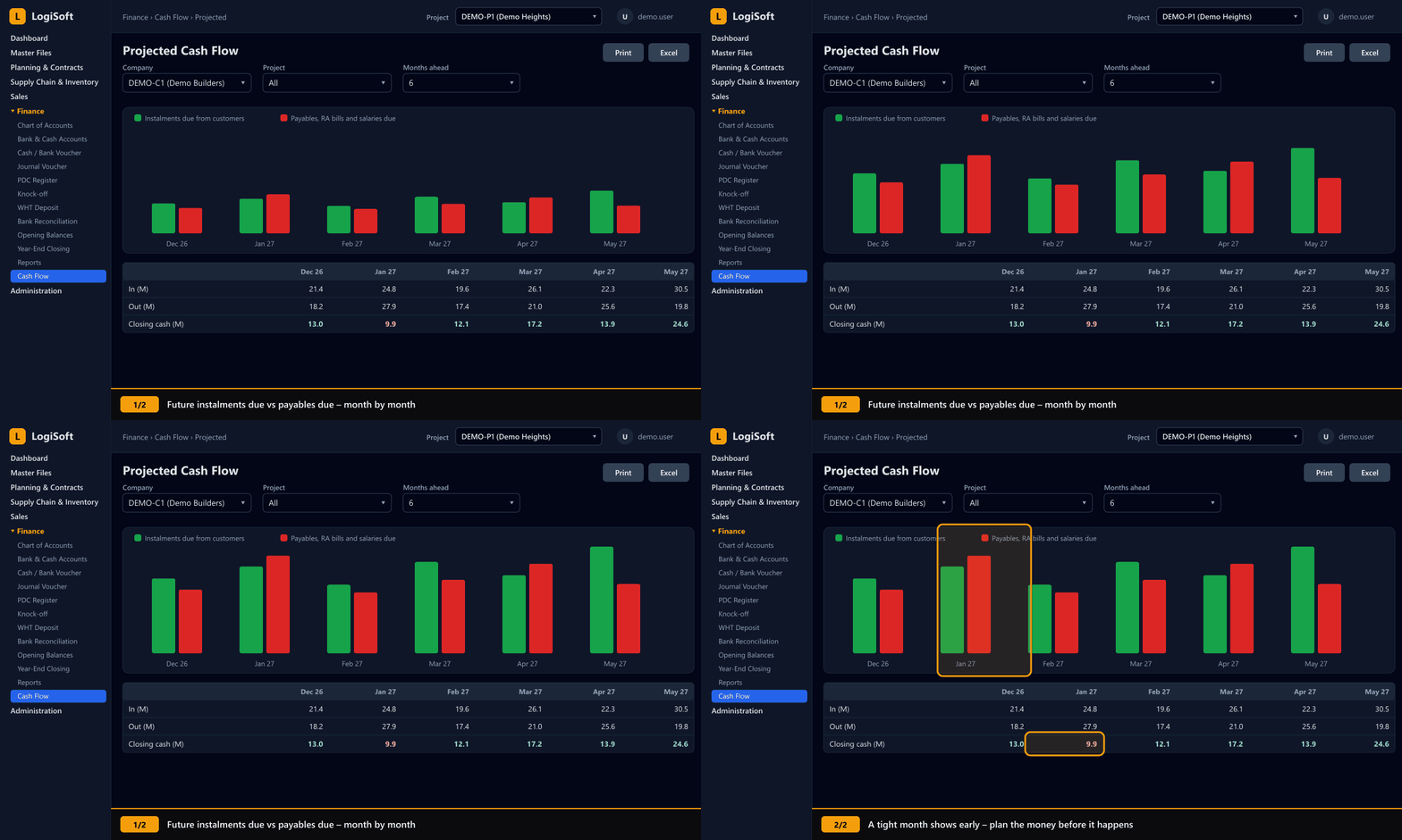
See a tight month before it happens.

How

Month by month: instalments due from customers (from the sales schedules and PDCs) against payables, RA bills and salaries due, with the projected closing cash. Per project, company or group.

Projected cash flow

D4Daily cash & bank position

Where

Finance › Cash Flow › Daily position.

Why

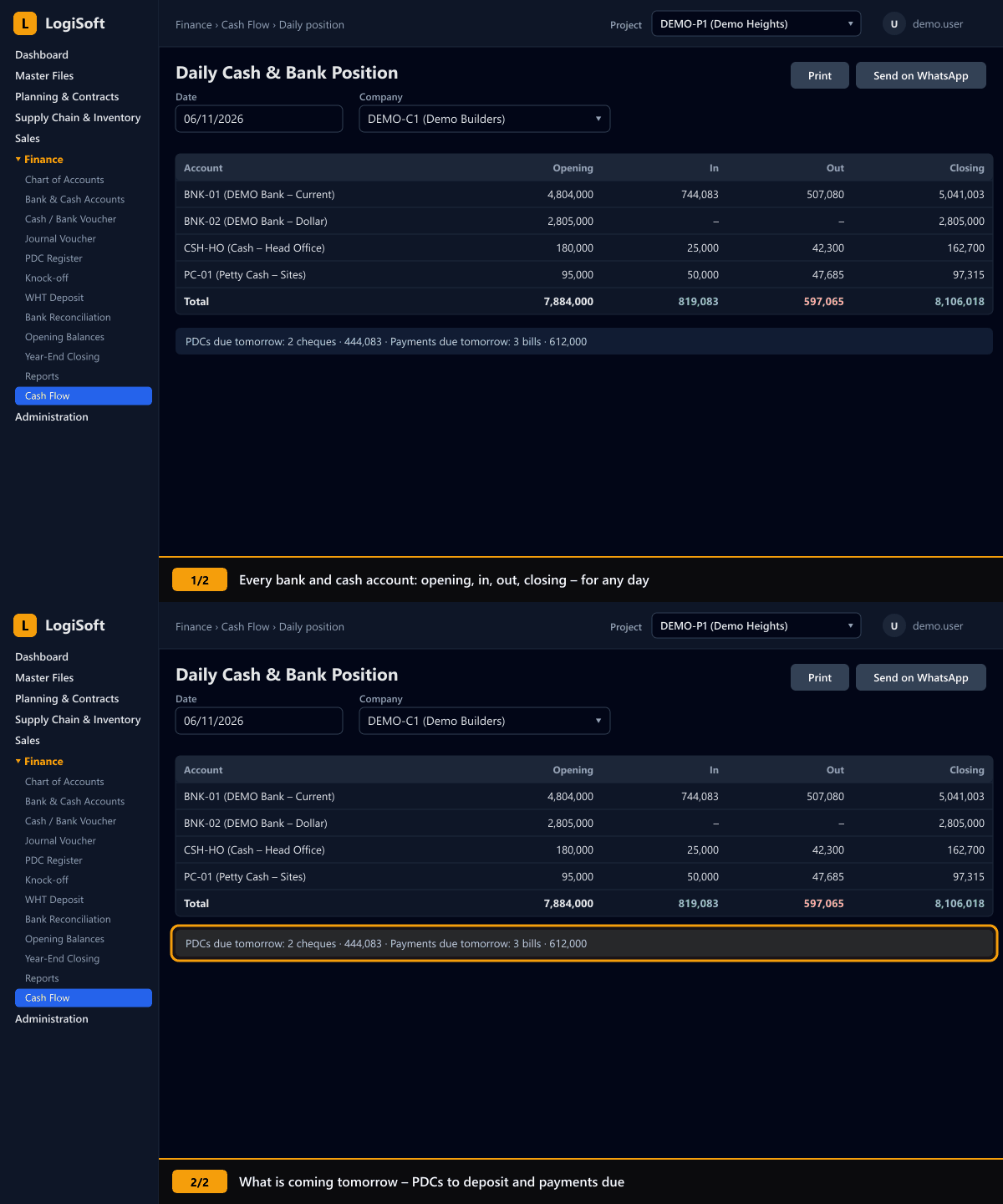
Every morning: how much is in every account, and what is coming tomorrow.

How

Opening, in, out and closing for each bank, cash and petty cash account for any day; PDCs to deposit and payments due tomorrow. Print or send on WhatsApp.

Daily cash & bank position

D5Aging

Where

Finance › Reports › Aging.

Why

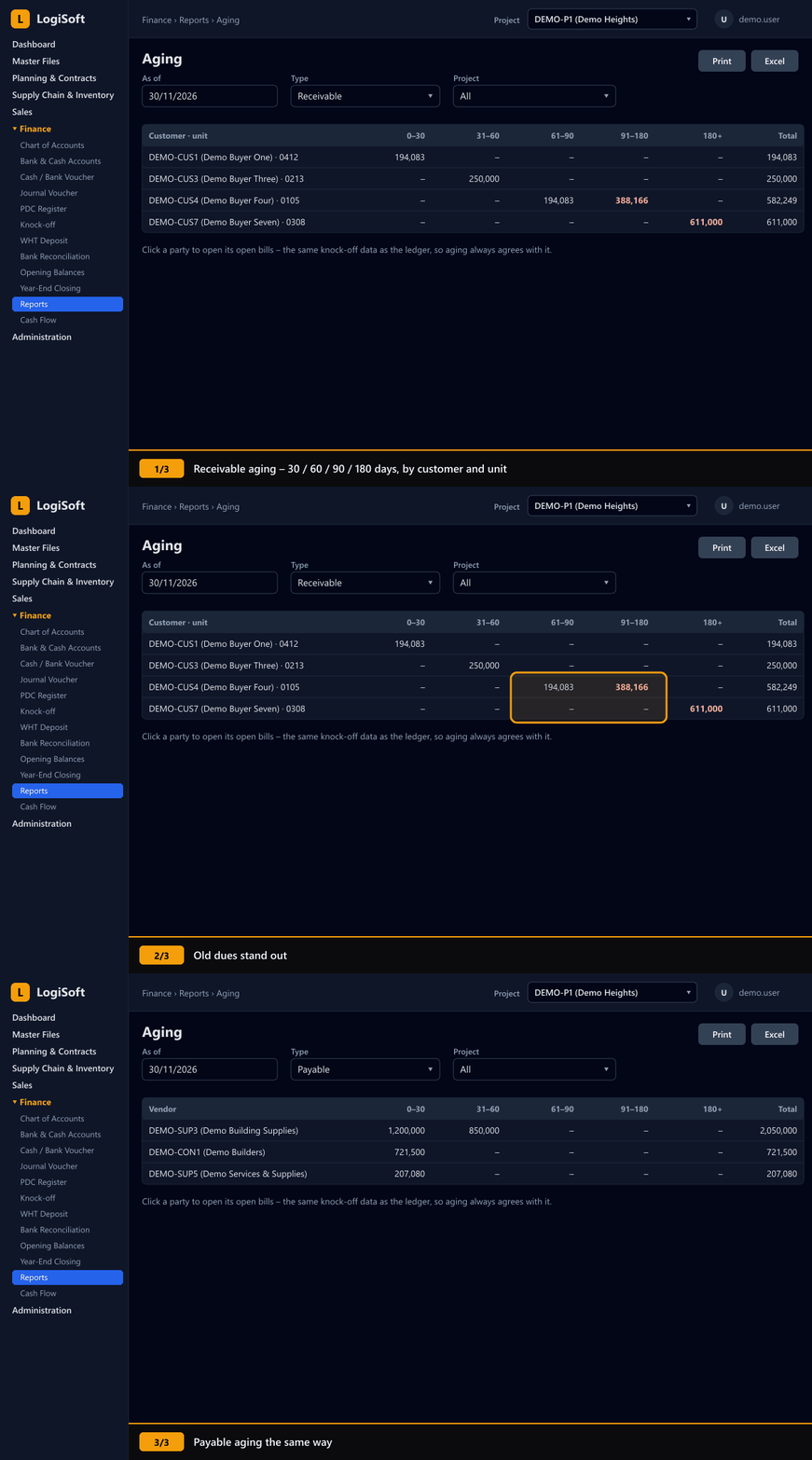
Who owes what, and for how long – customers and vendors.

How

Receivable and payable aging in 0–30 / 31–60 / 61–90 / 91–180 / 180+ days, by party (and unit for customers). Built from the same knock-off data as the ledger, so it always agrees with it.

Aging

D6Audit Trail

Where

Finance › Reports › Audit Trail.

Why

Auditors and management must see who changed what, and when.

How

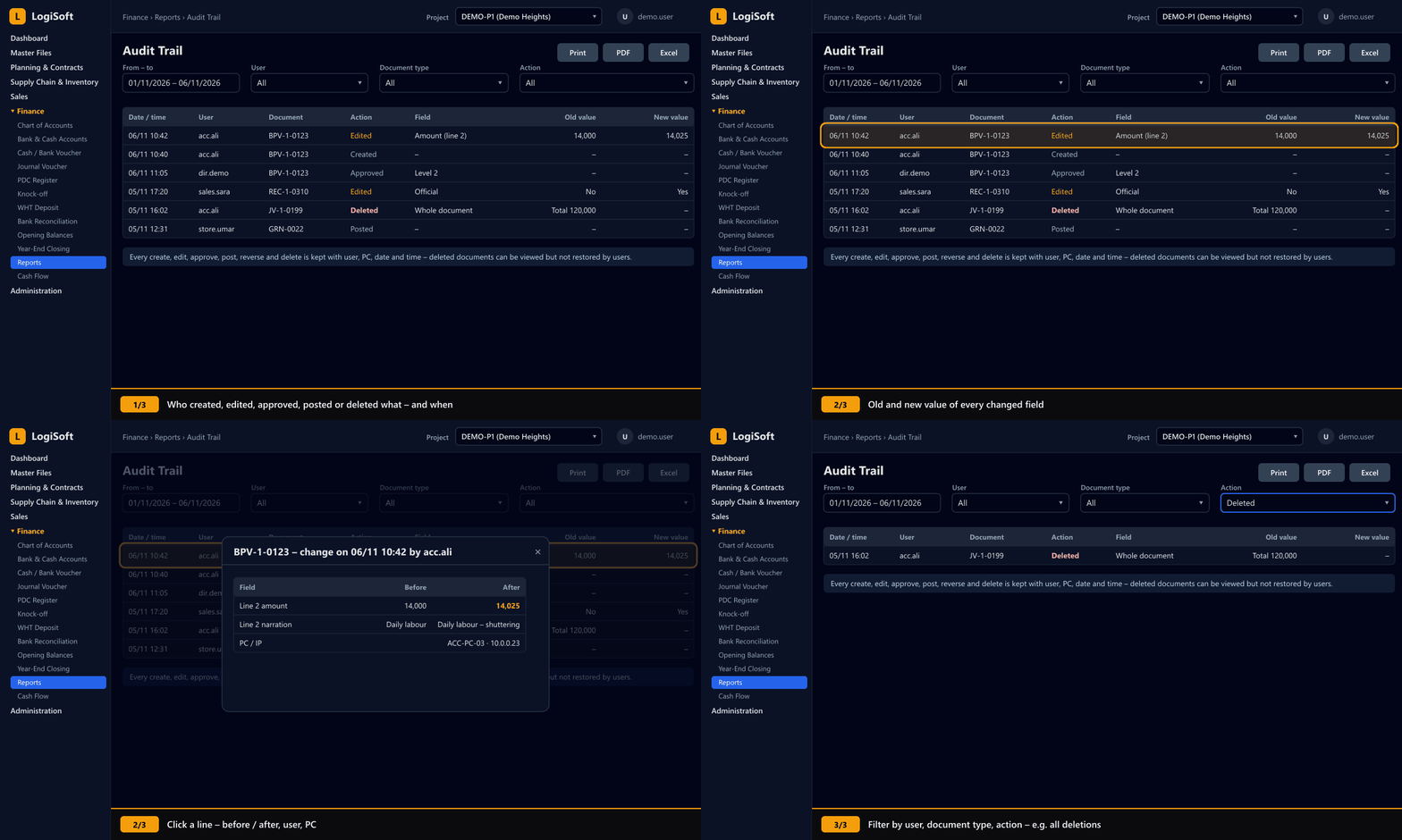
Every create, edit, approve, post, reverse and delete with user, PC / IP, date and time; old and new value of each changed field; click a line for before / after. Filters: dates, user, document type, action (e.g. all deletions). Print, PDF, Excel.

Audit Trail

Part E

Accounting entries and reports

Entries are posted on final approval. Every line carries its company and project; accounts come from the Chart of Accounts, the bank / cash account and the Tax Master.

Accounting entries

DocumentDebitCredit
Cash / bank paymentExpense / party (with project)Bank or cash
Cash / bank receiptBank or cashCustomer / income (with project)
PDC depositedBank (chosen at deposit)Customer – knocked off against the planned instalments
PDC bouncedCustomer (receipt reversed) + bounce chargeBank
Payment with WHTVendorBank (net) · WHT Payable
WHT depositedWHT PayableBank (CPR no. kept)
Bank charges / profit from statementBank charges expense / BankBank / Profit on account
Year-endIncome accountsExpense accounts · Retained earnings (difference)

Reports

R1Trial Balance – project, company or group (convert to group currency)
R2General Ledger / account ledger with running balance
R3Profit & Loss and Balance Sheet; project-wise P&L
R4Cash flow statement, projected cash flow, daily cash & bank position
R5Receivable and payable aging; customer and vendor statements
R6PDC register: received, due for deposit, deposited, bounced
R7Bank reconciliation statement
R8WHT register, WHT deposits and certificates; sales-tax register (input / output)
R9Voucher register and day book
R10Audit trail – every create / edit / approve / delete with old and new values

All reports: filters (company, project, period, party, account; Entries: All / Official only), print / PDF / Excel, company logo.

Not included

  • Fixed Assets (asset register, depreciation) – a separate module, to be scoped and built later.
  • Approval limits by amount – approvals work by levels and users (Approval Master).
  • Month-end closing lock for all users – posting dates are controlled per user (date access).
  • Batching plant (concrete sales) – separate project, not part of this scope.

Acceptance

The module is accepted when: a payment voucher charges three projects and the project P&L shows each → a PDC is received against two instalments, deposited into a bank chosen on the day, and the instalments are settled → a bounced PDC makes the instalment due again → a vendor is paid in part with WHT on the part only, and the WHT is deposited with a CPR no. → a bank statement is imported and reconciled to 0 → opening balances with open bills are knocked off → a group trial balance of a PKR and an AED company is shown in the group currency → the projected cash flow shows the next six months.

Prepared by Dynamic Software Solution · 05 Nov 2026 · Document version 0.1

Powered by Dynamic Software Solution · www.dynamicsoft.biz