Sales Module · The Court Industrial Park

Additional Charges Invoice – Late Payment & Other Charges

At present every new monthly penalty needs a new Expense code, because the old Extra Charges screen charges each unit only once. This document shows the new screen, how cancelled and transferred units will treat these invoices, and the data that needs cleaning. Please review and approve before development starts.

Back to projects

Part A

High

New Additional Charges Invoice screen

Late payment, gas / electricity connection and any other charge · any number of times

Part B

High

Cancel, re-purchase & transfer

“Include in Refund” decides whether the invoice is reversed – ledger examples

Part C

Clean-up

Old screen, old penalties, data

Hide old screen · re-make 25 penalties · 5 unbalanced vouchers

How it will work

01

Filter

Choose Tower and Flat Type – sold units are listed

02

Charge

Pick charge from Expense File, enter amount, bill date, narration

03

Options

Unit Cost & Schedule? Include in Refund?

04

Generate

One sales invoice per selected unit

05

Approve

Invoices wait for approval, then show in ledger

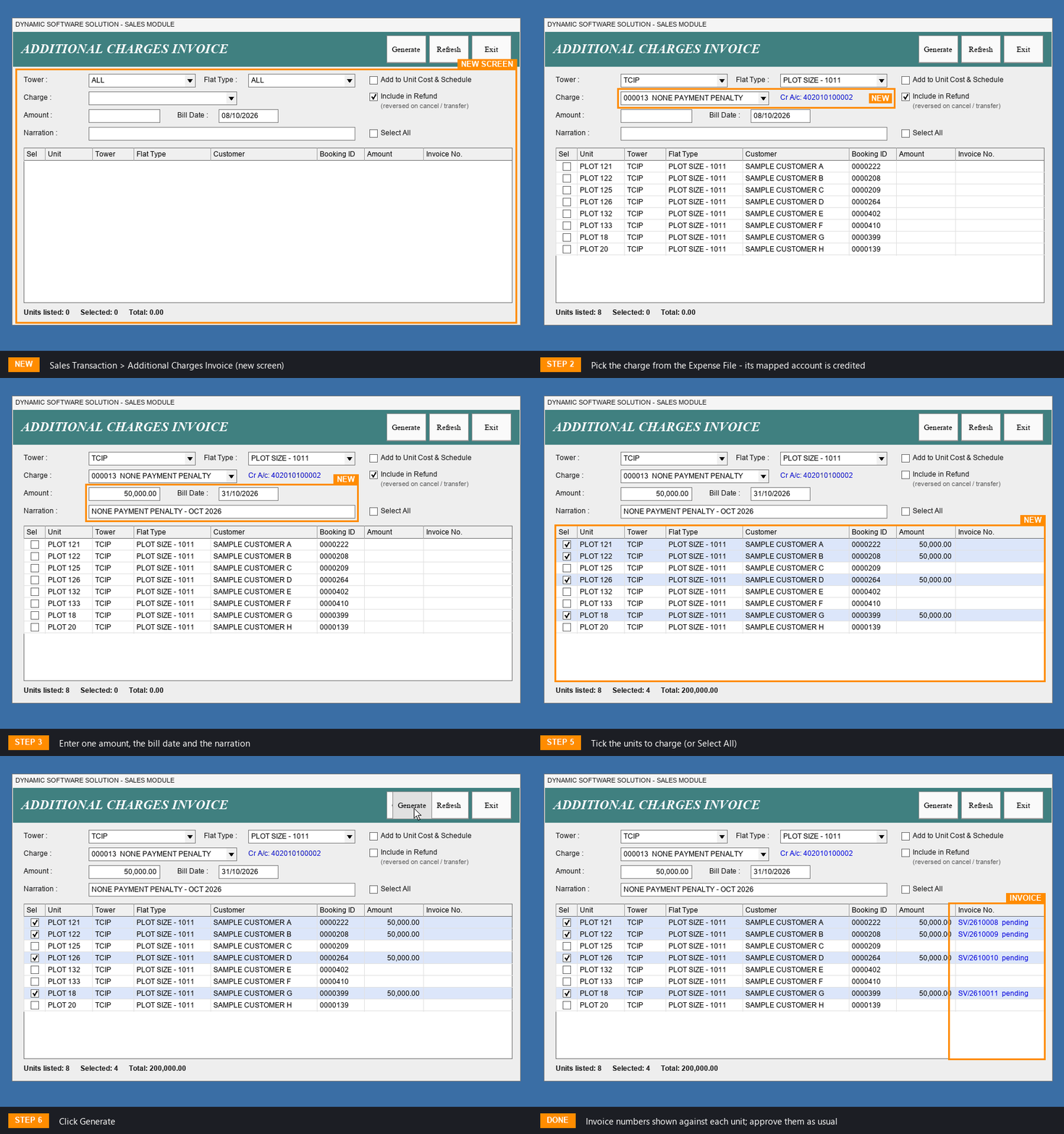
In all pictures, new items are shown in an orange box. The GIFs play the steps automatically; click any picture to open it full size. Customer names and ledger amounts in the pictures are sample data.

Part A

New screen: Additional Charges Invoice

One screen for every extra charge – late payment penalty, gas connection, electricity connection or anything else in the Expense File. It can be used every month without creating new codes.

A1Menu

Where

Sales Module › Sales Transaction › Additional Charges Invoice (new).

Why

The old “Additional Invoice For Extra Chgs.” screen can charge a unit only once per Expense code, so a new code was needed every month.

How

The old screen is hidden from the menu. Invoices already made by it are not changed.
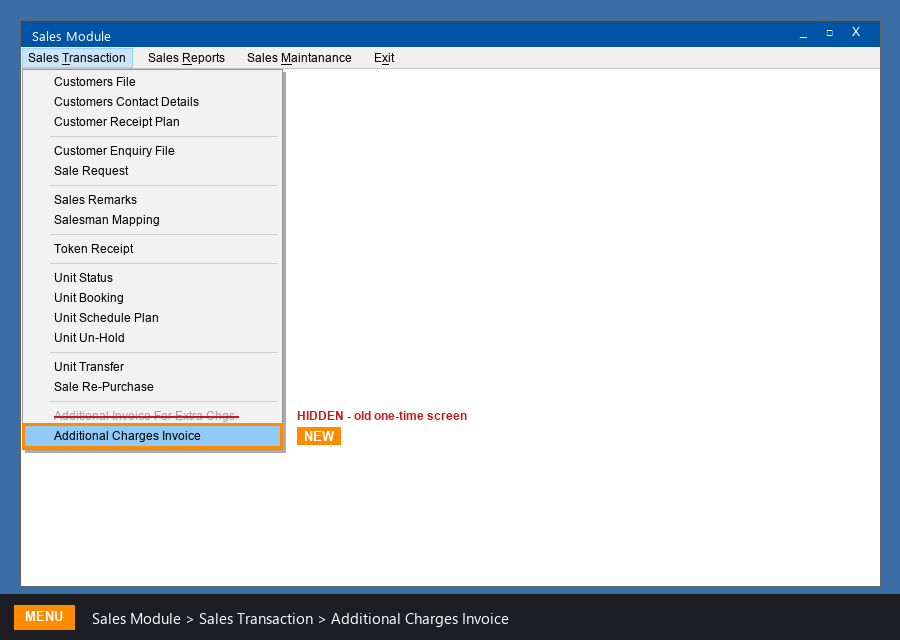
Sales Transaction menu – new option added, old one hidden

A2Generate invoices

Where

Top of the screen: Tower, Flat Type, Charge, Amount, Bill Date, Narration and two options. Below: the sold units that match, each with a tick box.

Why

Charge many units in one go with the same amount – for example all “PLOT SIZE - 1011” plots here, or all “3 BED A” flats of “TOWER - A” in an apartment project.

How

Choose the Tower and Flat Type → pick the charge → enter one amount and the bill date → tick the units → Generate. One invoice per unit is created and sent for approval.

Tower & Flat Type → Charge → Amount & Bill Date → Options → tick units → Generate
FilterComes fromExamples
TowerTower of the unit (Sales Maintanance › Tower File)TCIP here; TOWER - A, TOWER - B, CT - 1 in apartment projects
Flat TypeFlat Type of the unit (Sales Maintanance › Flat File)PLOT SIZE - 1011 here; 3 BED A, B 2-BEDS, XL 4-BEDS in apartment projects

Both filters start at ALL and can be used together or alone. Only sold units with a customer and an active booking are listed. Only a direct amount is entered (no percentages). The same amount is used for every selected unit. The narration is filled automatically from the charge name and month and can be changed.

A3The two options

OptionTickedNot ticked
Add to Unit Cost & ScheduleAmount is added to the unit's cost and a line is added to the unit's schedule – the charge becomes part of the unit value.Unit cost and schedule are not touched (normal for penalties).
Include in RefundIf the unit is cancelled, re-purchased or transferred, this invoice is reversed like an installment (as today).The invoice is not reversed. It stays with this customer and is not passed to a new customer on transfer. See Part B.

Contract value and sales reports keep working as today, using the “Exclude Contract” setting of each charge in the Expense File.

A4Checks before generating

Account mapping

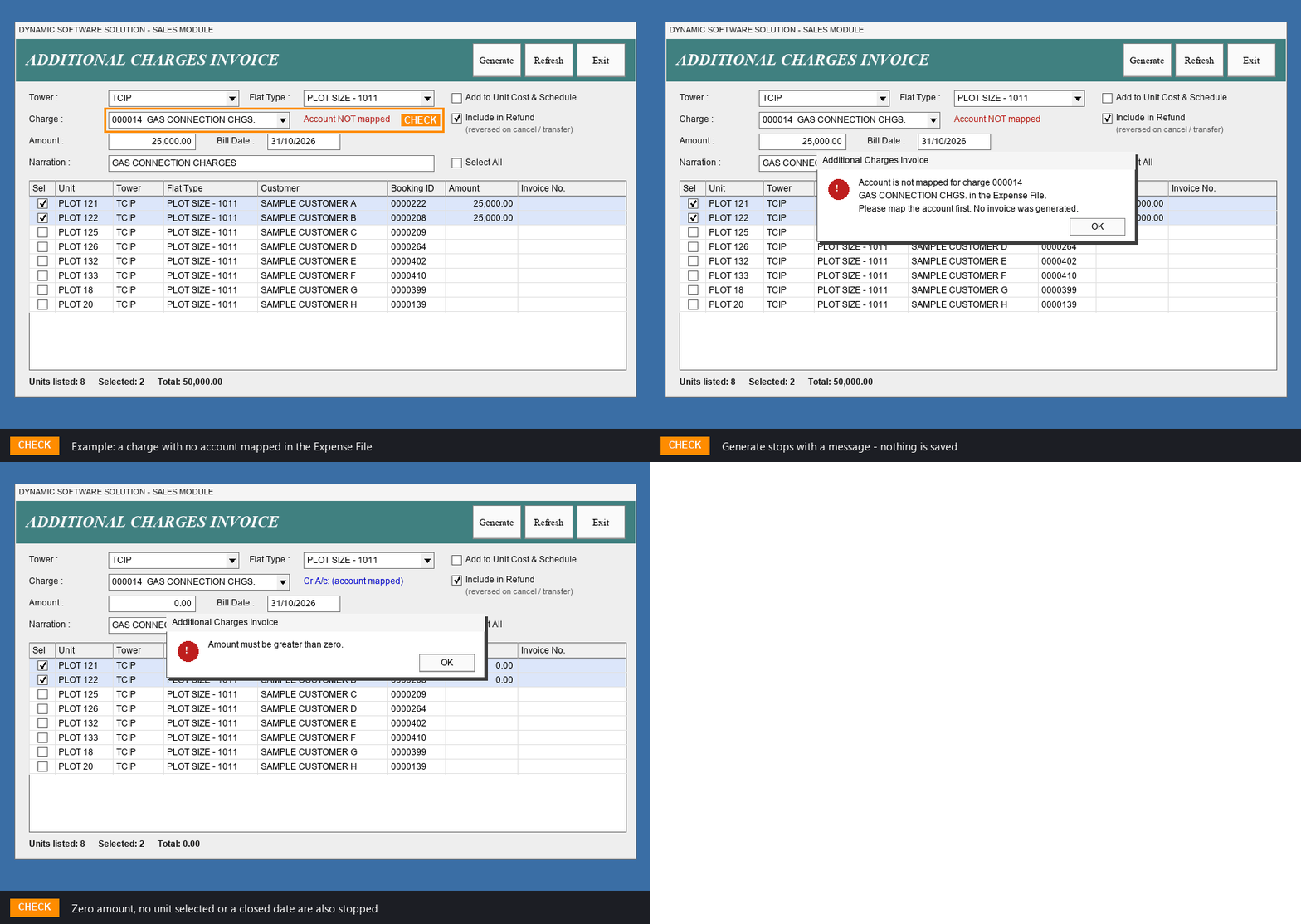
The credit account comes from the Expense File. If the charge has no account mapped, a message is shown and nothing is generated.

Entries

Amount must be more than zero, at least one unit must be ticked, and the bill date must be inside the user's allowed date range.

All or nothing

Each invoice is saved completely or not at all – no half invoices if there is a power or network failure. User rights apply as on other screens.

Unmapped account and zero amount are stopped with a message

A5What each invoice records

ItemValue
Sales Book (SV) invoiceOne per unit, normal SV number, dated with the Bill Date chosen.
DebitCustomer of the unit.
CreditAccount mapped to the charge in the Expense File (e.g. 000013 → 402010100002 None Payment Penalty).
Linked toUnit, booking and charge code – so the invoice appears in the unit ledger, customer ledger, aging and in Knock-off when receiving payment.
NarrationAs entered, e.g. “NONE PAYMENT PENALTY - OCT 2026”.
StatusWaiting for approval. Shows in the ledger after it is approved.
Options“Include in Refund” is saved on the invoice. Unit cost and schedule are updated only if that option is ticked.
LogUser, computer and time are recorded in the Sales Book log.

Part B

Cancel, re-purchase & transfer

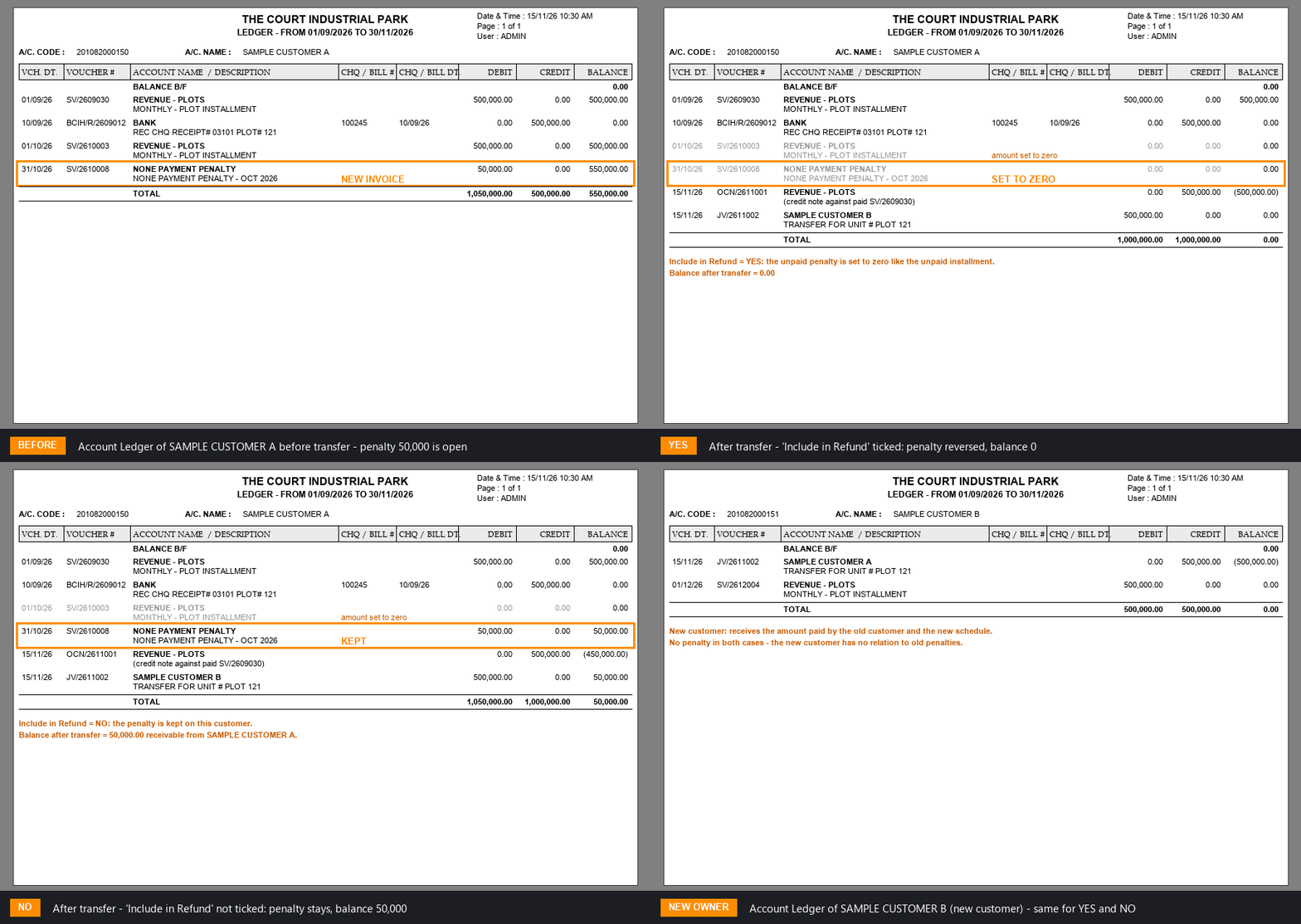
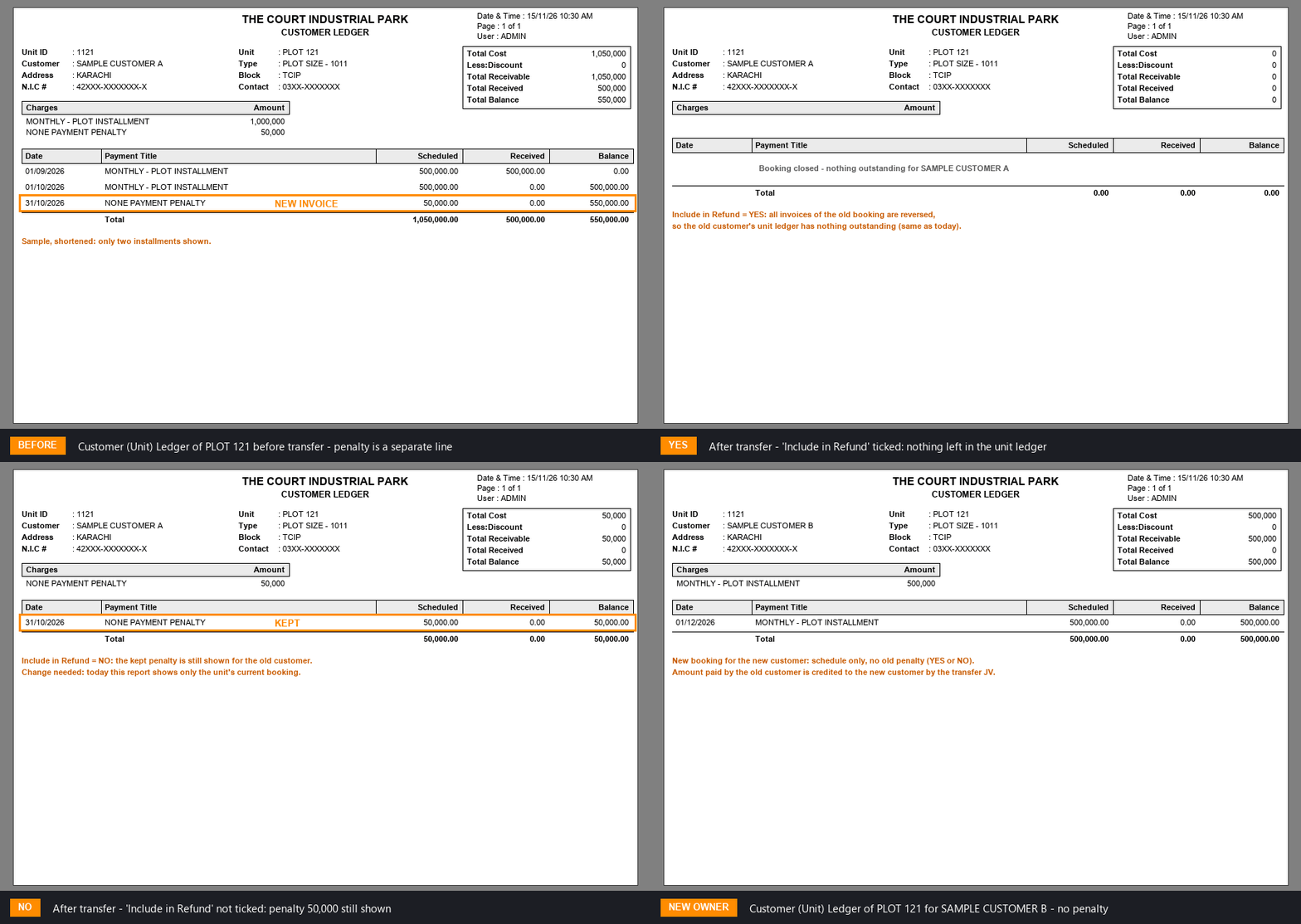
What the Account Ledger and the Customer (Unit) Ledger show after cancellation or transfer, with “Include in Refund” ticked (YES) and not ticked (NO). Amounts are sample data.

B1Cancellation (Sale Re-Purchase) – ledger entries

Include in Refund = YES

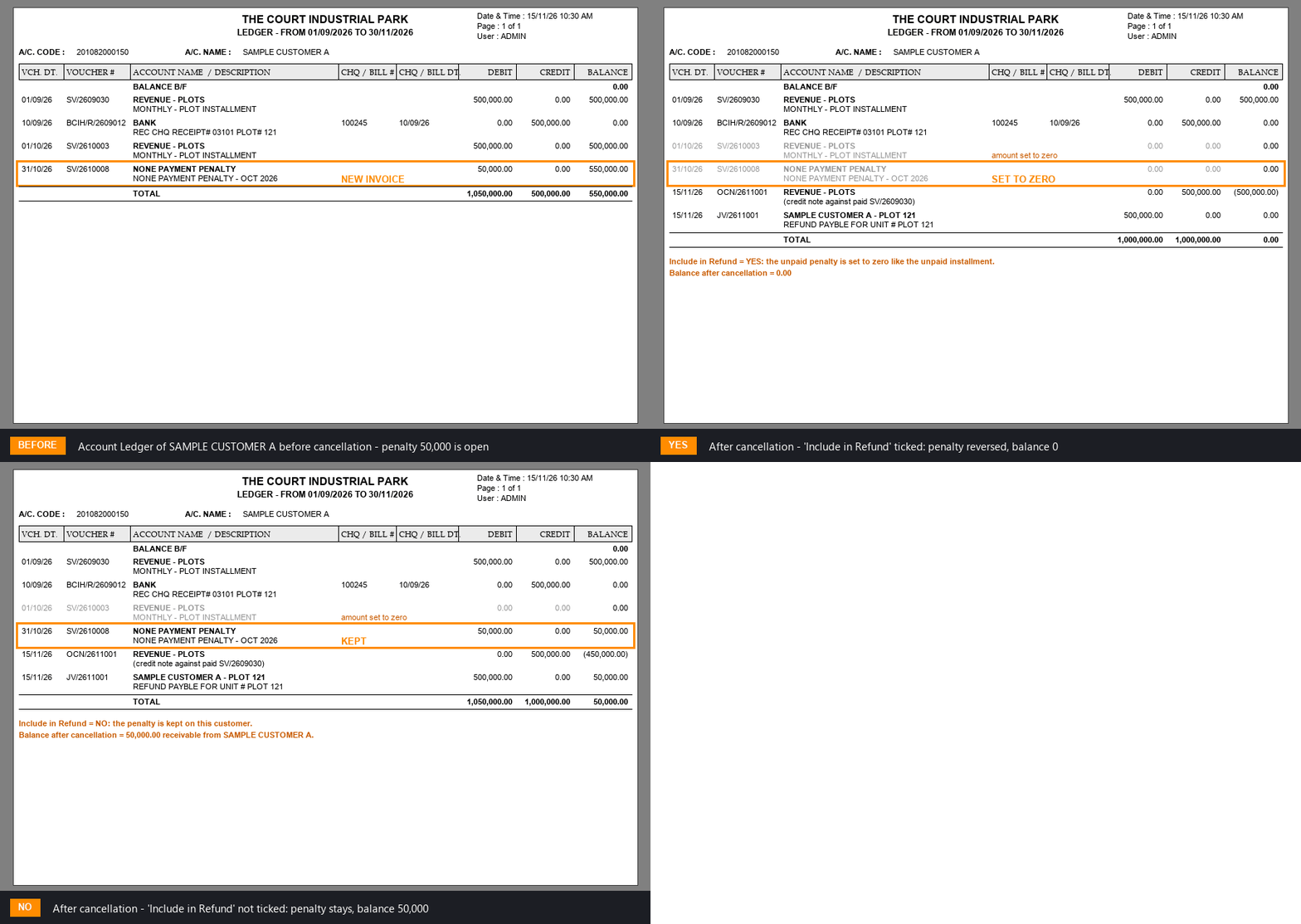
Same as today: a paid invoice is reversed by a credit note, an unpaid invoice is set to zero, and the amount received goes to the refund account (“REFUND PAYBLE FOR UNIT #”). Customer balance becomes 0.

Include in Refund = NO

The charge is not reversed. It stays on the customer's account, so the customer balance after cancellation equals the unpaid charge.

Example (sample)

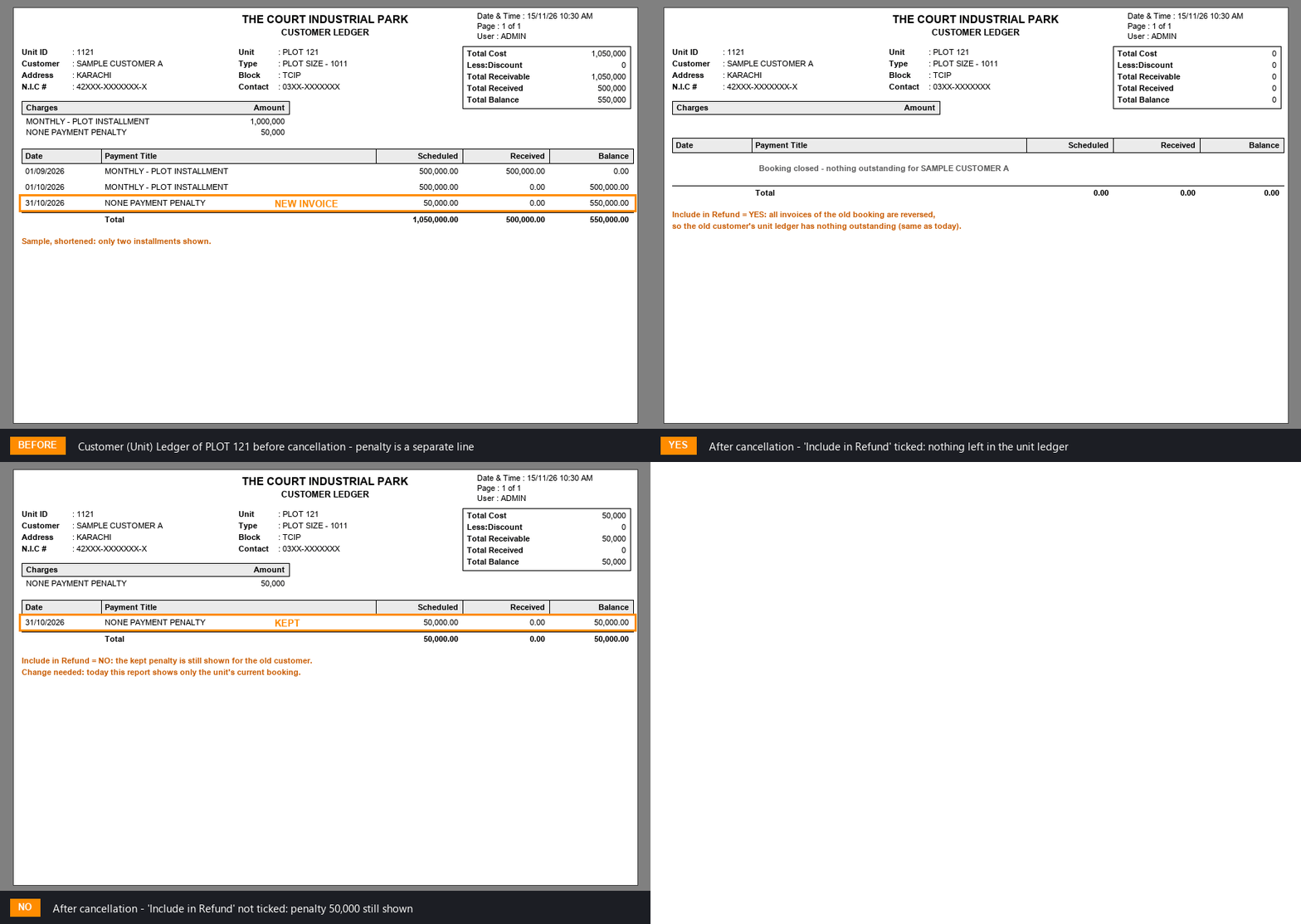
PLOT 121: one paid installment 500,000, one unpaid installment 500,000 and an unpaid penalty of 50,000 – cancelled on 15/11/2026.

Account Ledger: before → after (YES) → after (NO)
Customer (Unit) Ledger: before → after (YES) → after (NO)

Change needed: today the Customer (Unit) Ledger shows only the unit's current booking, so after cancellation it shows nothing for the old customer. To show a kept charge (NO), this report will also list kept charges of the old booking for that customer.

B2Transfer (Unit Transfer) – ledger entries

Old customer – YES

Same as today: invoices reversed or set to zero, the amount received is moved to the new customer (“TRANSFER FOR UNIT #”). Balance becomes 0.

Old customer – NO

The charge stays with the old customer. Balance after transfer equals the unpaid charge.

New customer

Gets the transferred amount and a new schedule. Charges of the old customer are never moved to the new customer – YES or NO.

Account Ledger: old customer before → after (YES) → after (NO) → new customer
Customer (Unit) Ledger: old customer before → after (YES) → after (NO) → new customer

B3Good to know (no change)

  • Partly paid installments: On cancellation an installment that is partly paid is reversed for its full amount by a credit note (for example 100,000 installment with 20,000 received → credit note of 100,000). This is how it works today.
  • Re-schedule: Works as today – all invoices of the booking, including additional invoices, are removed and the schedule is made again.
  • Refund amount: How a kept unpaid charge is settled against the refund is an open point – see question 01 below.

Part C

Clean-up

Data found during the review that needs action.

C1Old penalty invoices – delete and make again

What

25 penalty invoices (Expense 000013) made by the old screen. They have no narration and no “Include in Refund” choice.

Action

Your team deletes these invoices and generates them again from the new screen with the correct date, narration and options.

Note

The old screen also added these amounts to each unit's cost. Unit cost is left as it is.

#VoucherDateUnitFlat TypeAmount
1SV/260600630/06/2026PLOT 122PLOT SIZE - 10113,540,038
2SV/260600730/06/2026PLOT 8PLOT SIZE - 4822,037,000
3SV/260600830/06/2026PLOT 46PLOT SIZE - 10114,164,050
4SV/260600930/06/2026PLOT 118PLOT SIZE - 7982,952,000
5SV/260601030/06/2026PLOT 34PLOT SIZE - 10114,330,780
6SV/260601130/06/2026PLOT 24PLOT SIZE - 10114,136,331
7SV/260601230/06/2026PLOT 121PLOT SIZE - 10115,710,555
8SV/260900426/09/2026PLOT 124PLOT SIZE - 9603,360,000
9SV/260900526/09/2026PLOT 109PLOT SIZE - 8072,824,500
10SV/260900626/09/2026PLOT 9PLOT SIZE - 15215,323,500
11SV/260900726/09/2026PLOT 28PLOT SIZE - 10113,538,500
12SV/260900826/09/2026PLOT 117PLOT SIZE - 9023,157,000
13SV/260900926/09/2026PLOT 79PLOT SIZE - 10473,664,500
14SV/260901026/09/2026PLOT 74PLOT SIZE - 10113,538,500
15SV/260901126/09/2026PLOT 64PLOT SIZE - 9603,360,000
16SV/260901226/09/2026PLOT 63PLOT SIZE - 10113,538,500
17SV/260901326/09/2026PLOT 62PLOT SIZE - 10113,538,500
18SV/260901426/09/2026PLOT 6PLOT SIZE - 4821,687,000
19SV/260901526/09/2026PLOT 58PLOT SIZE - 10113,538,500
20SV/260901626/09/2026PLOT 41PLOT SIZE - 10113,538,500
21SV/260901726/09/2026PLOT HOSPITAL PB- IIHOSPITAL 1466 SQYD5,131,000
22SV/260901826/09/2026PLOT 123PLOT SIZE - 9603,360,000
23SV/260901926/09/2026PLOT 120PLOT SIZE - 9663,381,000
24SV/260902026/09/2026PLOT 59PLOT SIZE - 9433,300,500
25SV/260902126/09/2026PLOT 108PLOT SIZE - 10813,783,500
Total – 25 invoices90,434,254

C2Unbalanced vouchers

These vouchers have only one line (no opposite account), so debit and credit do not match. Please correct or delete them.

BookVoucherDateDebitCredit
Bank BookBCIH/R/221106918/11/20220500,000
Bank BookBCIH/P/260801831/08/20265,000,0000
Bank BookBCIH/P/260801931/08/20265,000,0000
Cash BookCIHO/P/221110715/11/2022148,2000
Cash BookCCIH/P/230201310/02/2023360,0000

Menu

Where the changes appear

MenuNew / changedPart
Sales Module › Sales TransactionAdditional Charges Invoice (new screen)A
Sales Module › Sales TransactionAdditional Invoice For Extra Chgs. hiddenA
Sales Module › Sales Transaction › Sale Re-PurchaseSkips invoices not marked “Include in Refund”B
Sales Module › Sales Transaction › Unit TransferSkips invoices not marked “Include in Refund”B
Customer (Unit) LedgerAlso shows kept charges of a cancelled / transferred booking for the old customerB

Open points

Questions for The Court Industrial Park

01

Refund and kept charges

When a unit is cancelled and an unpaid charge is not included in the refund, should it be deducted from the refund amount, or stay as an amount the old customer owes? (to be discussed)

02

Default of “Include in Refund”

Should the box be ticked or not ticked when the screen opens?

03

Same charge twice

If a unit already has the same charge in the same month, should the screen warn, stop, or allow it?

04

Old penalties

Which bill date should be used when the 25 penalties in C1 are made again – the original dates or a new date?

05

Unbalanced vouchers

Will your team correct the 5 vouchers in C2, or should we?

06

Go-live

What is the target date?

Approval

Sign-off

Development starts after this document is approved.

Approved by (The Court Industrial Park)

Designation

Date

Prepared by Dynamic Software Solution · 08 Oct 2026 · Document version 1.2