Module 9 · Construction & Real Estate Suite

Administration & Dashboard – Scope of Work

The settings that sit above the modules – module configuration, SMS and WhatsApp gateways, e-mail and notifications – and the dashboards that show management, sales, projects, supply chain and finance at a glance. Users, rights and approvals are part of Core Setup. Anything not written on this page is not part of this module.

All modules
AD
Administration & Dashboard

What this module covers

01

Module settings

Every module's switches in one place

02

SMS & WhatsApp

Your own gateways · delivery status

03

E-mail

Statements and approvals from your address

04

Notifications

Bell · who gets which alert

05

Dashboards

Role-based · click through to reports

How it fits in LogiSoftWhat it means
Core SetupCompanies, projects, users, roles and rights, date access, Approval Master, document numbering and the audit log are on the Core Setup page.
Project drop-downEvery dashboard shows only the projects the user is allowed – “All my projects” or one project from the drop-down at the top.
ReportsEvery dashboard tile and chart opens the report behind it, with the same filters, so a figure can always be checked.
MessagesSales (dues, statements, brochures), approvals and alerts all send through the gateways set up here.
Users, roles and rights, date access, Approval Master, document numbering and the audit log are part of Core Setup. Core Setup
The GIFs play the steps of each screen automatically; the orange box shows where to look in each step. Click any picture to open it full size. Screens are a preview of the planned design – names, figures and amounts are sample data.

Part A

Administration

The settings that are not part of one module – set once by your administrator.

A1Module Configuration

Where

Administration › Module Configuration.

Why

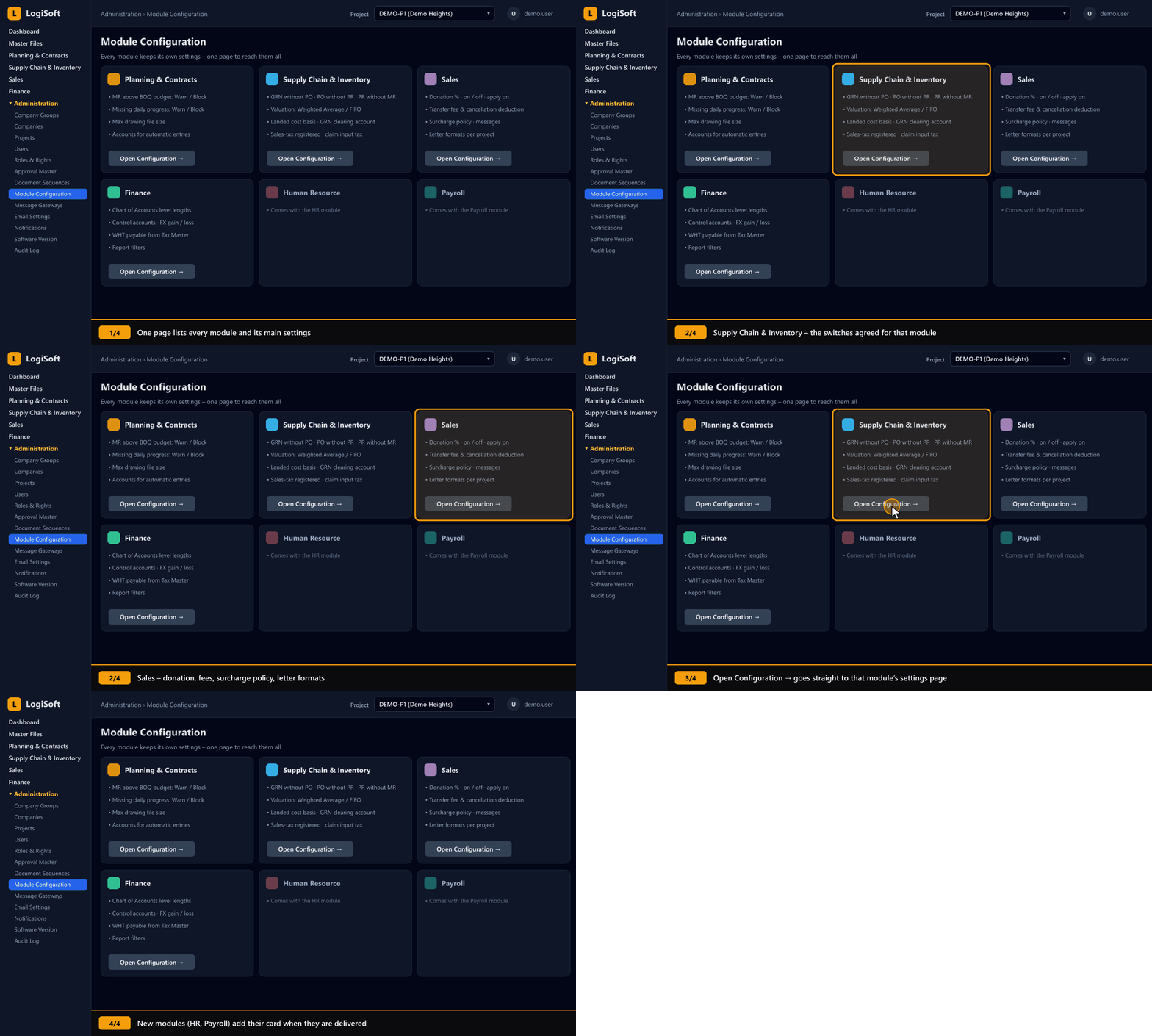
Each module has its own switches – one page lists them all so nothing is missed.

How

One card per module (Planning & Contracts, Supply Chain & Inventory, Sales, Finance) with its main settings and an “Open Configuration” button to that module's settings page. HR and Payroll add their card when they are delivered.
Module Configuration

A2Message Gateways – SMS & WhatsApp

Where

Administration › Message Gateways.

Why

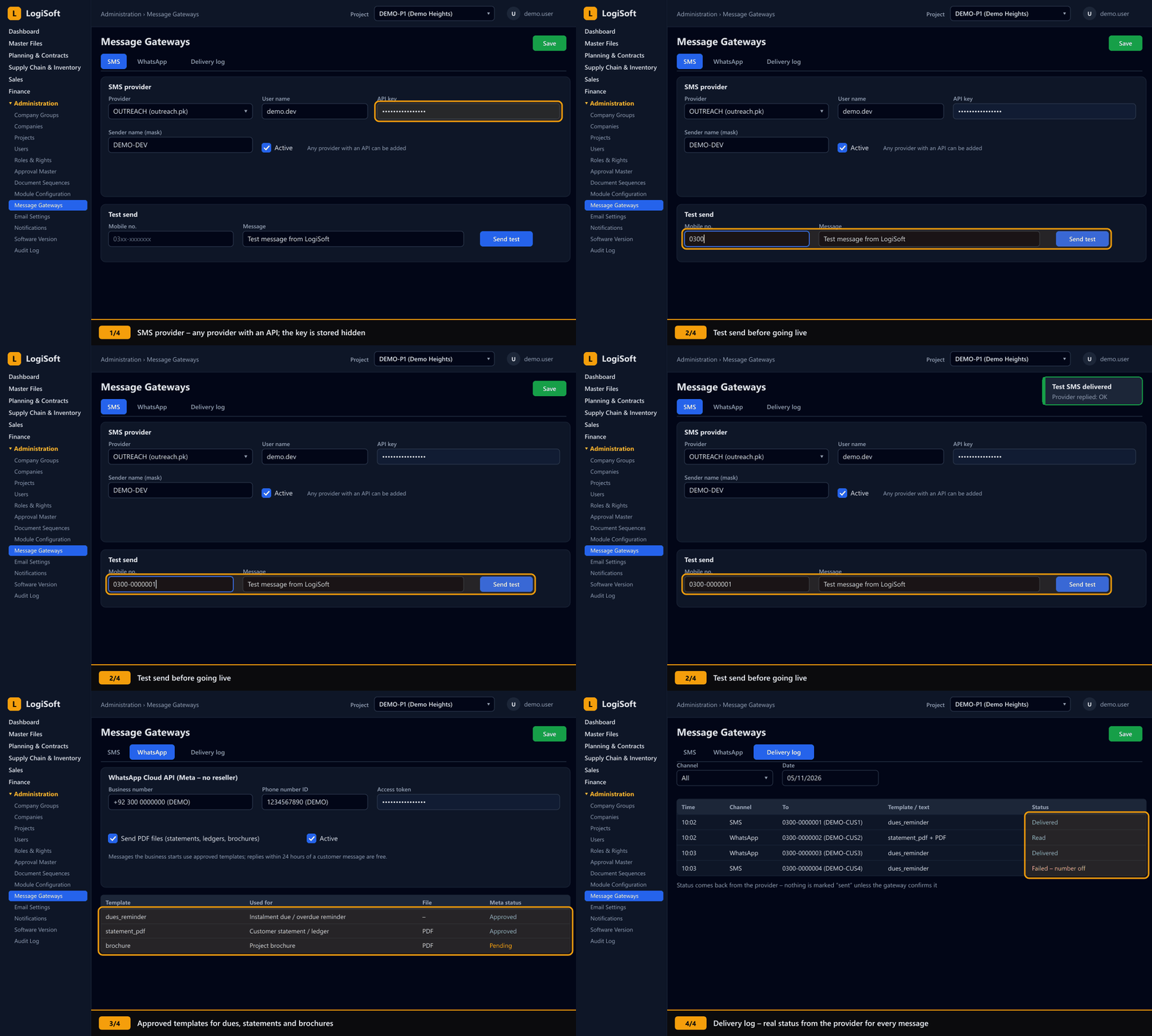
Dues reminders, statements and brochures go out through your own SMS and WhatsApp accounts.

How

SMS: any provider with an API, user name, hidden API key, sender name, test send. WhatsApp: Meta's WhatsApp Cloud API directly (no reseller), business number, hidden access token, PDF files allowed, approved message templates. Delivery log with the real status returned by the provider (Delivered / Read / Failed).

Message Gateways – SMS & WhatsApp

Message charges are billed by the SMS provider and by Meta directly to your account.

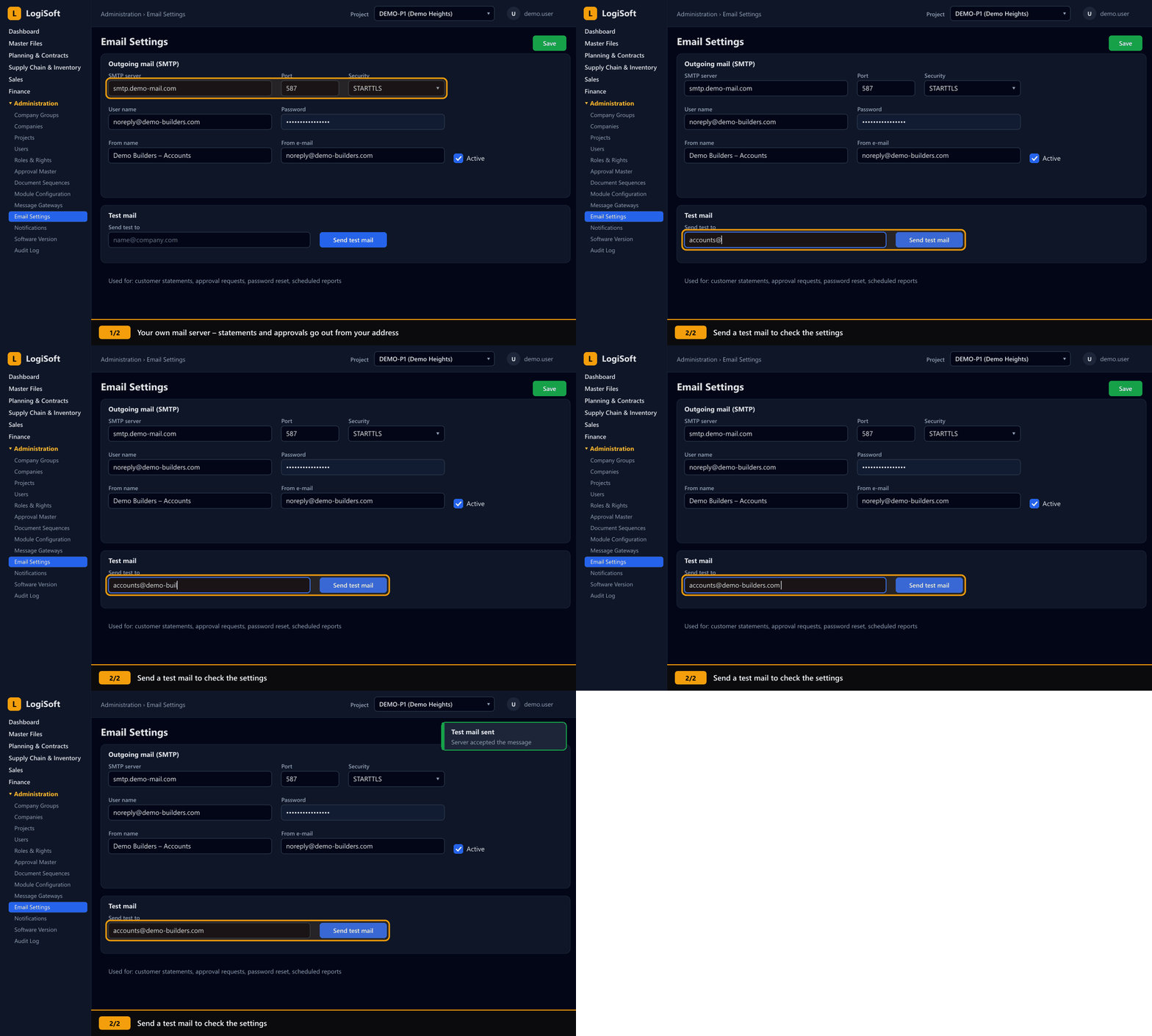
A3Email Settings

Where

Administration › Email Settings.

Why

Statements, approval requests and password resets go out from your own address.

How

SMTP server, port, security, user name, hidden password, from name and e-mail, Active. Test mail before going live.

Email Settings

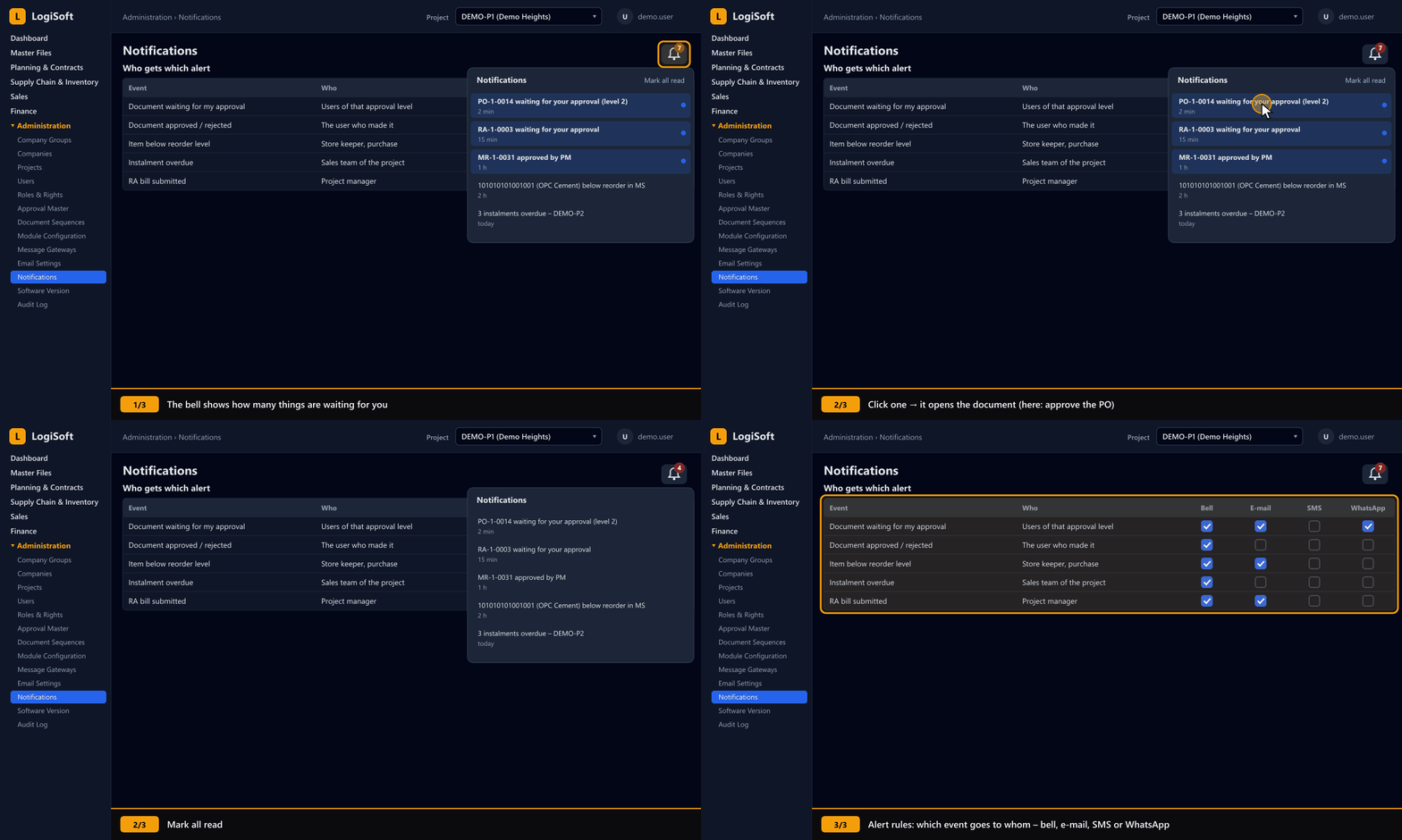
A4Notifications

Where

Bell at the top of every screen · Administration › Notifications.

Why

Nobody has to search for work waiting for them.

How

The bell shows how many items wait for the user (approvals, reorder alerts, overdue instalments …); clicking one opens the document. Mark as read. Alert rules: for each event choose who gets it and how – bell, e-mail, SMS or WhatsApp.

Notifications

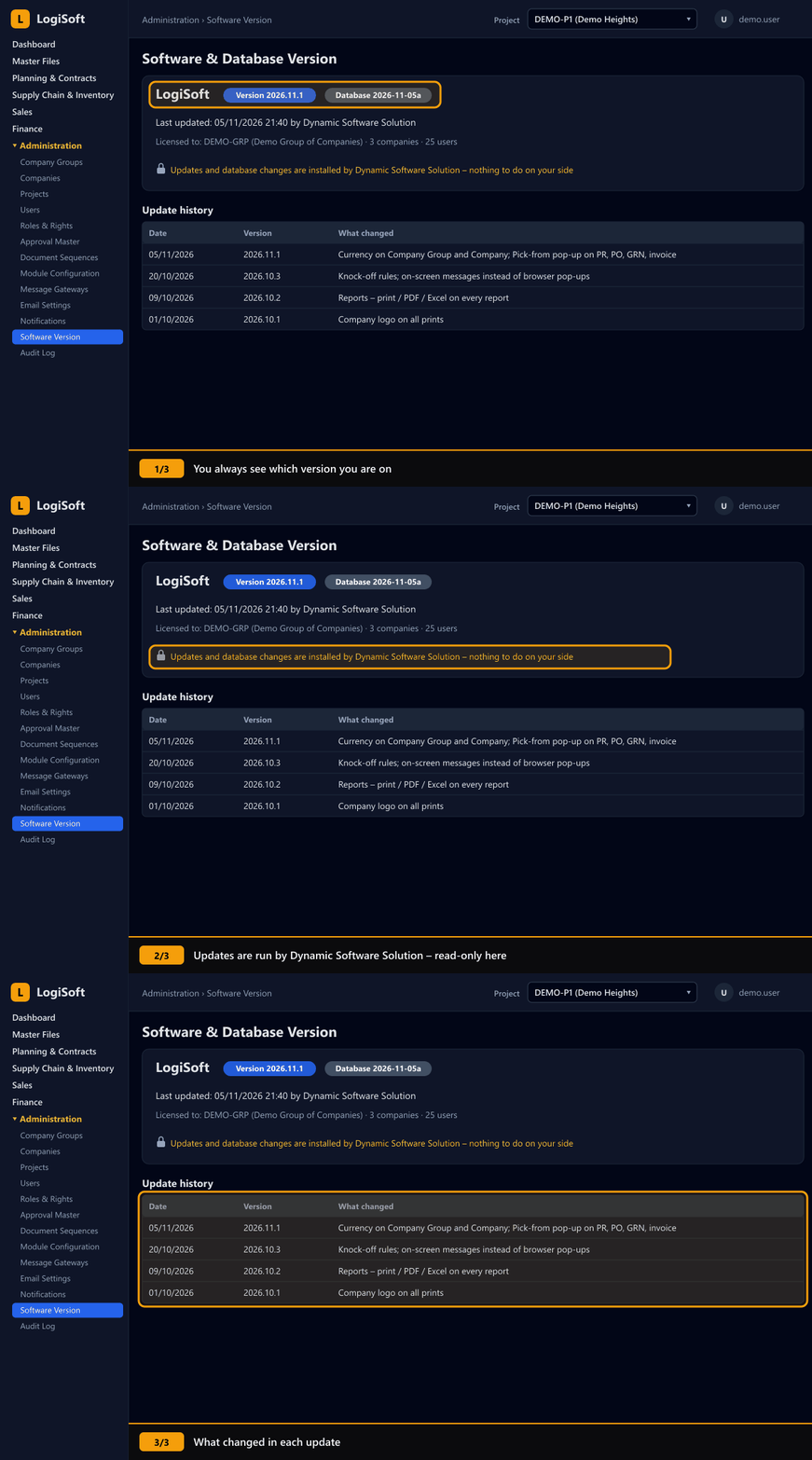
A5Software & Database Version

Where

Administration › Software Version.

Why

You always know which version you are on and what changed.

How

Version, database version, last update date and licence (companies, users). Update history with what changed. Read-only – updates and database changes are installed by Dynamic Software Solution.

Software & Database Version

Part B

Dashboards

Each user sees the dashboards their role allows, for the projects they are allowed. Every tile opens its report.

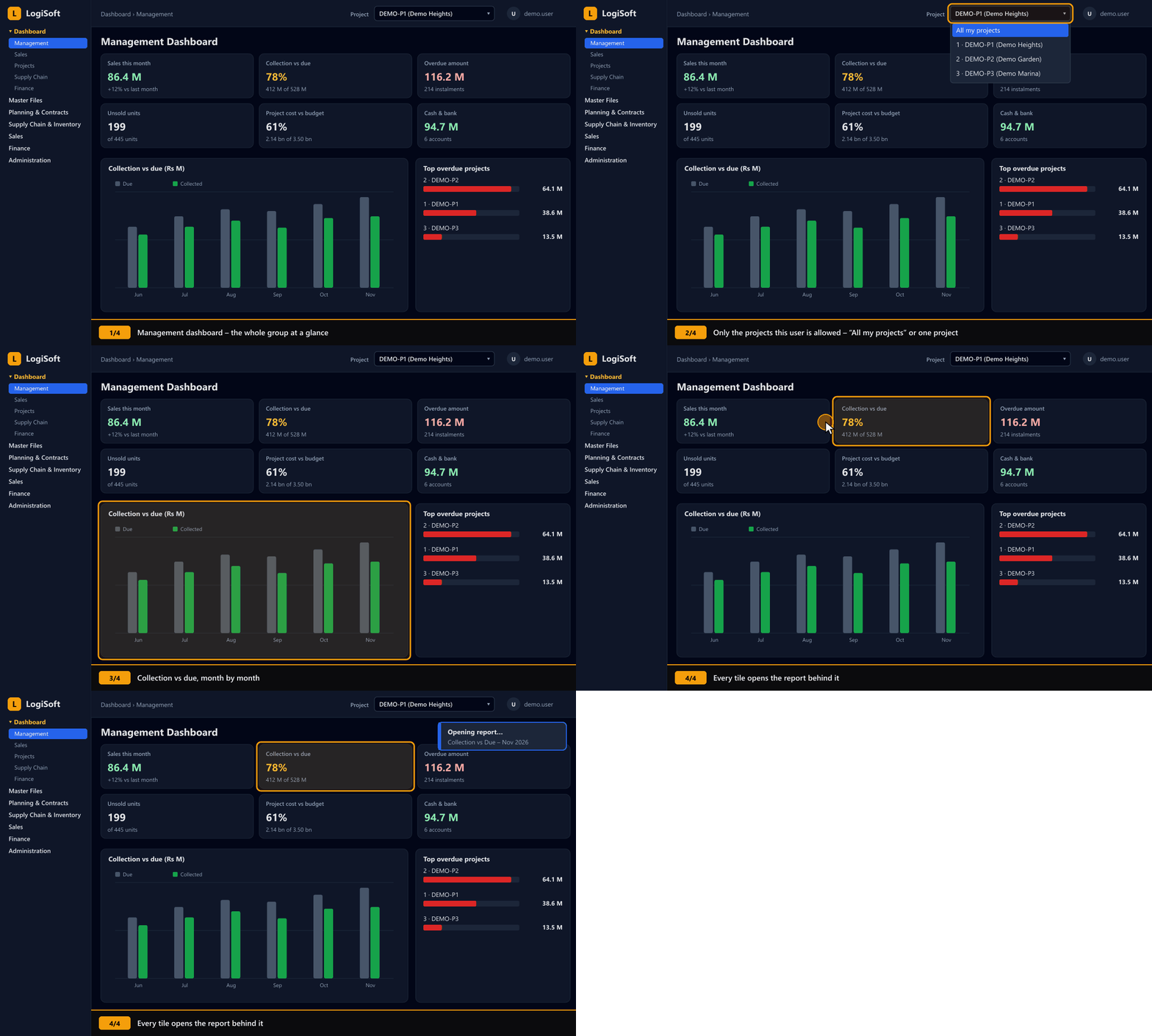
B1Management Dashboard

Where

Dashboard › Management.

Why

The whole group – or one project – on one screen.

How

Sales this month, collection vs due, overdue amount, unsold units, project cost vs budget, cash & bank; collection vs due by month; top overdue projects. Project drop-down: “All my projects” or one project.

Management Dashboard

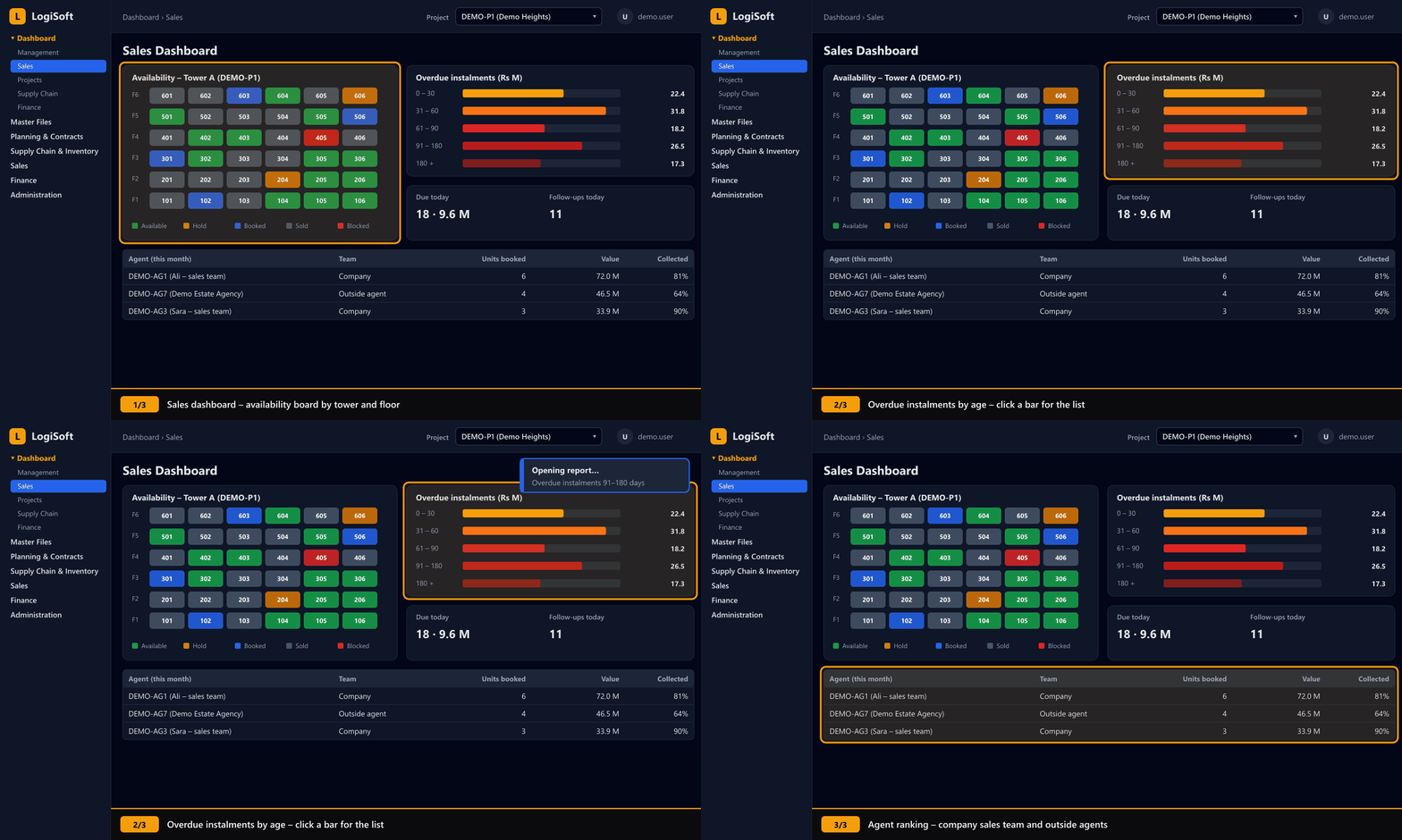
B2Sales Dashboard

Where

Dashboard › Sales.

Why

What is available, what is overdue and who is selling.

How

Availability board per tower and floor coloured by status (Available / Hold / Booked / Sold / Blocked), overdue instalments by age (0–30 … 180+), due today, follow-ups today, agent ranking for the company sales team and outside agents.

Sales Dashboard

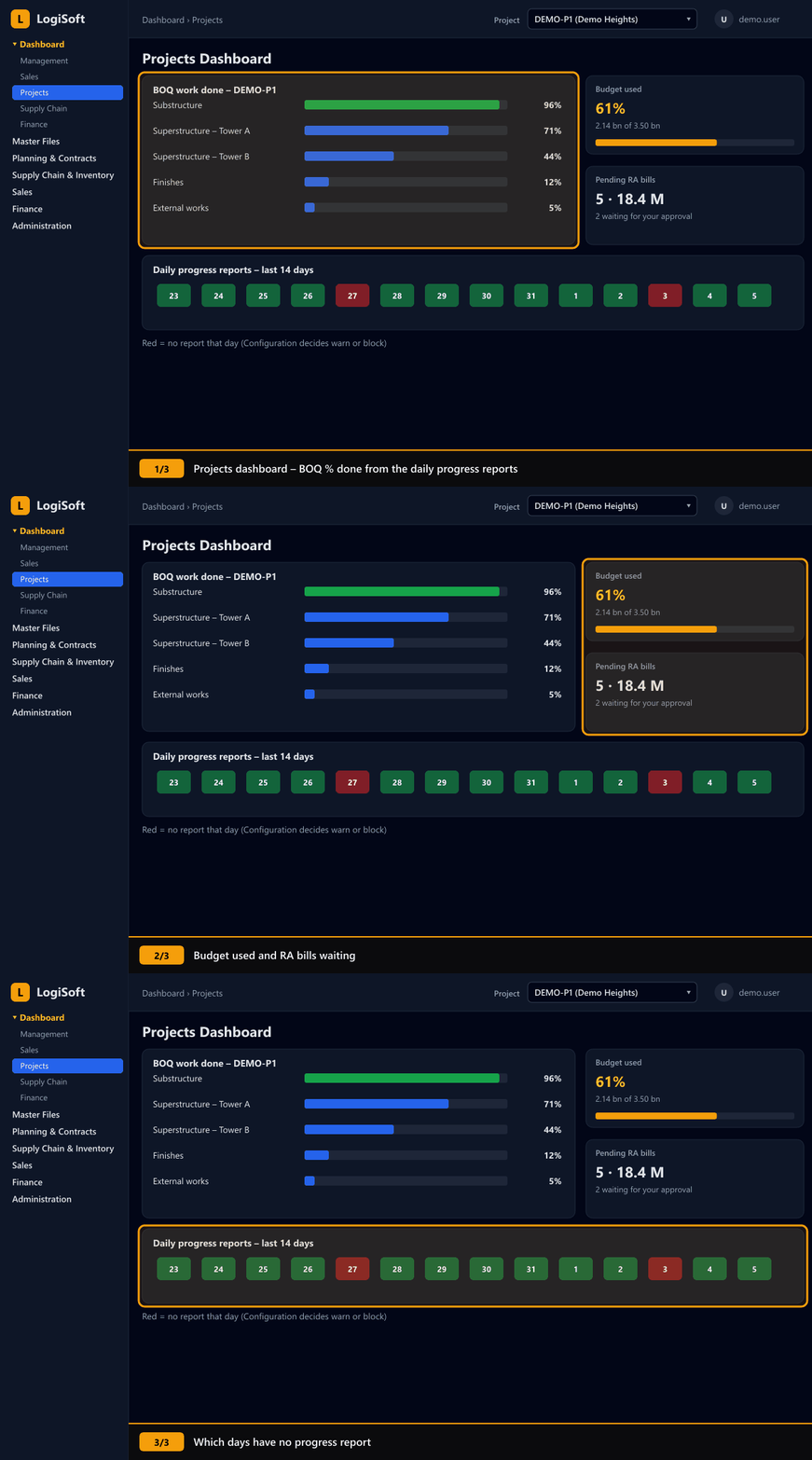
B3Projects Dashboard

Where

Dashboard › Projects.

Why

Progress and cost of each project without opening reports.

How

BOQ % done per head (from daily progress reports), budget used, RA bills pending (and how many wait for this user), days without a daily progress report.

Projects Dashboard

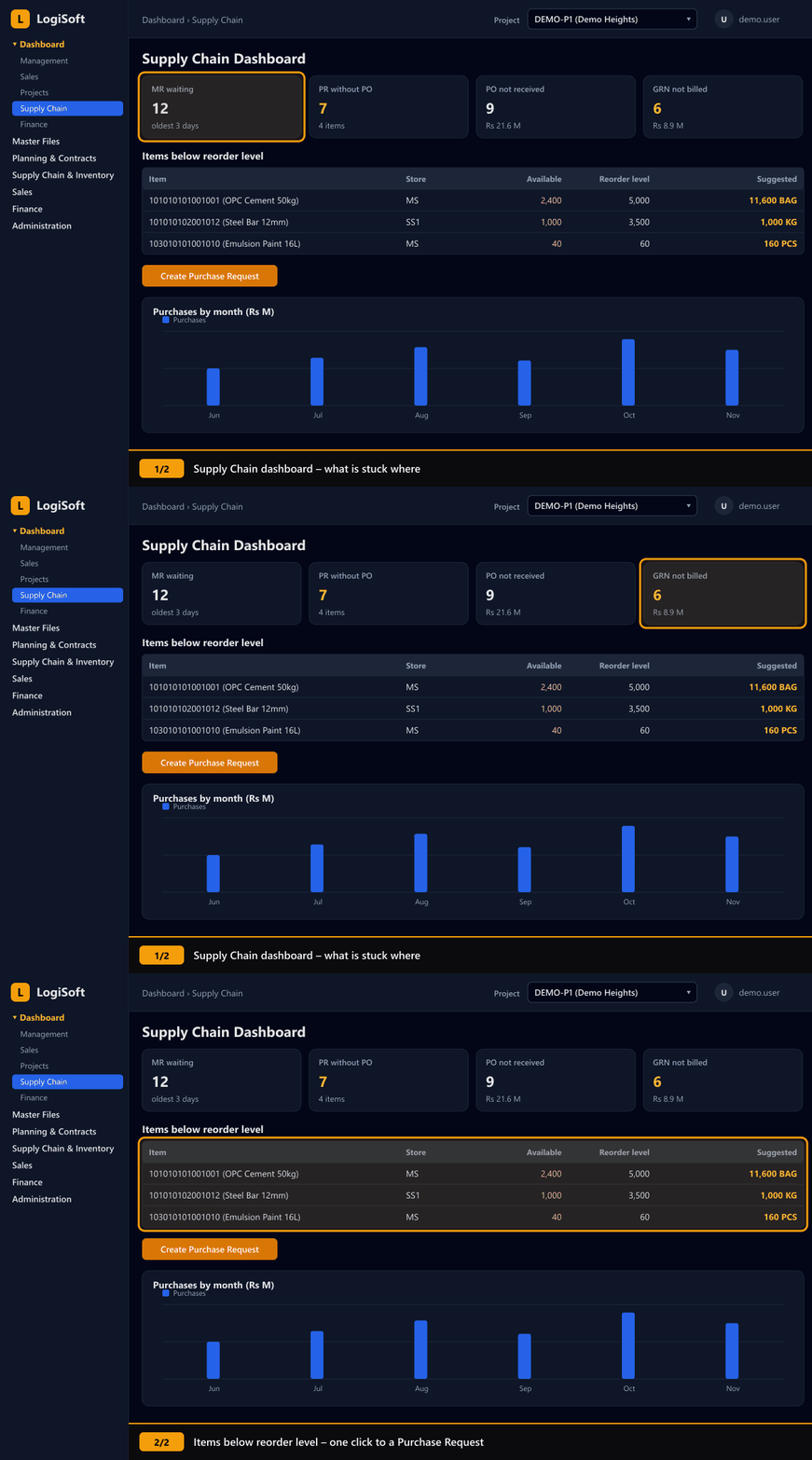
B4Supply Chain Dashboard

Where

Dashboard › Supply Chain.

Why

See what is stuck – before the site runs out of material.

How

MR waiting, PR without PO, PO not received, GRN not billed; items below reorder level with a “Create Purchase Request” button; purchases by month.

Supply Chain Dashboard

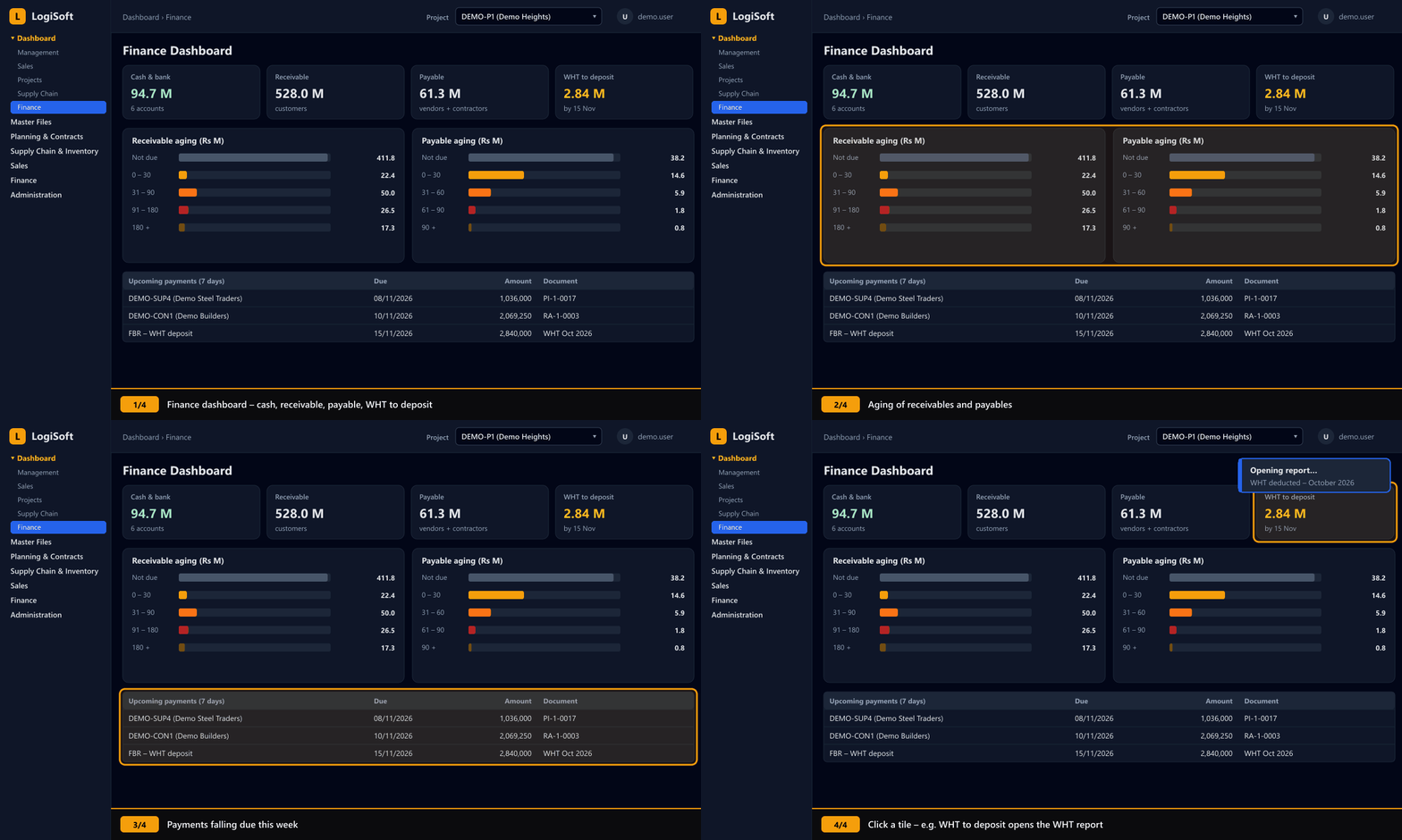
B5Finance Dashboard

Where

Dashboard › Finance.

Why

Cash position and what is due in and out.

How

Cash & bank, receivable, payable, WHT to deposit; receivable and payable aging; payments falling due in the next 7 days.

Finance Dashboard

Not included

  • Customer portal (statements and schedule online for customers) – part of the CRM module.
  • SMS / WhatsApp charges – billed by the provider and by Meta to your account.
  • Dashboards for HR and Payroll – delivered with those modules.
  • Installing updates by your team – updates are installed by Dynamic Software Solution.

Acceptance

The module is accepted when: each module's settings open from Module Configuration → a test SMS, a test WhatsApp with a PDF and a test e-mail are delivered and show in the delivery log → an approval waiting for a user appears on the bell and opens the document → each dashboard shows only the user's allowed projects, and every tile opens its report with matching figures.

Prepared by Dynamic Software Solution · 05 Nov 2026 · Document version 0.1

Powered by Dynamic Software Solution · www.dynamicsoft.biz